> ## Documentation Index
> Fetch the complete documentation index at: https://kb.snagr.co.uk/llms.txt
> Use this file to discover all available pages before exploring further.

# 如何自制名单于表格上？

自制名单是一个下拉列表。

它能使人们更容易完成表格，更可以让您的公司从表格中收集结构化的数据。

<img src="https://mintcdn.com/snagr/Fc-Qgss-VatVIL0b/images/uploads/123693-if_ic_tv_48px_352186.png?fit=max&auto=format&n=Fc-Qgss-VatVIL0b&q=85&s=06b23e0223986004fba7bbb6aa8febb3" alt="if ic tv 48px 352186" width="20" data-path="images/uploads/123693-if_ic_tv_48px_352186.png" /> **网页\*\*\*\*版**

首先，请登录公司管理区。如果您不是公司管理员，则不会看到登入公司管理页面。

<img src="https://mintcdn.com/snagr/aCu3mhgFT8Fq_FxQ/images/direct/1524132326635-Admin_Website_s.124.jpeg?fit=max&auto=format&n=aCu3mhgFT8Fq_FxQ&q=85&s=5eca3f4d04ee2805d2ee90863ace006e" alt="Admin Website s.124" width="1024" height="768" data-path="images/direct/1524132326635-Admin_Website_s.124.jpeg" />

公司检查模板 ＞ 清单

你可选择**手动添加**或**汇入列表**以添加多款名单。

<img src="https://mintcdn.com/snagr/V8StriBwFl_CwQFJ/images/direct/1525238315881-exclamation-mark.png?fit=max&auto=format&n=V8StriBwFl_CwQFJ&q=85&s=4431dbd9bceab1a3323b9267293e64a7" alt="exclamation mark" width="19" data-path="images/direct/1525238315881-exclamation-mark.png" />注意：如果要添加10个或以上的项目，请直接跳至汇入列表。

### **1. 选项一 - 手动添加清单**

<img src="https://mintcdn.com/snagr/aCu3mhgFT8Fq_FxQ/images/direct/1524132705297-Admin_Website_s.125.jpeg?fit=max&auto=format&n=aCu3mhgFT8Fq_FxQ&q=85&s=85d37b0497a171627b54b1a3979c182b" alt="Admin Website s.125" width="1024" height="768" data-path="images/direct/1524132705297-Admin_Website_s.125.jpeg" />

输入清单名称，然后按提交。

<img src="https://mintcdn.com/snagr/aCu3mhgFT8Fq_FxQ/images/direct/1524132727449-Admin_Website_s.126.jpeg?fit=max&auto=format&n=aCu3mhgFT8Fq_FxQ&q=85&s=d20603ddb8ec9b7b27cbb86ae8cd7130" alt="Admin Website s.126" width="1024" height="768" data-path="images/direct/1524132727449-Admin_Website_s.126.jpeg" />

按添加清单项目

<img src="https://mintcdn.com/snagr/aCu3mhgFT8Fq_FxQ/images/direct/1524132879103-Admin_Website_s.127.jpeg?fit=max&auto=format&n=aCu3mhgFT8Fq_FxQ&q=85&s=6d038e1244c4b0157231a67a9f893e82" alt="Admin Website s.127" width="1024" height="768" data-path="images/direct/1524132879103-Admin_Website_s.127.jpeg" />

输入选项，然后按**添加项目**继续输入其余选项，如此类推。

<img src="https://mintcdn.com/snagr/aCu3mhgFT8Fq_FxQ/images/direct/1524133053515-Admin_Website_s.128.jpeg?fit=max&auto=format&n=aCu3mhgFT8Fq_FxQ&q=85&s=1467741cd81149644a96b97560ec95c5" alt="Admin Website s.128" width="1024" height="768" data-path="images/direct/1524133053515-Admin_Website_s.128.jpeg" />

完成输入最后选项后，按**关闭**。

<img src="https://mintcdn.com/snagr/aCu3mhgFT8Fq_FxQ/images/direct/1524133110951-Admin_Website_s.129.jpeg?fit=max&auto=format&n=aCu3mhgFT8Fq_FxQ&q=85&s=921ab01c9ca655540e4337faddb07c46" alt="Admin Website s.129" width="1024" height="768" data-path="images/direct/1524133110951-Admin_Website_s.129.jpeg" />

请向下滚动以查看 > 设置表格字段以显示自制名单。

### 1. 选项二 - 汇入列表

### <img src="https://mintcdn.com/snagr/aCu3mhgFT8Fq_FxQ/images/direct/1524133215103-Admin_Website_s.130.jpeg?fit=max&auto=format&n=aCu3mhgFT8Fq_FxQ&q=85&s=d521d8d71c7c32f294d635bb4c22f5ad" alt="Admin Website s.130" width="1024" height="768" data-path="images/direct/1524133215103-Admin_Website_s.130.jpeg" />

下载模板 ＞ 输入资料 > 上载 > **汇入清单**

<img src="https://mintcdn.com/snagr/aCu3mhgFT8Fq_FxQ/images/direct/1524133368116-Admin_Website_s.131.jpeg?fit=max&auto=format&n=aCu3mhgFT8Fq_FxQ&q=85&s=1a65fc7c380e62772fac1f1a8fefbe16" alt="Admin Website s.131" width="1024" height="768" data-path="images/direct/1524133368116-Admin_Website_s.131.jpeg" />

你的Excel文件应该如下所示：

列A是自制名单的名称。 B列是自制名单中的显示文本/选项。

<img src="https://mintcdn.com/snagr/aCu3mhgFT8Fq_FxQ/images/direct/1524133393691-Admin_Website_s.132.jpeg?fit=max&auto=format&n=aCu3mhgFT8Fq_FxQ&q=85&s=47de07ecea991ec20171431f13edd9e3" alt="Admin Website s.132" width="1024" height="768" data-path="images/direct/1524133393691-Admin_Website_s.132.jpeg" />

<img src="https://mintcdn.com/snagr/aCu3mhgFT8Fq_FxQ/images/direct/1524133412283-Admin_Website_s.133.jpeg?fit=max&auto=format&n=aCu3mhgFT8Fq_FxQ&q=85&s=c7f1bef9bb5f47d2c32334a16deba507" alt="Admin Website s.133" width="1024" height="768" data-path="images/direct/1524133412283-Admin_Website_s.133.jpeg" />

### 2. 设置表格热点属性以显示自制名单

返回到表格向导>选择表格热点

<img src="https://mintcdn.com/snagr/V8StriBwFl_CwQFJ/images/direct/1525245259953-Screen-Shot-2018-05-02-at-3.02.39-PM.png?fit=max&auto=format&n=V8StriBwFl_CwQFJ&q=85&s=ba3a5af9ba2ddbab4c2b3f34fffdf018" alt="Screen Shot 2018 05 02 at 3.02.39 PM" width="1110" height="467" data-path="images/direct/1525245259953-Screen-Shot-2018-05-02-at-3.02.39-PM.png" />

按Command + 4或Ctrl + 4以调出**属性**。<img src="https://mintcdn.com/snagr/V8StriBwFl_CwQFJ/images/direct/1525243757831-Screen-Shot-2018-05-02-at-2.49.10-PM.png?fit=max&auto=format&n=V8StriBwFl_CwQFJ&q=85&s=7db04ded79f3cc81d152361601c7abc1" alt="Screen Shot 2018 05 02 at 2.49.10 PM" width="35" data-path="images/direct/1525243757831-Screen-Shot-2018-05-02-at-2.49.10-PM.png" />

转到类型，将文本更改为**名单**。

<img src="https://mintcdn.com/snagr/V8StriBwFl_CwQFJ/images/direct/1525245159191-Screen-Shot-2018-05-02-at-3.05.26-PM.png?fit=max&auto=format&n=V8StriBwFl_CwQFJ&q=85&s=db7af441cf2b913355d82694babba6af" alt="Screen Shot 2018 05 02 at 3.05.26 PM" width="490" height="419" data-path="images/direct/1525245159191-Screen-Shot-2018-05-02-at-3.05.26-PM.png" />

<img src="https://mintcdn.com/snagr/V8StriBwFl_CwQFJ/images/direct/1525245189726-Screen-Shot-2018-05-02-at-3.06.44-PM.png?fit=max&auto=format&n=V8StriBwFl_CwQFJ&q=85&s=8232ae0467b2d196ed5132992101a529" alt="Screen Shot 2018 05 02 at 3.06.44 PM" width="476" height="576" data-path="images/direct/1525245189726-Screen-Shot-2018-05-02-at-3.06.44-PM.png" />

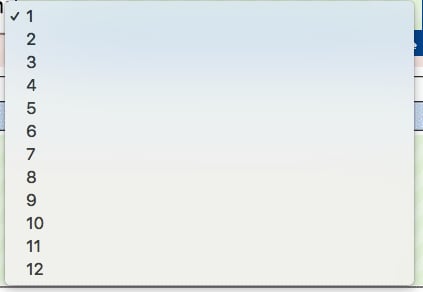
之后，不要忘记为该热点分配一个**清单编号**。在这种情况下，我们选择1-12，因为这是我们刚刚创建的。

<img src="https://mintcdn.com/snagr/V8StriBwFl_CwQFJ/images/direct/1525245217527-Screen-Shot-2018-05-02-at-3.06.03-PM.png?fit=max&auto=format&n=V8StriBwFl_CwQFJ&q=85&s=025e85724012f4c6fa806d0d5d6a05a2" alt="Screen Shot 2018 05 02 at 3.06.03 PM" width="326" height="341" data-path="images/direct/1525245217527-Screen-Shot-2018-05-02-at-3.06.03-PM.png" />

最后，不要忘记按Command + S或Ctrl + S来保存您在表格向导中所做的更改。<img src="https://mintcdn.com/snagr/V8StriBwFl_CwQFJ/images/direct/1525243978520-Screen-Shot-2018-05-02-at-2.52.47-PM.png?fit=max&auto=format&n=V8StriBwFl_CwQFJ&q=85&s=99b37462cd509dbf7e2357324e6b3555" alt="Screen Shot 2018 05 02 at 2.52.47 PM" width="33" data-path="images/direct/1525243978520-Screen-Shot-2018-05-02-at-2.52.47-PM.png" />

当新的表格被创建时，你现在应该看到名单：

<img src="https://mintcdn.com/snagr/cq3DLfKmhQlF8uo8/images/direct/1521171629566-Screen-Shot-2018-03-16-at-11.34.36-AM.png?fit=max&auto=format&n=cq3DLfKmhQlF8uo8&q=85&s=cd7630fa6e06ae9c8ec308093a9326ee" alt="Screen Shot 2018 03 16 at 11.34.36 AM" width="423" height="292" data-path="images/direct/1521171629566-Screen-Shot-2018-03-16-at-11.34.36-AM.png" />