> ## Documentation Index
> Fetch the complete documentation index at: https://kb.snagr.co.uk/llms.txt
> Use this file to discover all available pages before exploring further.

# [将表格内容导出到Excel] 如何设置模板？

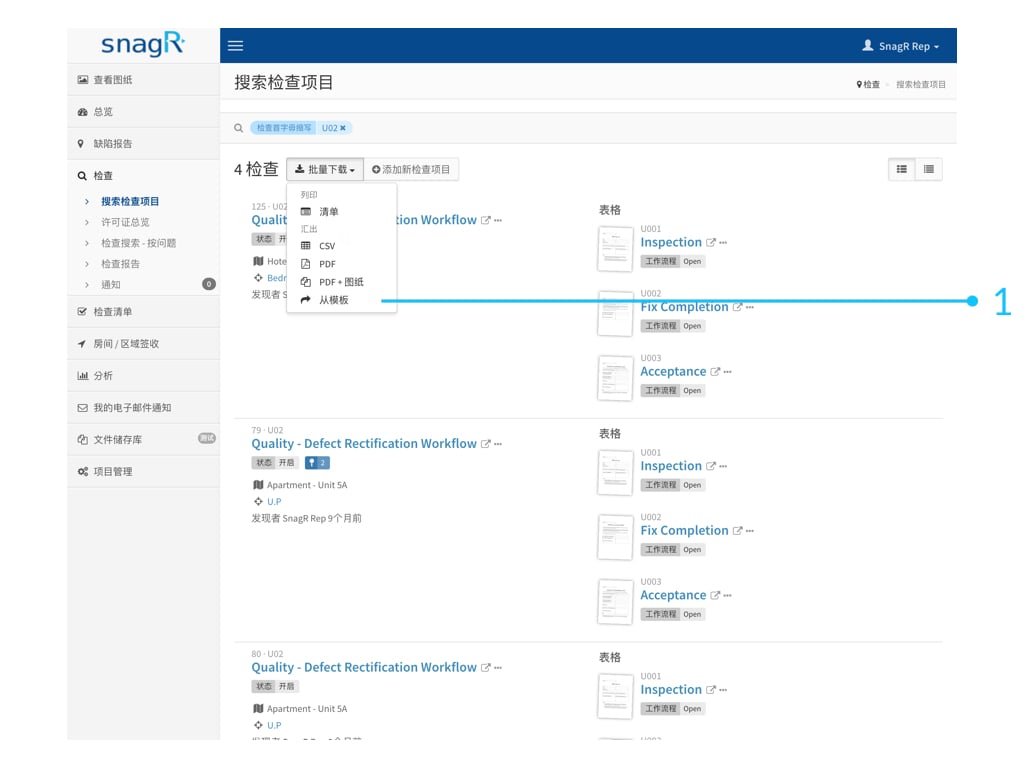
设置此模板可供用户导出每项于表格内输入的资料成为Excel档。

模板需由项目管理员设置，才可供用户使用。

<img src="https://mintcdn.com/snagr/vJ5XaG3RYOZM_uYD/images/direct/1524038886639-Website-Form-Mode_Sim.052.jpeg?fit=max&auto=format&n=vJ5XaG3RYOZM_uYD&q=85&s=a0fed960cda942ca7be481a91feafb88" alt="Website Form Mode Sim.052" width="1024" height="768" data-path="images/direct/1524038886639-Website-Form-Mode_Sim.052.jpeg" />

**<img src="https://mintcdn.com/snagr/Fc-Qgss-VatVIL0b/images/uploads/123693-if_ic_tv_48px_352186.png?fit=max&auto=format&n=Fc-Qgss-VatVIL0b&q=85&s=06b23e0223986004fba7bbb6aa8febb3" alt="if ic tv 48px 352186" width="20" data-path="images/uploads/123693-if_ic_tv_48px_352186.png" /> 网页版**

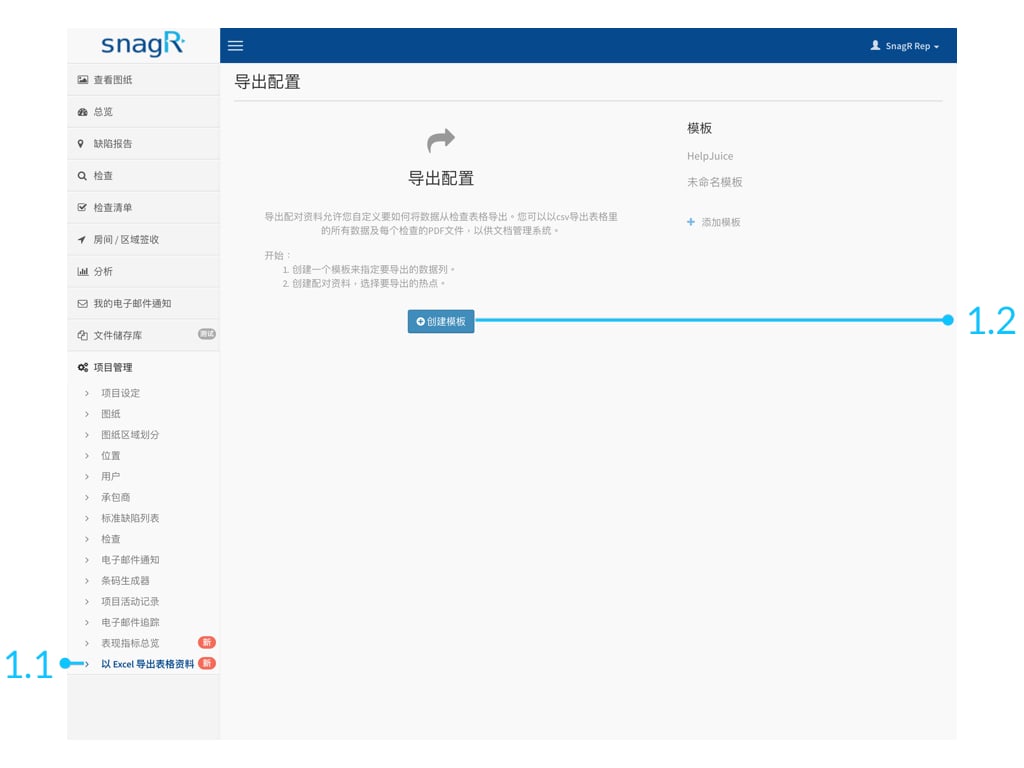
点击 项目管理 ＞ 以Excel导出表格资料金＞ 创建模板

<img src="https://mintcdn.com/snagr/aCu3mhgFT8Fq_FxQ/images/direct/1524201796067-Admin_Website_s.134.jpeg?fit=max&auto=format&n=aCu3mhgFT8Fq_FxQ&q=85&s=0c7c5133382e6031d4204d38321a54b8" alt="Admin Website s.134" width="1024" height="768" data-path="images/direct/1524201796067-Admin_Website_s.134.jpeg" />

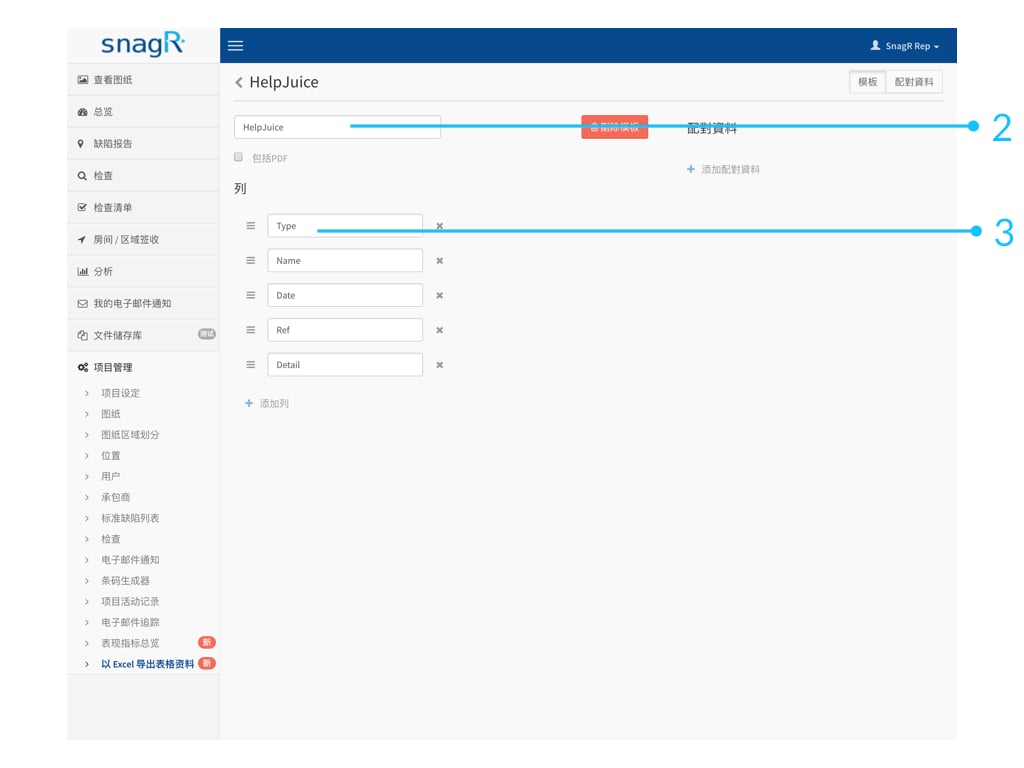
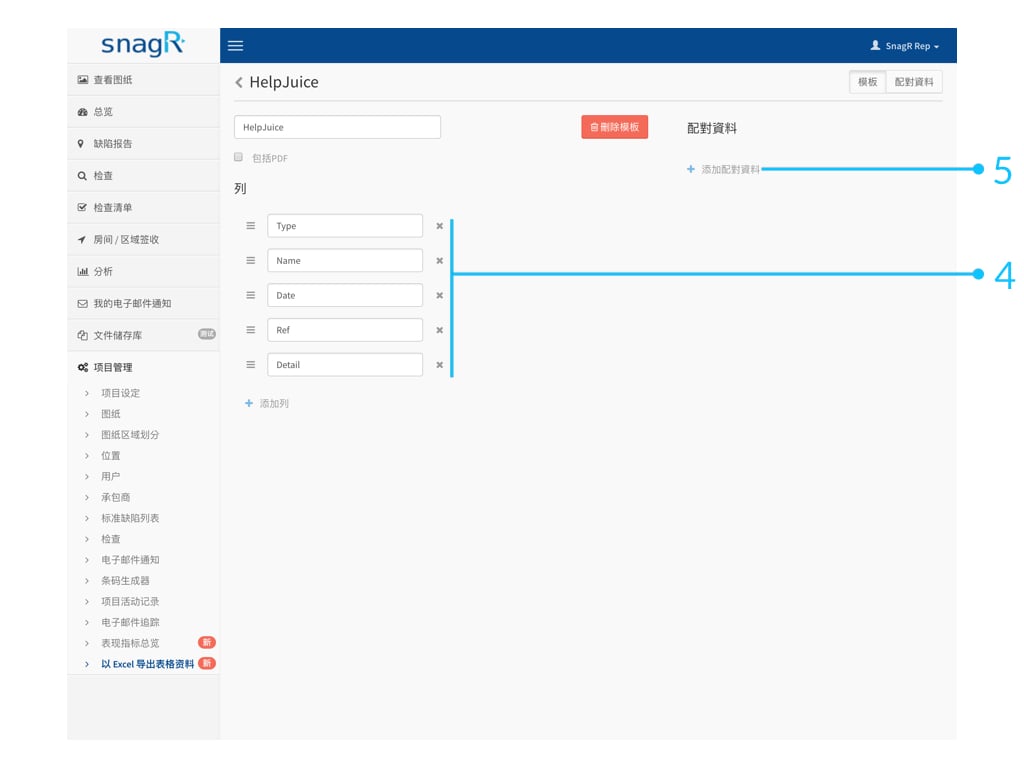
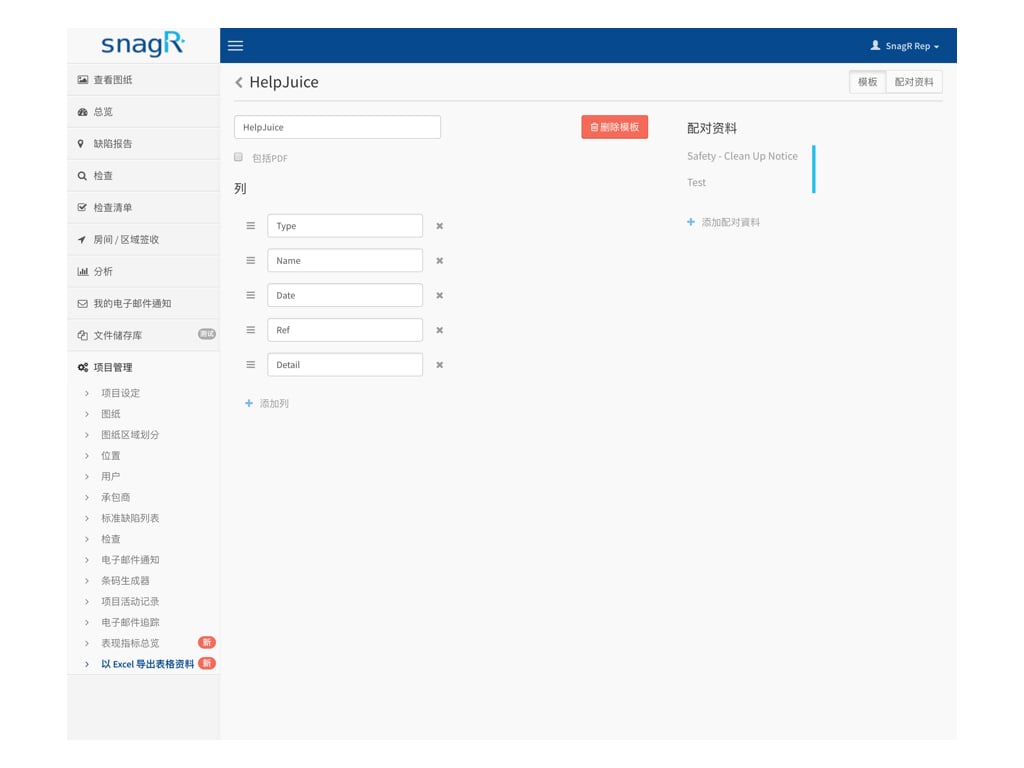
输入模板名称，按添加列

<img src="https://mintcdn.com/snagr/cq3DLfKmhQlF8uo8/images/direct/1521435164478-Screen-Shot-2018-03-19-at-12.52.27-PM.png?fit=max&auto=format&n=cq3DLfKmhQlF8uo8&q=85&s=b9827d6c1de34eda4c361b8bc39d4983" alt="Screen Shot 2018 03 19 at 12.52.27 PM" width="70" height="23" data-path="images/direct/1521435164478-Screen-Shot-2018-03-19-at-12.52.27-PM.png" />

来添加所需列数及命名。

<img src="https://mintcdn.com/snagr/aCu3mhgFT8Fq_FxQ/images/direct/1524201844439-Admin_Website_s.135.jpeg?fit=max&auto=format&n=aCu3mhgFT8Fq_FxQ&q=85&s=ec005048c7f6b6d17820cc5f68cdc56e" alt="Admin Website s.135" width="1024" height="768" data-path="images/direct/1524201844439-Admin_Website_s.135.jpeg" />

添加足够的列数后，点击添加配对资料

<img src="https://mintcdn.com/snagr/cq3DLfKmhQlF8uo8/images/direct/1521435372064-Screen-Shot-2018-03-19-at-12.55.59-PM.png?fit=max&auto=format&n=cq3DLfKmhQlF8uo8&q=85&s=617aae3c20c3b6d97255fb4b61ed0f3b" alt="Screen Shot 2018 03 19 at 12.55.59 PM" width="104" height="25" data-path="images/direct/1521435372064-Screen-Shot-2018-03-19-at-12.55.59-PM.png" />

来选择表格及项目。

<img src="https://mintcdn.com/snagr/aCu3mhgFT8Fq_FxQ/images/direct/1524201869287-Admin_Website_s.136.jpeg?fit=max&auto=format&n=aCu3mhgFT8Fq_FxQ&q=85&s=028220c0873c4c17b76ddec4a6c89e55" alt="Admin Website s.136" width="1024" height="768" data-path="images/direct/1524201869287-Admin_Website_s.136.jpeg" />

配对资料中, 你可以选择配对：

1. 热点位置
2. 属性资料
3. 文本

### 1. 热点位置

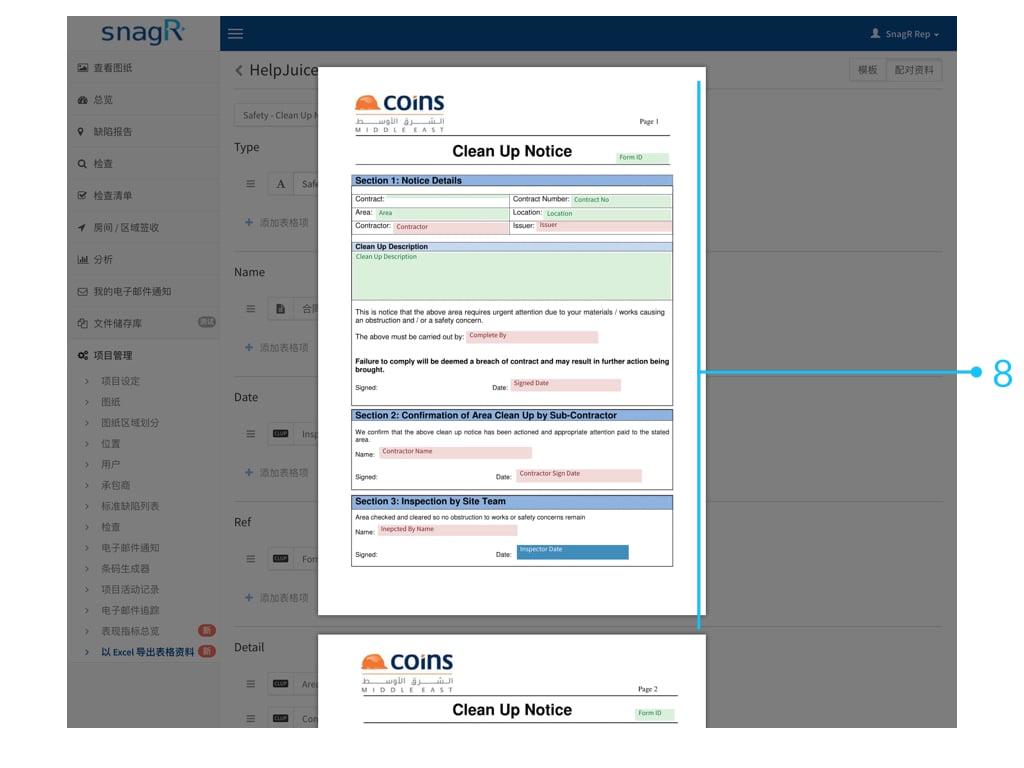
热点位置是在表格上可输入数据的位置。

先选择表格
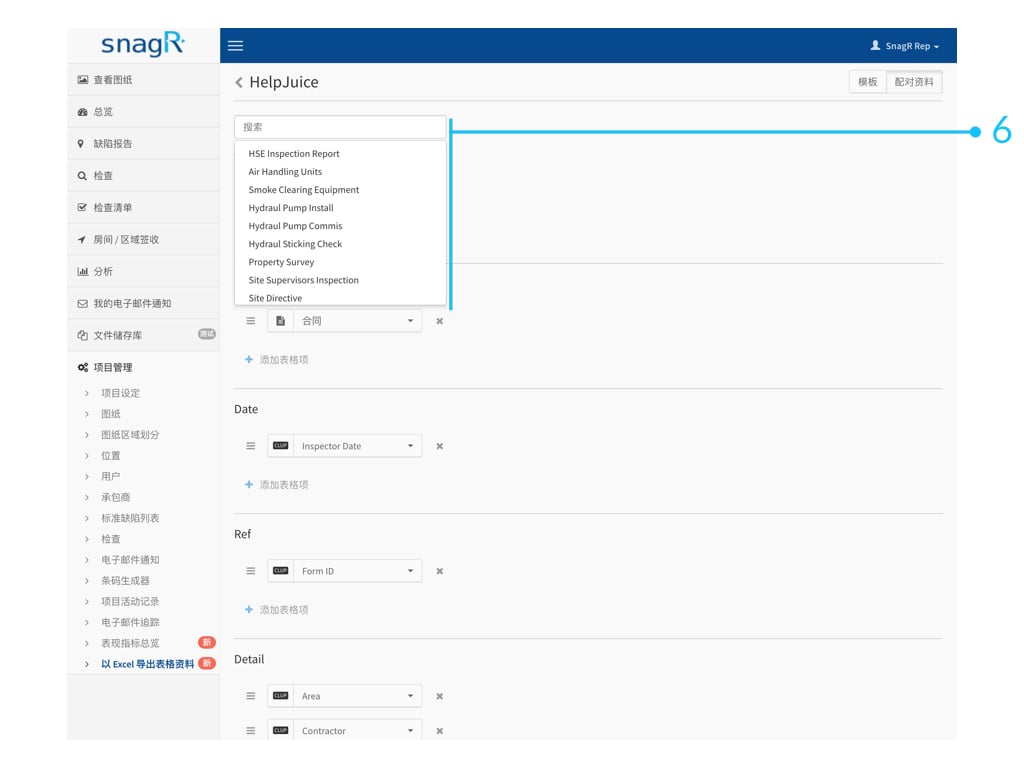
<img src="https://mintcdn.com/snagr/aCu3mhgFT8Fq_FxQ/images/direct/1524201947505-Admin_Website_s.137.jpeg?fit=max&auto=format&n=aCu3mhgFT8Fq_FxQ&q=85&s=1ac3836ae34c926ce0f07f785bc5181b" alt="Admin Website s.137" width="1024" height="768" data-path="images/direct/1524201947505-Admin_Website_s.137.jpeg" />

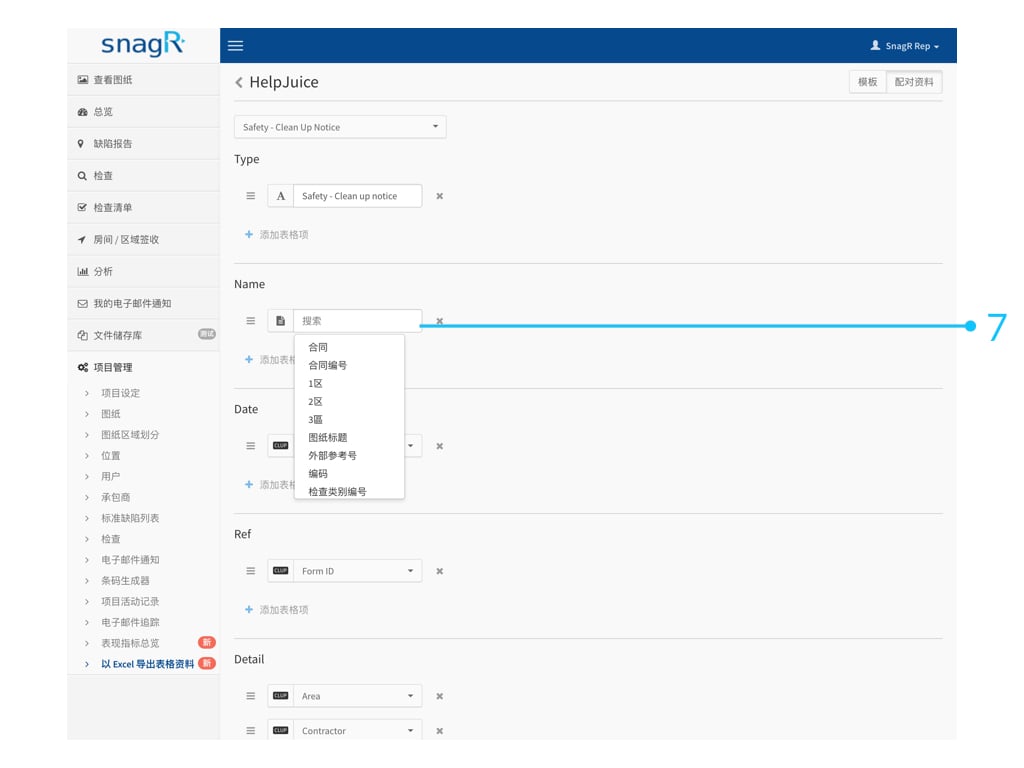
然后配对。您可直接选择热点名称。

<img src="https://mintcdn.com/snagr/aCu3mhgFT8Fq_FxQ/images/direct/1524202072651-Admin_Website_s.138.jpeg?fit=max&auto=format&n=aCu3mhgFT8Fq_FxQ&q=85&s=0018b39a4bc42e0a932f354f1edae20d" alt="Admin Website s.138" width="1024" height="768" data-path="images/direct/1524202072651-Admin_Website_s.138.jpeg" />

你亦可以**打开热点选取器**直接开启该表格来选取所需资料的热点位置。

<img src="https://mintcdn.com/snagr/aCu3mhgFT8Fq_FxQ/images/direct/1524202122177-Admin_Website_s.139.jpeg?fit=max&auto=format&n=aCu3mhgFT8Fq_FxQ&q=85&s=68fe1321adb3a1f21a6a96a8aaa02449" alt="Admin Website s.139" width="1024" height="768" data-path="images/direct/1524202122177-Admin_Website_s.139.jpeg" />

### 2. 属性资料

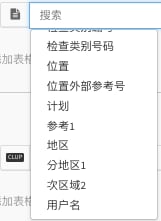
属性资料是有关表格的资料，例如表格的位置，项目编码，建立表格的用户等。

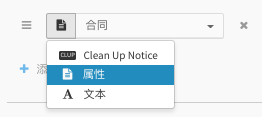
选择属性

<img src="https://mintcdn.com/snagr/V8StriBwFl_CwQFJ/images/direct/1525237543179-Screen-Shot-2018-05-02-at-1.05.31-PM.png?fit=max&auto=format&n=V8StriBwFl_CwQFJ&q=85&s=4d21739671bf73f2c28a27eb2c74032b" alt="Screen Shot 2018 05 02 at 1.05.31 PM" width="262" height="117" data-path="images/direct/1525237543179-Screen-Shot-2018-05-02-at-1.05.31-PM.png" />

然后选择类别

<img src="https://mintcdn.com/snagr/aCu3mhgFT8Fq_FxQ/images/direct/1524211623270-Screen-Shot-2018-04-20-at-4.06.05-PM.png?fit=max&auto=format&n=aCu3mhgFT8Fq_FxQ&q=85&s=2377e87f1c6b49edf0ed5d0411c981ac" alt="Screen Shot 2018 04 20 at 4.06.05 PM" width="158" height="218" data-path="images/direct/1524211623270-Screen-Shot-2018-04-20-at-4.06.05-PM.png" />

<img src="https://mintcdn.com/snagr/aCu3mhgFT8Fq_FxQ/images/direct/1524211638043-Screen-Shot-2018-04-20-at-4.06.25-PM.png?fit=max&auto=format&n=aCu3mhgFT8Fq_FxQ&q=85&s=97580d96015898478fc375b743b21962" alt="Screen Shot 2018 04 20 at 4.06.25 PM" width="161" height="221" data-path="images/direct/1524211638043-Screen-Shot-2018-04-20-at-4.06.25-PM.png" />

### 3. 文本

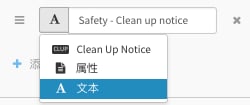
选择文本

<img src="https://mintcdn.com/snagr/V8StriBwFl_CwQFJ/images/direct/1525237558091-Screen-Shot-2018-05-02-at-1.05.49-PM.png?fit=max&auto=format&n=V8StriBwFl_CwQFJ&q=85&s=81848801a2a6e5083a2e6ea1dd426870" alt="Screen Shot 2018 05 02 at 1.05.49 PM" width="250" height="105" data-path="images/direct/1525237558091-Screen-Shot-2018-05-02-at-1.05.49-PM.png" />

<img src="https://mintcdn.com/snagr/cq3DLfKmhQlF8uo8/images/direct/1521436445874-electric-light-bulb_1f4a1.png?fit=max&auto=format&n=cq3DLfKmhQlF8uo8&q=85&s=c8c0f922694296671395e06c06f3db9d" alt="electric light bulb 1f4a1" width="24" data-path="images/direct/1521436445874-electric-light-bulb_1f4a1.png" />***这有什么用处？***

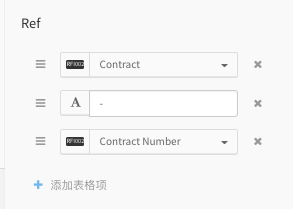
同一列上是可以建立多于一种配对资料。你可以以文本作为划分，结合热点资料或属性资料。以下是一个例子：

<img src="https://mintcdn.com/snagr/V8StriBwFl_CwQFJ/images/direct/1525237685349-Screen-Shot-2018-05-02-at-1.07.20-PM.png?fit=max&auto=format&n=V8StriBwFl_CwQFJ&q=85&s=7a2d2dce0d76691b9da24a05862d7814" alt="Screen Shot 2018 05 02 at 1.07.20 PM" width="293" height="209" data-path="images/direct/1525237685349-Screen-Shot-2018-05-02-at-1.07.20-PM.png" />

如一个模板中需要有多于一个表格的资料，请**继续添加配对资料**并选取所需项目。

<img src="https://mintcdn.com/snagr/aCu3mhgFT8Fq_FxQ/images/direct/1524220803442-Admin_Website_s.141.jpeg?fit=max&auto=format&n=aCu3mhgFT8Fq_FxQ&q=85&s=62eae544baa1d4d36aef1ef67655b59e" alt="Admin Website s.141" width="1024" height="768" data-path="images/direct/1524220803442-Admin_Website_s.141.jpeg" />

<img src="https://mintcdn.com/snagr/lG5zeW-JZpPjZFoL/images/uploads/127041-Red_Flag_Emoji.png?fit=max&auto=format&n=lG5zeW-JZpPjZFoL&q=85&s=122220a995f6a719dddaffb5de76ce80" alt="Red Flag Emoji" width="20" data-path="images/uploads/127041-Red_Flag_Emoji.png" /> 小提示：建立模板後，請[嘗試導出Excel檔](/cn/forms/export-forms/305202)，檢視效果是否理想。