> ## Documentation Index
> Fetch the complete documentation index at: https://kb.snagr.co.uk/llms.txt
> Use this file to discover all available pages before exploring further.

# 如何从模板导出资料？

### 从模板导出资料

可供用户导出每项于表格内输入的资料成为Excel档。

<img src="https://mintcdn.com/snagr/vJ5XaG3RYOZM_uYD/images/direct/1524036439410-Screen-Shot-2018-04-18-at-3.26.56-PM.png?fit=max&auto=format&n=vJ5XaG3RYOZM_uYD&q=85&s=b7fc31dc00fbc17543ae51622b6266f7" alt="從模板" width="130" height="174" data-path="images/direct/1524036439410-Screen-Shot-2018-04-18-at-3.26.56-PM.png" />

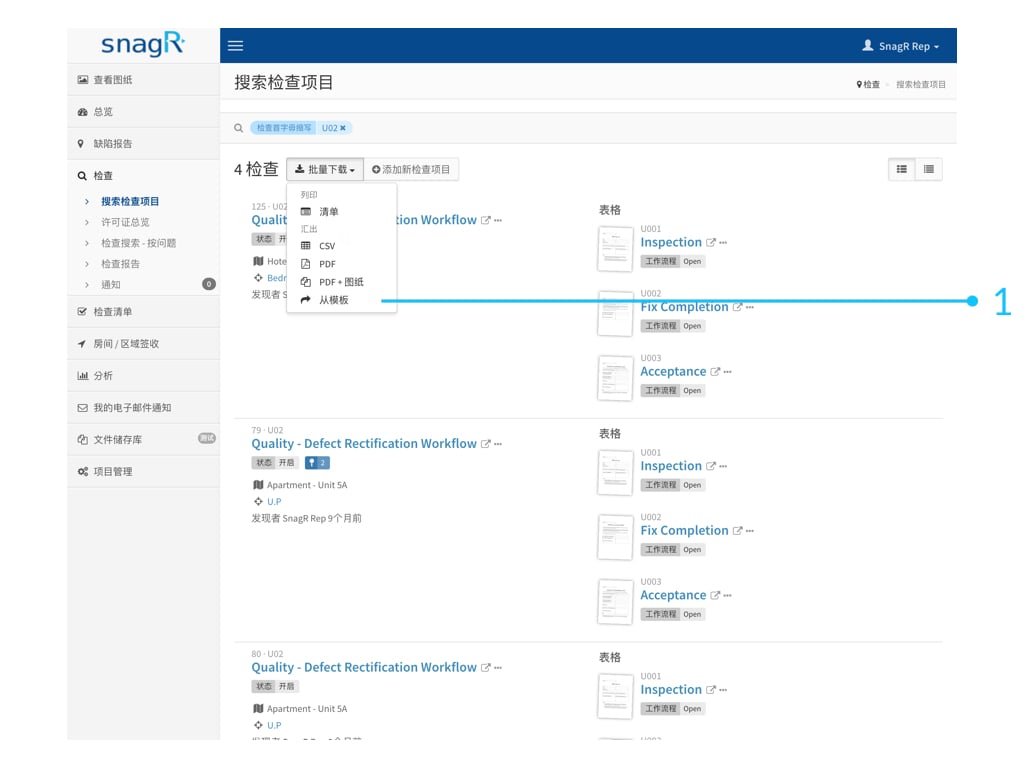
此功能要求管理员提前设置导出模板。该模板以Excel格式提取所需的表单域和映射到所需的列。

创建模板时，请按照以下步骤操作。

<img src="https://mintcdn.com/snagr/Fc-Qgss-VatVIL0b/images/uploads/123693-if_ic_tv_48px_352186.png?fit=max&auto=format&n=Fc-Qgss-VatVIL0b&q=85&s=06b23e0223986004fba7bbb6aa8febb3" alt="if ic tv 48px 352186" width="20" data-path="images/uploads/123693-if_ic_tv_48px_352186.png" /> **网页版**

点击 检查 ＞ 搜索检查项目 ＞ 批量下载 ＞ 从模板

<img src="https://mintcdn.com/snagr/cq3DLfKmhQlF8uo8/images/direct/1521436445874-electric-light-bulb_1f4a1.png?fit=max&auto=format&n=cq3DLfKmhQlF8uo8&q=85&s=c8c0f922694296671395e06c06f3db9d" alt="electric light bulb 1f4a1" width="24" data-path="images/direct/1521436445874-electric-light-bulb_1f4a1.png" />如有需要可先利用搜索特定表格来缩细导出范围！

<img src="https://mintcdn.com/snagr/vJ5XaG3RYOZM_uYD/images/direct/1524038886639-Website-Form-Mode_Sim.052.jpeg?fit=max&auto=format&n=vJ5XaG3RYOZM_uYD&q=85&s=a0fed960cda942ca7be481a91feafb88" alt="Website Form Mode Sim.052" width="1024" height="768" data-path="images/direct/1524038886639-Website-Form-Mode_Sim.052.jpeg" />

选择所需的模板，然后按**汇出**。

<img src="https://mintcdn.com/snagr/vJ5XaG3RYOZM_uYD/images/direct/1524039728117-Website-Form-Mode_Sim.053.jpeg?fit=max&auto=format&n=vJ5XaG3RYOZM_uYD&q=85&s=7470f87e715252f9f2e52a3822b0f503" alt="Website Form Mode Sim.053" width="1024" height="768" data-path="images/direct/1524039728117-Website-Form-Mode_Sim.053.jpeg" />

成功下载Excel CSV档案了！但还没结束喔，需要把**CSV档转成EXL档**才行。

<img src="https://mintcdn.com/snagr/cq3DLfKmhQlF8uo8/images/direct/1521443343223-Mar-19-2018-14-22-36.gif?s=32d9e31b6b7ce0f6a8783415236c4605" alt="helpjuice production/uploads/upload/image/3577/direct/1521443343223 Mar 19 2018 14 22 36" width="1260" height="710" data-path="images/direct/1521443343223-Mar-19-2018-14-22-36.gif" />

开启新Excel ＞ Data ＞ From Text，然后选取你刚刚下载的CSV档。

<img src="https://mintcdn.com/snagr/cq3DLfKmhQlF8uo8/images/direct/1521443424032-Website-Form-Mode_Tra.004.jpeg?fit=max&auto=format&n=cq3DLfKmhQlF8uo8&q=85&s=1ca5982959a6a4ff026ef2f9b668a3b7" alt="Website Form Mode Tra.004" width="1024" height="768" data-path="images/direct/1521443424032-Website-Form-Mode_Tra.004.jpeg" />

点击选择 Delimited ＞ Next

<img src="https://mintcdn.com/snagr/5Ct0kGva8U2RUSvy/images/direct/1521443446468-Website-Form-Mode_Tra.005.jpeg?fit=max&auto=format&n=5Ct0kGva8U2RUSvy&q=85&s=dd119cffa7a5d56e7ced5229006a8410" alt="Website Form Mode Tra.005" width="1024" height="768" data-path="images/direct/1521443446468-Website-Form-Mode_Tra.005.jpeg" />

取消选取 Tab，选择 Other，然后输入 "|"（垂直线）

<img src="https://mintcdn.com/snagr/cq3DLfKmhQlF8uo8/images/direct/1521436445874-electric-light-bulb_1f4a1.png?fit=max&auto=format&n=cq3DLfKmhQlF8uo8&q=85&s=c8c0f922694296671395e06c06f3db9d" alt="electric light bulb 1f4a1" width="24" data-path="images/direct/1521436445874-electric-light-bulb_1f4a1.png" />注意| 是一个垂直条，它在键盘上看起来像这样：

<img src="https://mintcdn.com/snagr/5Ct0kGva8U2RUSvy/images/direct/1521444271954-Screen-Shot-2018-03-19-at-3.24.16-PM.png?fit=max&auto=format&n=5Ct0kGva8U2RUSvy&q=85&s=14024bfb78eb0c29e1df4ded0337f1dd" alt="Screen Shot 2018 03 19 at 3.24.16 PM" width="147" height="126" data-path="images/direct/1521444271954-Screen-Shot-2018-03-19-at-3.24.16-PM.png" />

按 Finish > OK。

<img src="https://mintcdn.com/snagr/5Ct0kGva8U2RUSvy/images/direct/1521443618692-Website-Form-Mode_Tra.006.jpeg?fit=max&auto=format&n=5Ct0kGva8U2RUSvy&q=85&s=d74b03e5c5894ee60ff98c45e5df0d76" alt="Website Form Mode Tra.006" width="1024" height="768" data-path="images/direct/1521443618692-Website-Form-Mode_Tra.006.jpeg" />

<img src="https://mintcdn.com/snagr/5Ct0kGva8U2RUSvy/images/direct/1521443641672-Website-Form-Mode_Tra.007.jpeg?fit=max&auto=format&n=5Ct0kGva8U2RUSvy&q=85&s=3280cdafec35e9dac566f5b8b99d8e74" alt="Website Form Mode Tra.007" width="1024" height="768" data-path="images/direct/1521443641672-Website-Form-Mode_Tra.007.jpeg" />

完成！你现在已经转换了文件。

從

<img src="https://mintcdn.com/snagr/5Ct0kGva8U2RUSvy/images/direct/1521443795789-Screen-Shot-2018-03-19-at-3.16.20-PM.png?fit=max&auto=format&n=5Ct0kGva8U2RUSvy&q=85&s=bf596273f7ee2839e7b793bbc271daf8" alt="Screen Shot 2018 03 19 at 3.16.20 PM" width="426" height="316" data-path="images/direct/1521443795789-Screen-Shot-2018-03-19-at-3.16.20-PM.png" />

转成＞

<img src="https://mintcdn.com/snagr/5Ct0kGva8U2RUSvy/images/direct/1521443821871-Screen-Shot-2018-03-19-at-3.16.08-PM.png?fit=max&auto=format&n=5Ct0kGva8U2RUSvy&q=85&s=3c4b6194d824700b6323df6ef79e0ee3" alt="Screen Shot 2018 03 19 at 3.16.08 PM" width="483" height="297" data-path="images/direct/1521443821871-Screen-Shot-2018-03-19-at-3.16.08-PM.png" />

了！

<img src="https://mintcdn.com/snagr/lG5zeW-JZpPjZFoL/images/uploads/127041-Red_Flag_Emoji.png?fit=max&auto=format&n=lG5zeW-JZpPjZFoL&q=85&s=122220a995f6a719dddaffb5de76ce80" alt="Red Flag Emoji" width="20" data-path="images/uploads/127041-Red_Flag_Emoji.png" /> 了解更多 [如何设置以Excel导出表格资料（模板）？ .](/cn/admin/form-templates/excel).