> ## Documentation Index
> Fetch the complete documentation index at: https://kb.snagr.co.uk/llms.txt
> Use this file to discover all available pages before exploring further.
# Overzicht voor onderaannemers
SnagR is een kwaliteitsmanagement en inspectiesysteem dat jouw team op locatie actiepunten laat toevoegen en formulieren laat invullen op basis van locaties.
**Wat bied SnagR qua voordelen voor mij**\*\*?\*\*
** Rapporteer de voortgang eenvoudig**
 **Aan de slag**:\
Download de SnagR app en [voeg het project toe](/nl/ga-van-start/startgids-hoe-ga-ik-met-actiepunten-om/hoe-download-ik-een-project) op je apparaat
**Aan de slag**:\
Download de SnagR app en [voeg het project toe](/nl/ga-van-start/startgids-hoe-ga-ik-met-actiepunten-om/hoe-download-ik-een-project) op je apparaat
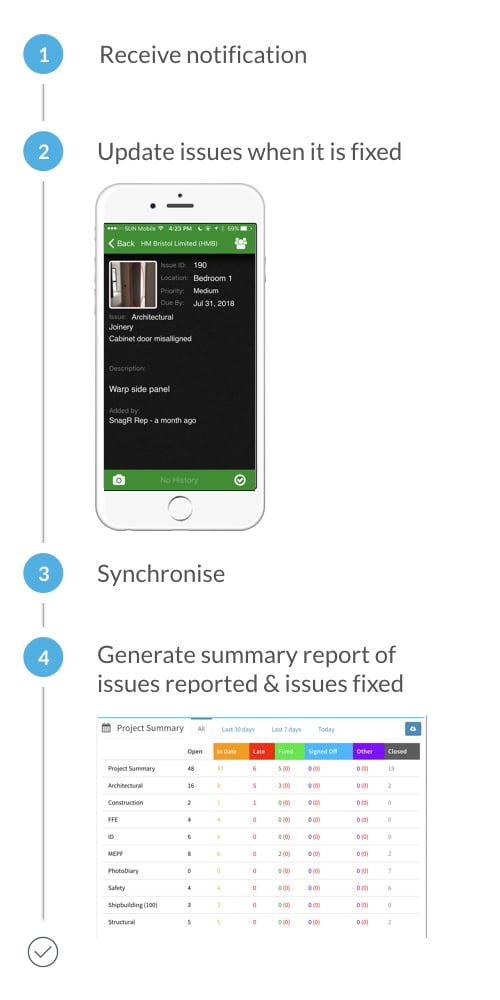
 Ontvang notificaties
 [Update actiepunten](/nl/ga-van-start/startgids-hoe-ga-ik-met-actiepunten-om/hoe-update-ik-een-actiepunt) wanneer deze zijn verholpen
 [Synchroniseer](/nl/veelgestelde-vragen/klaar-voor-mobiel-gebruik/waarom-moet-ik-synchroniseren)
 Zie het [samenvatting dashboard](/nl/verslaglegging/standaard-pdf-rapport/hoe-krijg-ik-samenvattingen-van-onze-actiepunten) of [genereer rapporten](/nl/ga-van-start/startgids-hoe-ga-ik-met-actiepunten-om/hoe-maak-ik-een-actiepunten-rapport)
 Wat betekenen de verschillende kleuren van actiepunten? [Leer hier meer](/nl/ga-van-start/startgids-hoe-ga-ik-met-actiepunten-om/wat-betekenen-de-verschillende-actiepunt-kleuren).
**
Wat betekenen de verschillende kleuren van actiepunten? [Leer hier meer](/nl/ga-van-start/startgids-hoe-ga-ik-met-actiepunten-om/wat-betekenen-de-verschillende-actiepunt-kleuren).
** Zoek en documenteer formulieren in één klik**
 **Aan de slag**:\
Download de SnagR app en [voeg het project toe](/nl/ga-van-start/startgids-hoe-ga-ik-met-actiepunten-om/hoe-download-ik-een-project) op je apparaat
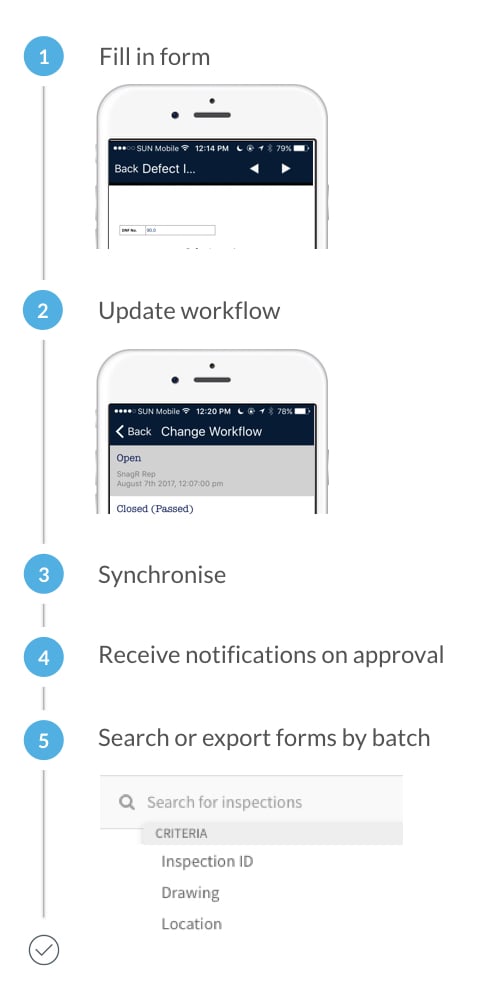
[Vul formulieren in](/nl/ga-van-start/startgids-hoe-voeg-ik-formulieren-toe/hoe-vul-ik-een-formulier-in-met-de-app)
[Update](/nl/ga-van-start/startgids-hoe-voeg-ik-formulieren-toe/hoe-kan-ik-zoeken-naar-formulieren) workflow
[Synchroniseer](/nl/veelgestelde-vragen/klaar-voor-mobiel-gebruik/waarom-moet-ik-synchroniseren)
[Ontvang notificaties op goedkeuring](/nl/formulieren/formulieren-vinden-en-bewerken/hoe-zie-ik-formulier-notificaties)
**Aan de slag**:\
Download de SnagR app en [voeg het project toe](/nl/ga-van-start/startgids-hoe-ga-ik-met-actiepunten-om/hoe-download-ik-een-project) op je apparaat
[Vul formulieren in](/nl/ga-van-start/startgids-hoe-voeg-ik-formulieren-toe/hoe-vul-ik-een-formulier-in-met-de-app)
[Update](/nl/ga-van-start/startgids-hoe-voeg-ik-formulieren-toe/hoe-kan-ik-zoeken-naar-formulieren) workflow
[Synchroniseer](/nl/veelgestelde-vragen/klaar-voor-mobiel-gebruik/waarom-moet-ik-synchroniseren)
[Ontvang notificaties op goedkeuring](/nl/formulieren/formulieren-vinden-en-bewerken/hoe-zie-ik-formulier-notificaties)
 [Zoek](/nl/ga-van-start/startgids-hoe-voeg-ik-formulieren-toe/hoe-kan-ik-zoeken-naar-formulieren) en exporteer [formulieren per groep](/nl/ga-van-start/startgids-hoe-voeg-ik-formulieren-toe/hoe-kan-ik-formulieren-exporteren-in-pdf-formaat)
Leer hoe je [documenten aan formulieren koppelt](/nl/ga-van-start/startgids-hoe-voeg-ik-formulieren-toe/hoe-kan-ik-actiepunten-koppelen-aan-een-formulier) en de [wijzigingen kunt volgen](/nl/ga-van-start/startgids-hoe-voeg-ik-formulieren-toe/kan-ik-de-wijzigingen-van-een-formulier-bekijken).
[Zoek](/nl/ga-van-start/startgids-hoe-voeg-ik-formulieren-toe/hoe-kan-ik-zoeken-naar-formulieren) en exporteer [formulieren per groep](/nl/ga-van-start/startgids-hoe-voeg-ik-formulieren-toe/hoe-kan-ik-formulieren-exporteren-in-pdf-formaat)
Leer hoe je [documenten aan formulieren koppelt](/nl/ga-van-start/startgids-hoe-voeg-ik-formulieren-toe/hoe-kan-ik-actiepunten-koppelen-aan-een-formulier) en de [wijzigingen kunt volgen](/nl/ga-van-start/startgids-hoe-voeg-ik-formulieren-toe/kan-ik-de-wijzigingen-van-een-formulier-bekijken).