> ## Documentation Index
> Fetch the complete documentation index at: https://kb.snagr.co.uk/llms.txt
> Use this file to discover all available pages before exploring further.

# Wie füge ich einen Aktionspunkt hinzu?

<img src="https://mintcdn.com/snagr/Fc-Qgss-VatVIL0b/images/uploads/123669-if_icons_mobile_1564515.png?fit=max&auto=format&n=Fc-Qgss-VatVIL0b&q=85&s=33c23172e831246883598cbf05523c0d" alt="if icons mobile 1564515" width="18" data-path="images/uploads/123669-if_icons_mobile_1564515.png" /> **App**

<iframe src="https://player.vimeo.com/video/108707758" width="100%" height="400" frameBorder="0" allow="autoplay; fullscreen; picture-in-picture" allowFullScreen />

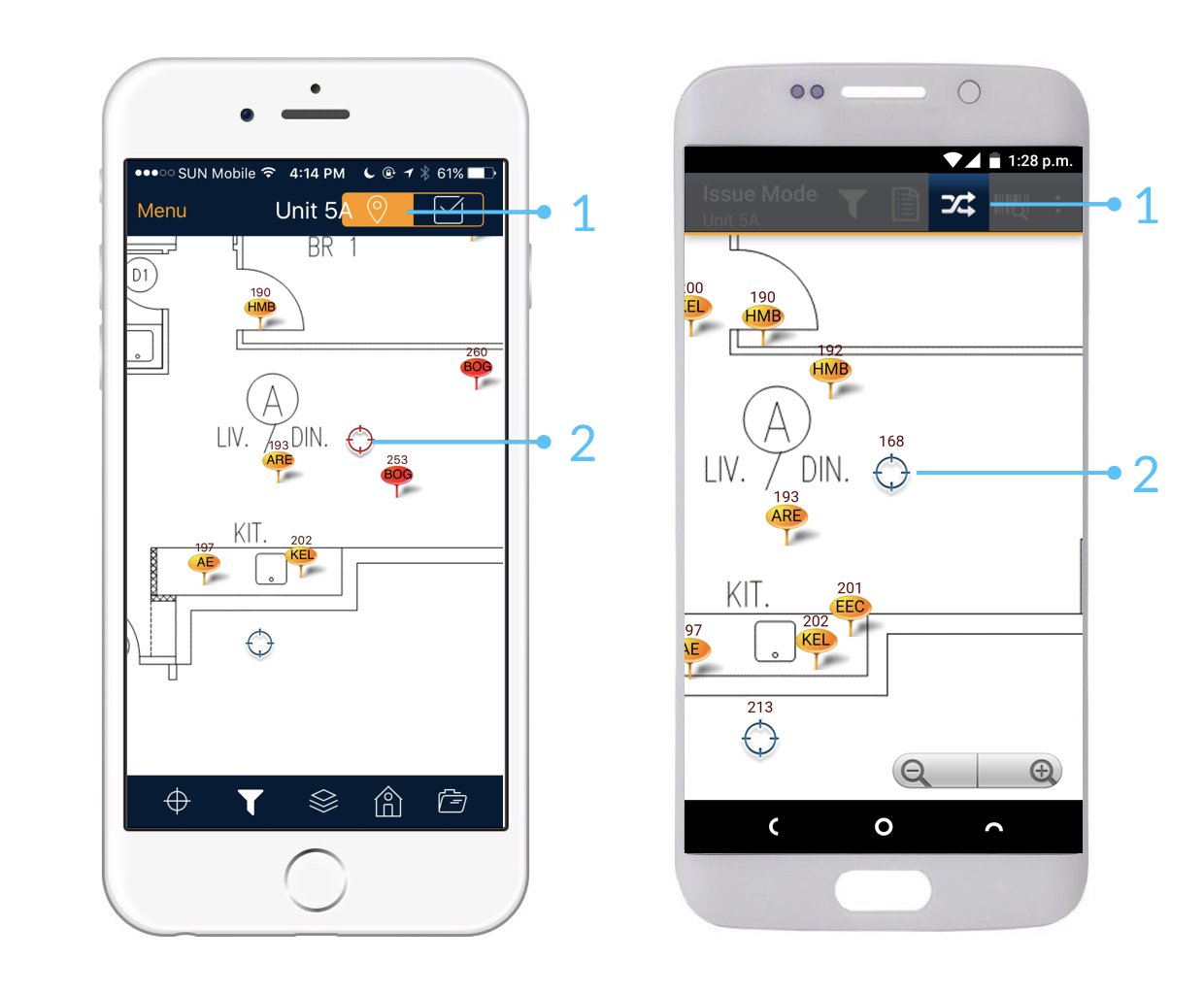
Stellen Sie zunächst sicher, dass Sie sich im **SnagR-Aktionsmodus** befinden.

Sie müssen einen Aktionspunkt basierend auf einem Lokation hinzufügen.

Das Lokationsymbol sieht folgendermaßen aus: <img src="https://mintcdn.com/snagr/Fc-Qgss-VatVIL0b/images/uploads/121217-location.png?fit=max&auto=format&n=Fc-Qgss-VatVIL0b&q=85&s=0ab13035cd34537b9f4b7de50c0b419a" alt="location" width="18" data-path="images/uploads/121217-location.png" />

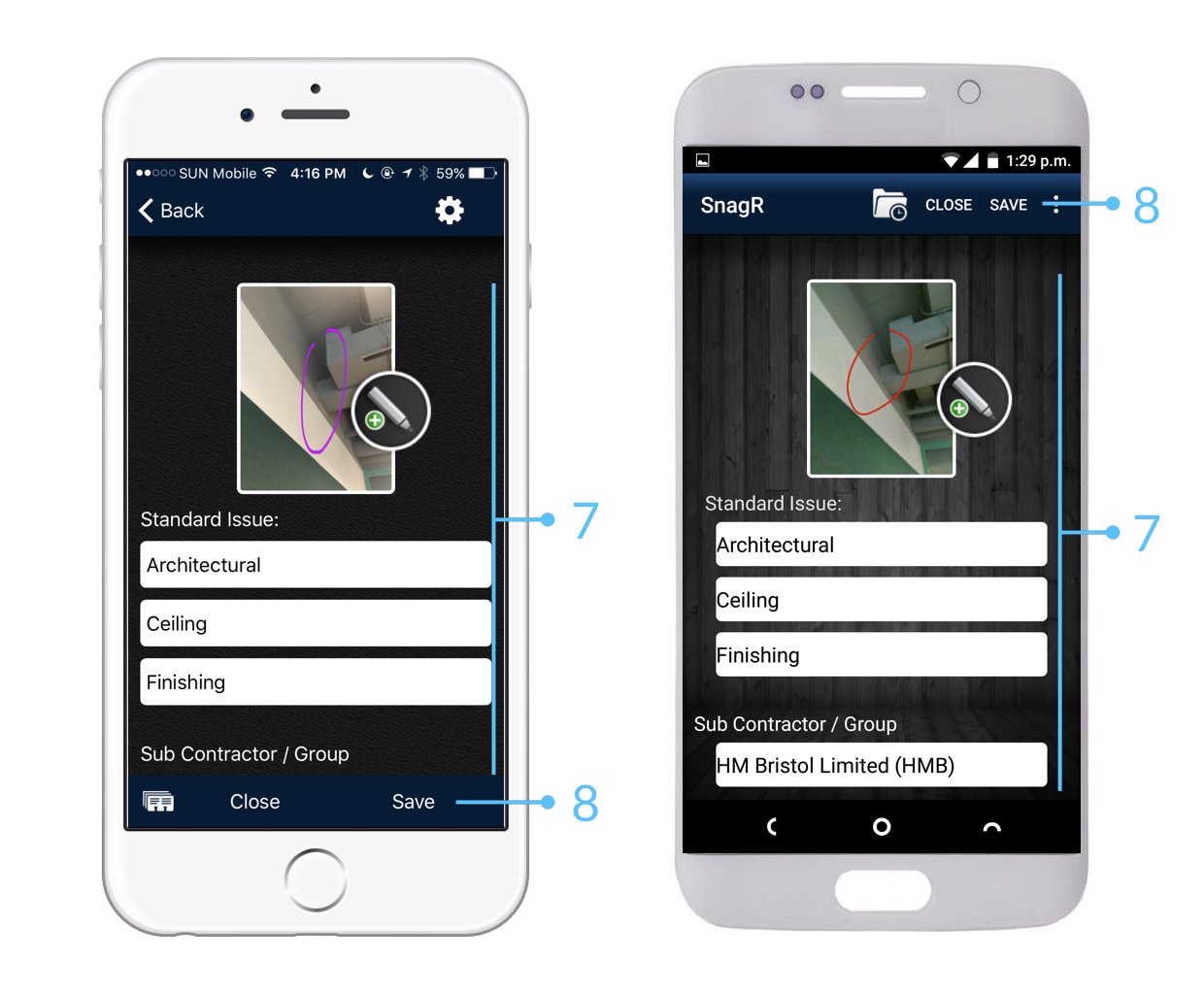
<img src="https://mintcdn.com/snagr/lG5zeW-JZpPjZFoL/images/uploads/127090-Issue_Mode_Device.001.jpeg?fit=max&auto=format&n=lG5zeW-JZpPjZFoL&q=85&s=74b1a8c925d8e94ef3167740d57c6fb3" alt="Issue Mode Device.001" width="1240" height="1024" data-path="images/uploads/127090-Issue_Mode_Device.001.jpeg" />

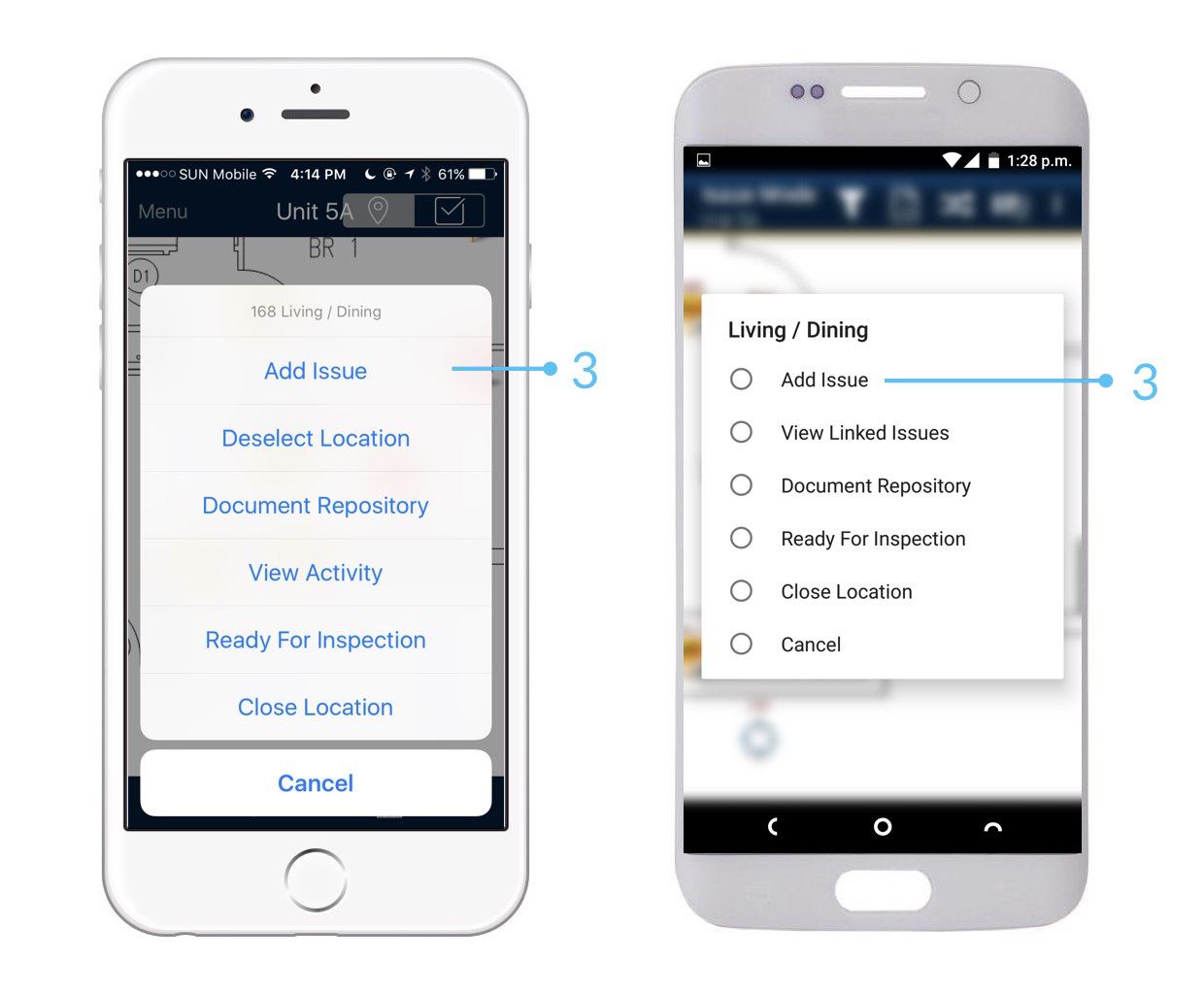
<img src="https://mintcdn.com/snagr/lG5zeW-JZpPjZFoL/images/uploads/127091-Issue_Mode_Device.002.jpeg?fit=max&auto=format&n=lG5zeW-JZpPjZFoL&q=85&s=6b81c3702fba9372684d9330cf54e1e9" alt="Issue Mode Device.002" width="1240" height="1024" data-path="images/uploads/127091-Issue_Mode_Device.002.jpeg" />

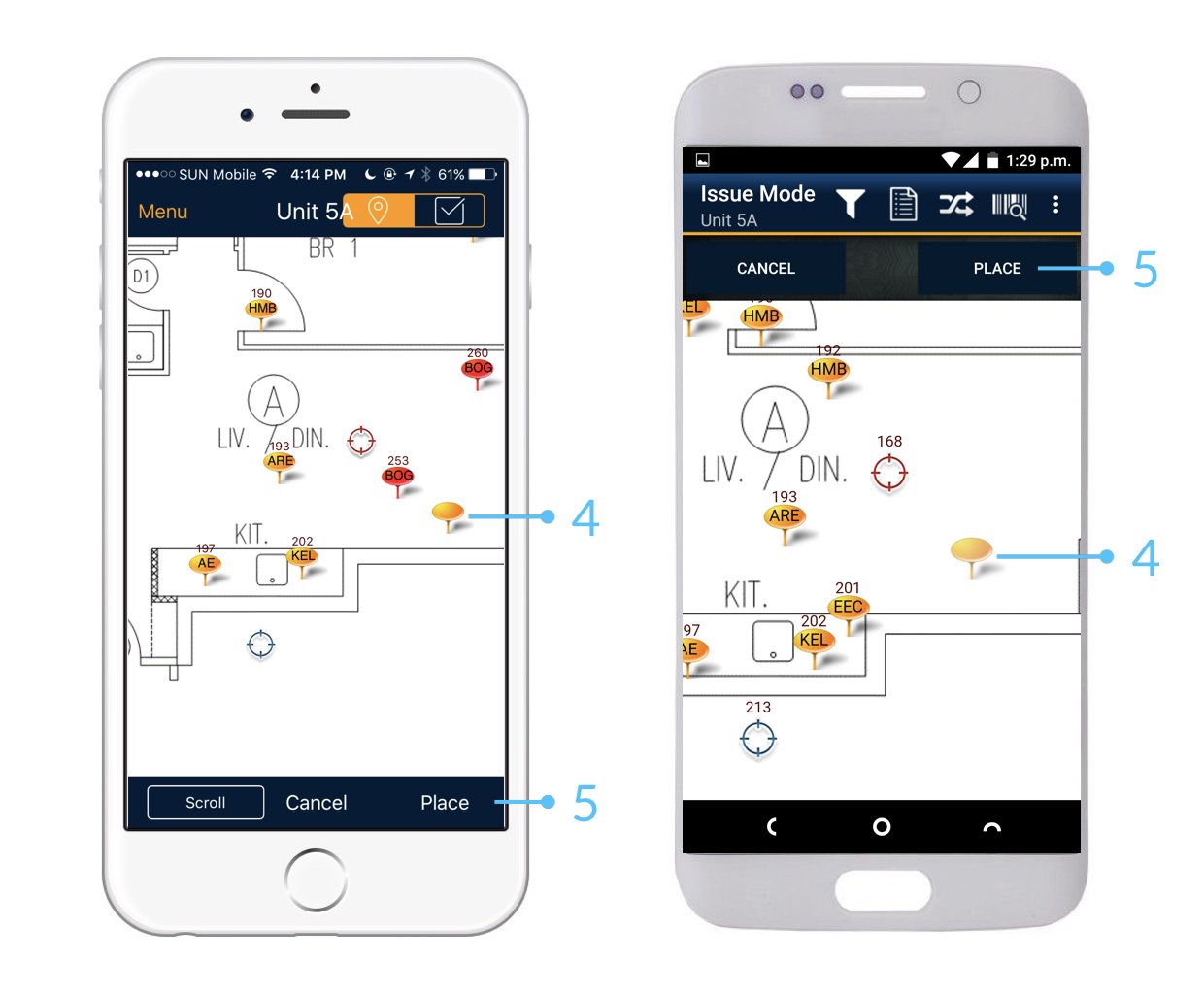
<img src="https://mintcdn.com/snagr/lG5zeW-JZpPjZFoL/images/uploads/127092-Issue_Mode_Device.003.jpeg?fit=max&auto=format&n=lG5zeW-JZpPjZFoL&q=85&s=85b94552a6da12bd468ebb15a0ba7aeb" alt="Issue Mode Device.003" width="1240" height="1024" data-path="images/uploads/127092-Issue_Mode_Device.003.jpeg" />

<img src="https://mintcdn.com/snagr/lG5zeW-JZpPjZFoL/images/uploads/127093-Issue_Mode_Device.004.jpeg?fit=max&auto=format&n=lG5zeW-JZpPjZFoL&q=85&s=13ccc1a1b8a88def725ad0966e5448bf" alt="Issue Mode Device.004" width="1240" height="1024" data-path="images/uploads/127093-Issue_Mode_Device.004.jpeg" />

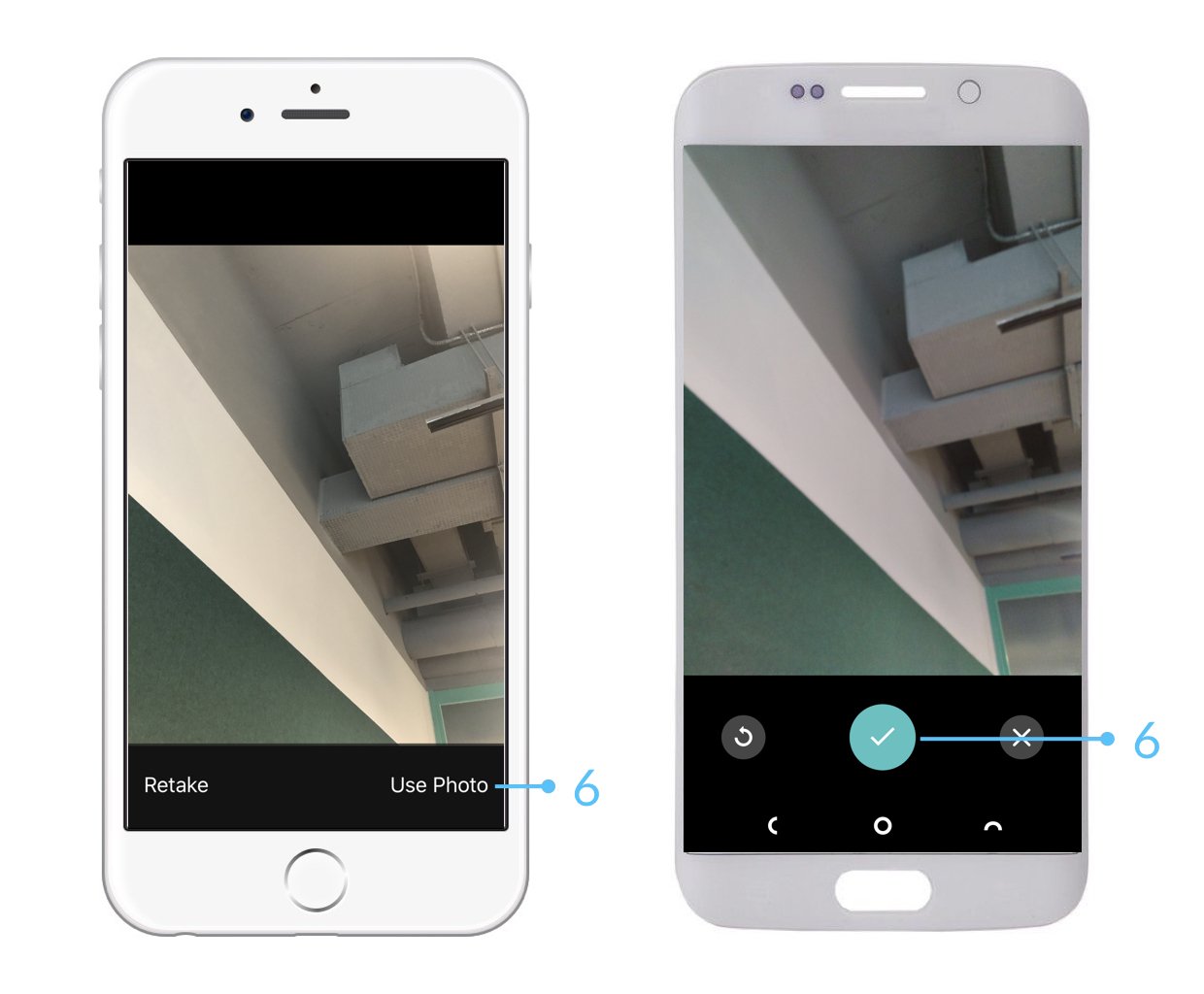
<img src="https://mintcdn.com/snagr/lG5zeW-JZpPjZFoL/images/uploads/127094-Issue_Mode_Device.005.jpeg?fit=max&auto=format&n=lG5zeW-JZpPjZFoL&q=85&s=802bf25d7a8a0b16b205129e7ff218f2" alt="Issue Mode Device.005" width="1240" height="1024" data-path="images/uploads/127094-Issue_Mode_Device.005.jpeg" />

<img src="https://mintcdn.com/snagr/xF5c6BECuZRMUk48/images/uploads/127505-sparkles.png?fit=max&auto=format&n=xF5c6BECuZRMUk48&q=85&s=904495e280f3b621b409dbce01ef7c8a" alt="sparkles" width="20" data-path="images/uploads/127505-sparkles.png" /> Vergessen Sie nach Abschluss Ihrer Arbeit vor Ort nicht, die [Synchronisierung](/de/haufig-gestellte-fragen/bereit-fur-den-mobilen-einsatz/warum-muss-ich-synchronisieren) durchzuführen. Dadurch wird sichergestellt, dass Ihre Daten für das Projektteam gespeichert und aktualisiert werden.

<img src="https://mintcdn.com/snagr/Fc-Qgss-VatVIL0b/images/uploads/123693-if_ic_tv_48px_352186.png?fit=max&auto=format&n=Fc-Qgss-VatVIL0b&q=85&s=06b23e0223986004fba7bbb6aa8febb3" alt="if ic tv 48px 352186" width="20" data-path="images/uploads/123693-if_ic_tv_48px_352186.png" /> **Website**

Die Umgebung und der Prozess zum Erstellen von Aktionspunkten funktionieren genauso wie in der Anwendung.
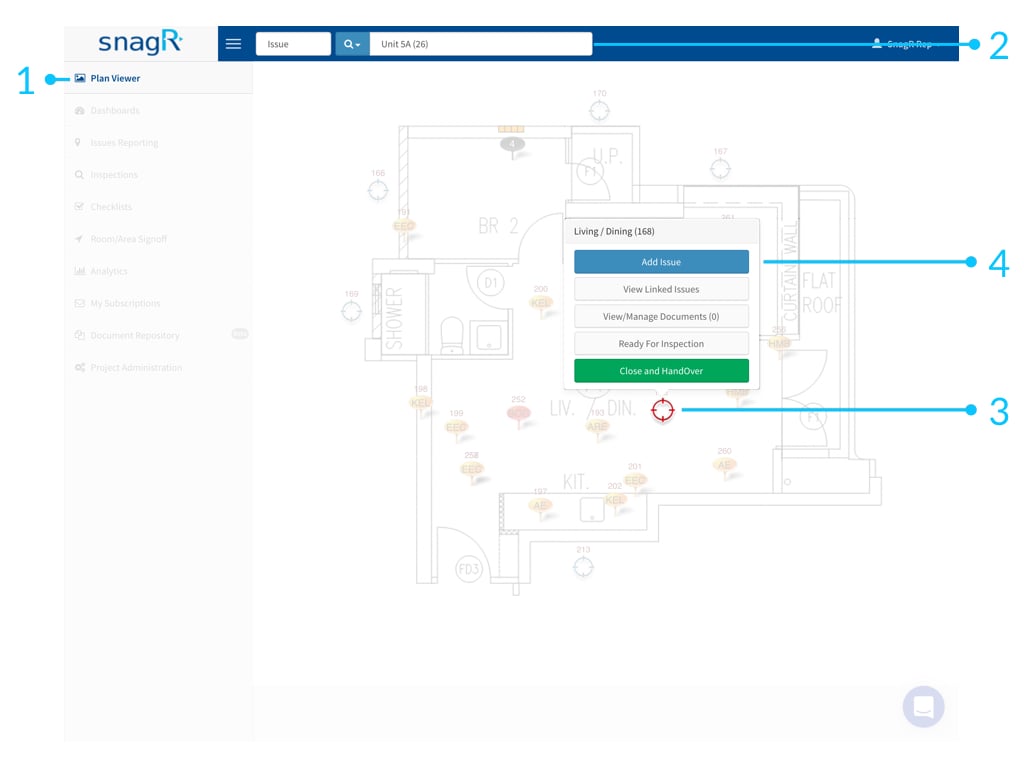
<img src="https://mintcdn.com/snagr/Fc-Qgss-VatVIL0b/images/uploads/123675-Website_Issue_Mode.002.jpeg?fit=max&auto=format&n=Fc-Qgss-VatVIL0b&q=85&s=a8f9089f4bc3fb10364d5073bd2dedd5" alt="Website Issue Mode.002" width="1024" height="768" data-path="images/uploads/123675-Website_Issue_Mode.002.jpeg" />

<img src="https://mintcdn.com/snagr/xF5c6BECuZRMUk48/images/uploads/127505-sparkles.png?fit=max&auto=format&n=xF5c6BECuZRMUk48&q=85&s=904495e280f3b621b409dbce01ef7c8a" alt="sparkles" width="20" data-path="images/uploads/127505-sparkles.png" /> Diese Daten müssen nicht synchronisiert werden, da alle Änderungen bereits online vorgenommen wurden.

<img src="https://mintcdn.com/snagr/lG5zeW-JZpPjZFoL/images/uploads/127041-Red_Flag_Emoji.png?fit=max&auto=format&n=lG5zeW-JZpPjZFoL&q=85&s=122220a995f6a719dddaffb5de76ce80" alt="Red Flag Emoji" width="20" data-path="images/uploads/127041-Red_Flag_Emoji.png" /> Erfahren Sie, wie Sie nach [Aktionspunkten suchen](/de/fangen-sie-an/startanleitung-wie-gehe-ich-mit-aktionspunkten-um/wie-suche-ich-nach-aktionspunkten) und diese [aktualisieren](/de/fangen-sie-an/startanleitung-wie-gehe-ich-mit-aktionspunkten-um/wie-aktualisiere-ich-einen-aktionspunkt).