> ## Documentation Index
> Fetch the complete documentation index at: https://kb.snagr.co.uk/llms.txt
> Use this file to discover all available pages before exploring further.

# [Export Form Content to Excel] How to setup template?

When this template is created, your team can export form content to a csv file by simply clicking the ***from Template*** button below.
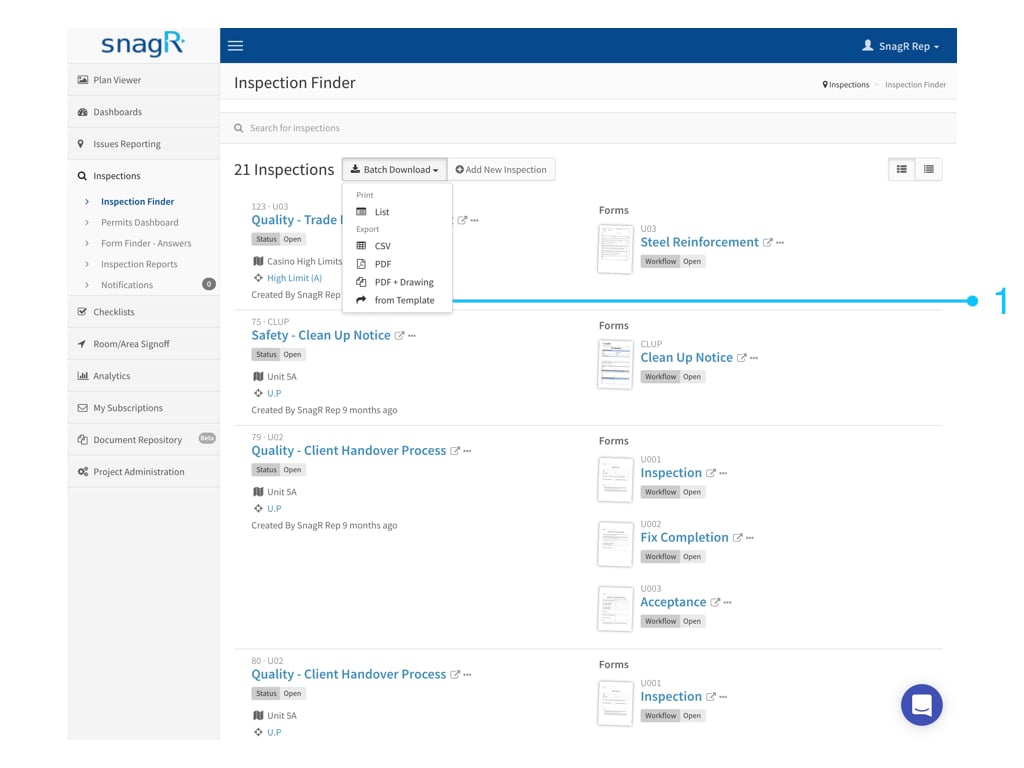
<img src="https://mintcdn.com/snagr/V8StriBwFl_CwQFJ/images/direct/1524726673545-1521600778207-Website-Form-Mode_Tra.001.jpeg?fit=max&auto=format&n=V8StriBwFl_CwQFJ&q=85&s=a774d2acf0d7492ee018da2079d1a9a6" alt="1521600778207 Website Form Mode Tra.001" width="1024" height="768" data-path="images/direct/1524726673545-1521600778207-Website-Form-Mode_Tra.001.jpeg" />

<img src="https://mintcdn.com/snagr/Fc-Qgss-VatVIL0b/images/uploads/123693-if_ic_tv_48px_352186.png?fit=max&auto=format&n=Fc-Qgss-VatVIL0b&q=85&s=06b23e0223986004fba7bbb6aa8febb3" alt="if ic tv 48px 352186" width="20" data-path="images/uploads/123693-if_ic_tv_48px_352186.png" /> **Website**

Login to a project.

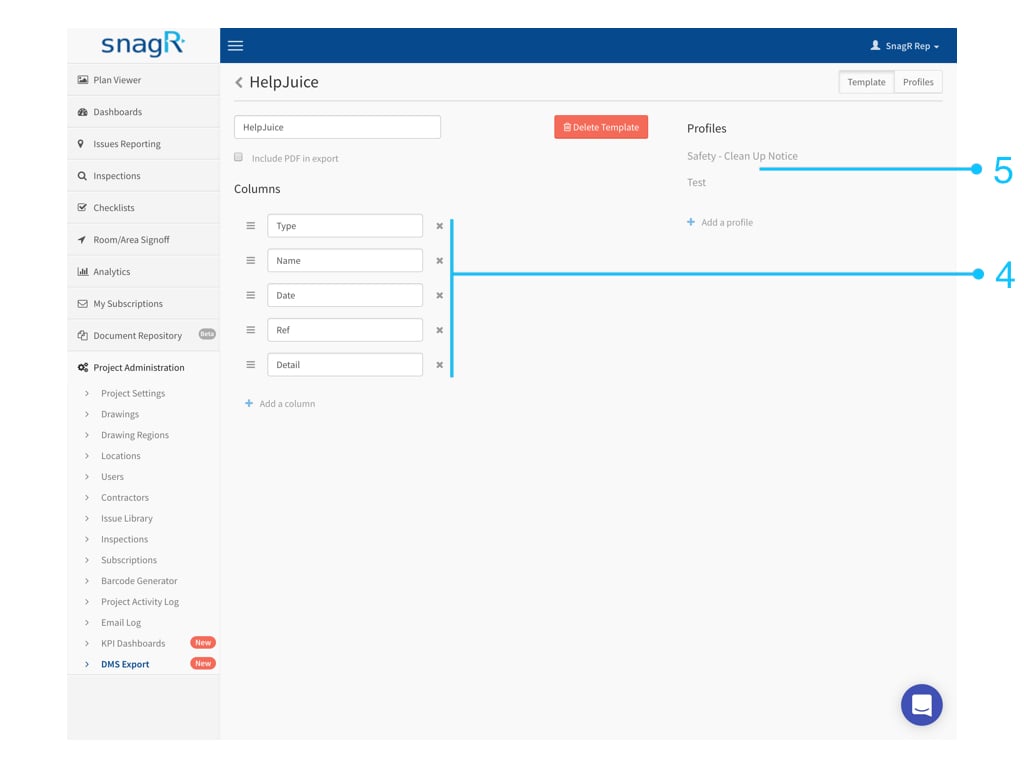
Go to **Project Administration > DMS Export > Create a Template**.
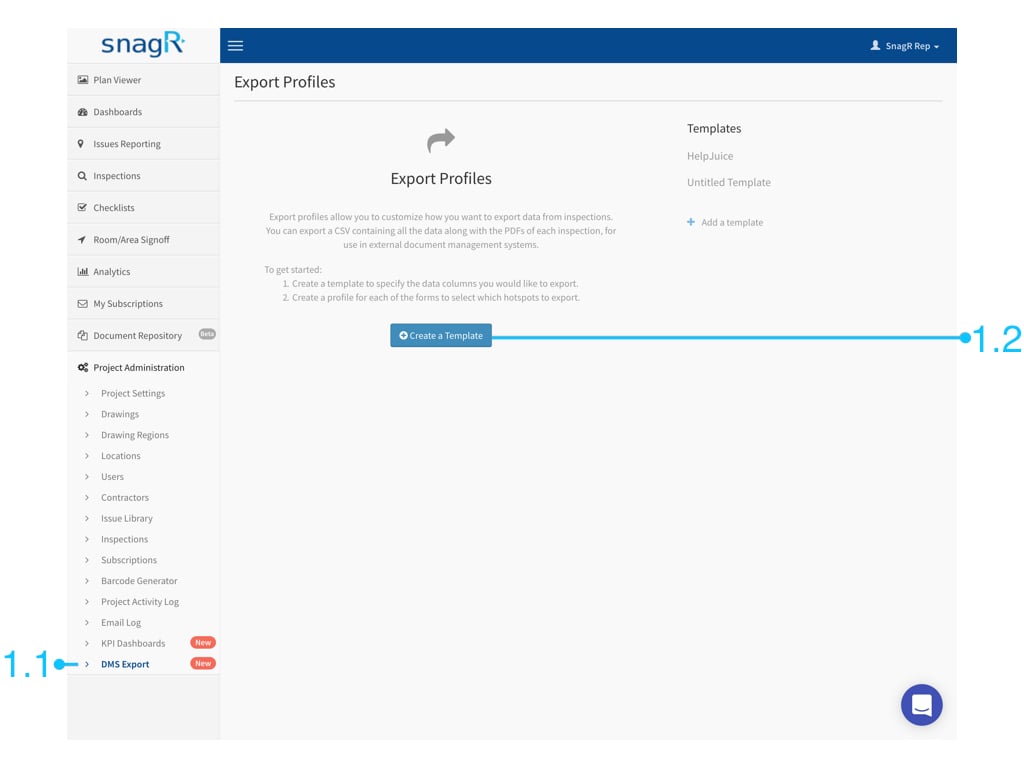
<img src="https://mintcdn.com/snagr/cq3DLfKmhQlF8uo8/images/direct/1521437933981-Admin_Website.001.jpeg?fit=max&auto=format&n=cq3DLfKmhQlF8uo8&q=85&s=a76a01fe10e9cee16fc35c02c3460ba0" alt="Admin Website.001" width="1024" height="768" data-path="images/direct/1521437933981-Admin_Website.001.jpeg" />

Give the template a name, and click **Add a Column**

<img src="https://mintcdn.com/snagr/cq3DLfKmhQlF8uo8/images/direct/1521438963111-Screen-Shot-2018-03-19-at-1.55.49-PM.png?fit=max&auto=format&n=cq3DLfKmhQlF8uo8&q=85&s=91fc57a844986c1e2b0963936be9bd90" alt="Screen Shot 2018 03 19 at 1.55.49 PM" width="103" height="20" data-path="images/direct/1521438963111-Screen-Shot-2018-03-19-at-1.55.49-PM.png" />

to create as many columns as you would like to see in an Excel format.
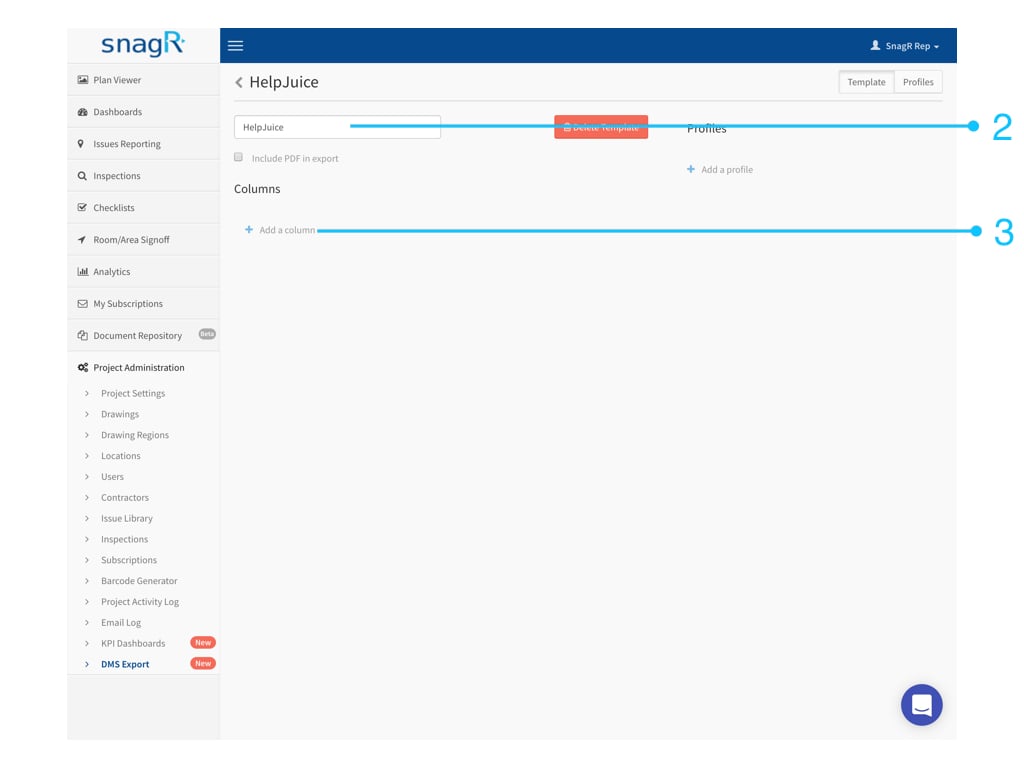
<img src="https://mintcdn.com/snagr/cq3DLfKmhQlF8uo8/images/direct/1521437960221-Admin_Website.002.jpeg?fit=max&auto=format&n=cq3DLfKmhQlF8uo8&q=85&s=f351e9e1db22949e95750611c9d04865" alt="Admin Website.002" width="1024" height="768" data-path="images/direct/1521437960221-Admin_Website.002.jpeg" />

**Name** **the columns**. After that, click **Add a Profile**

<img src="https://mintcdn.com/snagr/cq3DLfKmhQlF8uo8/images/direct/1521438998427-Screen-Shot-2018-03-19-at-1.56.28-PM.png?fit=max&auto=format&n=cq3DLfKmhQlF8uo8&q=85&s=28f329b204abd49bb19fe1b9a73cf804" alt="Screen Shot 2018 03 19 at 1.56.28 PM" width="90" height="24" data-path="images/direct/1521438998427-Screen-Shot-2018-03-19-at-1.56.28-PM.png" />

.

<img src="https://mintcdn.com/snagr/cq3DLfKmhQlF8uo8/images/direct/1521437975206-Admin_Website.003.jpeg?fit=max&auto=format&n=cq3DLfKmhQlF8uo8&q=85&s=53f4a9846c6957f0119f904fddc75330" alt="Admin Website.003" width="1024" height="768" data-path="images/direct/1521437975206-Admin_Website.003.jpeg" />

At **Profiles**, you can **map columns** to:

1. Form fields
2. Attributes
3. Text

### 1. Form Fields

Form fields are the data filled into the form.\
**Select** a form.
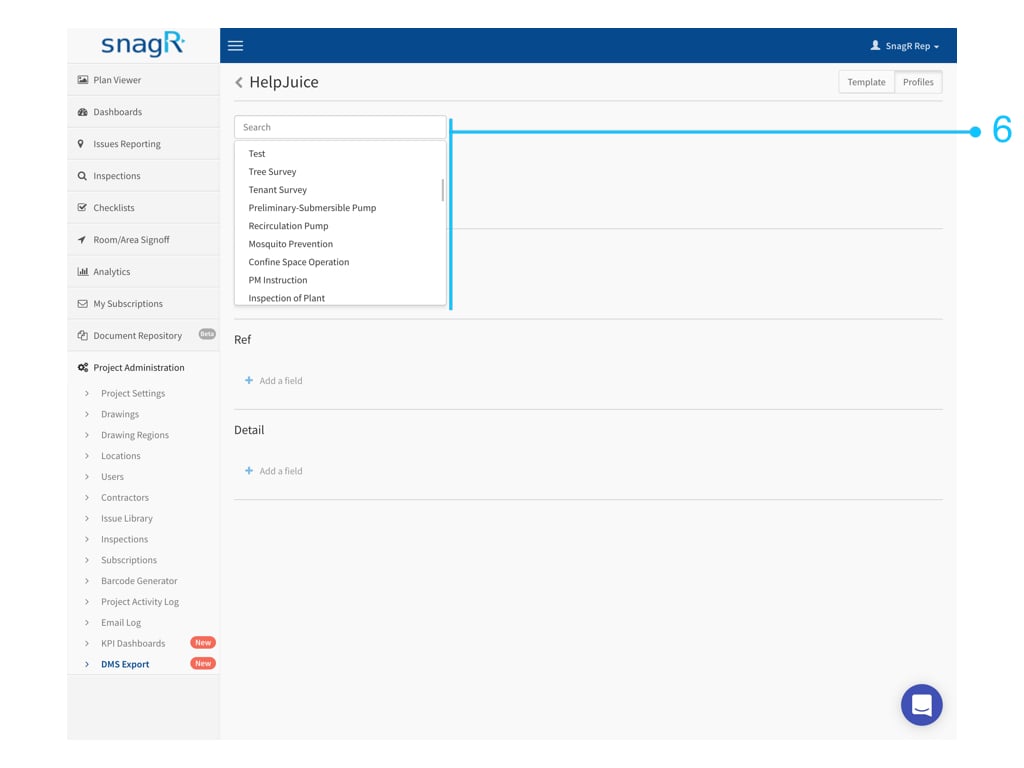
<img src="https://mintcdn.com/snagr/cq3DLfKmhQlF8uo8/images/direct/1521438335946-Admin_Website.004.jpeg?fit=max&auto=format&n=cq3DLfKmhQlF8uo8&q=85&s=dcbd183c874415b25d00ebc521b48fb5" alt="Admin Website.004" width="1024" height="768" data-path="images/direct/1521438335946-Admin_Website.004.jpeg" />

At the drop down, **pick** the name of the form field.
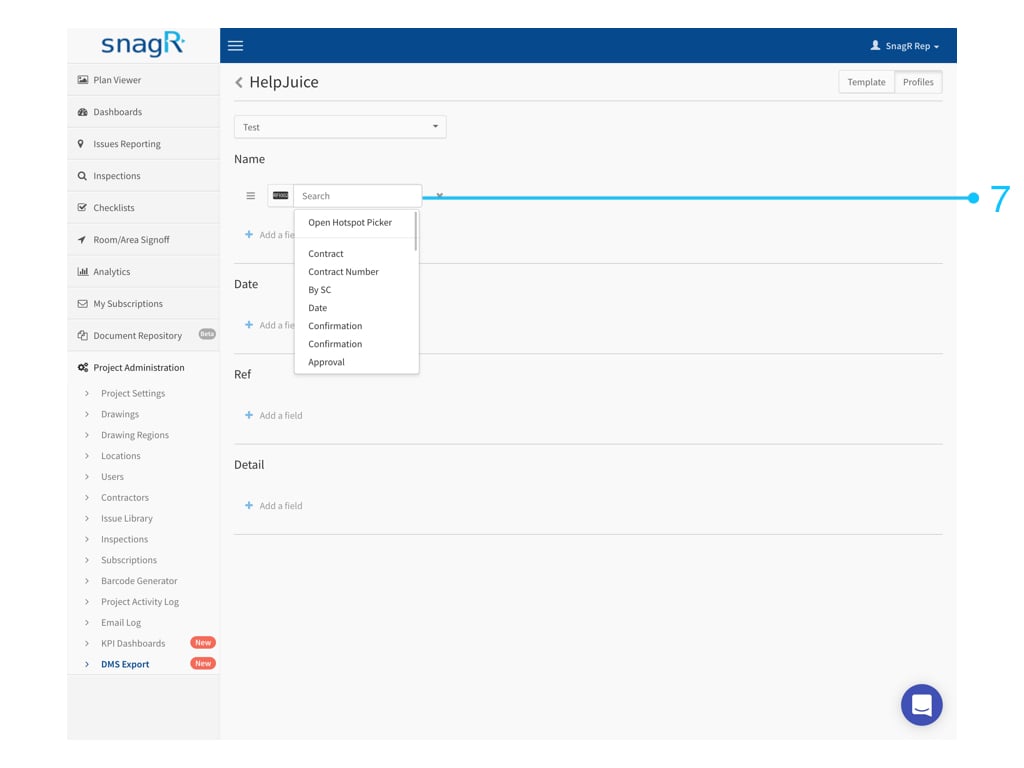
<img src="https://mintcdn.com/snagr/cq3DLfKmhQlF8uo8/images/direct/1521438366250-Admin_Website.005.jpeg?fit=max&auto=format&n=cq3DLfKmhQlF8uo8&q=85&s=aef04aa79f74e0cc22b1a84096224009" alt="Admin Website.005" width="1024" height="768" data-path="images/direct/1521438366250-Admin_Website.005.jpeg" />

***Why can't I see any names in the drop down list?***\
It is likely the form has not been set up with a title for each field.

In this case, simply click **Open Hotspot Picker** to select the desired hotspot directly:
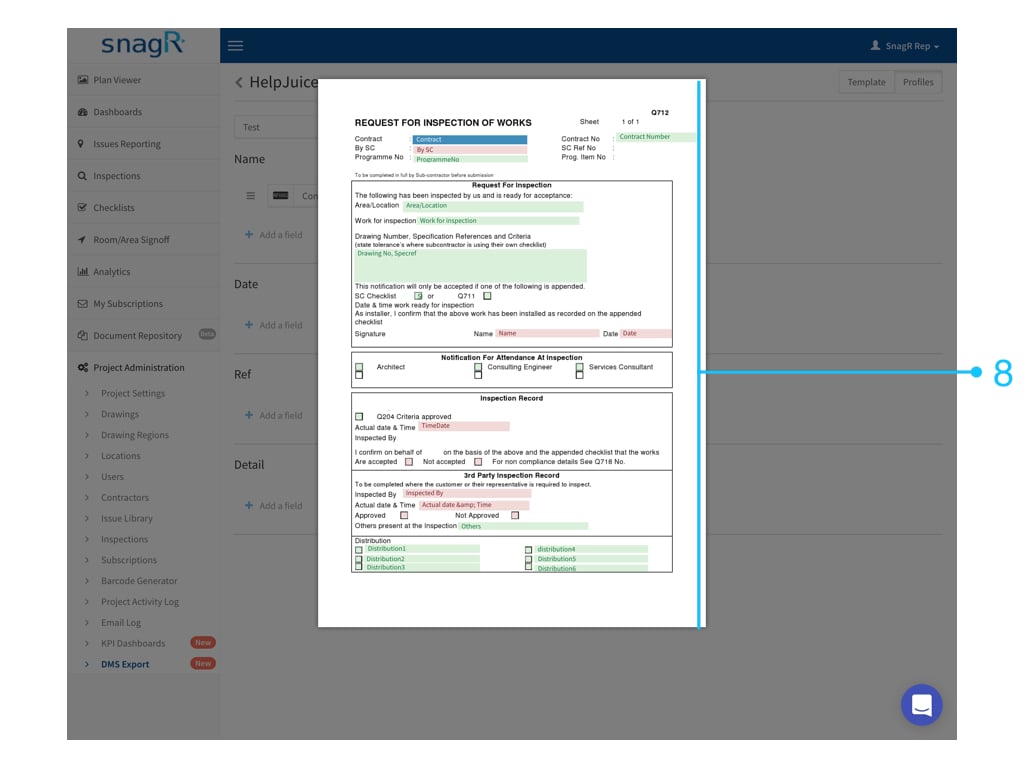
<img src="https://mintcdn.com/snagr/cq3DLfKmhQlF8uo8/images/direct/1521438382930-Admin_Website.006.jpeg?fit=max&auto=format&n=cq3DLfKmhQlF8uo8&q=85&s=531d6356cfd4b7a8250e79e8977a3bf1" alt="Admin Website.006" width="1024" height="768" data-path="images/direct/1521438382930-Admin_Website.006.jpeg" />

### 2. Attributes

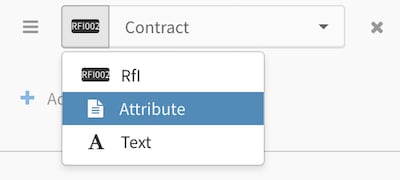
Attribute is the information regarding the form, such as the drawing title of where the form is created, the project contract number, the user who created the form, etc.

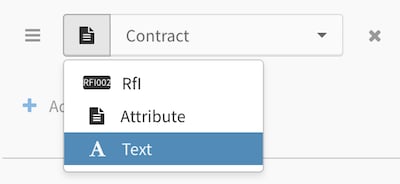
Choose **Attribute**.
<img src="https://mintcdn.com/snagr/V8StriBwFl_CwQFJ/images/direct/1524729093539-Screen-Shot-2018-04-26-at-3.50.38-PM.png?fit=max&auto=format&n=V8StriBwFl_CwQFJ&q=85&s=c406245de9be684901c96f8751426a5f" alt="Screen Shot 2018 04 26 at 3.50.38 PM" width="400" height="180" data-path="images/direct/1524729093539-Screen-Shot-2018-04-26-at-3.50.38-PM.png" />

**Select** an attribute.

<img src="https://mintcdn.com/snagr/V8StriBwFl_CwQFJ/images/direct/1524729110727-Screen-Shot-2018-04-26-at-3.50.53-PM.png?fit=max&auto=format&n=V8StriBwFl_CwQFJ&q=85&s=d57e40fc8aec2965e604b90f280abf8b" alt="Screen Shot 2018 04 26 at 3.50.53 PM" width="400" height="358" data-path="images/direct/1524729110727-Screen-Shot-2018-04-26-at-3.50.53-PM.png" />

### 3. Text

Choose **Text**

<img src="https://mintcdn.com/snagr/V8StriBwFl_CwQFJ/images/direct/1524729177881-Screen-Shot-2018-04-26-at-3.52.38-PM.png?fit=max&auto=format&n=V8StriBwFl_CwQFJ&q=85&s=473a41e955f9ed106cb389a22dd52354" alt="Screen Shot 2018 04 26 at 3.52.38 PM" width="400" height="184" data-path="images/direct/1524729177881-Screen-Shot-2018-04-26-at-3.52.38-PM.png" />

***<img src="https://mintcdn.com/snagr/cq3DLfKmhQlF8uo8/images/direct/1521436445874-electric-light-bulb_1f4a1.png?fit=max&auto=format&n=cq3DLfKmhQlF8uo8&q=85&s=c8c0f922694296671395e06c06f3db9d" alt="electric light bulb 1f4a1" width="24" data-path="images/direct/1521436445874-electric-light-bulb_1f4a1.png" /> What can I use text for?***

There can be more than one field in a column. This means you can **combine** form fields and attributes with text. An example would be:

<img src="https://mintcdn.com/snagr/V8StriBwFl_CwQFJ/images/direct/1524733496620-Screen-Shot-2018-04-26-at-3.54.35-PM.png?fit=max&auto=format&n=V8StriBwFl_CwQFJ&q=85&s=d4e31db987226592daa1d901e91b5b19" alt="Screen Shot 2018 04 26 at 3.54.35 PM" width="400" height="299" data-path="images/direct/1524733496620-Screen-Shot-2018-04-26-at-3.54.35-PM.png" />

**Can the template includes data from multiple forms?**

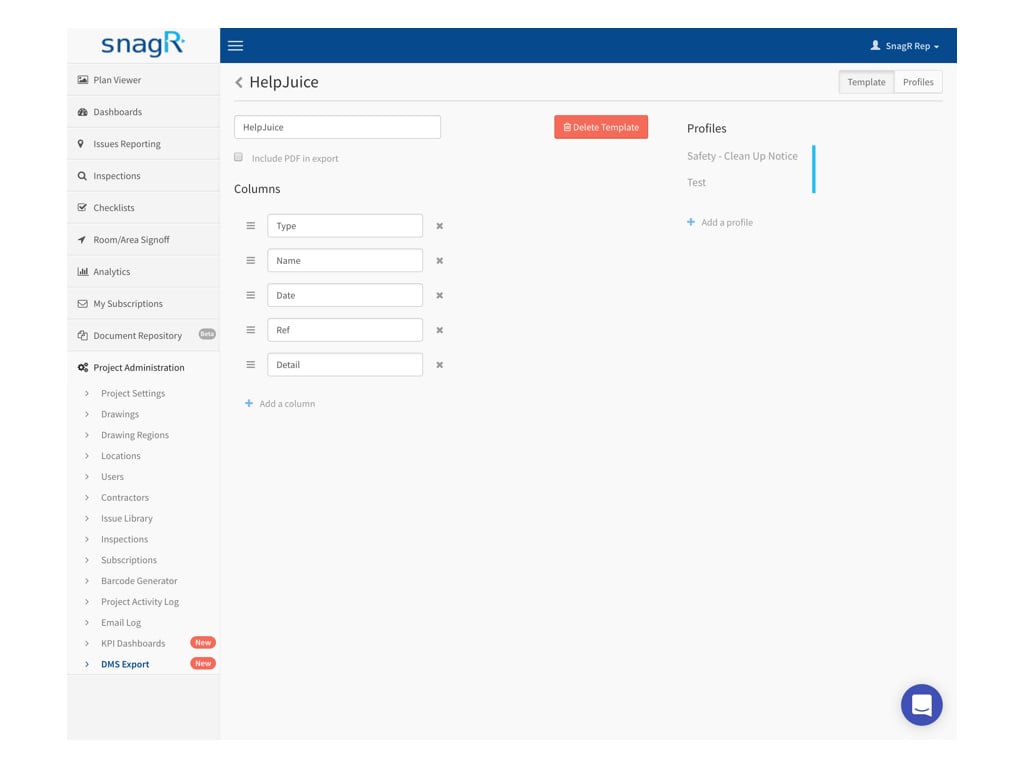
Yes, click **Add a profile** and continue mapping columns to the desired form field or attribute.
<img src="https://mintcdn.com/snagr/cq3DLfKmhQlF8uo8/images/direct/1521438541830-Admin_Website.008.jpeg?fit=max&auto=format&n=cq3DLfKmhQlF8uo8&q=85&s=4917186fc2af22fcd168abfc7da02d51" alt="Admin Website.008" width="1024" height="768" data-path="images/direct/1521438541830-Admin_Website.008.jpeg" />

That's it! When the template is set up, do **try it out**.

Click here to see how you can [export data from Template](/en/forms/export-forms/how-to-export-excel-from-template).