> ## Documentation Index
> Fetch the complete documentation index at: https://kb.snagr.co.uk/llms.txt
> Use this file to discover all available pages before exploring further.

# How to update / close issues?

After [an issue is created](/en/issues/add-issues/how-to-add-an-issue), different parties may be involved to fix, sign off and close out issues. It is important these different parties are involved completing the full circle of the issue rectification process.

<img src="https://mintcdn.com/snagr/Fc-Qgss-VatVIL0b/images/uploads/123669-if_icons_mobile_1564515.png?fit=max&auto=format&n=Fc-Qgss-VatVIL0b&q=85&s=33c23172e831246883598cbf05523c0d" alt="if icons mobile 1564515" width="18" data-path="images/uploads/123669-if_icons_mobile_1564515.png" /> **Device**

<iframe src="https://player.vimeo.com/video/108712072" width="100%" height="400" frameBorder="0" allow="autoplay; fullscreen; picture-in-picture" allowFullScreen />

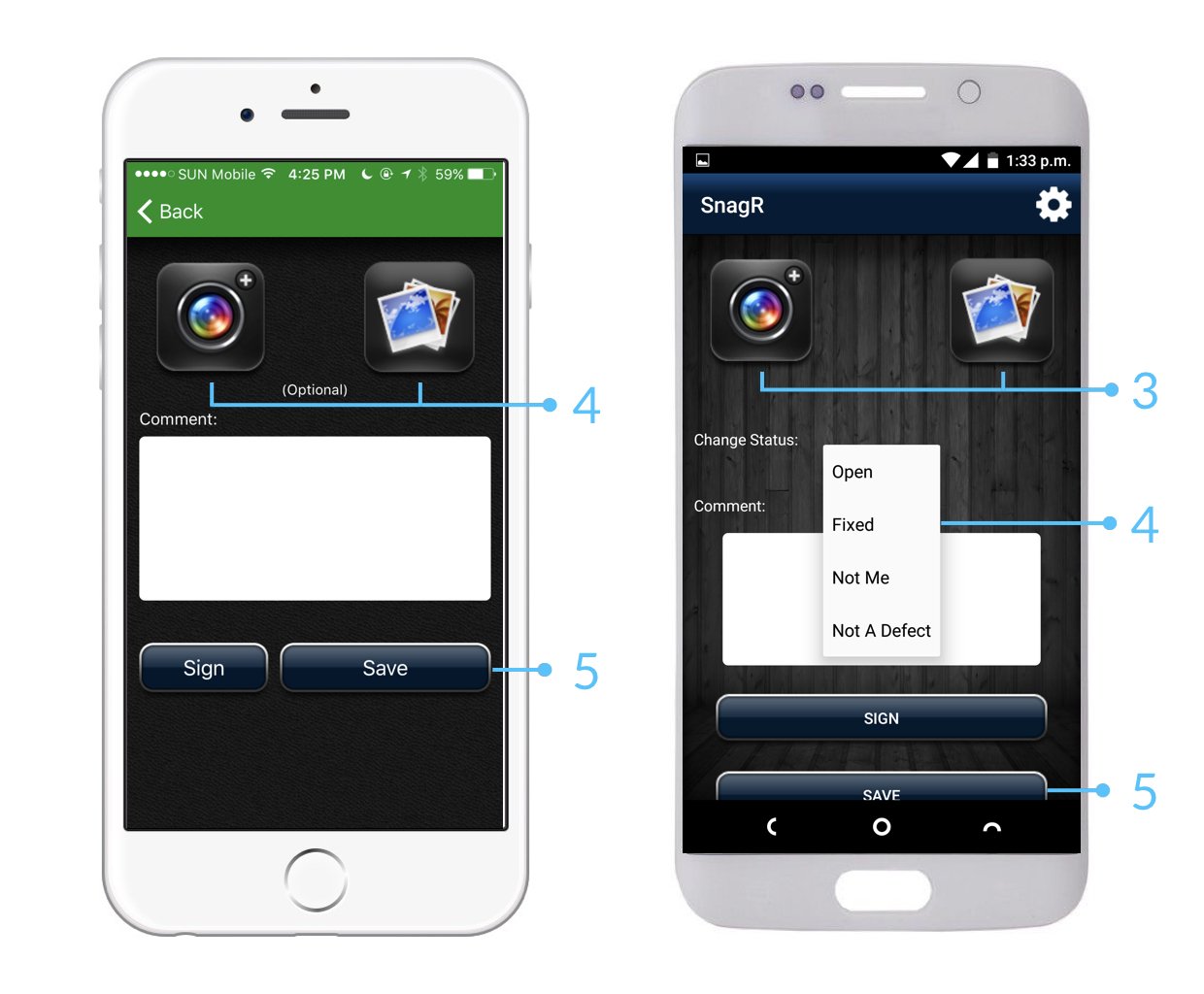
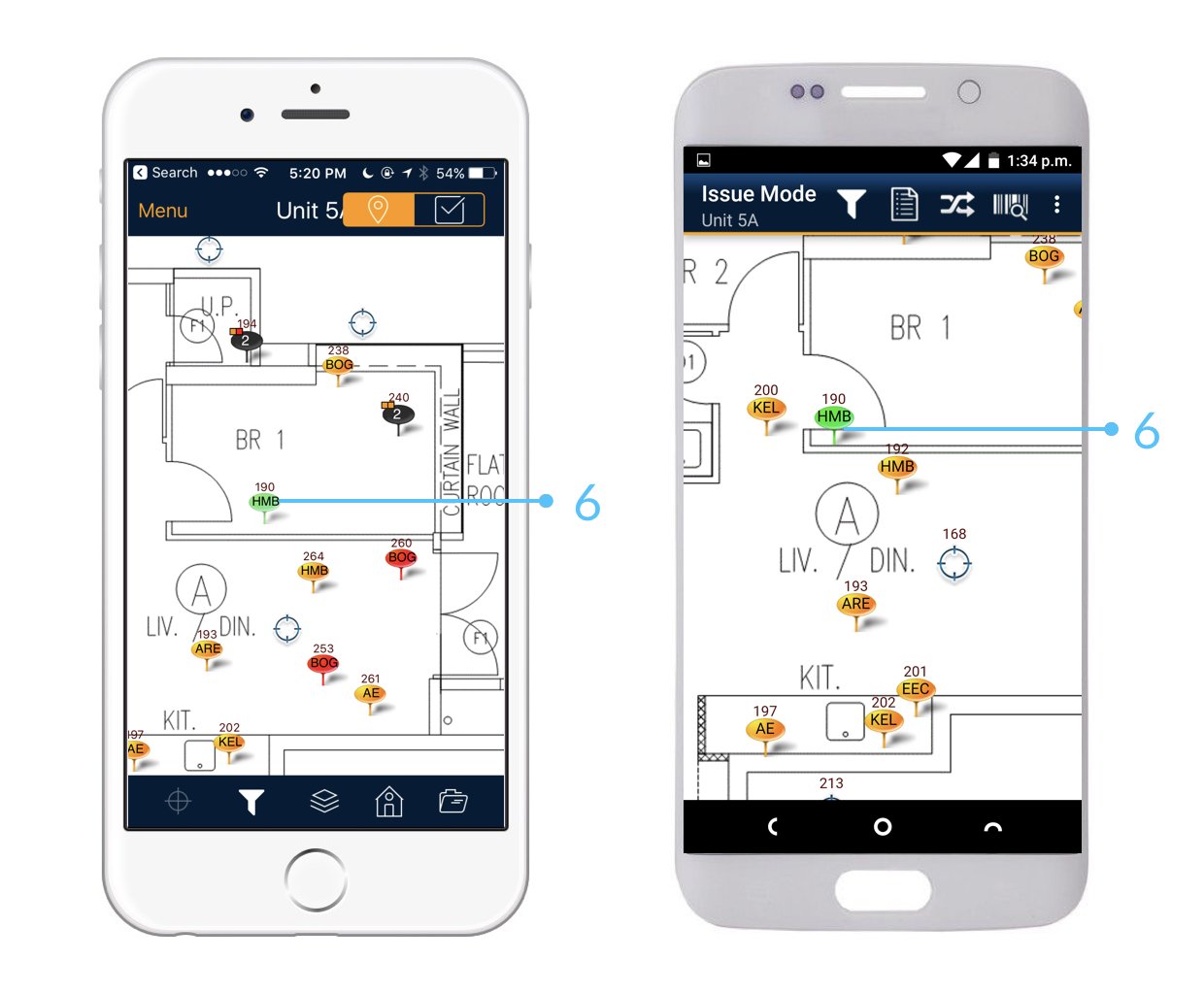
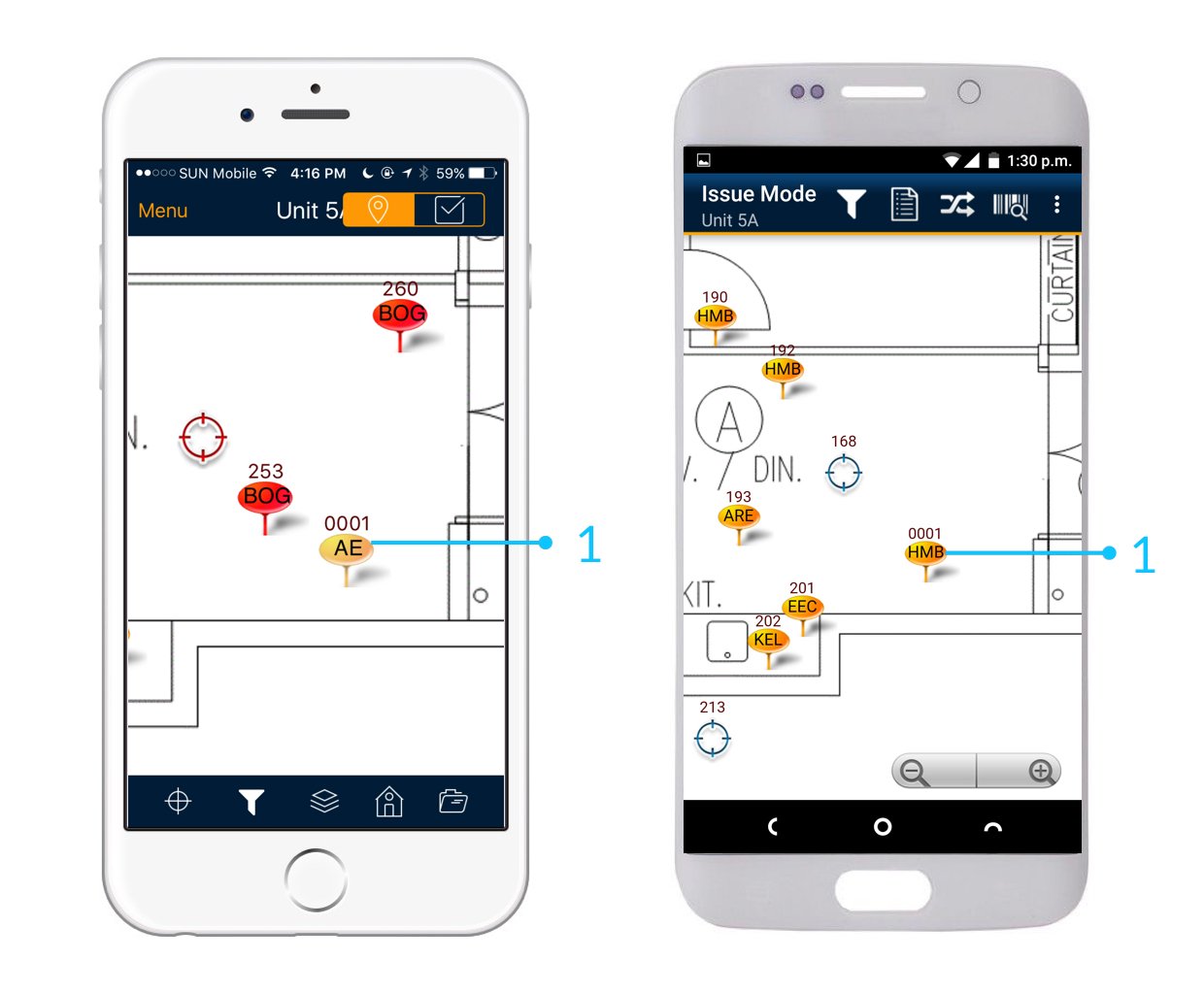
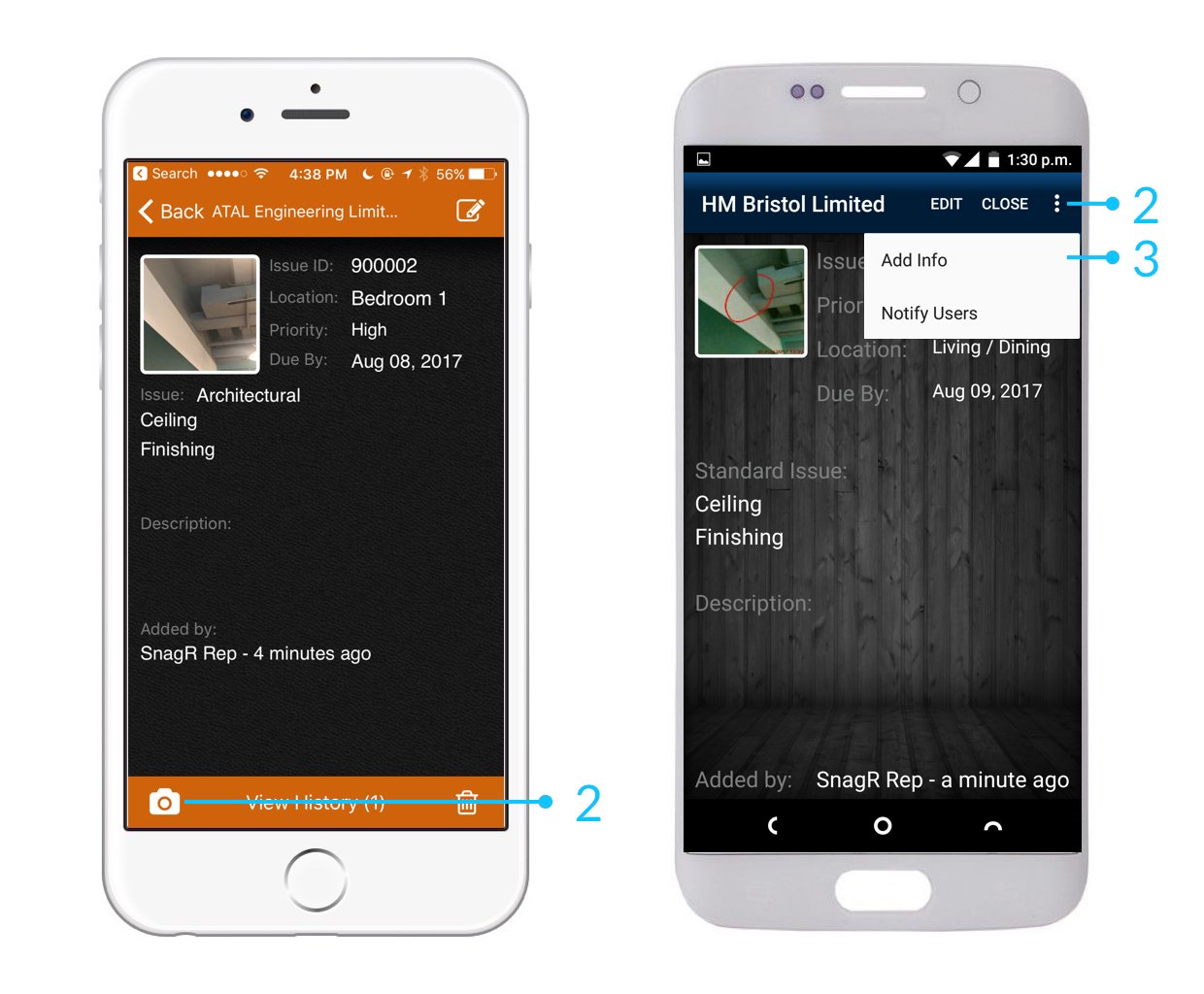
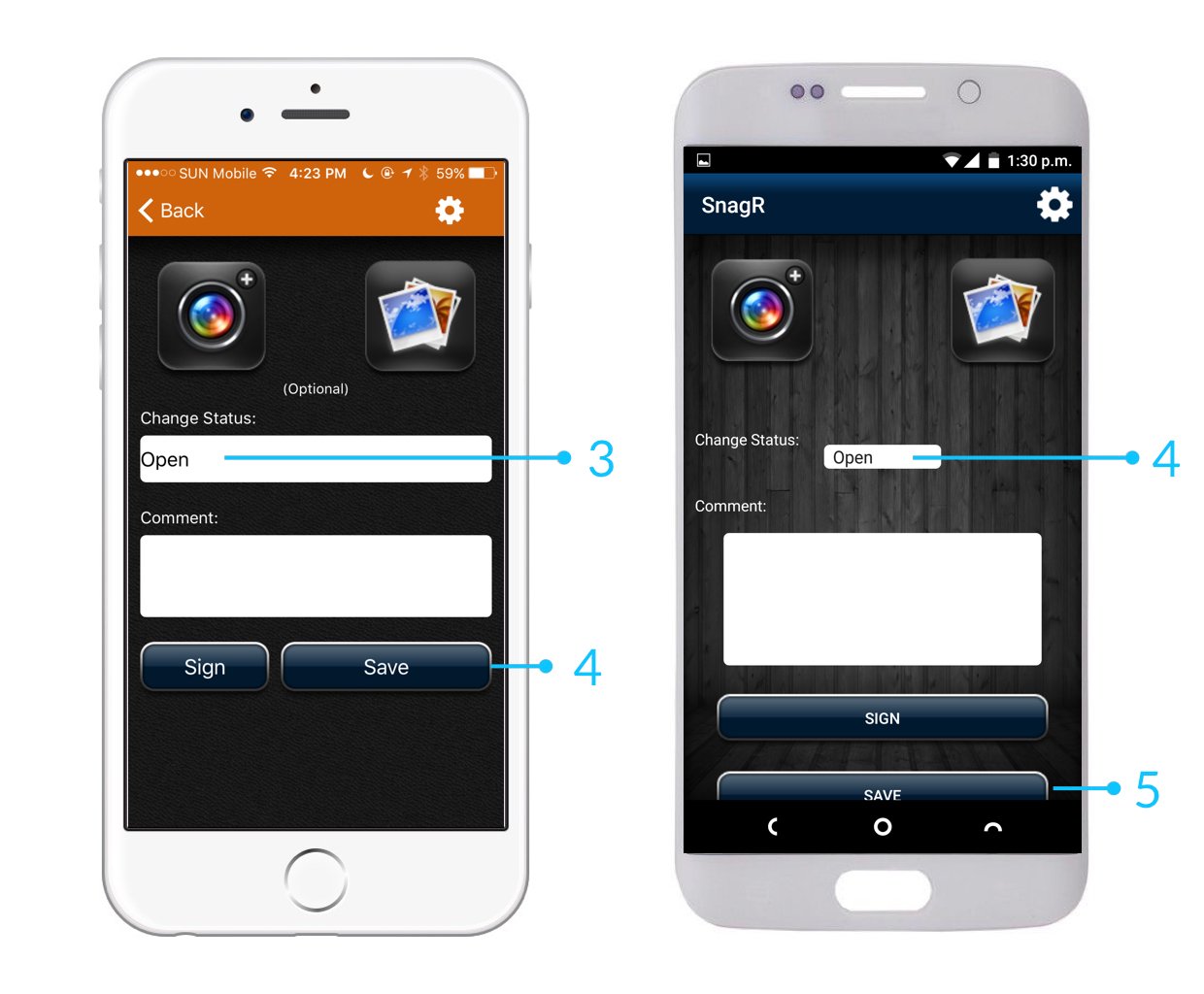
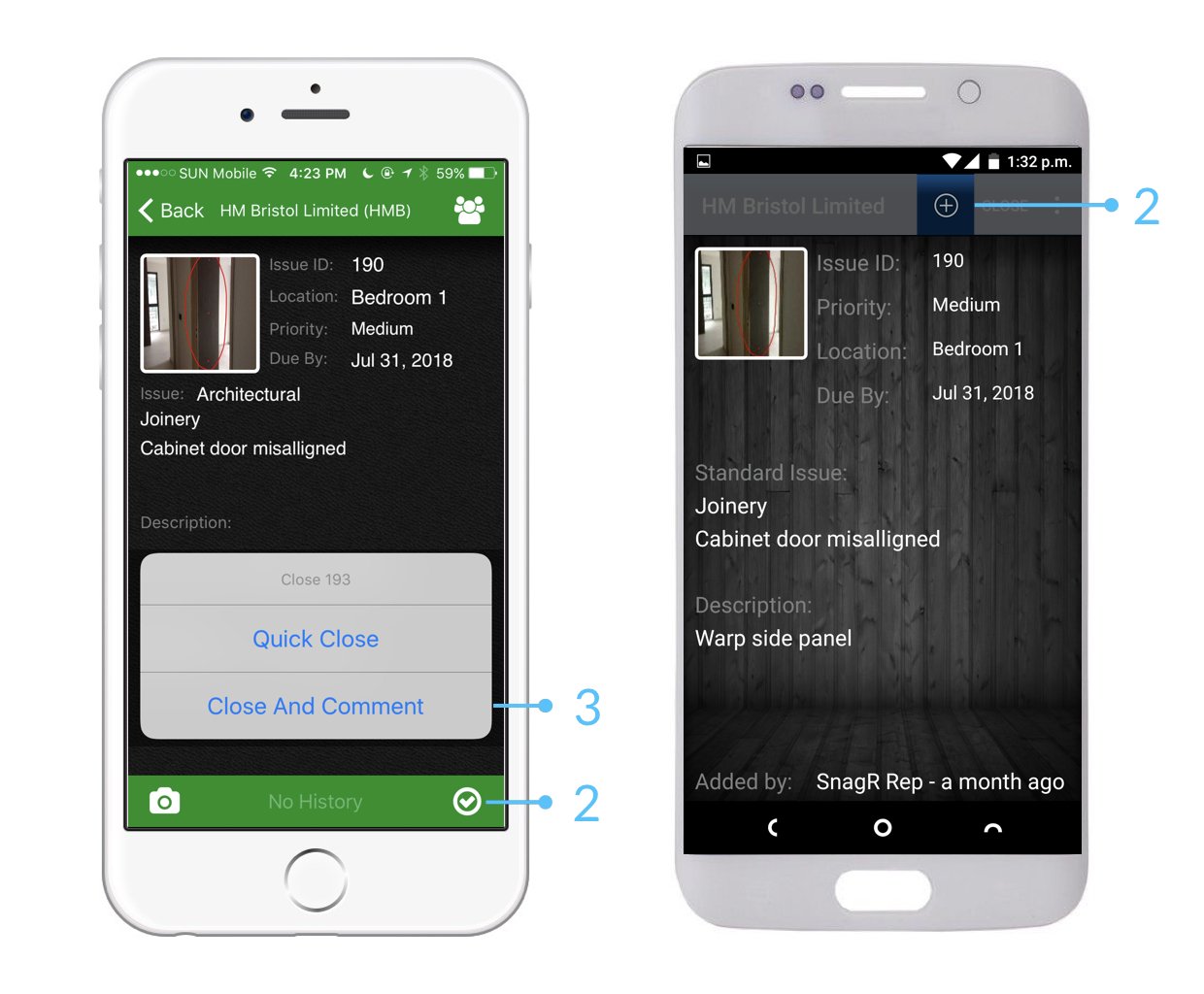
When you attempt to close issues, you have the option to:

**Quick close**: change defect status / pin colour directly

**Close and comment**: change defect status / pin colour with photo attachments or comments

<img src="https://mintcdn.com/snagr/xF5c6BECuZRMUk48/images/uploads/127505-sparkles.png?fit=max&auto=format&n=xF5c6BECuZRMUk48&q=85&s=904495e280f3b621b409dbce01ef7c8a" alt="sparkles" width="20" data-path="images/uploads/127505-sparkles.png" /> It is best practice to update issues with photos so that it provides evidence and support to the record.
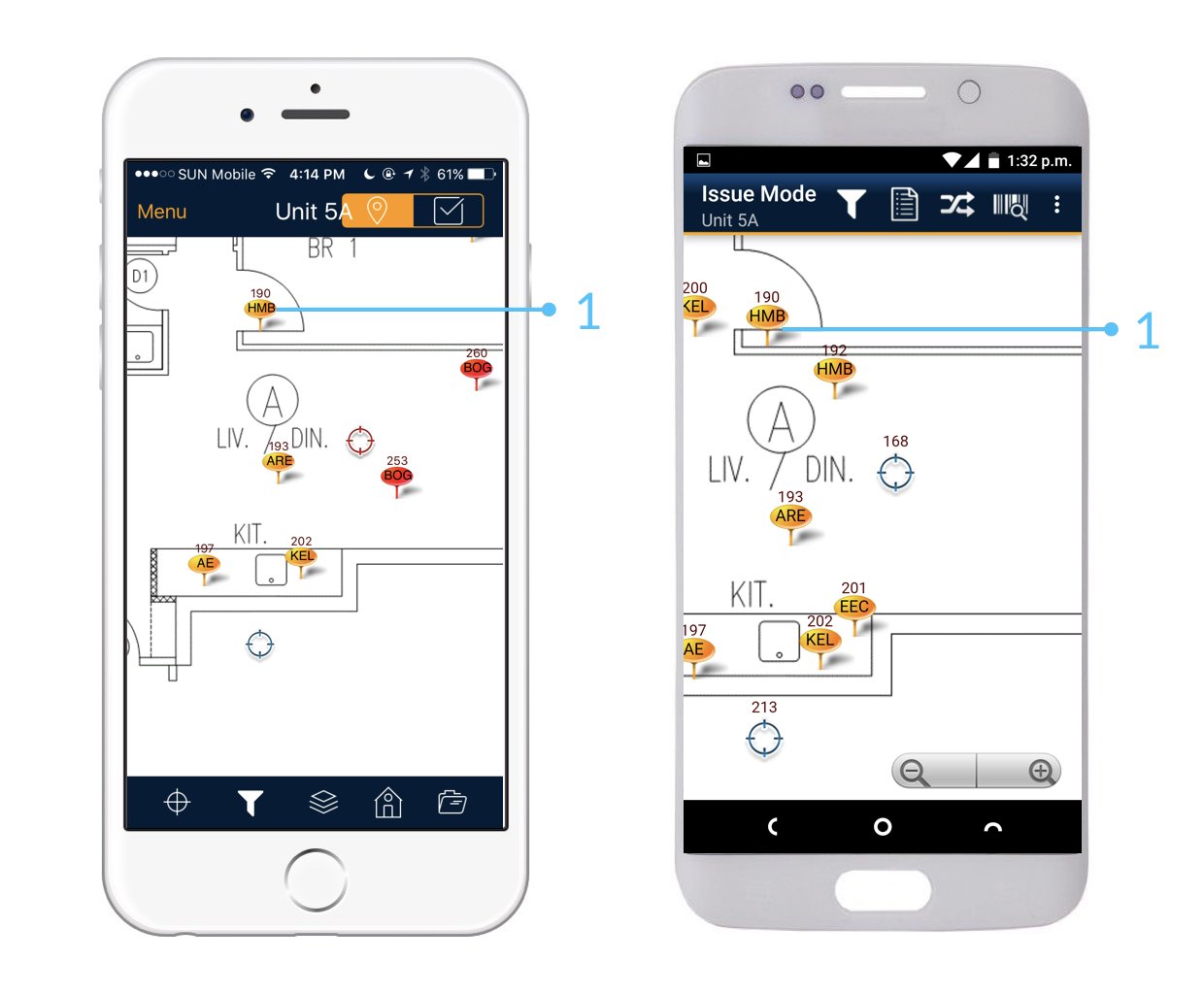
<img src="https://mintcdn.com/snagr/lG5zeW-JZpPjZFoL/images/uploads/127108-Issue_Mode_Device.019.jpeg?fit=max&auto=format&n=lG5zeW-JZpPjZFoL&q=85&s=4876339eb9d63892f680b0f684be9fc4" alt="Issue Mode Device.019" width="1240" height="1024" data-path="images/uploads/127108-Issue_Mode_Device.019.jpeg" />

<img src="https://mintcdn.com/snagr/lG5zeW-JZpPjZFoL/images/uploads/127109-Issue_Mode_Device.020.jpeg?fit=max&auto=format&n=lG5zeW-JZpPjZFoL&q=85&s=8ffd3af508ed803f9e9f95ca7a6718b2" alt="Issue Mode Device.020" width="1240" height="1024" data-path="images/uploads/127109-Issue_Mode_Device.020.jpeg" />

<img src="https://mintcdn.com/snagr/lG5zeW-JZpPjZFoL/images/uploads/127110-Issue_Mode_Device.021.jpeg?fit=max&auto=format&n=lG5zeW-JZpPjZFoL&q=85&s=afb8b620e343e12b9ba930c82424dbcf" alt="Issue Mode Device.021" width="1240" height="1024" data-path="images/uploads/127110-Issue_Mode_Device.021.jpeg" />

<img src="https://mintcdn.com/snagr/lG5zeW-JZpPjZFoL/images/uploads/127111-Issue_Mode_Device.022.jpeg?fit=max&auto=format&n=lG5zeW-JZpPjZFoL&q=85&s=d38da3e6fb0a1c26dd5af11a7a74b8f8" alt="Issue Mode Device.022" width="1240" height="1024" data-path="images/uploads/127111-Issue_Mode_Device.022.jpeg" />

Or update issue status

<img src="https://mintcdn.com/snagr/aCu3mhgFT8Fq_FxQ/images/direct/1524472024858-Issue-Mode_Device.001.jpeg?fit=max&auto=format&n=aCu3mhgFT8Fq_FxQ&q=85&s=ca3937982a266cd0313b6c24c3abb61c" alt="Issue Mode Device.001" width="1240" height="1024" data-path="images/direct/1524472024858-Issue-Mode_Device.001.jpeg" />

<img src="https://mintcdn.com/snagr/aCu3mhgFT8Fq_FxQ/images/direct/1524472077736-Issue-Mode_Device.002.jpeg?fit=max&auto=format&n=aCu3mhgFT8Fq_FxQ&q=85&s=b4ba5b4da34023c57de946739a0e208f" alt="Issue Mode Device.002" width="1240" height="1024" data-path="images/direct/1524472077736-Issue-Mode_Device.002.jpeg" />

<img src="https://mintcdn.com/snagr/aCu3mhgFT8Fq_FxQ/images/direct/1524472186023-Issue-Mode_Device.003.jpeg?fit=max&auto=format&n=aCu3mhgFT8Fq_FxQ&q=85&s=7f46597e5d89a2bc055ac16609d1e184" alt="Issue Mode Device.003" width="1240" height="1024" data-path="images/direct/1524472186023-Issue-Mode_Device.003.jpeg" />

<img src="https://mintcdn.com/snagr/Fc-Qgss-VatVIL0b/images/uploads/123693-if_ic_tv_48px_352186.png?fit=max&auto=format&n=Fc-Qgss-VatVIL0b&q=85&s=06b23e0223986004fba7bbb6aa8febb3" alt="if ic tv 48px 352186" width="20" data-path="images/uploads/123693-if_ic_tv_48px_352186.png" /> **Website**

**<img src="https://mintcdn.com/snagr/xF5c6BECuZRMUk48/images/uploads/127190-Unknown_Man_Emoji.png?fit=max&auto=format&n=xF5c6BECuZRMUk48&q=85&s=702e34e7f0a99082b3bddd89840f4d65" alt="Unknown Man Emoji" width="20" data-path="images/uploads/127190-Unknown_Man_Emoji.png" /> Who** can update issues?

Apart from Read Only users, all users and contractors on SnagR are able to update issue records.

**How** to update issues on website?

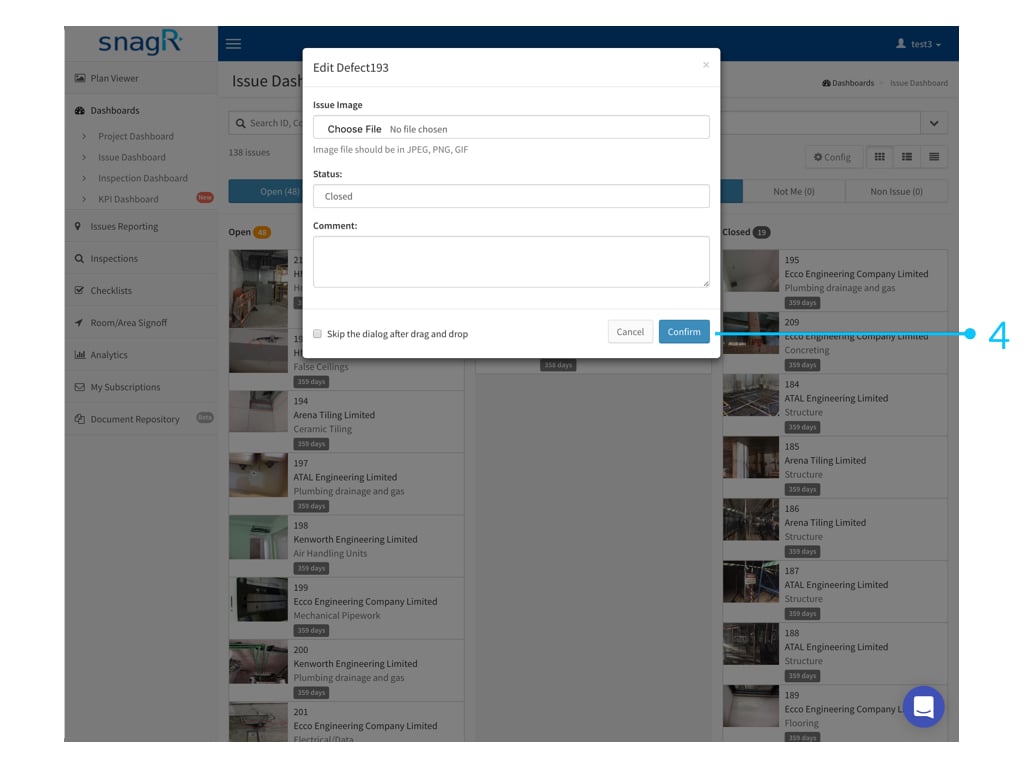
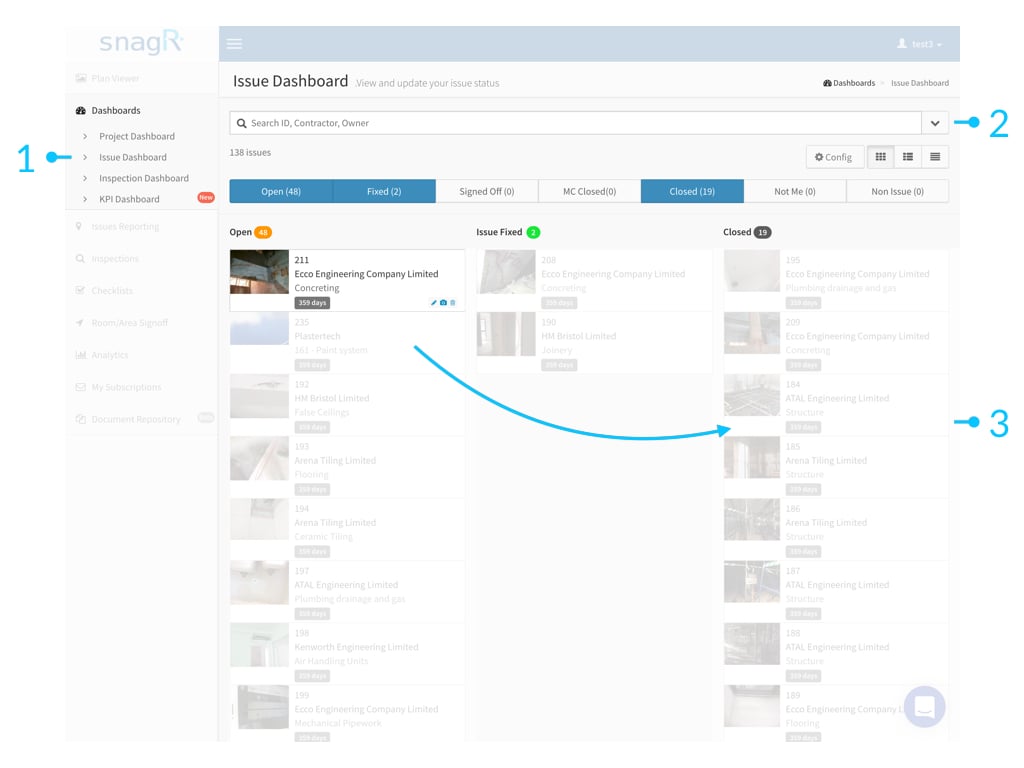
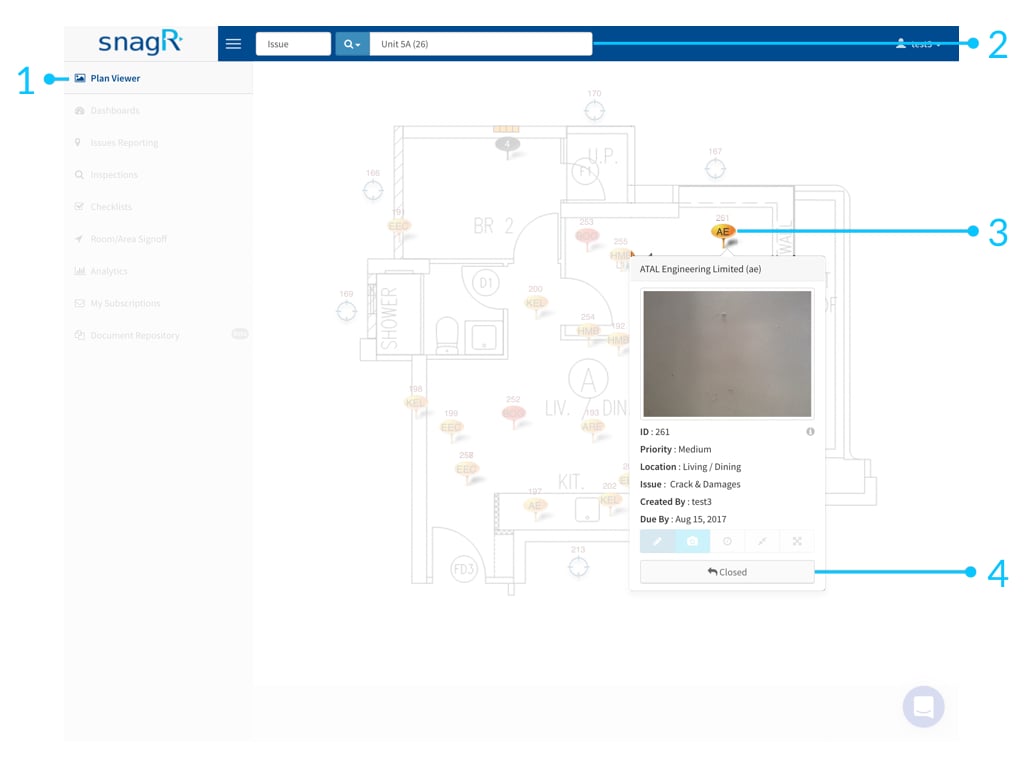
You can update issues at Issue Dashboard or Plan Viewer.

**Issue Dashboard**

Simply drag and drop the issue to the desired column.
<img src="https://mintcdn.com/snagr/Fc-Qgss-VatVIL0b/images/uploads/123688-Website_Issue_Mode.016.jpeg?fit=max&auto=format&n=Fc-Qgss-VatVIL0b&q=85&s=3cebe51bf13a8118426ab1f920a08f7c" alt="Website Issue Mode.016" width="1024" height="768" data-path="images/uploads/123688-Website_Issue_Mode.016.jpeg" />

<img src="https://mintcdn.com/snagr/Fc-Qgss-VatVIL0b/images/uploads/123689-Website_Issue_Mode.017.jpeg?fit=max&auto=format&n=Fc-Qgss-VatVIL0b&q=85&s=e94241137f615fbf8affe5b2a8aeb9a6" alt="Website Issue Mode.017" width="1024" height="768" data-path="images/uploads/123689-Website_Issue_Mode.017.jpeg" />

**Plan Viewer**

Simply click Close to update status.
<img src="https://mintcdn.com/snagr/Fc-Qgss-VatVIL0b/images/uploads/123690-Website_Issue_Mode.018.jpeg?fit=max&auto=format&n=Fc-Qgss-VatVIL0b&q=85&s=30f0b47574bbafc3ea0ec2eea1ba0301" alt="Website Issue Mode.018" width="1024" height="768" data-path="images/uploads/123690-Website_Issue_Mode.018.jpeg" />

Note depending on your permission, you will see the term \<Fix> \<Sign Off> \<Close> correspondingly.