> ## Documentation Index
> Fetch the complete documentation index at: https://kb.snagr.co.uk/llms.txt
> Use this file to discover all available pages before exploring further.
# Password complexity set up (at Company level)
To ensure user account security, we allow company to set up different levels of password complexity.
This has to be done by company administrator.
 **Website**
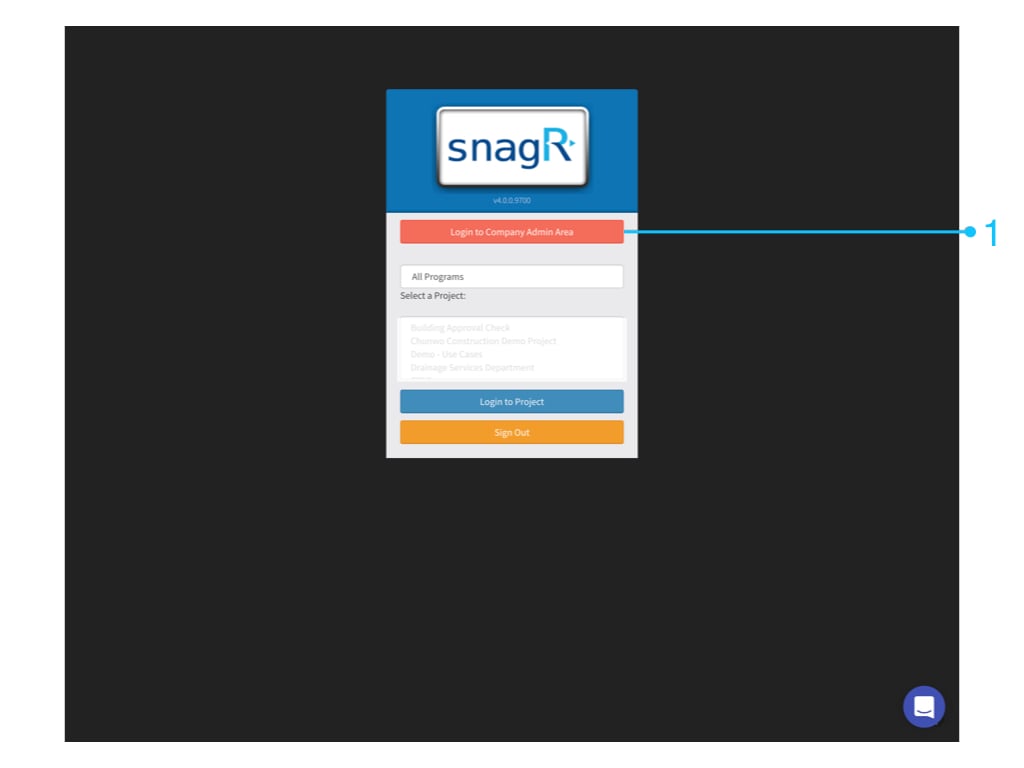
Login to **Company Admin Area**
**Website**
Login to **Company Admin Area**
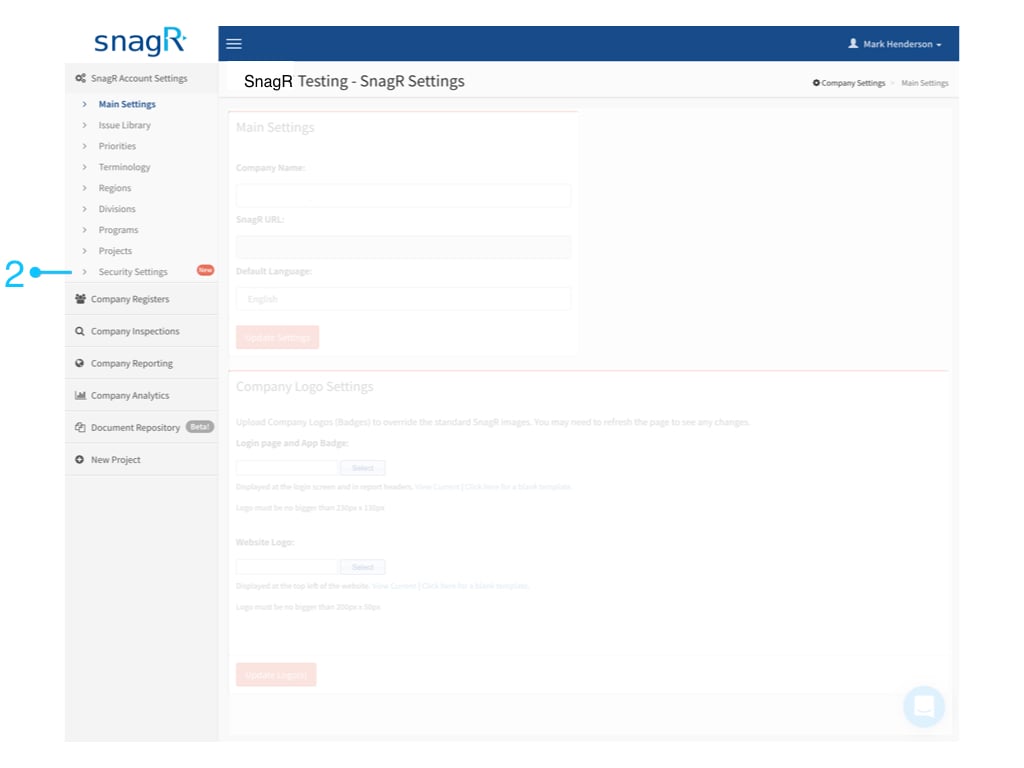
 Go to **SnagR Account Settings** > **Security Settings**
 You can change the password security settings by choosing your security level preference and click **Update Password Settings**
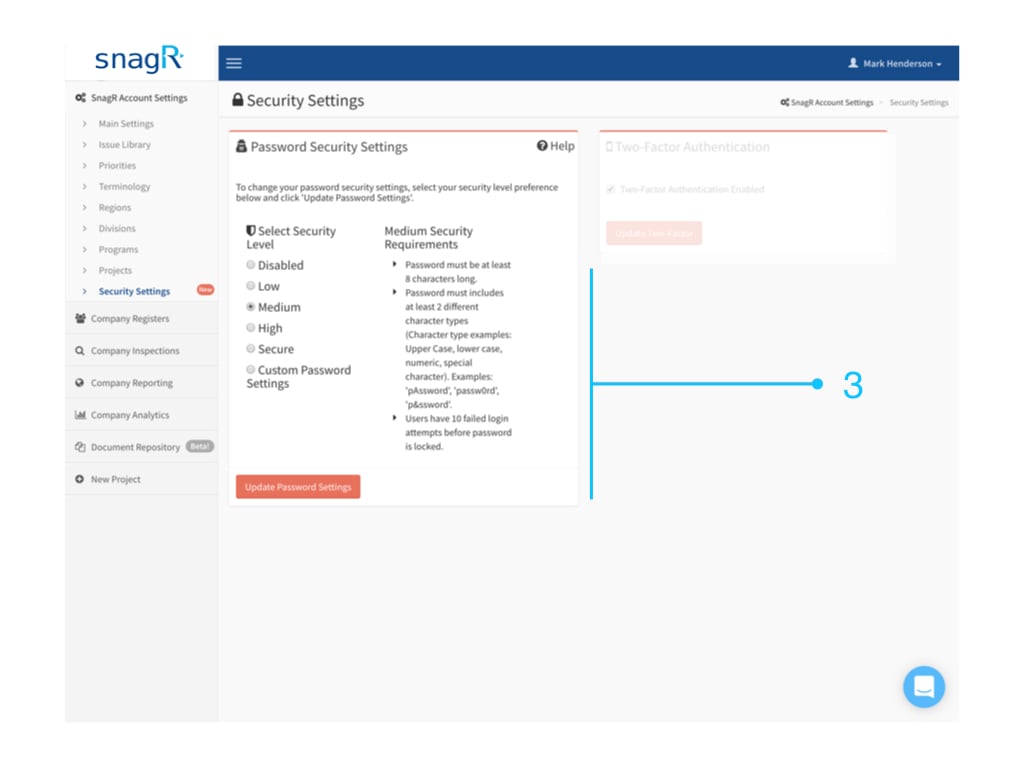 Security Level Options are:
* **Disabled**
* No limitation on the security requirements
* **Low**
* Password must contain at least 6 characters
* Users have 10 failed login attempts before password is locked)
* **Medium**
* Password must be at least 8 characters long.
* Password must includes at least 2 different character types (Character type examples: Upper Case, lower case, numeric, special character). Examples: 'pAssword', 'passw0rd', 'p\&ssword'.
* Users have 10 failed login attempts before password is locked.
* **High**
* Password must be at least 10 characters long
* Password must contain at least 1 of each different character type (Upper Case, lower case, numeric, special character)
* Examples: 'pAssword0!', 'myPa\$sw0rd'
* Users have 5 failed login attempts before password is locked.
* **Secure**
* Password must be at least 10 characters long
* Password must contain at least 1 of each different character type (Upper Case, lower case, numeric, special character)
* Examples: 'pAssword0!', 'myPa\$sw0rd'
* Password expires after 90 days.
* Users have 5 failed login attempts before password is locked.
* **Custom Password Settings**
* Password characters
* Uppercase character
* Lowercase character
* Numerical character
* Special characters
* Login attempts allowed
* Password Expiration
Security Level Options are:
* **Disabled**
* No limitation on the security requirements
* **Low**
* Password must contain at least 6 characters
* Users have 10 failed login attempts before password is locked)
* **Medium**
* Password must be at least 8 characters long.
* Password must includes at least 2 different character types (Character type examples: Upper Case, lower case, numeric, special character). Examples: 'pAssword', 'passw0rd', 'p\&ssword'.
* Users have 10 failed login attempts before password is locked.
* **High**
* Password must be at least 10 characters long
* Password must contain at least 1 of each different character type (Upper Case, lower case, numeric, special character)
* Examples: 'pAssword0!', 'myPa\$sw0rd'
* Users have 5 failed login attempts before password is locked.
* **Secure**
* Password must be at least 10 characters long
* Password must contain at least 1 of each different character type (Upper Case, lower case, numeric, special character)
* Examples: 'pAssword0!', 'myPa\$sw0rd'
* Password expires after 90 days.
* Users have 5 failed login attempts before password is locked.
* **Custom Password Settings**
* Password characters
* Uppercase character
* Lowercase character
* Numerical character
* Special characters
* Login attempts allowed
* Password Expiration