> ## Documentation Index
> Fetch the complete documentation index at: https://kb.snagr.co.uk/llms.txt
> Use this file to discover all available pages before exploring further.

# Come aggiungere piu' foto ad un Difetto

<img src="https://mintcdn.com/snagr/Fc-Qgss-VatVIL0b/images/uploads/123669-if_icons_mobile_1564515.png?fit=max&auto=format&n=Fc-Qgss-VatVIL0b&q=85&s=33c23172e831246883598cbf05523c0d" alt="if icons mobile 1564515" width="18" data-path="images/uploads/123669-if_icons_mobile_1564515.png" /> **applicazione mobile**

<iframe src="https://player.vimeo.com/video/108708142" width="100%" height="400" frameBorder="0" allow="autoplay; fullscreen; picture-in-picture" allowFullScreen />

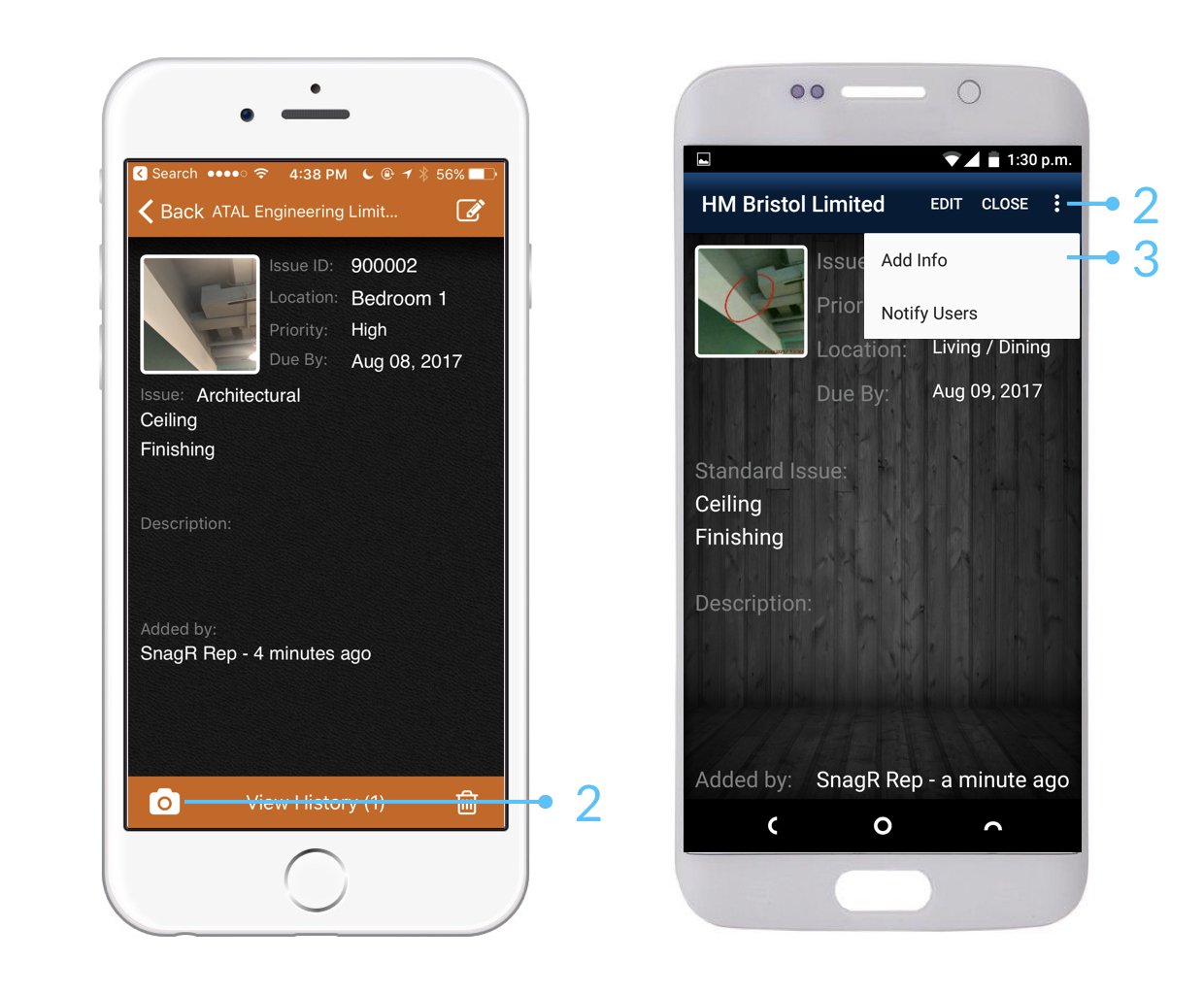
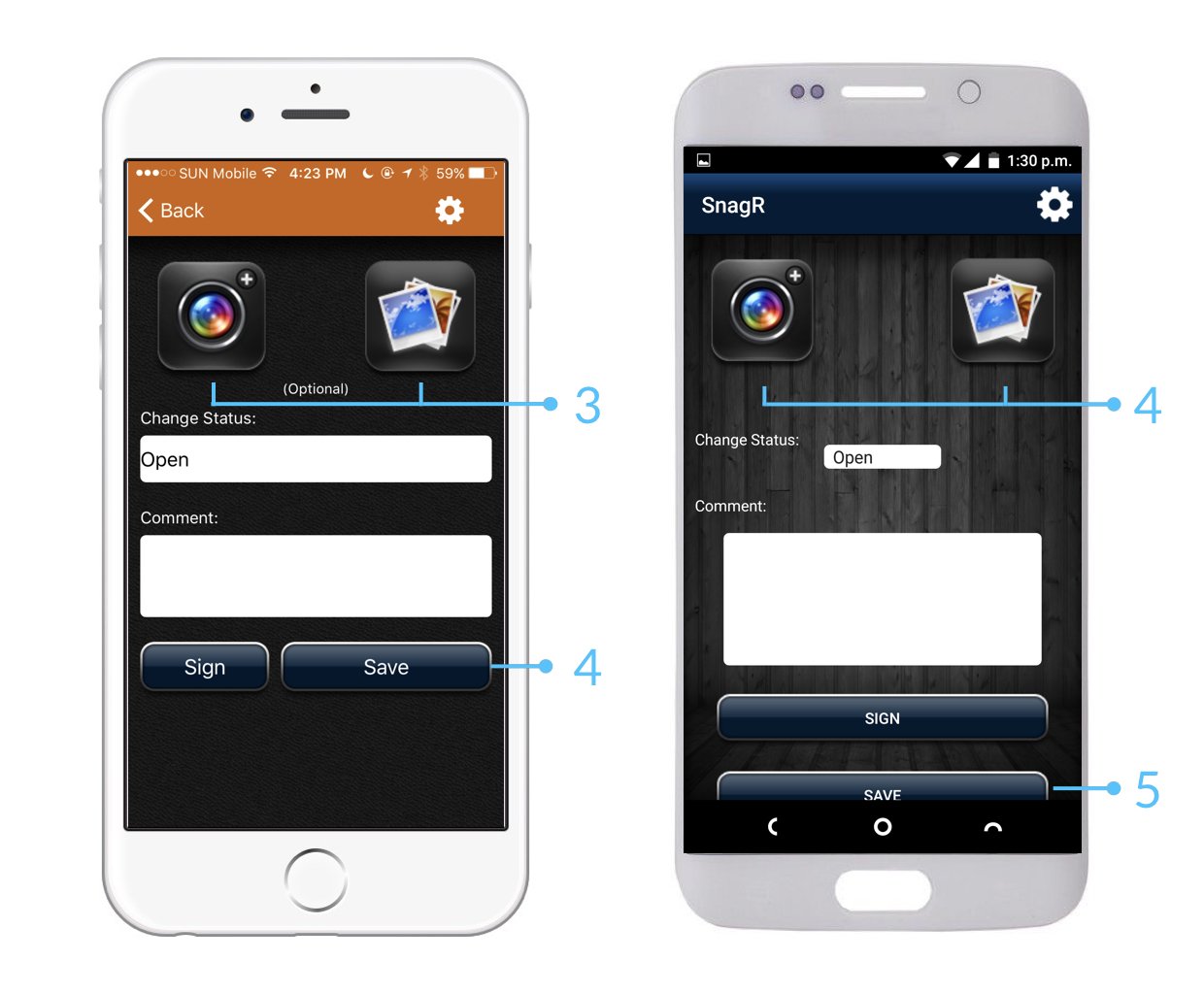
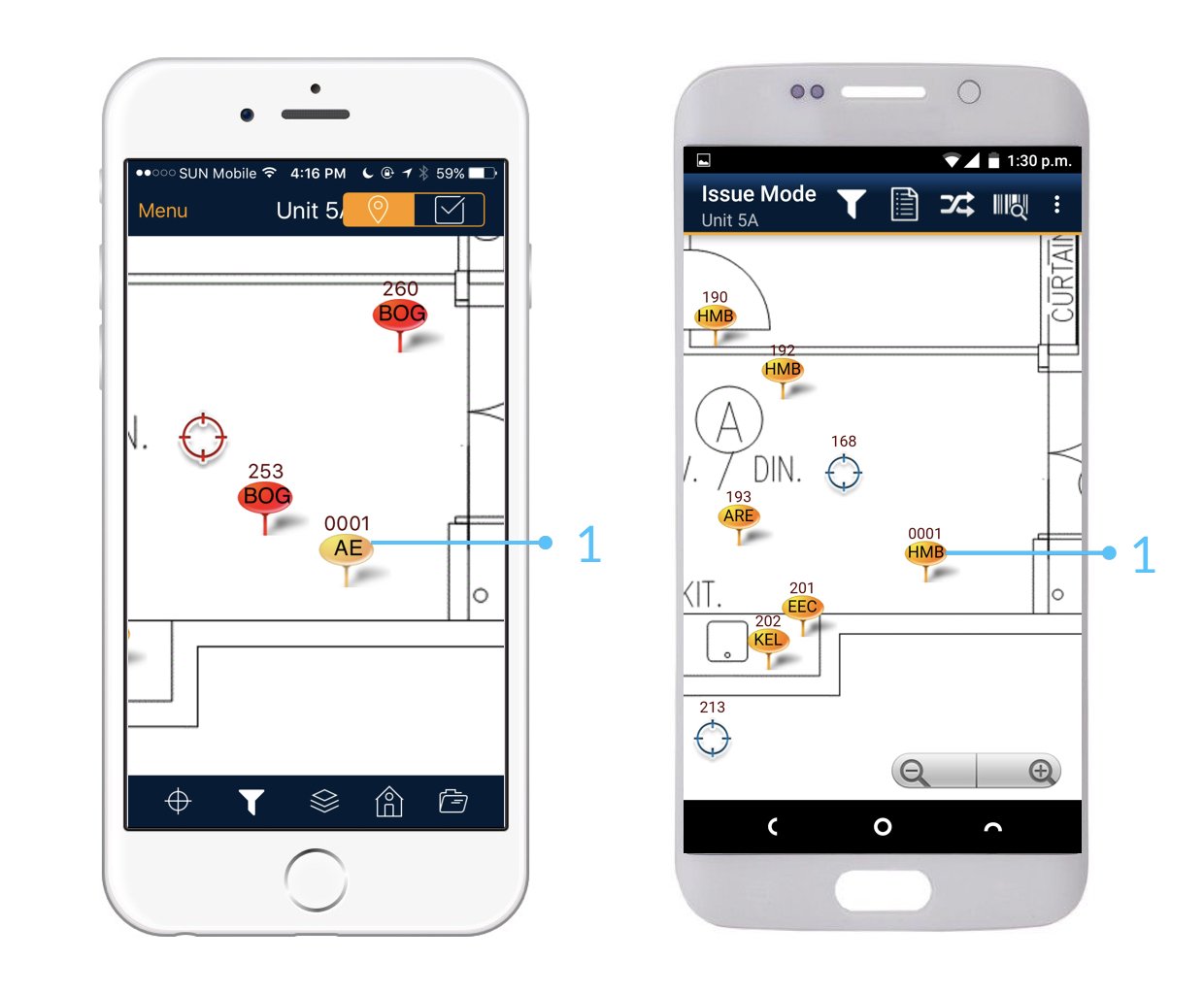
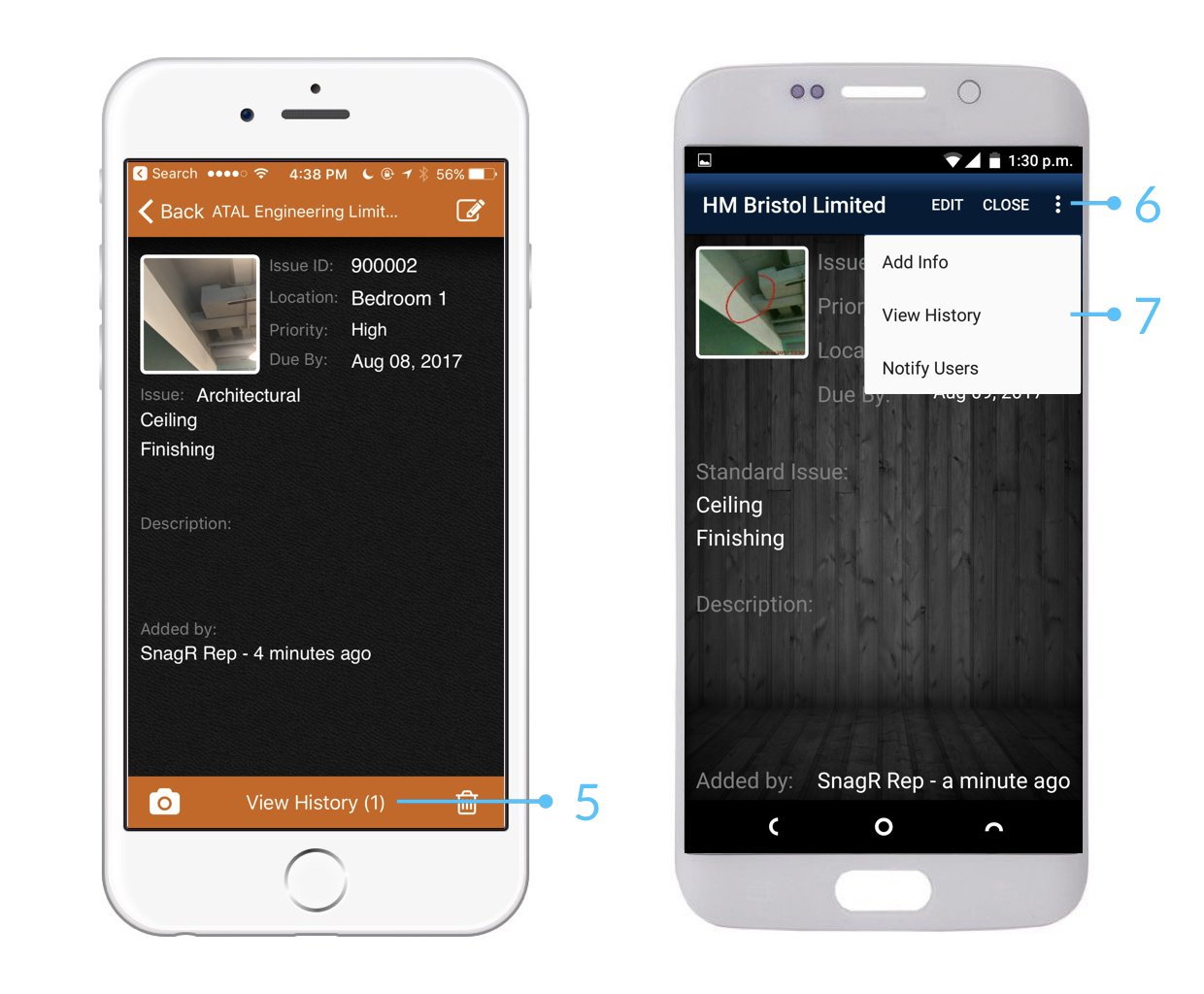
Per aggiungere ulteriore materiale fotografico ad un difetto usate la procedura seguente:
<img src="https://mintcdn.com/snagr/lG5zeW-JZpPjZFoL/images/uploads/127098-Issue_Mode_Device.009.jpeg?fit=max&auto=format&n=lG5zeW-JZpPjZFoL&q=85&s=01c7785cab5f1d436088fb2e455af27b" alt="Issue Mode Device.009" width="1240" height="1024" data-path="images/uploads/127098-Issue_Mode_Device.009.jpeg" />

<img src="https://mintcdn.com/snagr/lG5zeW-JZpPjZFoL/images/uploads/127099-Issue_Mode_Device.010.jpeg?fit=max&auto=format&n=lG5zeW-JZpPjZFoL&q=85&s=f7f58e46a384146d914e995b648f88d4" alt="Issue Mode Device.010" width="1240" height="1024" data-path="images/uploads/127099-Issue_Mode_Device.010.jpeg" />

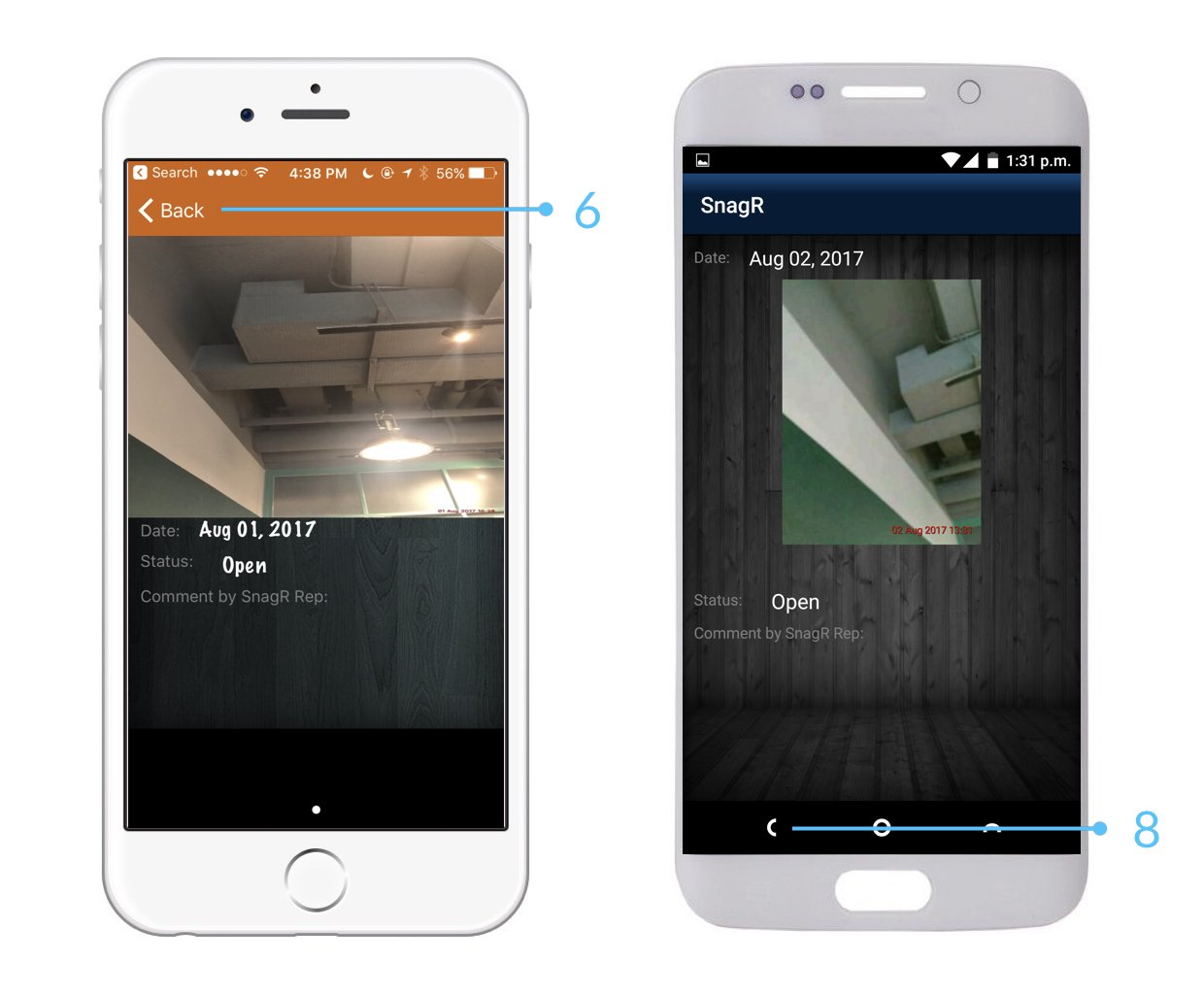
<img src="https://mintcdn.com/snagr/lG5zeW-JZpPjZFoL/images/uploads/127100-Issue_Mode_Device.011.jpeg?fit=max&auto=format&n=lG5zeW-JZpPjZFoL&q=85&s=5a0588a905fa28ef386d80f2ac4f512f" alt="Issue Mode Device.011" width="1240" height="1024" data-path="images/uploads/127100-Issue_Mode_Device.011.jpeg" />

Le ulteriori foto del difetto sono visibili in Visualizza cronistoria
<img src="https://mintcdn.com/snagr/lG5zeW-JZpPjZFoL/images/uploads/127101-Issue_Mode_Device.012.jpeg?fit=max&auto=format&n=lG5zeW-JZpPjZFoL&q=85&s=fbec13f3158a4690bae5dcc1a4d284fb" alt="Issue Mode Device.012" width="1240" height="1024" data-path="images/uploads/127101-Issue_Mode_Device.012.jpeg" />

<img src="https://mintcdn.com/snagr/lG5zeW-JZpPjZFoL/images/uploads/127102-Issue_Mode_Device.013.jpeg?fit=max&auto=format&n=lG5zeW-JZpPjZFoL&q=85&s=8405e4615fb54966d033462fd88a186e" alt="Issue Mode Device.013" width="1240" height="1024" data-path="images/uploads/127102-Issue_Mode_Device.013.jpeg" />

<img src="https://mintcdn.com/snagr/Fc-Qgss-VatVIL0b/images/uploads/123693-if_ic_tv_48px_352186.png?fit=max&auto=format&n=Fc-Qgss-VatVIL0b&q=85&s=06b23e0223986004fba7bbb6aa8febb3" alt="if ic tv 48px 352186" width="20" data-path="images/uploads/123693-if_ic_tv_48px_352186.png" /> **applicazione web**

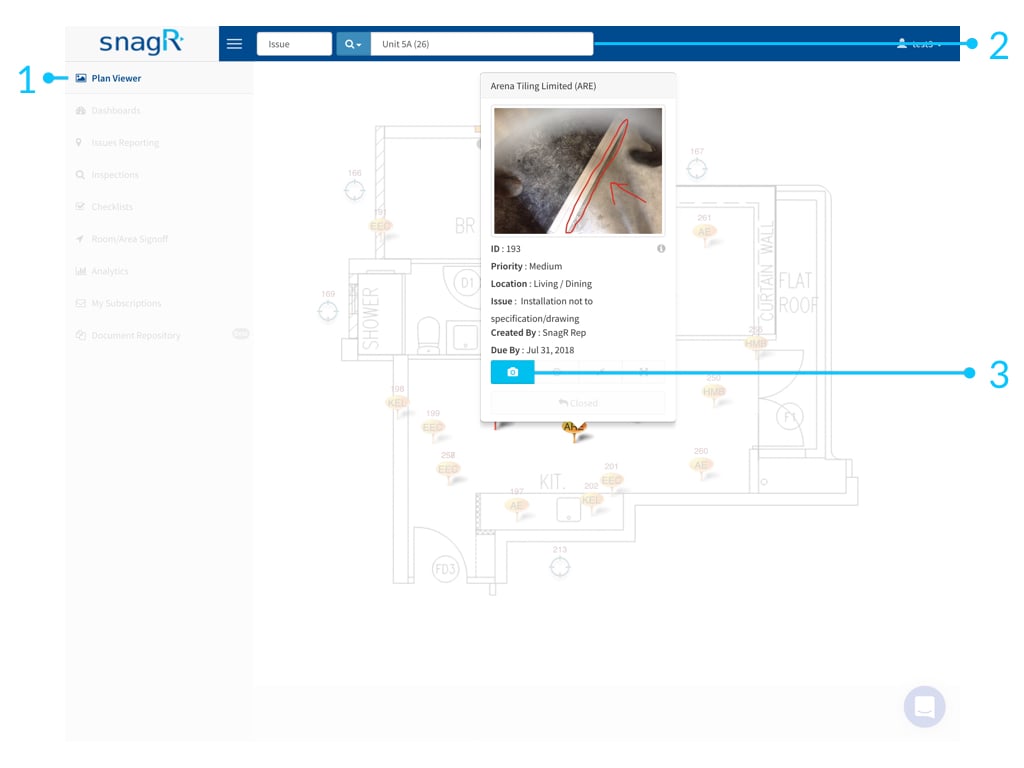
In **Visualizza Disegni** aggiungiamo materiale fotografico al difetto con la seguente procedura.
<img src="https://mintcdn.com/snagr/Fc-Qgss-VatVIL0b/images/uploads/123676-Website_Issue_Mode.003.jpeg?fit=max&auto=format&n=Fc-Qgss-VatVIL0b&q=85&s=4c5240718bec0fc50a5701aec969fe03" alt="Website Issue Mode.003" width="1024" height="768" data-path="images/uploads/123676-Website_Issue_Mode.003.jpeg" />