> ## Documentation Index
> Fetch the complete documentation index at: https://kb.snagr.co.uk/llms.txt
> Use this file to discover all available pages before exploring further.
# Overzicht voor Inspectie Teams / Adviseurs
SnagR is een kwaliteitsmanagement en inspectiesysteem dat jouw team op locatie actiepunten laat toevoegen en formulieren laat invullen op basis van locaties.
**Wat bied SnagR qua voordelen voor mij**\*\*?\*\*
** Genereer Actiepunten rapporten in een klik**
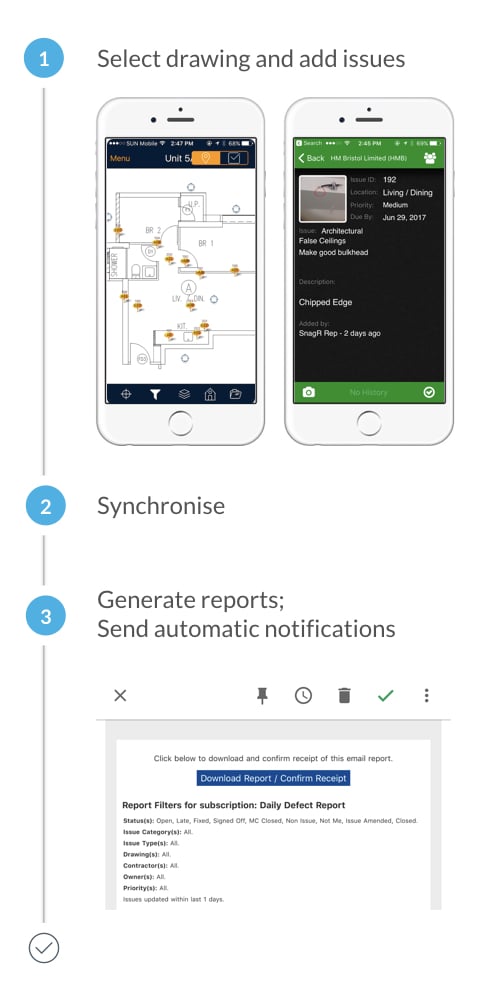 **Aan de slag**:\
Download de SnagR app en [voeg het project toe](/nl/ga-van-start/startgids-hoe-ga-ik-met-actiepunten-om/hoe-download-ik-een-project) op je apparaat
**Aan de slag**:\
Download de SnagR app en [voeg het project toe](/nl/ga-van-start/startgids-hoe-ga-ik-met-actiepunten-om/hoe-download-ik-een-project) op je apparaat
 [Selecteer tekening](/nl/ga-van-start/startgids-hoe-voeg-ik-formulieren-toe/hoe-kan-ik-tussen-de-tekeningen-navigeren) en voeg actiepunt toe
 [Synchroniseer](/nl/veelgestelde-vragen/klaar-voor-mobiel-gebruik/waarom-moet-ik-synchroniseren)[/en/faq/get-ready-on-mobile/what-does-synchronise-mean](/en/faq/get-ready-on-mobile/what-does-synchronise-mean)
 Genereer actiepunten rapport of voeg een automatische notificatie toe[/en/issues/report-and-analytics/how-to-generate-an-issue-report](/en/issues/report-and-analytics/how-to-generate-an-issue-report)[/en/set-up-project/notifications-project-level/how-to-set-up-issues-notifications-for-all-users](/en/set-up-project/notifications-project-level/how-to-set-up-issues-notifications-for-all-users)
 Leer meer over actiepunten toevoegen op een apparaat.
**
Leer meer over actiepunten toevoegen op een apparaat.
** Volg actiepunten gemakkelijk**
 **Aan de slag**:\
Download de SnagR app en v[oeg het project toe](/nl/ga-van-start/startgids-hoe-ga-ik-met-actiepunten-om/hoe-download-ik-een-project) op je apparaat
Bekijk updates op dashboards of in-app / email notificaties (als deze zijn ingesteld door de beheerder).
[Sluit actiepunten](/nl/ga-van-start/startgids-hoe-ga-ik-met-actiepunten-om/hoe-update-ik-een-actiepunt)
Synchroniseer
[
**Aan de slag**:\
Download de SnagR app en v[oeg het project toe](/nl/ga-van-start/startgids-hoe-ga-ik-met-actiepunten-om/hoe-download-ik-een-project) op je apparaat
Bekijk updates op dashboards of in-app / email notificaties (als deze zijn ingesteld door de beheerder).
[Sluit actiepunten](/nl/ga-van-start/startgids-hoe-ga-ik-met-actiepunten-om/hoe-update-ik-een-actiepunt)
Synchroniseer
[ ](/en/issues/report-and-analytics/how-to-generate-an-issue-report) Zie het samenvatting dashboard
Leer meer over [rapportage opties](/nl/actiepunten/rapporten-en-statistieken/kunnen-actiepunt-rapportages-automatisch-gegeneerd-worden) en [statistieken](/nl/verslaglegging/statistieken/hoe-zie-ik-de-statistieken).
**
](/en/issues/report-and-analytics/how-to-generate-an-issue-report) Zie het samenvatting dashboard
Leer meer over [rapportage opties](/nl/actiepunten/rapporten-en-statistieken/kunnen-actiepunt-rapportages-automatisch-gegeneerd-worden) en [statistieken](/nl/verslaglegging/statistieken/hoe-zie-ik-de-statistieken).
** Zoek formulieren met één klik**
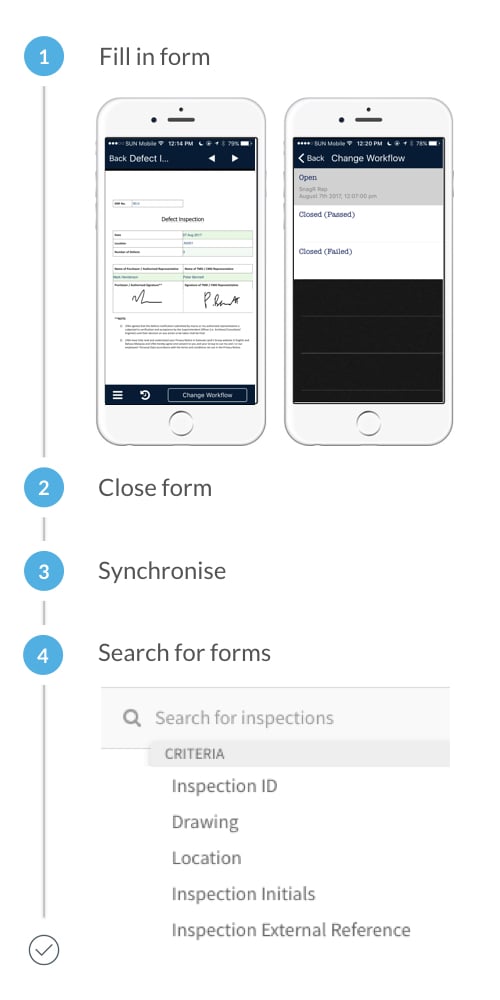 **Aan de slag**:\
Download de SnagR app en [voeg het project toe](/nl/ga-van-start/startgids-hoe-ga-ik-met-actiepunten-om/hoe-download-ik-een-project) op je apparaat
[Vul formulieren in](/nl/ga-van-start/startgids-hoe-voeg-ik-formulieren-toe/hoe-vul-ik-een-formulier-in-met-de-app)
[Sluit formulieren](/nl/ga-van-start/startgids-hoe-voeg-ik-formulieren-toe/hoe-vul-ik-een-formulier-in-met-de-app)
[Synchroniseer](/nl/veelgestelde-vragen/klaar-voor-mobiel-gebruik/waarom-moet-ik-synchroniseren)
[](/en/issues/report-and-analytics/how-to-generate-an-issue-report) [Zoek naar formulieren](/nl/ga-van-start/startgids-hoe-voeg-ik-formulieren-toe/hoe-kan-ik-zoeken-naar-formulieren) met een paar klikken
Leer meer over koppelen van actiepunten en documenten aan formulieren.
Als de workflow van jouw formulier meer opties moet bevatten dan alleen open, sluiten, gesloten afgekeurd en gesloten goedgekeurd dan is het mogelijk om meer workflowstadia toe te voegen aan het formulier. Je kan dit ontwerpen zoals je zelf wilt. Klik [hier](/nl/project-opzetten/formulieren-bedrijfsniveau/hoe-ontwerp-ik-inspecties) om meer te leren.
**Aan de slag**:\
Download de SnagR app en [voeg het project toe](/nl/ga-van-start/startgids-hoe-ga-ik-met-actiepunten-om/hoe-download-ik-een-project) op je apparaat
[Vul formulieren in](/nl/ga-van-start/startgids-hoe-voeg-ik-formulieren-toe/hoe-vul-ik-een-formulier-in-met-de-app)
[Sluit formulieren](/nl/ga-van-start/startgids-hoe-voeg-ik-formulieren-toe/hoe-vul-ik-een-formulier-in-met-de-app)
[Synchroniseer](/nl/veelgestelde-vragen/klaar-voor-mobiel-gebruik/waarom-moet-ik-synchroniseren)
[](/en/issues/report-and-analytics/how-to-generate-an-issue-report) [Zoek naar formulieren](/nl/ga-van-start/startgids-hoe-voeg-ik-formulieren-toe/hoe-kan-ik-zoeken-naar-formulieren) met een paar klikken
Leer meer over koppelen van actiepunten en documenten aan formulieren.
Als de workflow van jouw formulier meer opties moet bevatten dan alleen open, sluiten, gesloten afgekeurd en gesloten goedgekeurd dan is het mogelijk om meer workflowstadia toe te voegen aan het formulier. Je kan dit ontwerpen zoals je zelf wilt. Klik [hier](/nl/project-opzetten/formulieren-bedrijfsniveau/hoe-ontwerp-ik-inspecties) om meer te leren.
 **Heb de juiste documenten altijd bij de hand**
 **Aan de slag**:\
Download de SnagR app en [voeg het project toe](/nl/ga-van-start/startgids-hoe-ga-ik-met-actiepunten-om/hoe-download-ik-een-project) op je apparaat
[Upload documenten](/nl/documenten/documenten-uploaden/hoe-upload-ik-documenten)
[Synchroniseer](/nl/veelgestelde-vragen/klaar-voor-mobiel-gebruik/waarom-moet-ik-synchroniseren)
[Download documenten](/nl/documenten/documenten-downloaden/hoe-download-ik-bestanden) individueel of per groep
[](/en/issues/report-and-analytics/how-to-generate-an-issue-report) Vind documenten [per locatie](/nl/documenten/documenten-beheren/hoe-koppel-ik-documenten-aan-locaties) of [per map](/nl/documenten/documenten-downloaden/hoe-download-ik-bestanden)
**Aan de slag**:\
Download de SnagR app en [voeg het project toe](/nl/ga-van-start/startgids-hoe-ga-ik-met-actiepunten-om/hoe-download-ik-een-project) op je apparaat
[Upload documenten](/nl/documenten/documenten-uploaden/hoe-upload-ik-documenten)
[Synchroniseer](/nl/veelgestelde-vragen/klaar-voor-mobiel-gebruik/waarom-moet-ik-synchroniseren)
[Download documenten](/nl/documenten/documenten-downloaden/hoe-download-ik-bestanden) individueel of per groep
[](/en/issues/report-and-analytics/how-to-generate-an-issue-report) Vind documenten [per locatie](/nl/documenten/documenten-beheren/hoe-koppel-ik-documenten-aan-locaties) of [per map](/nl/documenten/documenten-downloaden/hoe-download-ik-bestanden)