> ## Documentation Index
> Fetch the complete documentation index at: https://kb.snagr.co.uk/llms.txt
> Use this file to discover all available pages before exploring further.

# Hoe voeg ik een actiepunt toe?

<img src="https://mintcdn.com/snagr/Fc-Qgss-VatVIL0b/images/uploads/123669-if_icons_mobile_1564515.png?fit=max&auto=format&n=Fc-Qgss-VatVIL0b&q=85&s=33c23172e831246883598cbf05523c0d" alt="if icons mobile 1564515" width="18" data-path="images/uploads/123669-if_icons_mobile_1564515.png" /> **App**

<iframe src="https://player.vimeo.com/video/108707758" width="100%" height="400" frameBorder="0" allow="autoplay; fullscreen; picture-in-picture" allowFullScreen />

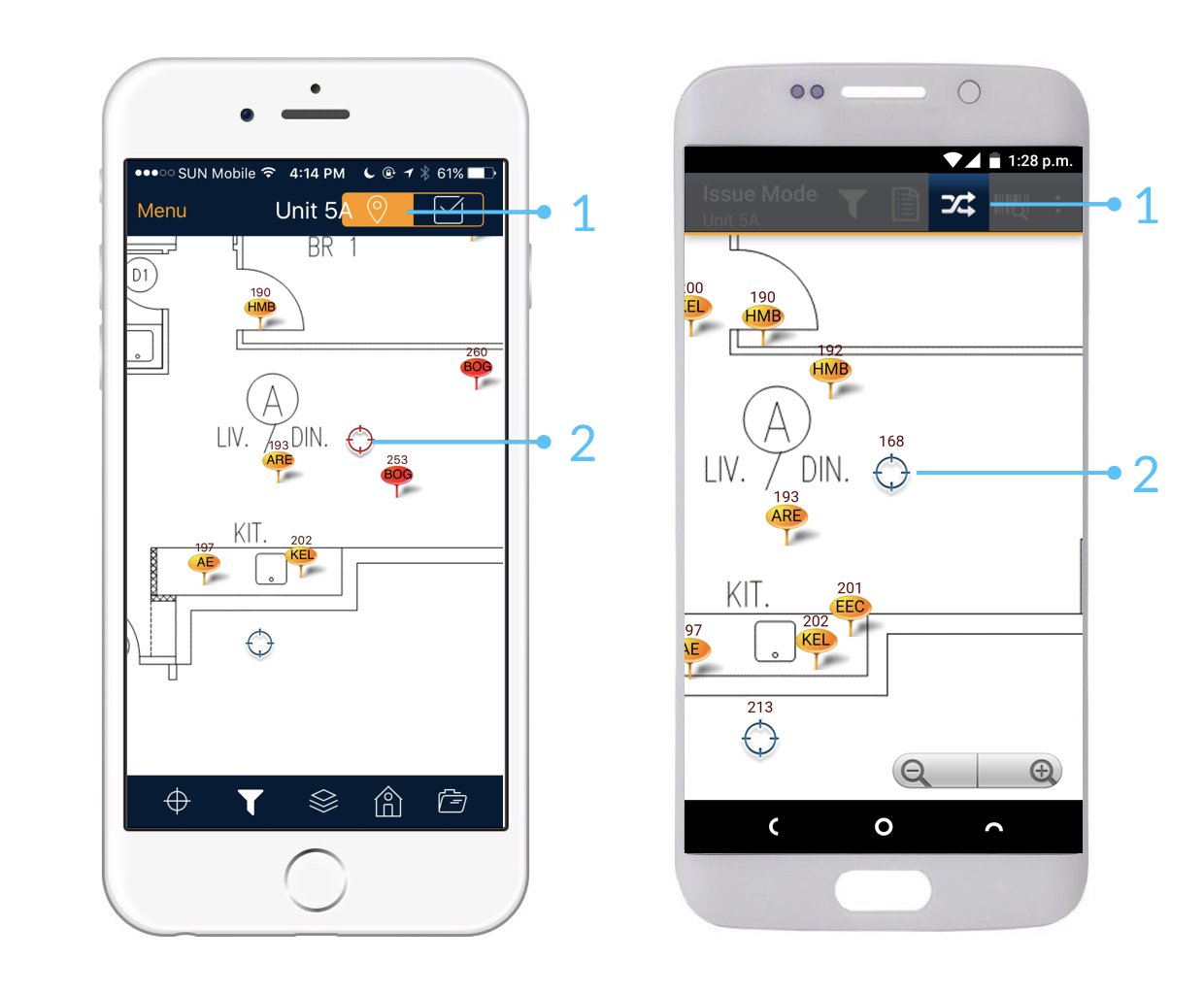
Eerst, zorg dat je in de **actiepunten mode** van SnagR bent.

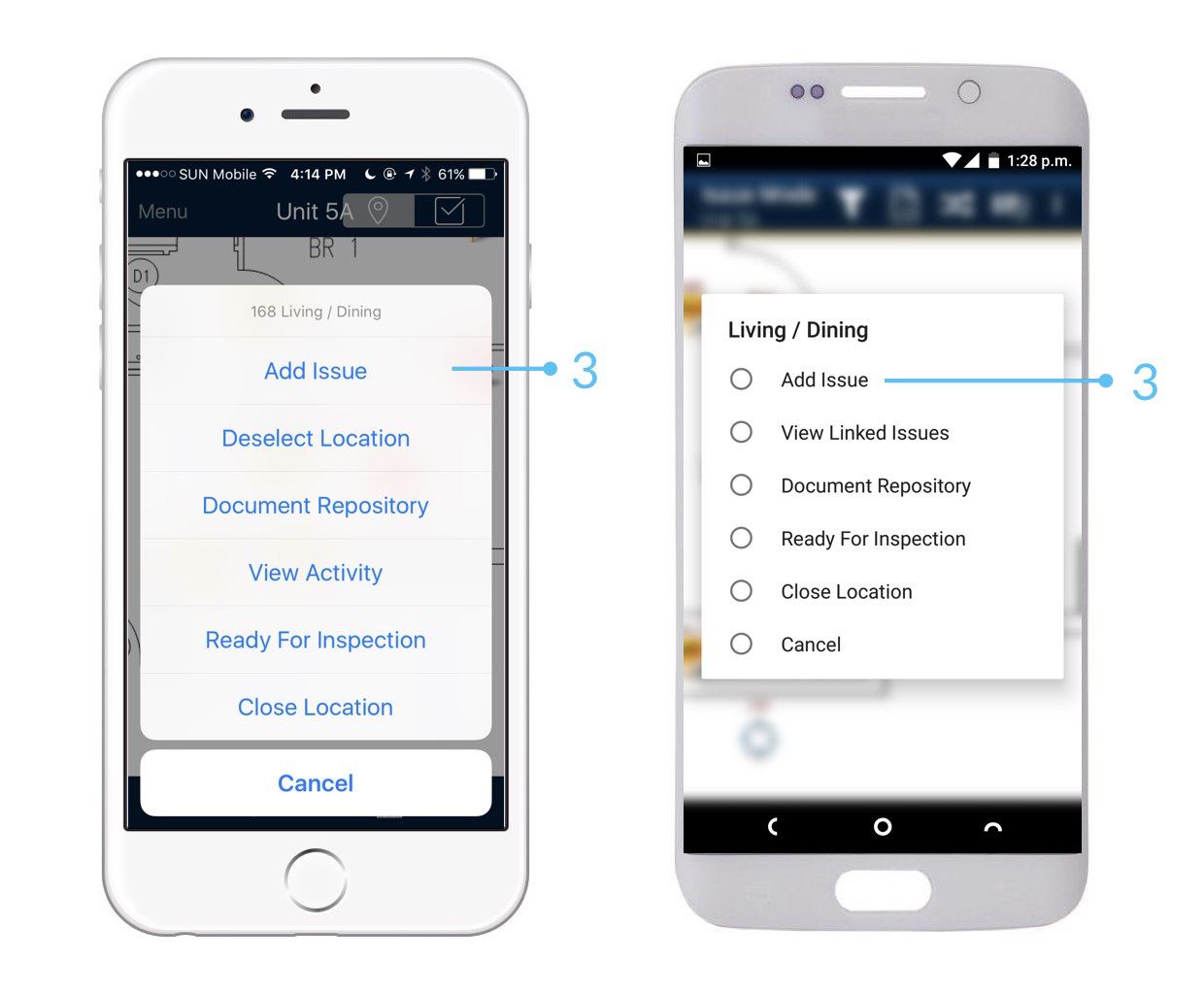
Je zal een actiepunten moeten toevoegen gebasseerd op een **locatie.**\
Het locatie icoon ziet er uit als: - <img src="https://mintcdn.com/snagr/Fc-Qgss-VatVIL0b/images/uploads/121217-location.png?fit=max&auto=format&n=Fc-Qgss-VatVIL0b&q=85&s=0ab13035cd34537b9f4b7de50c0b419a" alt="location" width="18" data-path="images/uploads/121217-location.png" />

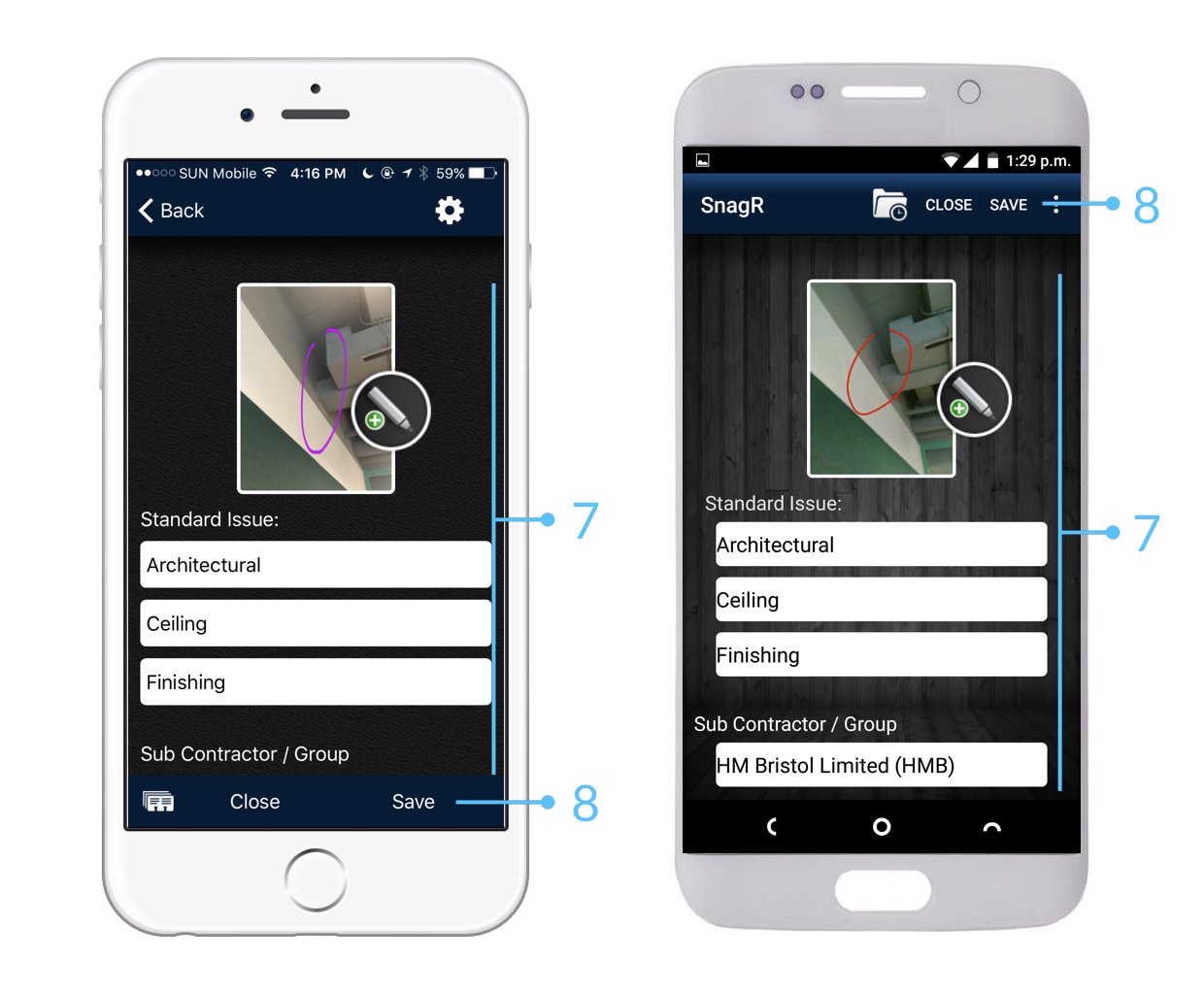
<img src="https://mintcdn.com/snagr/lG5zeW-JZpPjZFoL/images/uploads/127090-Issue_Mode_Device.001.jpeg?fit=max&auto=format&n=lG5zeW-JZpPjZFoL&q=85&s=74b1a8c925d8e94ef3167740d57c6fb3" alt="Issue Mode Device.001" width="1240" height="1024" data-path="images/uploads/127090-Issue_Mode_Device.001.jpeg" />

<img src="https://mintcdn.com/snagr/lG5zeW-JZpPjZFoL/images/uploads/127091-Issue_Mode_Device.002.jpeg?fit=max&auto=format&n=lG5zeW-JZpPjZFoL&q=85&s=6b81c3702fba9372684d9330cf54e1e9" alt="Issue Mode Device.002" width="1240" height="1024" data-path="images/uploads/127091-Issue_Mode_Device.002.jpeg" />

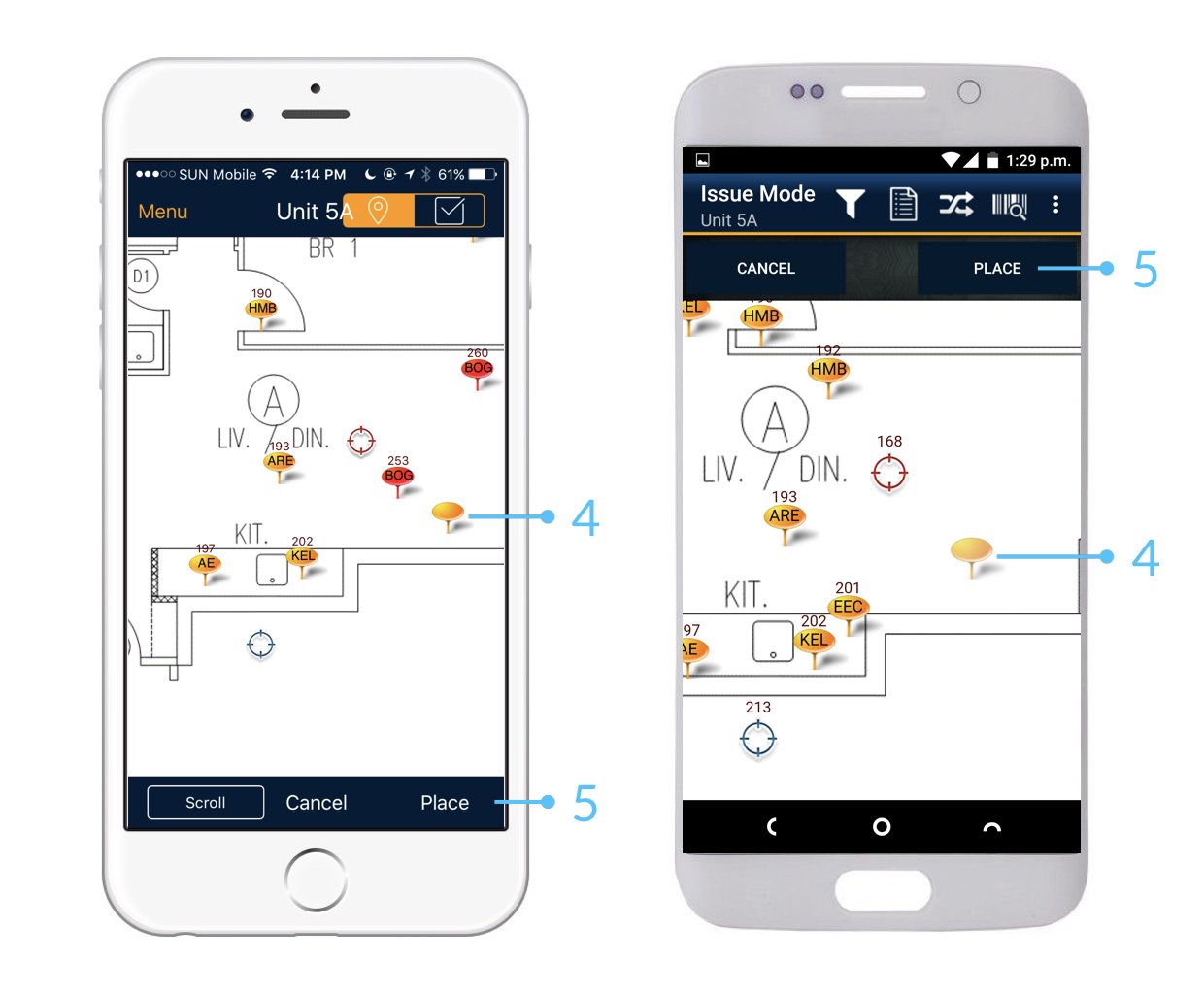
<img src="https://mintcdn.com/snagr/lG5zeW-JZpPjZFoL/images/uploads/127092-Issue_Mode_Device.003.jpeg?fit=max&auto=format&n=lG5zeW-JZpPjZFoL&q=85&s=85b94552a6da12bd468ebb15a0ba7aeb" alt="Issue Mode Device.003" width="1240" height="1024" data-path="images/uploads/127092-Issue_Mode_Device.003.jpeg" />

<img src="https://mintcdn.com/snagr/lG5zeW-JZpPjZFoL/images/uploads/127093-Issue_Mode_Device.004.jpeg?fit=max&auto=format&n=lG5zeW-JZpPjZFoL&q=85&s=13ccc1a1b8a88def725ad0966e5448bf" alt="Issue Mode Device.004" width="1240" height="1024" data-path="images/uploads/127093-Issue_Mode_Device.004.jpeg" />

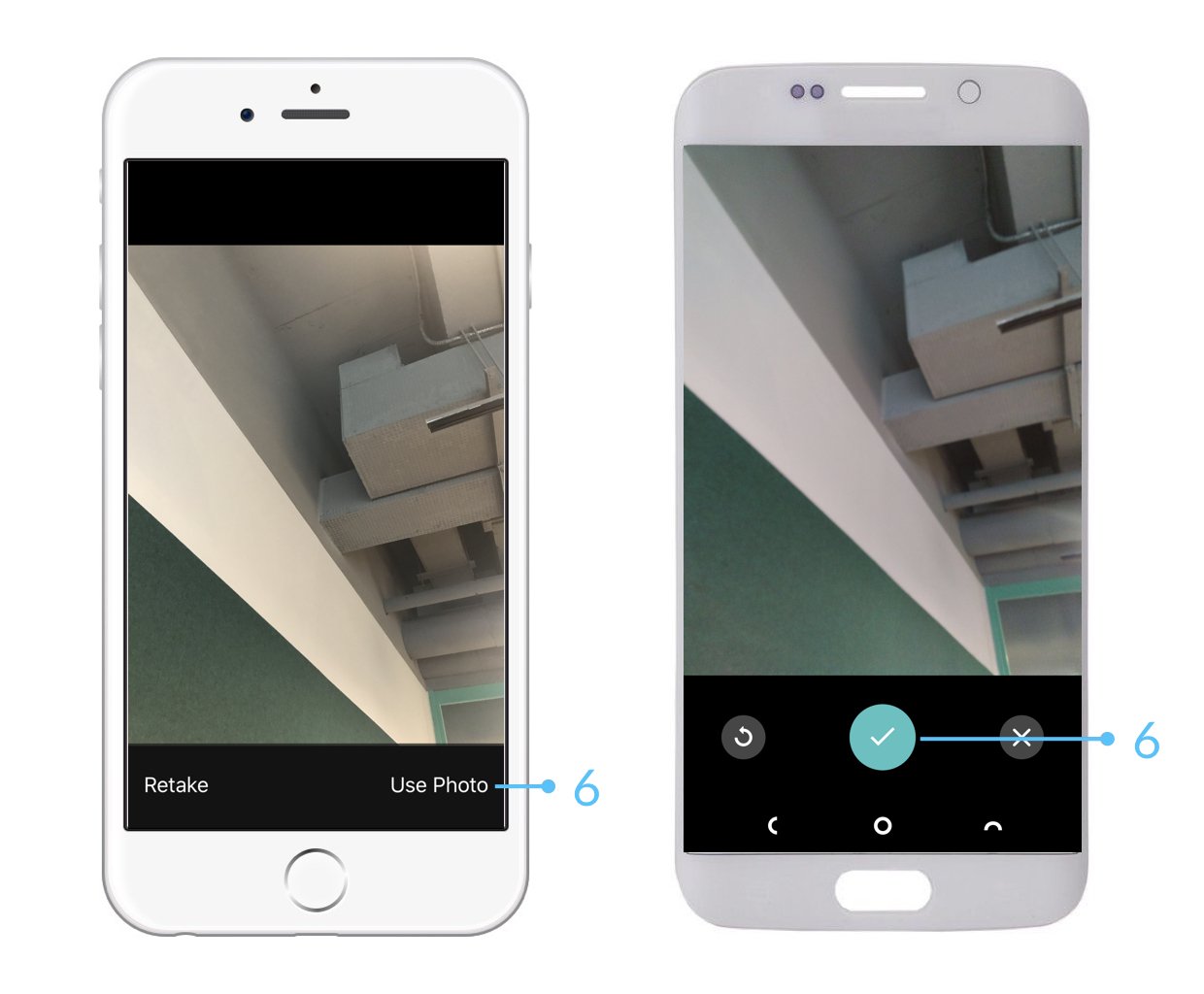
<img src="https://mintcdn.com/snagr/lG5zeW-JZpPjZFoL/images/uploads/127094-Issue_Mode_Device.005.jpeg?fit=max&auto=format&n=lG5zeW-JZpPjZFoL&q=85&s=802bf25d7a8a0b16b205129e7ff218f2" alt="Issue Mode Device.005" width="1240" height="1024" data-path="images/uploads/127094-Issue_Mode_Device.005.jpeg" />

<img src="https://mintcdn.com/snagr/xF5c6BECuZRMUk48/images/uploads/127505-sparkles.png?fit=max&auto=format&n=xF5c6BECuZRMUk48&q=85&s=904495e280f3b621b409dbce01ef7c8a" alt="sparkles" width="20" data-path="images/uploads/127505-sparkles.png" /> Na het afronden van je werk op locatie, vergeet niet om te [synchroniseren](/nl/veelgestelde-vragen/klaar-voor-mobiel-gebruik/waarom-moet-ik-synchroniseren). Dit zorgt er voor dat jouw data word opgeslagen en word ge-update voor het project team.

<img src="https://mintcdn.com/snagr/Fc-Qgss-VatVIL0b/images/uploads/123693-if_ic_tv_48px_352186.png?fit=max&auto=format&n=Fc-Qgss-VatVIL0b&q=85&s=06b23e0223986004fba7bbb6aa8febb3" alt="if ic tv 48px 352186" width="20" data-path="images/uploads/123693-if_ic_tv_48px_352186.png" /> **Website**

De omgeving en het proces van het creëren van actiepunten werkt exact hetzelfde als op de applicatie.
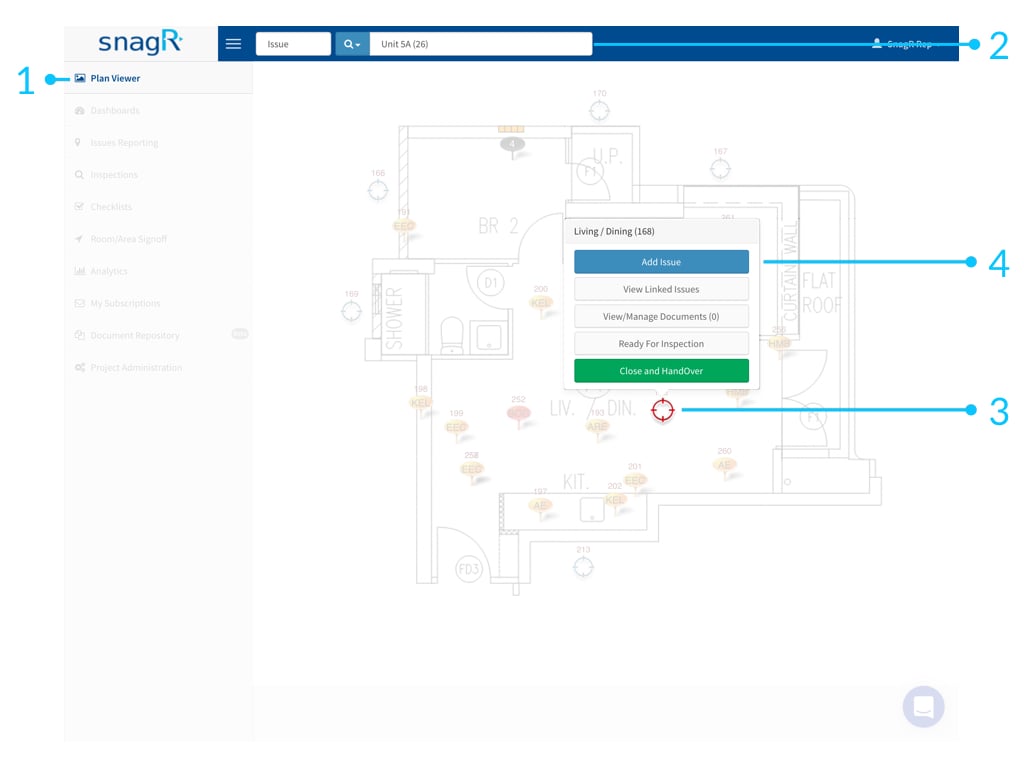
<img src="https://mintcdn.com/snagr/Fc-Qgss-VatVIL0b/images/uploads/123675-Website_Issue_Mode.002.jpeg?fit=max&auto=format&n=Fc-Qgss-VatVIL0b&q=85&s=a8f9089f4bc3fb10364d5073bd2dedd5" alt="Website Issue Mode.002" width="1024" height="768" data-path="images/uploads/123675-Website_Issue_Mode.002.jpeg" />

<img src="https://mintcdn.com/snagr/xF5c6BECuZRMUk48/images/uploads/127505-sparkles.png?fit=max&auto=format&n=xF5c6BECuZRMUk48&q=85&s=904495e280f3b621b409dbce01ef7c8a" alt="sparkles" width="20" data-path="images/uploads/127505-sparkles.png" /> Deze data hoeft niet gesynchroniseerd te worden aangezien alle aanpassingen al online gebeuren.

<img src="https://mintcdn.com/snagr/lG5zeW-JZpPjZFoL/images/uploads/127041-Red_Flag_Emoji.png?fit=max&auto=format&n=lG5zeW-JZpPjZFoL&q=85&s=122220a995f6a719dddaffb5de76ce80" alt="Red Flag Emoji" width="20" data-path="images/uploads/127041-Red_Flag_Emoji.png" /> Leer hoe je [actiepunten zoekt](/nl/ga-van-start/startgids-hoe-ga-ik-met-actiepunten-om/hoe-zoek-ik-naar-actiepunten) en [update](/nl/ga-van-start/startgids-hoe-ga-ik-met-actiepunten-om/hoe-update-ik-een-actiepunt).