> ## Documentation Index
> Fetch the complete documentation index at: https://kb.snagr.co.uk/llms.txt
> Use this file to discover all available pages before exploring further.

# Hoe stel ik inspecties en formulieren in?

<img src="https://mintcdn.com/snagr/Fc-Qgss-VatVIL0b/images/uploads/123693-if_ic_tv_48px_352186.png?fit=max&auto=format&n=Fc-Qgss-VatVIL0b&q=85&s=06b23e0223986004fba7bbb6aa8febb3" alt="if ic tv 48px 352186" width="20" data-path="images/uploads/123693-if_ic_tv_48px_352186.png" /> **Website**

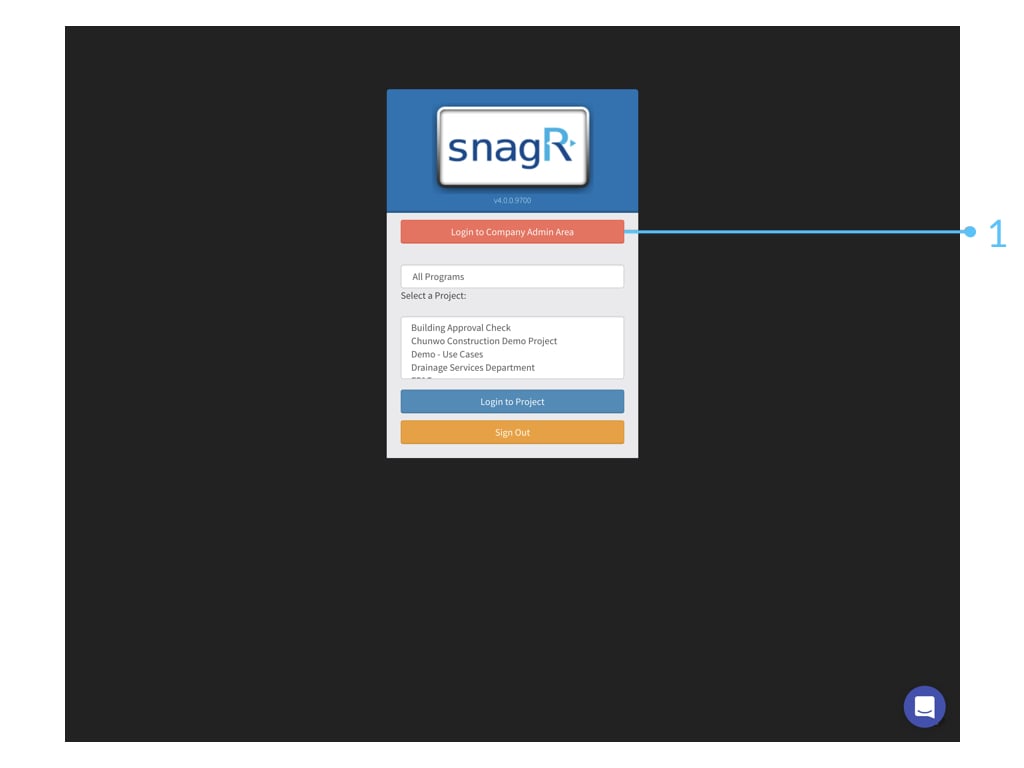
Als eerst, log in bij de Bedrijfsbeheer omgeving.
<img src="https://mintcdn.com/snagr/6w4ro9N7s9wIwqhO/images/uploads/147957-Admin_Website.112.jpeg?fit=max&auto=format&n=6w4ro9N7s9wIwqhO&q=85&s=75edab5d12f5914f51ceb4bb31fb2c56" alt="Admin Website.112" width="1024" height="768" data-path="images/uploads/147957-Admin_Website.112.jpeg" />

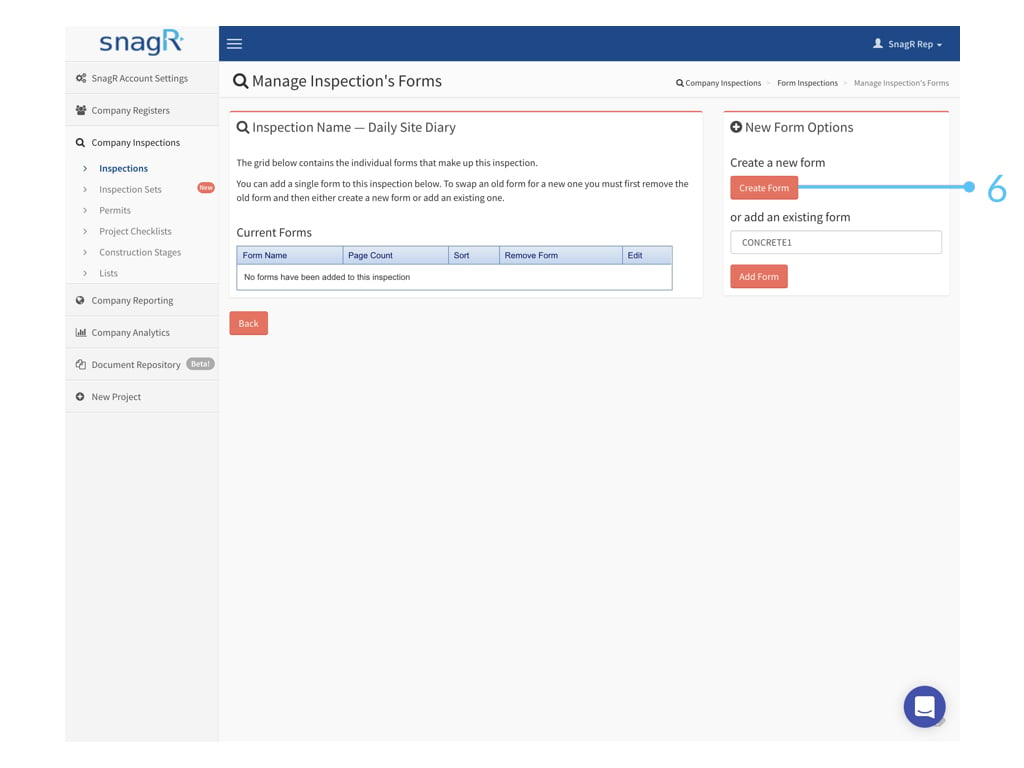
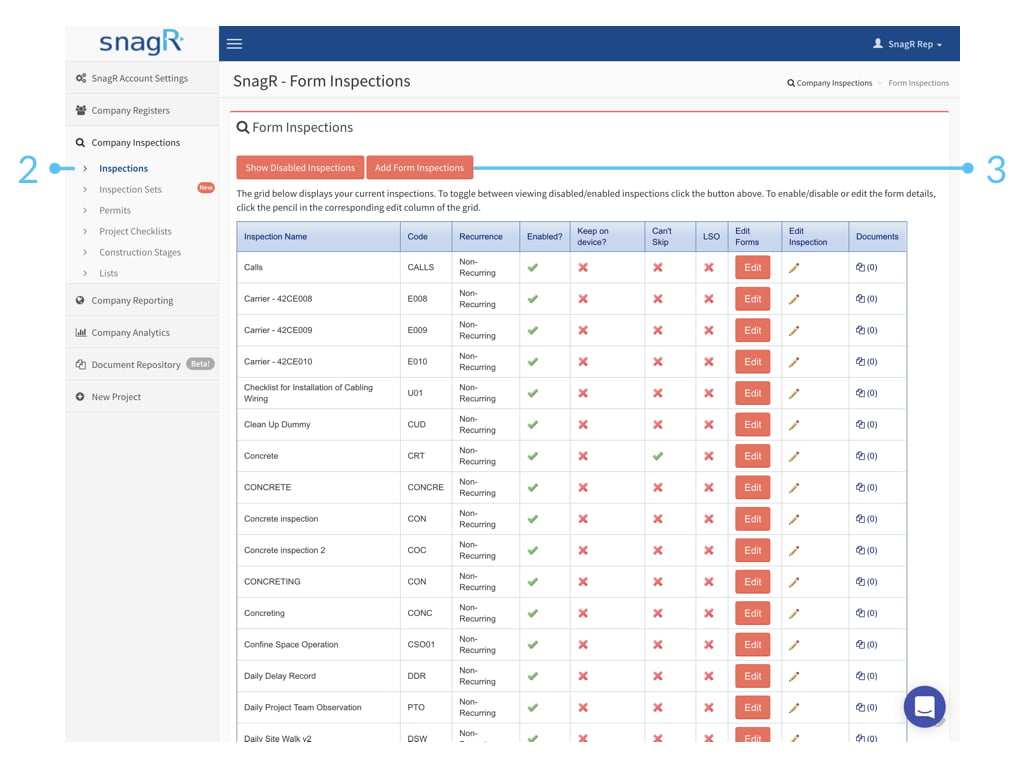
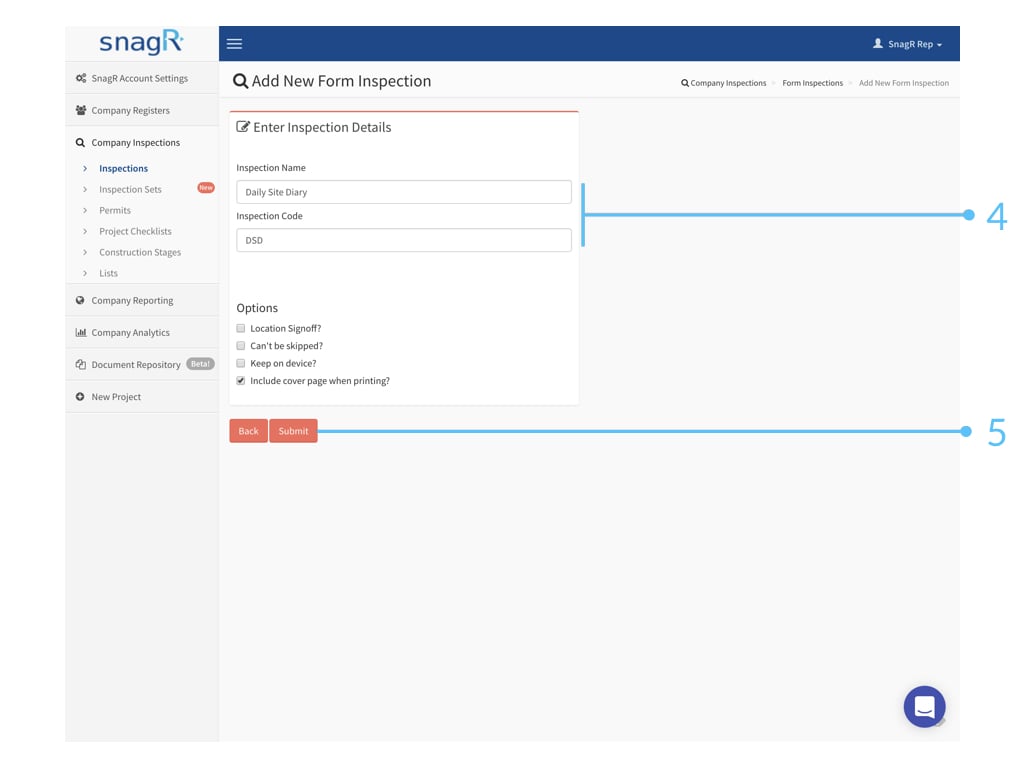
Vervolgens, ga naar **Bedrijfsinspecties > Inspecties.** Hier kan je inspectiesjablonen en formuliersjablonen creëren.
<img src="https://mintcdn.com/snagr/6w4ro9N7s9wIwqhO/images/uploads/147958-Admin_Website.113.jpeg?fit=max&auto=format&n=6w4ro9N7s9wIwqhO&q=85&s=52c018895c462451a98fc3f40ec70131" alt="Admin Website.113" width="1024" height="768" data-path="images/uploads/147958-Admin_Website.113.jpeg" />

<img src="https://mintcdn.com/snagr/6w4ro9N7s9wIwqhO/images/uploads/147959-Admin_Website.114.jpeg?fit=max&auto=format&n=6w4ro9N7s9wIwqhO&q=85&s=c5a5bcc03356ada4f4d9a1e35b1ad30b" alt="Admin Website.114" width="1024" height="768" data-path="images/uploads/147959-Admin_Website.114.jpeg" />

<img src="https://mintcdn.com/snagr/6w4ro9N7s9wIwqhO/images/uploads/147960-Admin_Website.115.jpeg?fit=max&auto=format&n=6w4ro9N7s9wIwqhO&q=85&s=39ae9bccc44d2ef33f3b64e1757c315f" alt="Admin Website.115" width="1024" height="768" data-path="images/uploads/147960-Admin_Website.115.jpeg" />

<img src="https://mintcdn.com/snagr/6w4ro9N7s9wIwqhO/images/uploads/147961-Admin_Website.116.jpeg?fit=max&auto=format&n=6w4ro9N7s9wIwqhO&q=85&s=6367d2bf3287e6df80574de5847573a2" alt="Admin Website.116" width="1024" height="768" data-path="images/uploads/147961-Admin_Website.116.jpeg" />

<img src="https://mintcdn.com/snagr/6w4ro9N7s9wIwqhO/images/uploads/147962-Admin_Website.117.jpeg?fit=max&auto=format&n=6w4ro9N7s9wIwqhO&q=85&s=50fbfec41d825c74a2c44e8d42918e59" alt="Admin Website.117" width="1024" height="768" data-path="images/uploads/147962-Admin_Website.117.jpeg" />

<img src="https://mintcdn.com/snagr/6w4ro9N7s9wIwqhO/images/uploads/147963-Admin_Website.118.jpeg?fit=max&auto=format&n=6w4ro9N7s9wIwqhO&q=85&s=49461621a2fc182194b776ec30acbc91" alt="Admin Website.118" width="1024" height="768" data-path="images/uploads/147963-Admin_Website.118.jpeg" />

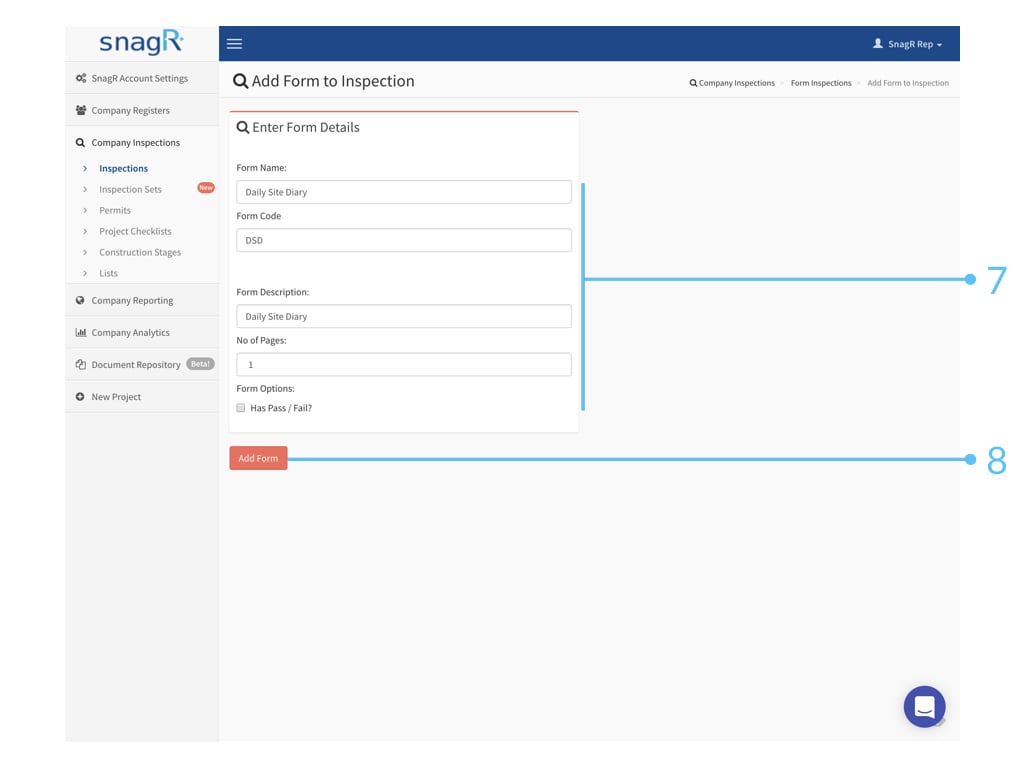
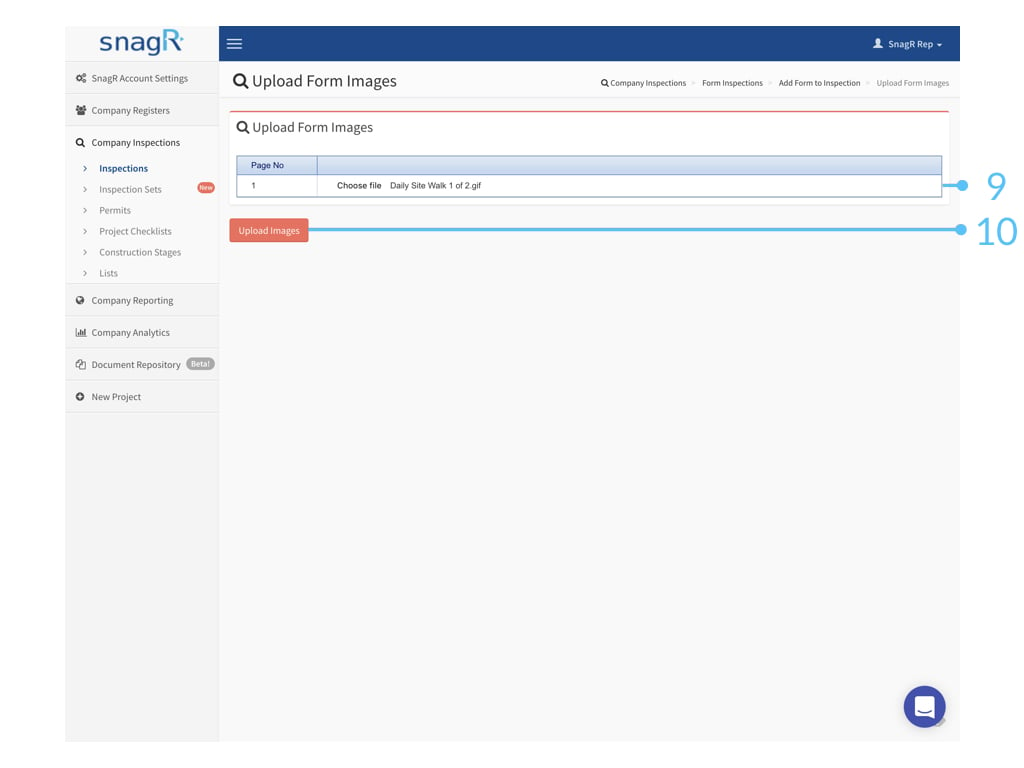
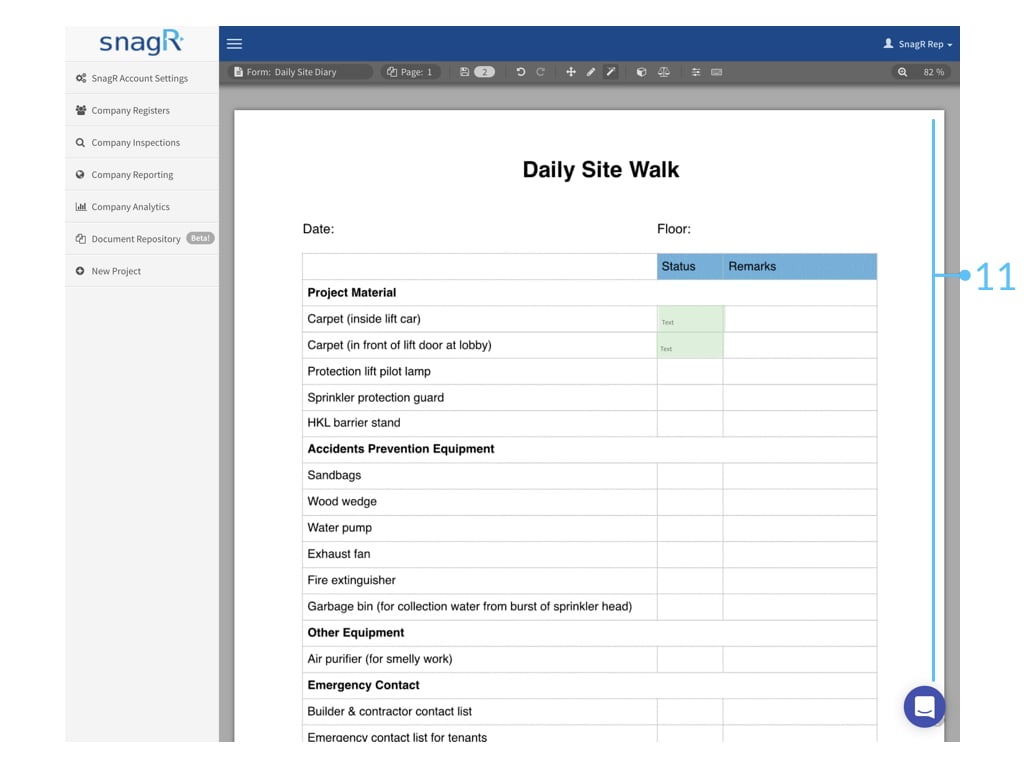
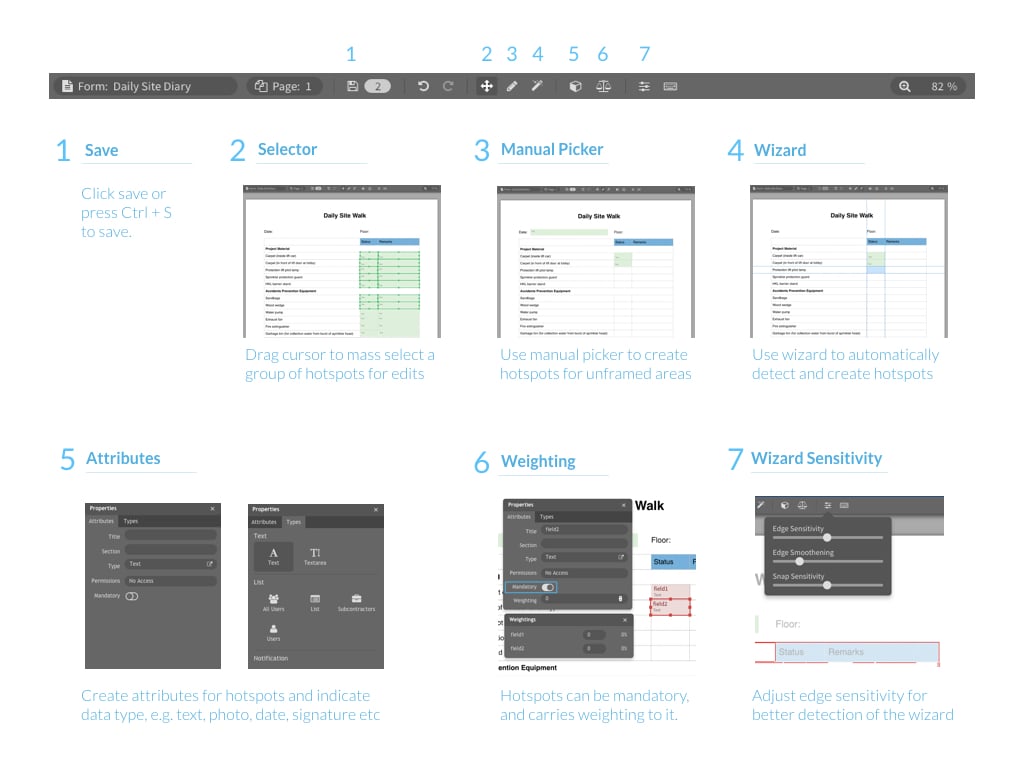
Hier zijn een aantal **tips** om formulieren in te stellen met de wizard:
<img src="https://mintcdn.com/snagr/6w4ro9N7s9wIwqhO/images/uploads/147964-Admin_Website.119.jpeg?fit=max&auto=format&n=6w4ro9N7s9wIwqhO&q=85&s=4f37827547b67dad4a5b3e59a6154267" alt="Admin Website.119" width="1024" height="768" data-path="images/uploads/147964-Admin_Website.119.jpeg" />

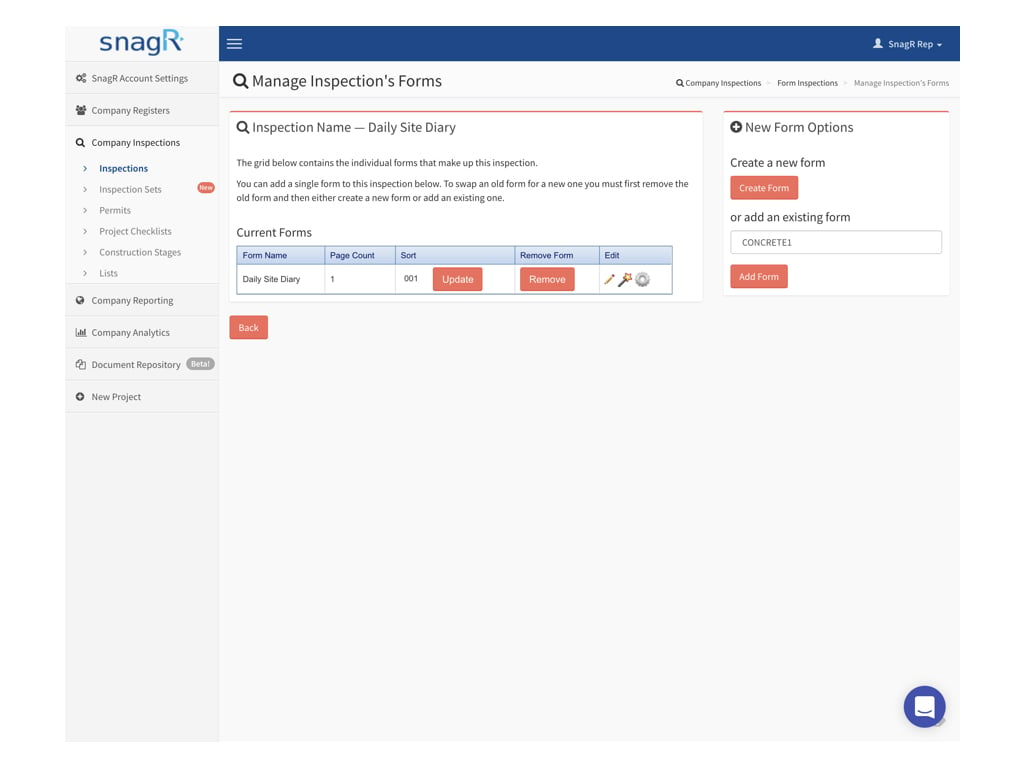
Nadat je een formuliersjabloon hebt opgeslagen, wordt deze automatisch aan de inspectie toegevoegd. Je kunt ook een bestaande formuliersjabloon toevoegen aan de inspectie.
<img src="https://mintcdn.com/snagr/6w4ro9N7s9wIwqhO/images/uploads/147966-Admin_Website.120.jpeg?fit=max&auto=format&n=6w4ro9N7s9wIwqhO&q=85&s=728af9dd4023bc322be7d9748af89005" alt="Admin Website.120" width="1024" height="768" data-path="images/uploads/147966-Admin_Website.120.jpeg" />

Vervolgens, vergeet niet om dit sjabloon te activieren op project niveau.

Standaard zijn alle inspectiesjablonen die op bedrijfsniveau zijn gemaakt uitgeschakeld op projectniveau.