> ## Documentation Index
> Fetch the complete documentation index at: https://kb.snagr.co.uk/llms.txt
> Use this file to discover all available pages before exploring further.

# [將表格內容導出到Excel] 如何設置模板？

設置此模板可供用戶導出每項於表格內輸入的資料成為Excel檔。

模板需由**項目管理員**設置，才可供用戶使用。

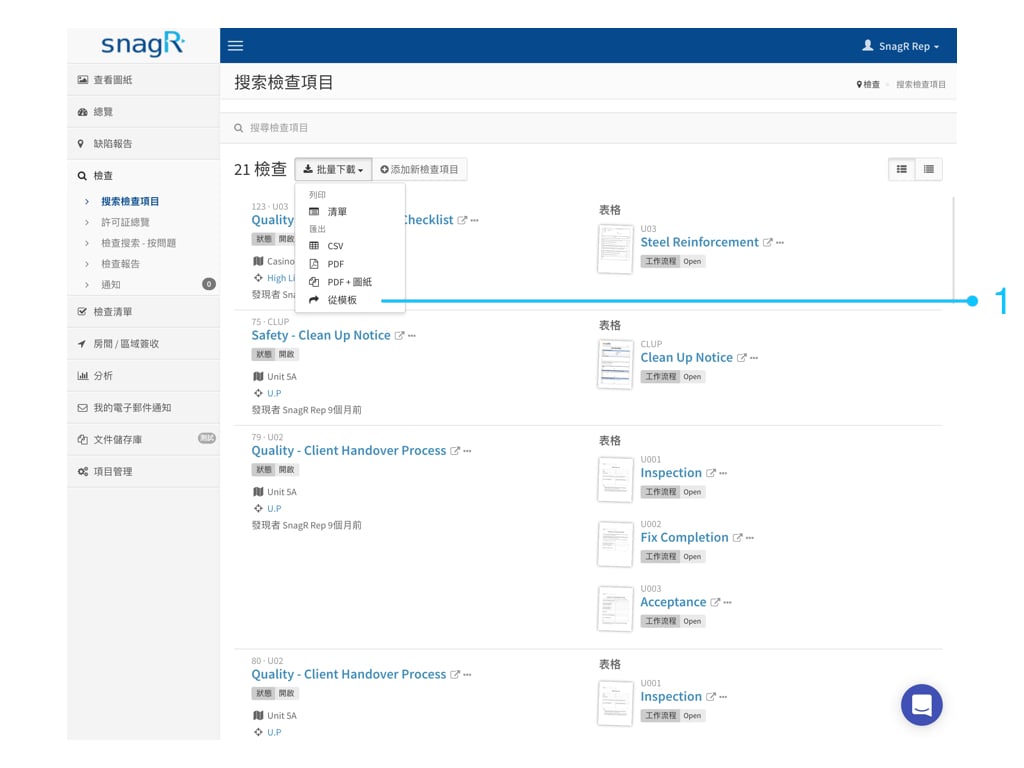
<img src="https://mintcdn.com/snagr/cq3DLfKmhQlF8uo8/images/direct/1521442366975-Website-Form-Mode_Tra.001.jpeg?fit=max&auto=format&n=cq3DLfKmhQlF8uo8&q=85&s=43543ff5ee7c00b52bbb5229723a340d" alt="Website Form Mode Tra.001" width="1024" height="768" data-path="images/direct/1521442366975-Website-Form-Mode_Tra.001.jpeg" />

<img src="https://mintcdn.com/snagr/Fc-Qgss-VatVIL0b/images/uploads/123693-if_ic_tv_48px_352186.png?fit=max&auto=format&n=Fc-Qgss-VatVIL0b&q=85&s=06b23e0223986004fba7bbb6aa8febb3" alt="if ic tv 48px 352186" width="20" data-path="images/uploads/123693-if_ic_tv_48px_352186.png" /> **網頁版**

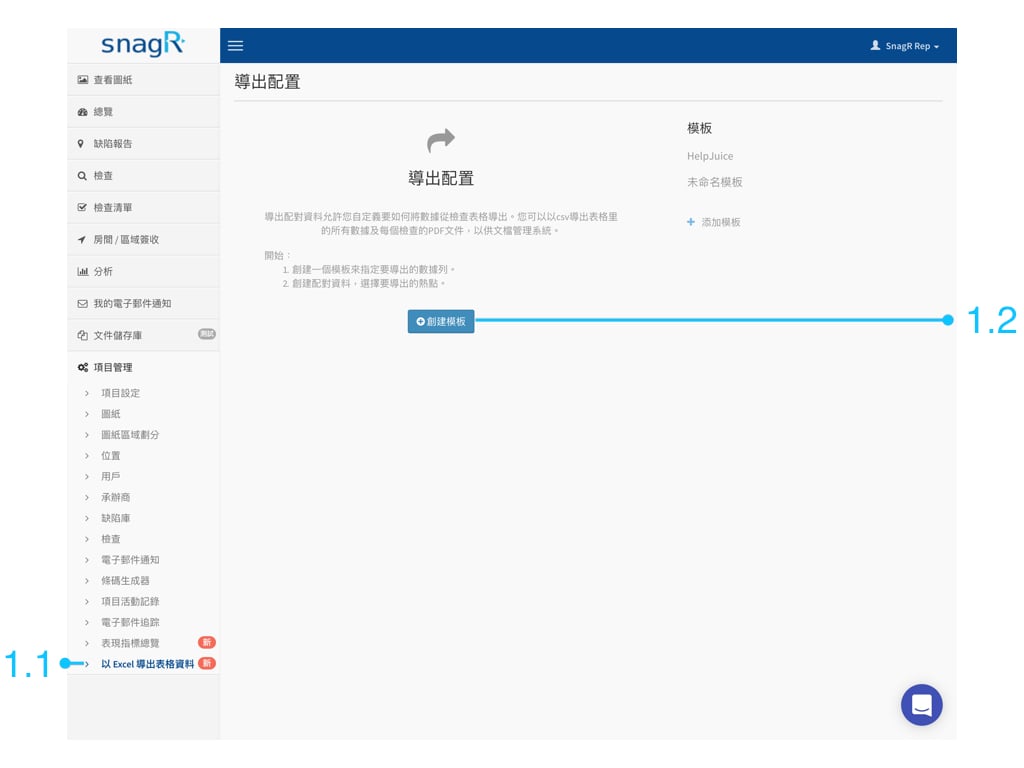
點擊 項目管理 ＞ 以Excel導出表格資料金＞ 創建模板

<img src="https://mintcdn.com/snagr/cq3DLfKmhQlF8uo8/images/direct/1521433762239-Admin_Website_Tra.001.jpeg?fit=max&auto=format&n=cq3DLfKmhQlF8uo8&q=85&s=e4cf8752731032eeb9cabf086f2079a0" alt="Admin Website Tra.001" width="1024" height="768" data-path="images/direct/1521433762239-Admin_Website_Tra.001.jpeg" />

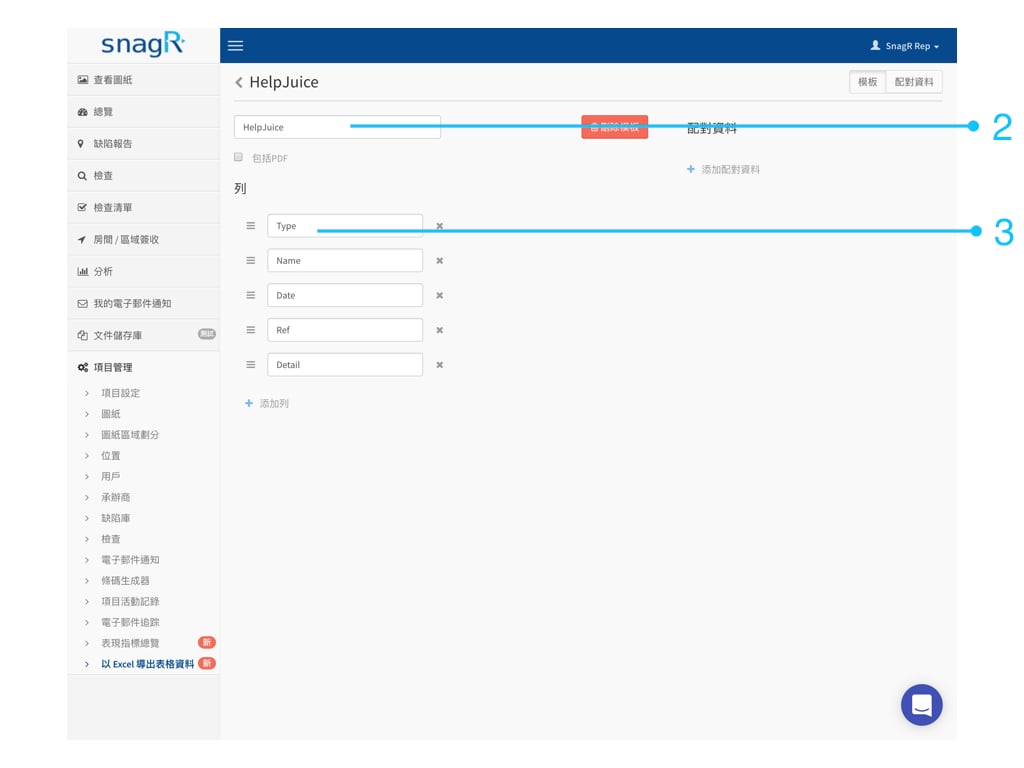
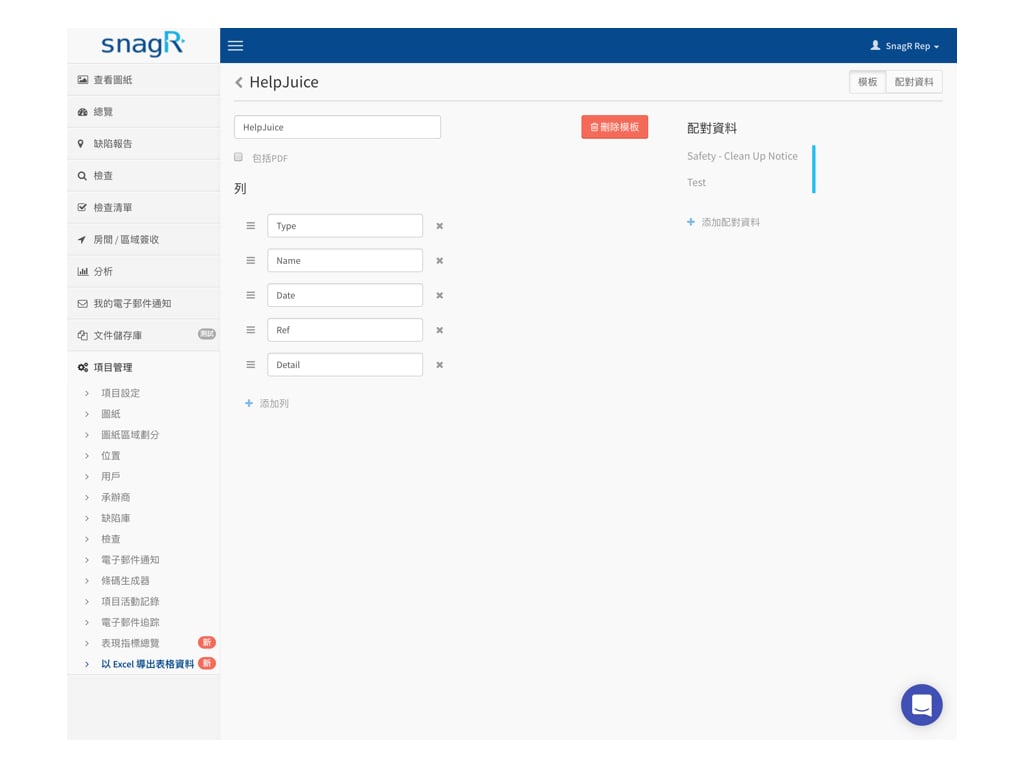
輸入模板名稱，按**添加列**

<img src="https://mintcdn.com/snagr/cq3DLfKmhQlF8uo8/images/direct/1521435164478-Screen-Shot-2018-03-19-at-12.52.27-PM.png?fit=max&auto=format&n=cq3DLfKmhQlF8uo8&q=85&s=b9827d6c1de34eda4c361b8bc39d4983" alt="Screen Shot 2018 03 19 at 12.52.27 PM" width="70" height="23" data-path="images/direct/1521435164478-Screen-Shot-2018-03-19-at-12.52.27-PM.png" />

來添加所需列數及命名。

<img src="https://mintcdn.com/snagr/cq3DLfKmhQlF8uo8/images/direct/1521433816052-Admin_Website_Tra.002.jpeg?fit=max&auto=format&n=cq3DLfKmhQlF8uo8&q=85&s=fb6b747527a5463c14659bbf81dd9b60" alt="Admin Website Tra.002" width="1024" height="768" data-path="images/direct/1521433816052-Admin_Website_Tra.002.jpeg" />

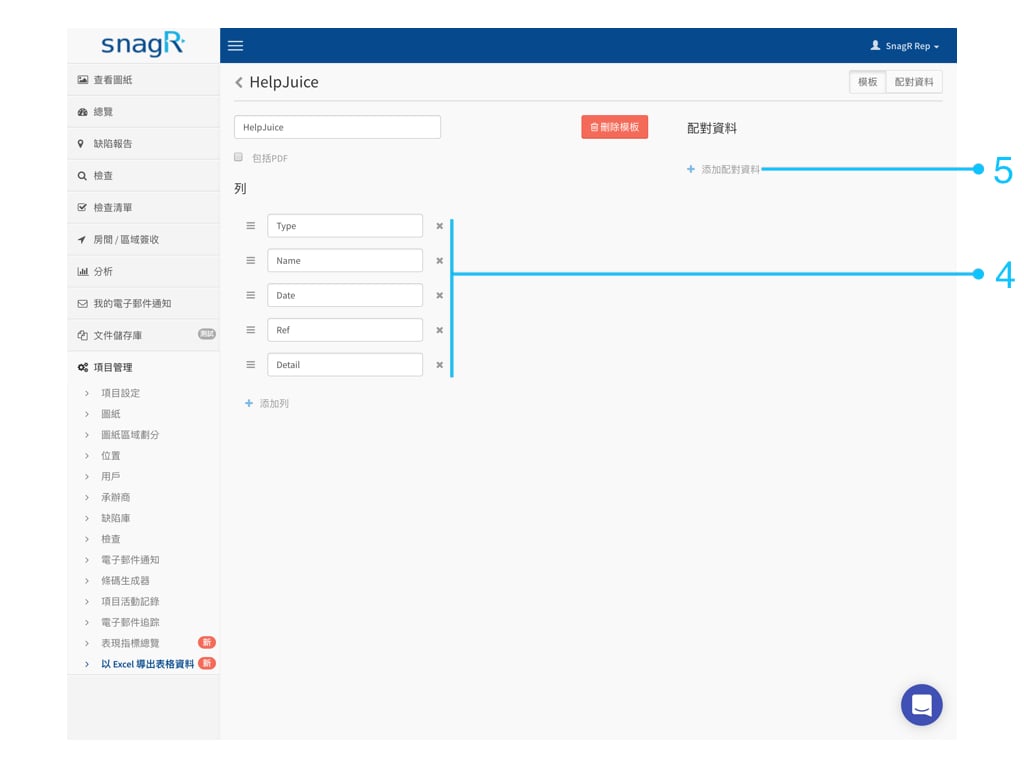
添加足夠的列數後，點擊添加配對資料

<img src="https://mintcdn.com/snagr/cq3DLfKmhQlF8uo8/images/direct/1521435372064-Screen-Shot-2018-03-19-at-12.55.59-PM.png?fit=max&auto=format&n=cq3DLfKmhQlF8uo8&q=85&s=617aae3c20c3b6d97255fb4b61ed0f3b" alt="Screen Shot 2018 03 19 at 12.55.59 PM" width="104" height="25" data-path="images/direct/1521435372064-Screen-Shot-2018-03-19-at-12.55.59-PM.png" />

來選擇表格及項目。

<img src="https://mintcdn.com/snagr/cq3DLfKmhQlF8uo8/images/direct/1521433835424-Admin_Website_Tra.003.jpeg?fit=max&auto=format&n=cq3DLfKmhQlF8uo8&q=85&s=88f19b245c595262d3cab6268717aa0f" alt="Admin Website Tra.003" width="1024" height="768" data-path="images/direct/1521433835424-Admin_Website_Tra.003.jpeg" />

配對資料中, 你可以選擇配對：

1. 熱點位置
2. 屬性資料
3. 文本

### 1. 熱點位置

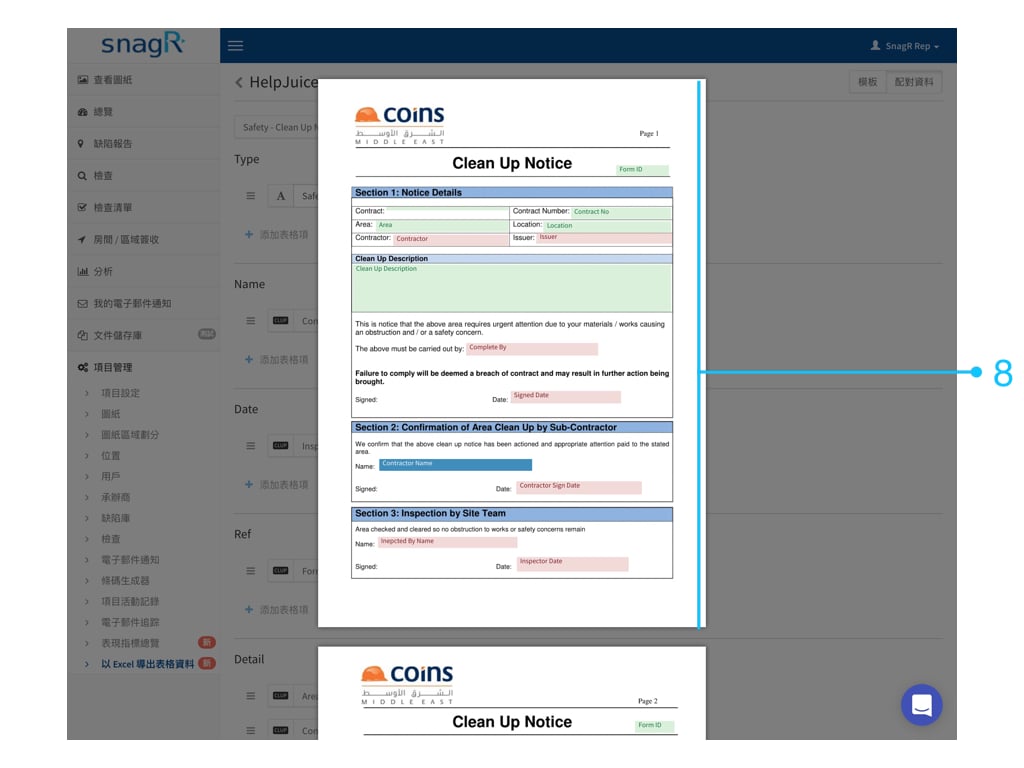
熱點位置是在表格上可輸入數據的位置。

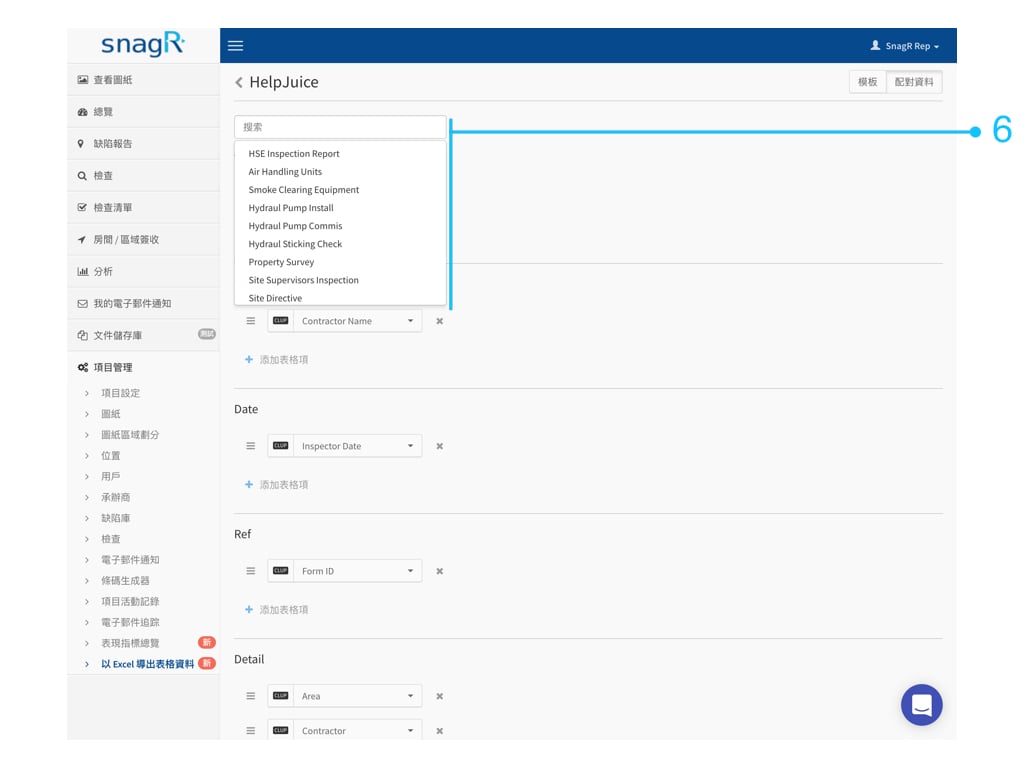
先選擇表格
<img src="https://mintcdn.com/snagr/cq3DLfKmhQlF8uo8/images/direct/1521434276002-Admin_Website_Tra.004.jpeg?fit=max&auto=format&n=cq3DLfKmhQlF8uo8&q=85&s=615d1d2d0ed7adae114bd400fa6691da" alt="Admin Website Tra.004" width="1024" height="768" data-path="images/direct/1521434276002-Admin_Website_Tra.004.jpeg" />

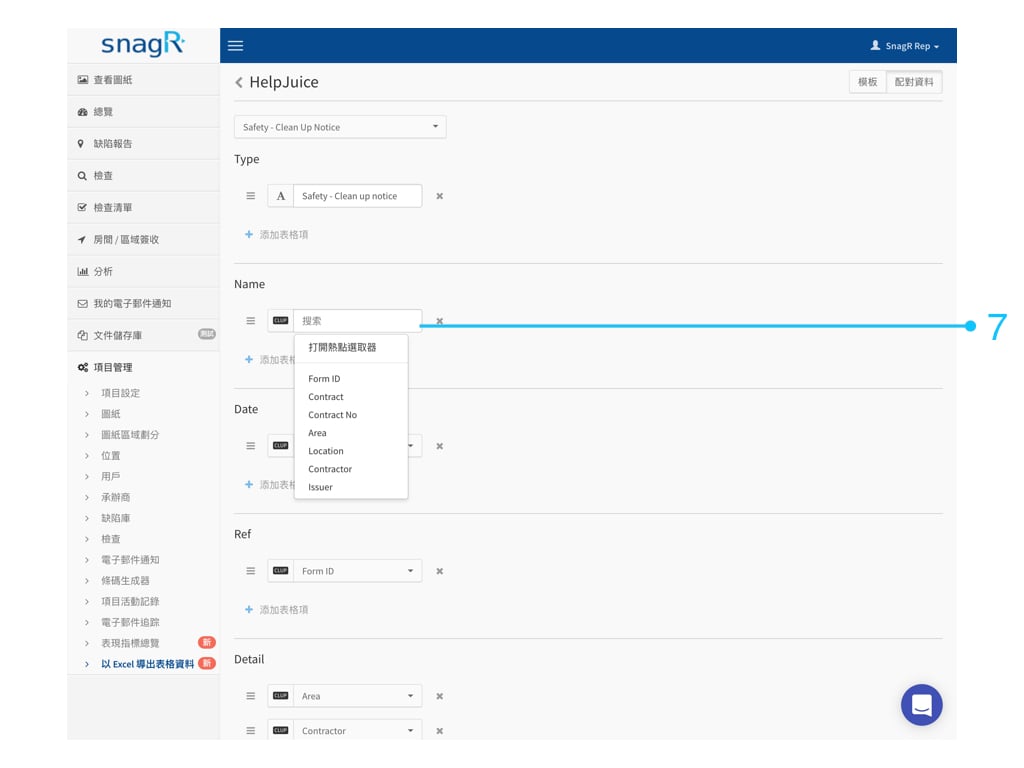
然後配對。您可直接選擇熱點名稱。

<img src="https://mintcdn.com/snagr/cq3DLfKmhQlF8uo8/images/direct/1521434395282-Admin_Website_Tra.005.jpeg?fit=max&auto=format&n=cq3DLfKmhQlF8uo8&q=85&s=779f6fa884dbc58b3f4f360c9dbcbb1b" alt="Admin Website Tra.005" width="1024" height="768" data-path="images/direct/1521434395282-Admin_Website_Tra.005.jpeg" />

你亦可以**打開\*\*\*\*熱點選取器**直接開啟該表格來選取所需資料的熱點位置。
<img src="https://mintcdn.com/snagr/cq3DLfKmhQlF8uo8/images/direct/1521434409889-Admin_Website_Tra.006.jpeg?fit=max&auto=format&n=cq3DLfKmhQlF8uo8&q=85&s=c2da3780d4e2274805e9047a4896e08e" alt="Admin Website Tra.006" width="1024" height="768" data-path="images/direct/1521434409889-Admin_Website_Tra.006.jpeg" />

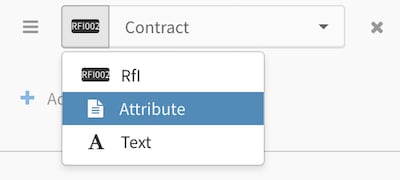
### 2. **屬性**資料

屬性資料是有關表格的資料，例如表格的位置，項目編碼，建立表格的用戶等。

選擇**屬性**

<img src="https://mintcdn.com/snagr/V8StriBwFl_CwQFJ/images/direct/1524729093539-Screen-Shot-2018-04-26-at-3.50.38-PM.png?fit=max&auto=format&n=V8StriBwFl_CwQFJ&q=85&s=c406245de9be684901c96f8751426a5f" alt="Screen Shot 2018 04 26 at 3.50.38 PM" width="400" height="180" data-path="images/direct/1524729093539-Screen-Shot-2018-04-26-at-3.50.38-PM.png" />

然後選擇類別

<img src="https://mintcdn.com/snagr/V8StriBwFl_CwQFJ/images/direct/1524729110727-Screen-Shot-2018-04-26-at-3.50.53-PM.png?fit=max&auto=format&n=V8StriBwFl_CwQFJ&q=85&s=d57e40fc8aec2965e604b90f280abf8b" alt="Screen Shot 2018 04 26 at 3.50.53 PM" width="400" height="358" data-path="images/direct/1524729110727-Screen-Shot-2018-04-26-at-3.50.53-PM.png" />

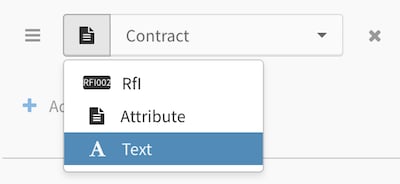
### 3. 文本

選擇**文本**

<img src="https://mintcdn.com/snagr/V8StriBwFl_CwQFJ/images/direct/1524729177881-Screen-Shot-2018-04-26-at-3.52.38-PM.png?fit=max&auto=format&n=V8StriBwFl_CwQFJ&q=85&s=473a41e955f9ed106cb389a22dd52354" alt="Screen Shot 2018 04 26 at 3.52.38 PM" width="400" height="184" data-path="images/direct/1524729177881-Screen-Shot-2018-04-26-at-3.52.38-PM.png" />

<img src="https://mintcdn.com/snagr/cq3DLfKmhQlF8uo8/images/direct/1521436445874-electric-light-bulb_1f4a1.png?fit=max&auto=format&n=cq3DLfKmhQlF8uo8&q=85&s=c8c0f922694296671395e06c06f3db9d" alt="electric light bulb 1f4a1" width="24" data-path="images/direct/1521436445874-electric-light-bulb_1f4a1.png" />***這有什麼用處？***

同一列上是可以建立多於一種配對資料。你可以以文本作為劃分，結合熱點資料或屬性資料。以下是一個例子：

<img src="https://mintcdn.com/snagr/V8StriBwFl_CwQFJ/images/direct/1524733496620-Screen-Shot-2018-04-26-at-3.54.35-PM.png?fit=max&auto=format&n=V8StriBwFl_CwQFJ&q=85&s=d4e31db987226592daa1d901e91b5b19" alt="Screen Shot 2018 04 26 at 3.54.35 PM" width="400" height="299" data-path="images/direct/1524733496620-Screen-Shot-2018-04-26-at-3.54.35-PM.png" />

如一個模板中需要多於一個表格的資料，請繼續**添加配對資料**並選取所需項目。

<img src="https://mintcdn.com/snagr/cq3DLfKmhQlF8uo8/images/direct/1521434449349-Admin_Website_Tra.008.jpeg?fit=max&auto=format&n=cq3DLfKmhQlF8uo8&q=85&s=11a0b651539bd92bd2301fae35f7e105" alt="Admin Website Tra.008" width="1024" height="768" data-path="images/direct/1521434449349-Admin_Website_Tra.008.jpeg" />

小提示：建立模板後，請[嘗試導出Excel檔](/zh-hant/forms/export-forms/304554)，檢視效果是否理想。