> ## Documentation Index
> Fetch the complete documentation index at: https://kb.snagr.co.uk/llms.txt
> Use this file to discover all available pages before exploring further.

# 如何設置圖紙區域？

<img src="https://mintcdn.com/snagr/Fc-Qgss-VatVIL0b/images/uploads/123693-if_ic_tv_48px_352186.png?fit=max&auto=format&n=Fc-Qgss-VatVIL0b&q=85&s=06b23e0223986004fba7bbb6aa8febb3" alt="if ic tv 48px 352186" width="20" data-path="images/uploads/123693-if_ic_tv_48px_352186.png" /> **網頁版**

有時在某個項目中，您希望使用大型圖紙進行導航（例如整個樓層），但如果將整張圖紙放在報告，則會將其縮放到A4尺寸。這意味著這些圖釘也更小。

現在我們有圖紙區域劃分。借助圖紙區域劃分，您可以分割報告的圖紙，令到報告中的圖紙更清晰可見。

如果您已在系統中上傳了所有需要的圖紙，請進入項目管理下的圖紙區域劃分。

<img src="https://mintcdn.com/snagr/V8StriBwFl_CwQFJ/images/direct/1524798320778-Admin_Website_Tra.001.jpeg?fit=max&auto=format&n=V8StriBwFl_CwQFJ&q=85&s=c5197524d2af8d9f5695eb5f31795921" alt="Admin Website Tra.001" width="1024" height="768" data-path="images/direct/1524798320778-Admin_Website_Tra.001.jpeg" />

**添加區域**

在左上角的下拉菜單中選擇要為其分割區域的圖紙。

<img src="https://mintcdn.com/snagr/V8StriBwFl_CwQFJ/images/direct/1524798461492-Admin_Website_Tra.002.jpeg?fit=max&auto=format&n=V8StriBwFl_CwQFJ&q=85&s=7971161d666768589a0795aa254043cc" alt="Admin Website Tra.002" width="1024" height="768" data-path="images/direct/1524798461492-Admin_Website_Tra.002.jpeg" />

在頂部選擇您想要的區域分格數量。

只需點擊圖標一次，然後選擇代表區域數量的框。在下面的示例中，您將分割區域為6 x 3。

<img src="https://mintcdn.com/snagr/V8StriBwFl_CwQFJ/images/direct/1524798521419-Admin_Website_Tra.003.jpeg?fit=max&auto=format&n=V8StriBwFl_CwQFJ&q=85&s=05de2791e864a0f2816f1ffeaf3b047d" alt="Admin Website Tra.003" width="1024" height="768" data-path="images/direct/1524798521419-Admin_Website_Tra.003.jpeg" />

<img src="https://mintcdn.com/snagr/V8StriBwFl_CwQFJ/images/direct/1524798546043-Admin_Website_Tra.004.jpeg?fit=max&auto=format&n=V8StriBwFl_CwQFJ&q=85&s=1b5791e5158843e38d405f37250a08ee" alt="Admin Website Tra.004" width="1024" height="768" data-path="images/direct/1524798546043-Admin_Website_Tra.004.jpeg" />

圖紙上會顯示你設定的區域分割數量。

<img src="https://mintcdn.com/snagr/V8StriBwFl_CwQFJ/images/direct/1524798589591-Admin_Website_Tra.005.jpeg?fit=max&auto=format&n=V8StriBwFl_CwQFJ&q=85&s=f06155b98c38d36bfa1f1ef8097a67d7" alt="Admin Website Tra.005" width="1024" height="768" data-path="images/direct/1524798589591-Admin_Website_Tra.005.jpeg" />

您亦可以拖動分割線以設定分割圖紙的區域範圍。

<img src="https://mintcdn.com/snagr/V8StriBwFl_CwQFJ/images/direct/1524798715160-Admin_Website_Tra.006.jpeg?fit=max&auto=format&n=V8StriBwFl_CwQFJ&q=85&s=a86975df54b6bcab9f14c1c1bb9ca6d5" alt="Admin Website Tra.006" width="1024" height="768" data-path="images/direct/1524798715160-Admin_Website_Tra.006.jpeg" />

**合併/分割區域**

如果您於單一區域上單擊並按住鼠標左鍵拖動，則可以選擇多個區域。

頂部會出現合併選項。

如果你點擊合併，它會合併選定的區域。

<img src="https://mintcdn.com/snagr/V8StriBwFl_CwQFJ/images/direct/1524799417225-Screen-Shot-2018-04-27-at-11.22.53-AM.png?fit=max&auto=format&n=V8StriBwFl_CwQFJ&q=85&s=0c9c22faca83c4c719eda8cde55ba9b9" alt="Screen Shot 2018 04 27 at 11.22.53 AM" width="126" height="52" data-path="images/direct/1524799417225-Screen-Shot-2018-04-27-at-11.22.53-AM.png" />

<img src="https://mintcdn.com/snagr/V8StriBwFl_CwQFJ/images/direct/1524798771400-Admin_Website_Tra.007.jpeg?fit=max&auto=format&n=V8StriBwFl_CwQFJ&q=85&s=73ab6c1bf2166744e39d449f06b10d0f" alt="Admin Website Tra.007" width="1024" height="768" data-path="images/direct/1524798771400-Admin_Website_Tra.007.jpeg" />

如果要再次分割合併了的區域，請單擊該區域，然後單擊屏幕頂部的“分割”。

<img src="https://mintcdn.com/snagr/V8StriBwFl_CwQFJ/images/direct/1524799402439-Screen-Shot-2018-04-27-at-11.22.39-AM.png?fit=max&auto=format&n=V8StriBwFl_CwQFJ&q=85&s=4f07cebd50b7adc7f4cdefe805c02ee3" alt="Screen Shot 2018 04 27 at 11.22.39 AM" width="192" height="82" data-path="images/direct/1524799402439-Screen-Shot-2018-04-27-at-11.22.39-AM.png" />

<img src="https://mintcdn.com/snagr/V8StriBwFl_CwQFJ/images/direct/1524799821195-Screen-Shot-2018-04-27-at-11.29.49-AM.png?fit=max&auto=format&n=V8StriBwFl_CwQFJ&q=85&s=60b6c1ae76cbc0a3d0fb8343f06d5a24" alt="Screen Shot 2018 04 27 at 11.29.49 AM" width="568" height="442" data-path="images/direct/1524799821195-Screen-Shot-2018-04-27-at-11.29.49-AM.png" />

要將區域設定保存到圖紙中，請單擊頁面頂部的儲存。.

<img src="https://mintcdn.com/snagr/V8StriBwFl_CwQFJ/images/direct/1524799457134-Screen-Shot-2018-04-27-at-11.21.56-AM.png?fit=max&auto=format&n=V8StriBwFl_CwQFJ&q=85&s=14b4a74cea2a780ac3d081e8ca5290e3" alt="Screen Shot 2018 04 27 at 11.21.56 AM" width="120" height="49" data-path="images/direct/1524799457134-Screen-Shot-2018-04-27-at-11.21.56-AM.png" />

<img src="https://mintcdn.com/snagr/V8StriBwFl_CwQFJ/images/direct/1524798805821-Admin_Website_Tra.008.jpeg?fit=max&auto=format&n=V8StriBwFl_CwQFJ&q=85&s=8ef12ebdddb8ad2fff4330c7f251959c" alt="Admin Website Tra.008" width="1024" height="768" data-path="images/direct/1524798805821-Admin_Website_Tra.008.jpeg" />

選擇第一個選項“應用圖紙區域於 - 繪圖名稱”，然後單擊儲存。

<img src="https://mintcdn.com/snagr/V8StriBwFl_CwQFJ/images/direct/1524798831405-Admin_Website_Tra.009.jpeg?fit=max&auto=format&n=V8StriBwFl_CwQFJ&q=85&s=05dbcbe47586a58dcd5a1fc9177de0dc" alt="Admin Website Tra.009" width="1024" height="768" data-path="images/direct/1524798831405-Admin_Website_Tra.009.jpeg" />

如果還有其他圖紙與剛剛保存的圖紙相似並需要設定相同的區域，則可以單擊頁面頂部的儲存

<img src="https://mintcdn.com/snagr/V8StriBwFl_CwQFJ/images/direct/1524799457134-Screen-Shot-2018-04-27-at-11.21.56-AM.png?fit=max&auto=format&n=V8StriBwFl_CwQFJ&q=85&s=14b4a74cea2a780ac3d081e8ca5290e3" alt="Screen Shot 2018 04 27 at 11.21.56 AM" width="120" height="49" data-path="images/direct/1524799457134-Screen-Shot-2018-04-27-at-11.21.56-AM.png" />

，但選擇第二個選項“應用圖紙區域於以下圖紙”。選擇您想要應用這些區域的圖紙。如需要選擇多個圖紙，請按住CTRL / Command按鈕以多選。

然後點擊儲存以將區域儲存到這些圖紙中。

<img src="https://mintcdn.com/snagr/V8StriBwFl_CwQFJ/images/direct/1524799061612-Admin_Website_Tra.010.jpeg?fit=max&auto=format&n=V8StriBwFl_CwQFJ&q=85&s=62c95ebf6c3514da489d722e9404cc53" alt="Admin Website Tra.010" width="1024" height="768" data-path="images/direct/1524799061612-Admin_Website_Tra.010.jpeg" />

**刪除區域**

如果你在匯出報告後對區域不滿意，你可以隨時更改。只需再次按照步驟分割新的區域即可。

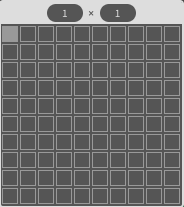
如果您不想要任何區域，只需選擇一個區塊1 x 1

<img src="https://mintcdn.com/snagr/V8StriBwFl_CwQFJ/images/direct/1524733680978-Screen-Shot-2018-04-26-at-4.42.56-PM.png?fit=max&auto=format&n=V8StriBwFl_CwQFJ&q=85&s=5f0c57941ad29ad11079fb65b194a7be" alt="Screen Shot 2018 04 26 at 4.42.56 PM" width="184" height="207" data-path="images/direct/1524733680978-Screen-Shot-2018-04-26-at-4.42.56-PM.png" />

。那麼整個圖紙就是一個區域。

<img src="https://mintcdn.com/snagr/V8StriBwFl_CwQFJ/images/direct/1524799175161-Admin_Website_Tra.011.jpeg?fit=max&auto=format&n=V8StriBwFl_CwQFJ&q=85&s=2a32ae9c5a940e3b40c7f189bf85386b" alt="Admin Website Tra.011" width="1024" height="768" data-path="images/direct/1524799175161-Admin_Website_Tra.011.jpeg" />

缺陷報告的圖紙區域劃分為1 x 1將如下所示：

<img src="https://mintcdn.com/snagr/V8StriBwFl_CwQFJ/images/direct/1524799740470-Screen-Shot-2018-04-26-at-5.20.51-PM.png?fit=max&auto=format&n=V8StriBwFl_CwQFJ&q=85&s=3bbd5c1964cb398732c00be3919bb55d" alt="Screen Shot 2018 04 26 at 5.20.51 PM" width="749" height="1063" data-path="images/direct/1524799740470-Screen-Shot-2018-04-26-at-5.20.51-PM.png" />

缺陷報告的圖紙區域劃分為3 x 6將如下所示：

<img src="https://mintcdn.com/snagr/V8StriBwFl_CwQFJ/images/direct/1524799680063-Screen-Shot-2018-04-27-at-11.27.41-AM.png?fit=max&auto=format&n=V8StriBwFl_CwQFJ&q=85&s=b1b0f0d3ffdc3b2a1729c8077b6584e3" alt="Screen Shot 2018 04 27 at 11.27.41 AM" width="594" height="807" data-path="images/direct/1524799680063-Screen-Shot-2018-04-27-at-11.27.41-AM.png" />