> ## Documentation Index
> Fetch the complete documentation index at: https://kb.snagr.co.uk/llms.txt
> Use this file to discover all available pages before exploring further.

# 如何自製名單於表格上？

自製名單是一個下拉列表。

它能使人們更容易完成表格，更可以讓您的公司從表格中收集結構化的數據。

<img src="https://mintcdn.com/snagr/Fc-Qgss-VatVIL0b/images/uploads/123693-if_ic_tv_48px_352186.png?fit=max&auto=format&n=Fc-Qgss-VatVIL0b&q=85&s=06b23e0223986004fba7bbb6aa8febb3" alt="if ic tv 48px 352186" width="20" data-path="images/uploads/123693-if_ic_tv_48px_352186.png" /> **網頁版**

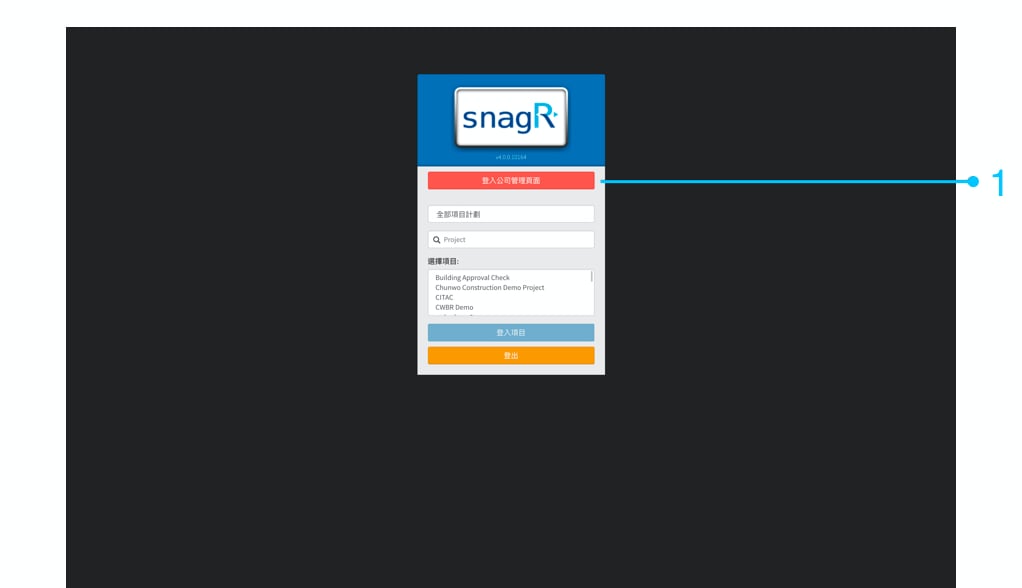
首先，請登錄公司管理區。 如果您不是公司管理員，則不會看到登入公司管理頁面。

<img src="https://mintcdn.com/snagr/cq3DLfKmhQlF8uo8/images/direct/1520499721726-Screen-Shot-2018-03-07-at-4.29.11-PM.png?fit=max&auto=format&n=cq3DLfKmhQlF8uo8&q=85&s=62527b68b8006fb8a933171dd9cce151" alt="Screen Shot 2018 03 07 at 4.29.11 PM" width="1022" height="588" data-path="images/direct/1520499721726-Screen-Shot-2018-03-07-at-4.29.11-PM.png" />

公司檢查模板 ＞ 清單

你可選擇**手動添加**或**匯入列表**以添加多款名單。

<img src="https://mintcdn.com/snagr/V8StriBwFl_CwQFJ/images/direct/1525238315881-exclamation-mark.png?fit=max&auto=format&n=V8StriBwFl_CwQFJ&q=85&s=4431dbd9bceab1a3323b9267293e64a7" alt="exclamation mark" width="19" data-path="images/direct/1525238315881-exclamation-mark.png" />注意：如果要添加10個或以上的項目，請直接跳至匯入列表。

### **1. 選項一 - 手動添加清單**

<img src="https://mintcdn.com/snagr/cq3DLfKmhQlF8uo8/images/direct/1521169536905-Admin_Website_Tra.002.jpeg?fit=max&auto=format&n=cq3DLfKmhQlF8uo8&q=85&s=3868cc8409f5975cea1f848b55d10c13" alt="Admin Website Tra.002" width="1024" height="768" data-path="images/direct/1521169536905-Admin_Website_Tra.002.jpeg" />

輸入清單名稱，然後按提交。

<img src="https://mintcdn.com/snagr/cq3DLfKmhQlF8uo8/images/direct/1521169554405-Admin_Website_Tra.003.jpeg?fit=max&auto=format&n=cq3DLfKmhQlF8uo8&q=85&s=174c0ac8c92b87b89a321452315ea6f0" alt="Admin Website Tra.003" width="1024" height="768" data-path="images/direct/1521169554405-Admin_Website_Tra.003.jpeg" />

按添加清單項目

<img src="https://mintcdn.com/snagr/cq3DLfKmhQlF8uo8/images/direct/1521169598399-Admin_Website_Tra.004.jpeg?fit=max&auto=format&n=cq3DLfKmhQlF8uo8&q=85&s=81986b885b33b9118be579e6dbcd6c16" alt="Admin Website Tra.004" width="1024" height="768" data-path="images/direct/1521169598399-Admin_Website_Tra.004.jpeg" />

輸入選項，然後按**添加項目**繼續輸入其餘選項，如此類推。

<img src="https://mintcdn.com/snagr/cq3DLfKmhQlF8uo8/images/direct/1521169633277-Admin_Website_Tra.005.jpeg?fit=max&auto=format&n=cq3DLfKmhQlF8uo8&q=85&s=222bdf80ef6159df3cfa0690bdf0db57" alt="Admin Website Tra.005" width="1024" height="768" data-path="images/direct/1521169633277-Admin_Website_Tra.005.jpeg" />

完成輸入最後選項後，按**關閉**。

<img src="https://mintcdn.com/snagr/cq3DLfKmhQlF8uo8/images/direct/1521171023909-Admin_Website_Tra1.001.jpeg?fit=max&auto=format&n=cq3DLfKmhQlF8uo8&q=85&s=6d9366d737551ab701875d7970a1e311" alt="Admin Website Tra1.001" width="1024" height="768" data-path="images/direct/1521171023909-Admin_Website_Tra1.001.jpeg" />

請向下滾動以查看 > 設置表格字段以顯示自製名單。

### **1. 選項二 - 匯入列表**

<img src="https://mintcdn.com/snagr/cq3DLfKmhQlF8uo8/images/direct/1521174137880-Admin_Website_Tra1.001.jpeg?fit=max&auto=format&n=cq3DLfKmhQlF8uo8&q=85&s=925d3c7ed7d15b60d2b3c89ccfb0c951" alt="Admin Website Tra1.001" width="1024" height="768" data-path="images/direct/1521174137880-Admin_Website_Tra1.001.jpeg" />

下載模板 ＞ 輸入資料 > 上載 > **匯入清單**

<img src="https://mintcdn.com/snagr/cq3DLfKmhQlF8uo8/images/direct/1521174206208-Admin_Website_Tra1.002.jpeg?fit=max&auto=format&n=cq3DLfKmhQlF8uo8&q=85&s=403394978552e9481dccbba572be322b" alt="Admin Website Tra1.002" width="1024" height="768" data-path="images/direct/1521174206208-Admin_Website_Tra1.002.jpeg" />

你的Excel文件應該如下所示：

列A是自製名單的名稱。 B列是自製名單中的顯示文本/選項。

<img src="https://mintcdn.com/snagr/cq3DLfKmhQlF8uo8/images/direct/1521174306426-Admin_Website_Tra1.003.jpeg?fit=max&auto=format&n=cq3DLfKmhQlF8uo8&q=85&s=1d5300018b956813ef3b5426fce1fb12" alt="Admin Website Tra1.003" width="1024" height="768" data-path="images/direct/1521174306426-Admin_Website_Tra1.003.jpeg" />

<img src="https://mintcdn.com/snagr/cq3DLfKmhQlF8uo8/images/direct/1521174329201-Admin_Website_Tra1.004.jpeg?fit=max&auto=format&n=cq3DLfKmhQlF8uo8&q=85&s=e92034549462f29509539fec1352abdb" alt="Admin Website Tra1.004" width="1024" height="768" data-path="images/direct/1521174329201-Admin_Website_Tra1.004.jpeg" />

### 2. 設置表格**熱點**屬性以顯示自製名單

返回到表格嚮導>選擇表格熱點

<img src="https://mintcdn.com/snagr/V8StriBwFl_CwQFJ/images/direct/1525243262220-Screen-Shot-2018-05-02-at-2.39.38-PM.png?fit=max&auto=format&n=V8StriBwFl_CwQFJ&q=85&s=30ff0af89bc675f535de687d0f5a92f0" alt="Screen Shot 2018 05 02 at 2.39.38 PM" width="977" height="418" data-path="images/direct/1525243262220-Screen-Shot-2018-05-02-at-2.39.38-PM.png" />

按Command + 4或Ctrl + 4以調出**屬性**。<img src="https://mintcdn.com/snagr/V8StriBwFl_CwQFJ/images/direct/1525243757831-Screen-Shot-2018-05-02-at-2.49.10-PM.png?fit=max&auto=format&n=V8StriBwFl_CwQFJ&q=85&s=7db04ded79f3cc81d152361601c7abc1" alt="Screen Shot 2018 05 02 at 2.49.10 PM" width="35" data-path="images/direct/1525243757831-Screen-Shot-2018-05-02-at-2.49.10-PM.png" />

轉到**類型**，將文本更改為名單。

<img src="https://mintcdn.com/snagr/V8StriBwFl_CwQFJ/images/direct/1525243796209-Screen-Shot-2018-05-02-at-2.45.00-PM.png?fit=max&auto=format&n=V8StriBwFl_CwQFJ&q=85&s=e964dd4c3232a3f635213da0758adab9" alt="Screen Shot 2018 05 02 at 2.45.00 PM" width="468" height="391" data-path="images/direct/1525243796209-Screen-Shot-2018-05-02-at-2.45.00-PM.png" />

<img src="https://mintcdn.com/snagr/V8StriBwFl_CwQFJ/images/direct/1525243807458-Screen-Shot-2018-05-02-at-2.45.30-PM.png?fit=max&auto=format&n=V8StriBwFl_CwQFJ&q=85&s=6d452e3826c5ac7cf48ec28c1ed771bf" alt="Screen Shot 2018 05 02 at 2.45.30 PM" width="466" height="565" data-path="images/direct/1525243807458-Screen-Shot-2018-05-02-at-2.45.30-PM.png" />

之後，不要忘記為該熱點分配一個**清單編號**。 在這種情況下，我們選擇1-12，因為這是我們剛剛創建的。

<img src="https://mintcdn.com/snagr/V8StriBwFl_CwQFJ/images/direct/1525243872897-Screen-Shot-2018-05-02-at-2.46.24-PM.png?fit=max&auto=format&n=V8StriBwFl_CwQFJ&q=85&s=4d434f05dbfbbe60e5a4e0d4bf7f2151" alt="Screen Shot 2018 05 02 at 2.46.24 PM" width="476" height="500" data-path="images/direct/1525243872897-Screen-Shot-2018-05-02-at-2.46.24-PM.png" />

最後，不要忘記按Command + S或Ctrl + S來保存您在表格嚮導中所做的更改。<img src="https://mintcdn.com/snagr/V8StriBwFl_CwQFJ/images/direct/1525243978520-Screen-Shot-2018-05-02-at-2.52.47-PM.png?fit=max&auto=format&n=V8StriBwFl_CwQFJ&q=85&s=99b37462cd509dbf7e2357324e6b3555" alt="Screen Shot 2018 05 02 at 2.52.47 PM" width="33" data-path="images/direct/1525243978520-Screen-Shot-2018-05-02-at-2.52.47-PM.png" />

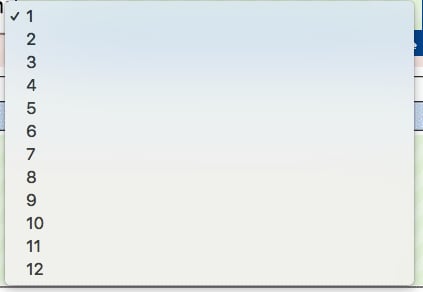
當新的表格被創建時，你現在應該看到名單：

<img src="https://mintcdn.com/snagr/cq3DLfKmhQlF8uo8/images/direct/1521171629566-Screen-Shot-2018-03-16-at-11.34.36-AM.png?fit=max&auto=format&n=cq3DLfKmhQlF8uo8&q=85&s=cd7630fa6e06ae9c8ec308093a9326ee" alt="Screen Shot 2018 03 16 at 11.34.36 AM" width="423" height="292" data-path="images/direct/1521171629566-Screen-Shot-2018-03-16-at-11.34.36-AM.png" />