> ## Documentation Index
> Fetch the complete documentation index at: https://kb.snagr.co.uk/llms.txt
> Use this file to discover all available pages before exploring further.

# 如何移動/ 編輯/ 刪除圖釘？

<img src="https://mintcdn.com/snagr/Fc-Qgss-VatVIL0b/images/uploads/123693-if_ic_tv_48px_352186.png?fit=max&auto=format&n=Fc-Qgss-VatVIL0b&q=85&s=06b23e0223986004fba7bbb6aa8febb3" alt="if ic tv 48px 352186" width="20" data-path="images/uploads/123693-if_ic_tv_48px_352186.png" /> **網頁**

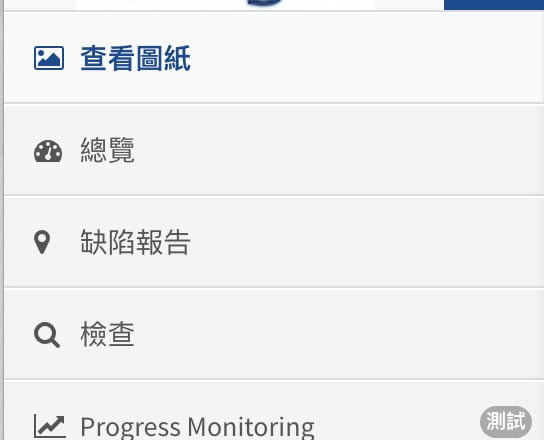
要移動/編輯/刪除位置，按主目錄中的 “**查看圖紙**”

<img src="https://mintcdn.com/snagr/sv-OAbBsFhPJOpPC/images/direct/1566287004209-Screenshot-2019-08-20-at-3.41.57-PM.png?fit=max&auto=format&n=sv-OAbBsFhPJOpPC&q=85&s=e40f9fb250bcf72ebb9f238ad87614b0" alt="Screenshot 2019 08 20 at 3.41.57 PM" width="544" height="440" data-path="images/direct/1566287004209-Screenshot-2019-08-20-at-3.41.57-PM.png" />

上方藍色欄中的第一個菜單下拉，更改為 "**設置**"

<img src="https://mintcdn.com/snagr/sv-OAbBsFhPJOpPC/images/direct/1566287023125-Screenshot-2019-08-20-at-3.42.10-PM.png?fit=max&auto=format&n=sv-OAbBsFhPJOpPC&q=85&s=3fc5c35857a321784a40a1c818fb66e8" alt="Screenshot 2019 08 20 at 3.42.10 PM" width="1156" height="184" data-path="images/direct/1566287023125-Screenshot-2019-08-20-at-3.42.10-PM.png" />

導航圖紙到包含您想要刪除的位置

<img src="https://mintcdn.com/snagr/sv-OAbBsFhPJOpPC/images/direct/1566287076558-Screenshot-2019-08-20-at-3.42.25-PM.png?fit=max&auto=format&n=sv-OAbBsFhPJOpPC&q=85&s=624eefeedfbcc5bf9f0ebd3b6d8444f5" alt="Screenshot 2019 08 20 at 3.42.25 PM" width="1414" height="108" data-path="images/direct/1566287076558-Screenshot-2019-08-20-at-3.42.25-PM.png" />

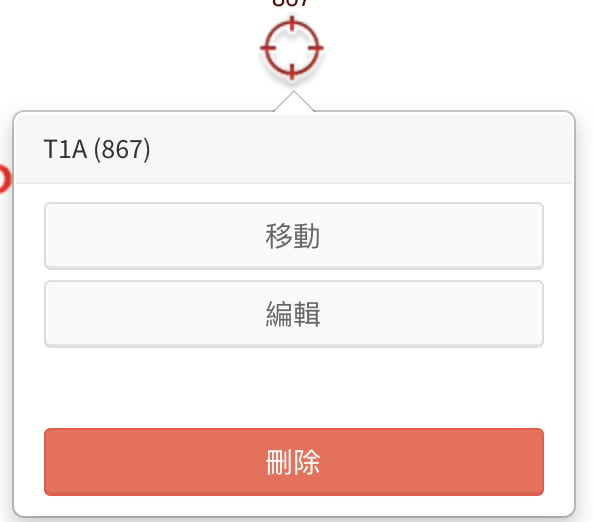
點擊位置

<img src="https://mintcdn.com/snagr/sv-OAbBsFhPJOpPC/images/direct/1566287087732-Screenshot-2019-08-20-at-3.42.35-PM.png?fit=max&auto=format&n=sv-OAbBsFhPJOpPC&q=85&s=2a8d1a642abda0241fa1da2f1f7bfcba" alt="Screenshot 2019 08 20 at 3.42.35 PM" width="594" height="522" data-path="images/direct/1566287087732-Screenshot-2019-08-20-at-3.42.35-PM.png" />

-**移動位置**，

按下“**移動**”。

將位置拖拉到您喜歡的位置，然後按“**確認**”。

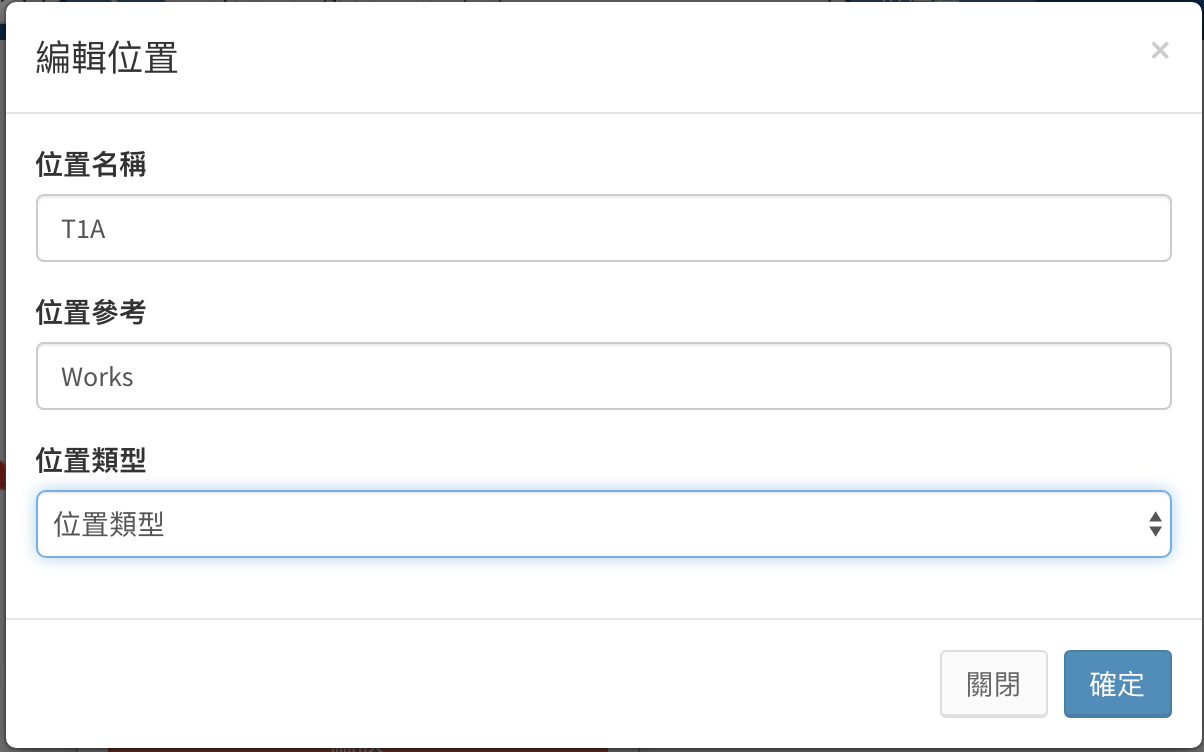
-**編輯位置**，

按“**編輯**”。

將出現一個彈出窗口，包含位置名稱，位置類型和外界參考。

更改資料，然後按“**確認**”。

<img src="https://mintcdn.com/snagr/sv-OAbBsFhPJOpPC/images/direct/1566287097534-Screenshot-2019-08-20-at-3.42.52-PM.png?fit=max&auto=format&n=sv-OAbBsFhPJOpPC&q=85&s=4c60987528ac794418c76bab430da315" alt="Screenshot 2019 08 20 at 3.42.52 PM" width="1204" height="752" data-path="images/direct/1566287097534-Screenshot-2019-08-20-at-3.42.52-PM.png" />

-**刪除位置**，

按“**刪除**”。\
然後該位置將會刪除。

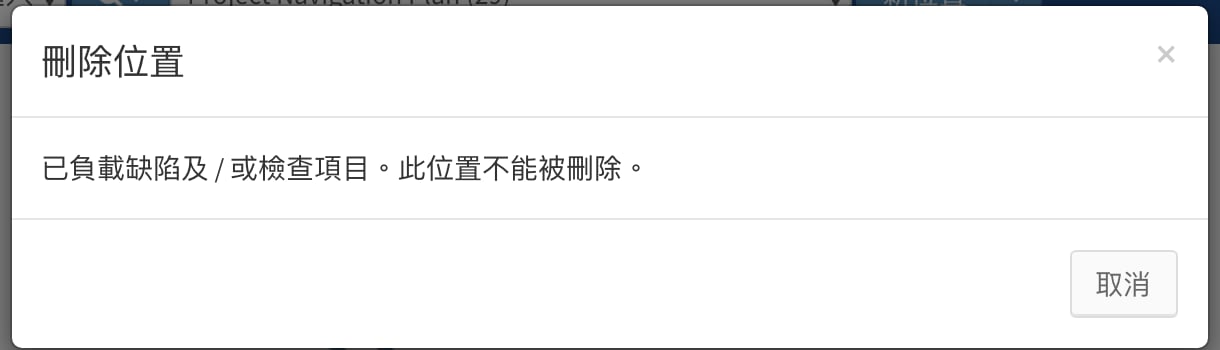
如果位置已有缺陷或檢查，您將看到一個彈出窗口，指無法刪除該位置。

<img src="https://mintcdn.com/snagr/sv-OAbBsFhPJOpPC/images/direct/1566287108472-Screenshot-2019-08-20-at-3.43.06-PM.png?fit=max&auto=format&n=sv-OAbBsFhPJOpPC&q=85&s=d1202be23393fe1a043e0a0bbe1f599c" alt="Screenshot 2019 08 20 at 3.43.06 PM" width="1220" height="350" data-path="images/direct/1566287108472-Screenshot-2019-08-20-at-3.43.06-PM.png" />

***

<img src="https://mintcdn.com/snagr/Fc-Qgss-VatVIL0b/images/uploads/123669-if_icons_mobile_1564515.png?fit=max&auto=format&n=Fc-Qgss-VatVIL0b&q=85&s=33c23172e831246883598cbf05523c0d" alt="if icons mobile 1564515" width="18" data-path="images/uploads/123669-if_icons_mobile_1564515.png" /> **裝置**

在**iOS裝備**上，我們可以這樣移動/編輯/刪除位置

要**移動** / **編輯** / **刪除**位置，請**長按**您要移動的位置。

在屏幕底部顯示位置目錄。

<img src="https://mintcdn.com/snagr/sv-OAbBsFhPJOpPC/images/direct/1566287499589-IMG_1254.PNG?fit=max&auto=format&n=sv-OAbBsFhPJOpPC&q=85&s=2e19bc45adede39813642bc03f2dccbd" alt="IMG 1254" width="750" height="1334" data-path="images/direct/1566287499589-IMG_1254.PNG" />

-**移動位置**，\
按移動圖標.

點擊屏幕移動位置。

您可以按“滾動”以拉動繪圖。

<img src="https://mintcdn.com/snagr/sv-OAbBsFhPJOpPC/images/direct/1566287534302-IMG_1252.PNG?fit=max&auto=format&n=sv-OAbBsFhPJOpPC&q=85&s=faac3512f17a9895dd742a580bf2092b" alt="IMG 1252" width="750" height="1334" data-path="images/direct/1566287534302-IMG_1252.PNG" />

按底部的 “放置” 來確認。

-**編輯位置**，\
按編輯圖標 .

當添加位置時會出現在相同的屏幕。

<img src="https://mintcdn.com/snagr/sv-OAbBsFhPJOpPC/images/direct/1566287552782-IMG_1253.PNG?fit=max&auto=format&n=sv-OAbBsFhPJOpPC&q=85&s=5526f361d11eef3b8f89570de50b3028" alt="IMG 1253" width="750" height="1334" data-path="images/direct/1566287552782-IMG_1253.PNG" />

然後按 “**添加位置**” 確認更改。

-**刪除位置**，\
按垃圾桶圖標  刪除位置。

*您只能刪除**尚未同步**的位置。*

***

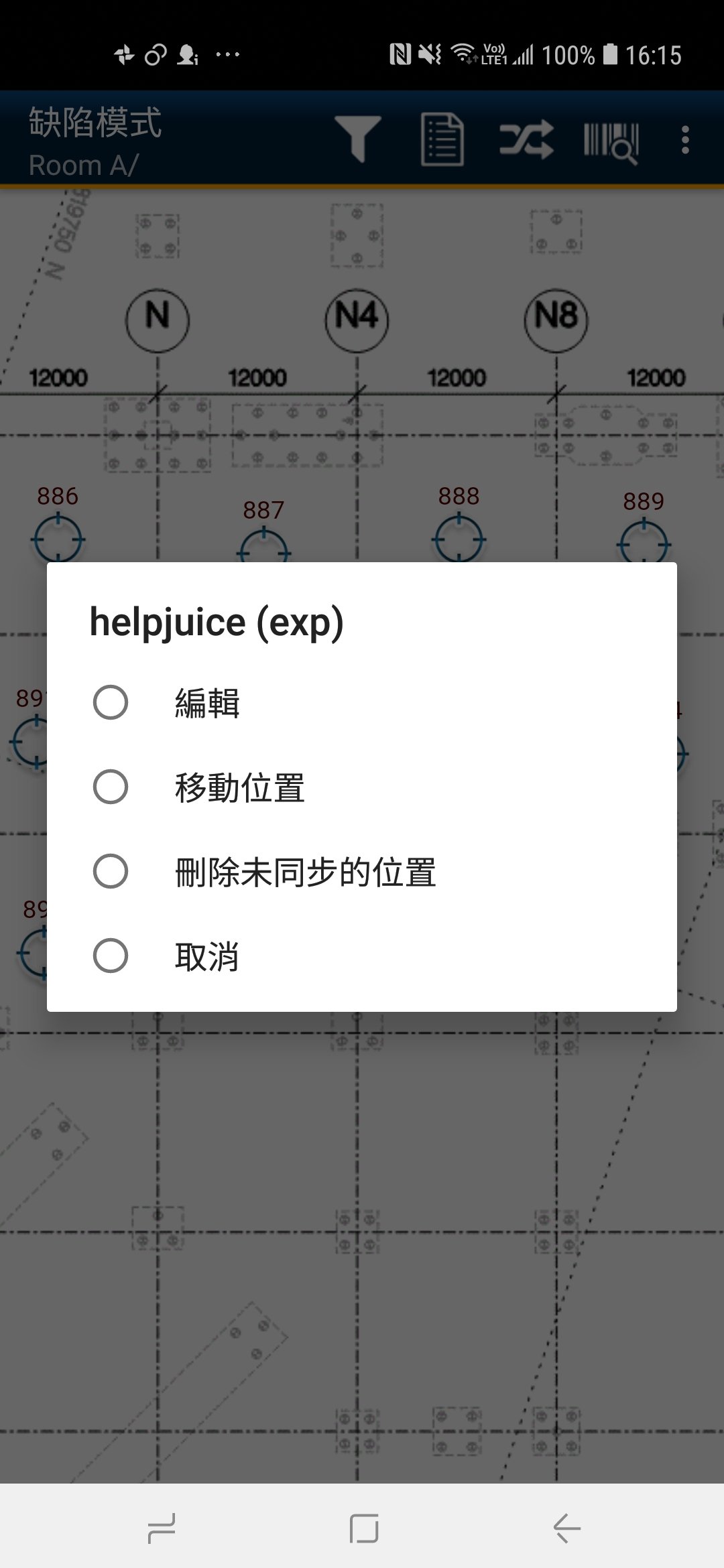
在到**Android**(安卓)**裝置**上，我們可以這樣**移動** / **編輯** / **刪除**位置

要**移動** / **編輯** / **刪除**位置，請**長按**您要編輯的位置。

在屏幕中央顯示位置目錄。

<img src="https://mintcdn.com/snagr/sv-OAbBsFhPJOpPC/images/direct/1566289098385-Screenshot_20190820-161525.jpg?fit=max&auto=format&n=sv-OAbBsFhPJOpPC&q=85&s=8f6483e3a289c5a97af1f7069d3e3f22" alt="Screenshot 20190820 161525" width="1080" height="2340" data-path="images/direct/1566289098385-Screenshot_20190820-161525.jpg" />

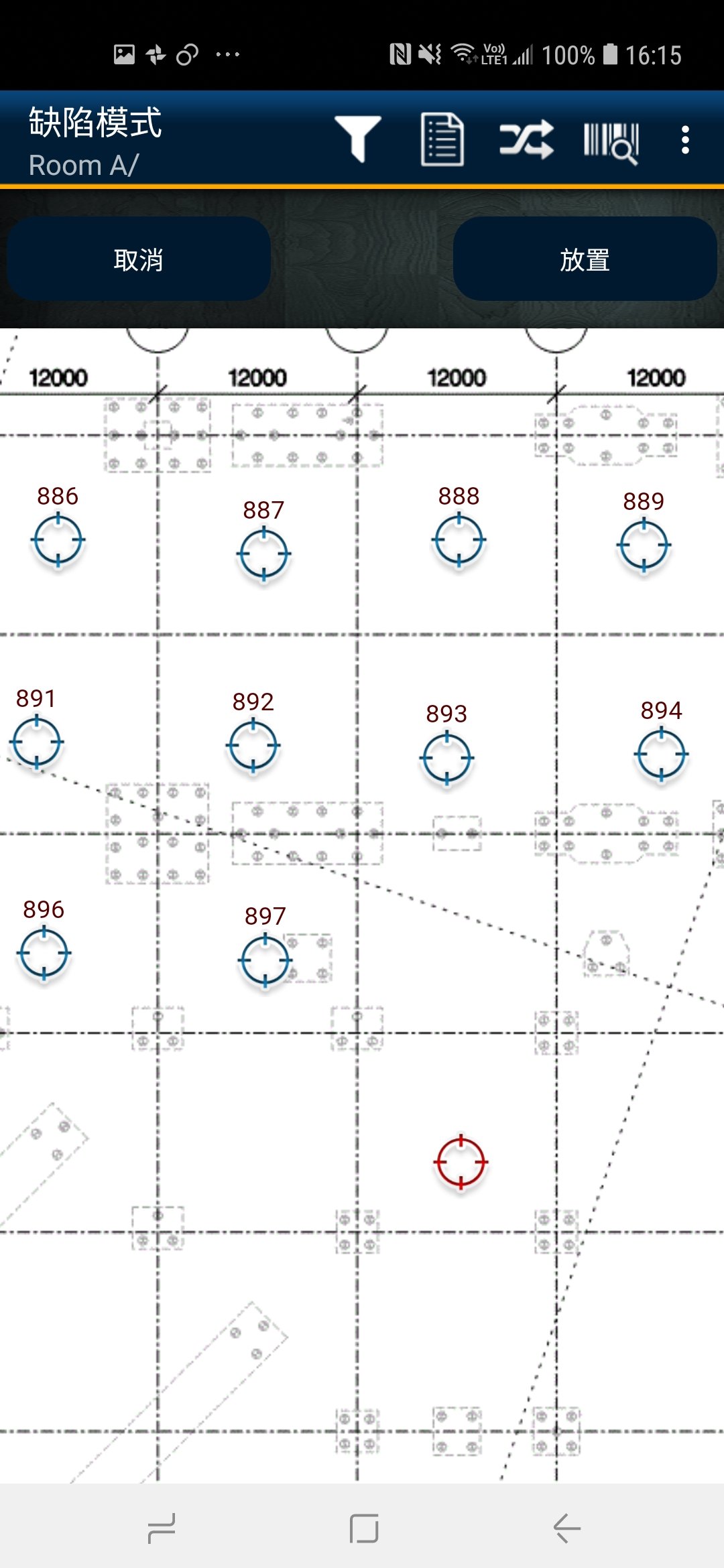
\- **移動位置**，

按“**移動位置**”，然後按屏幕移動位置，

<img src="https://mintcdn.com/snagr/sv-OAbBsFhPJOpPC/images/direct/1566289114732-Screenshot_20190820-161550.jpg?fit=max&auto=format&n=sv-OAbBsFhPJOpPC&q=85&s=1c2ea466a9ee47680ea38ff7129eaa8b" alt="Screenshot 20190820 161550" width="1080" height="2340" data-path="images/direct/1566289114732-Screenshot_20190820-161550.jpg" />

按“**放置**”確認。

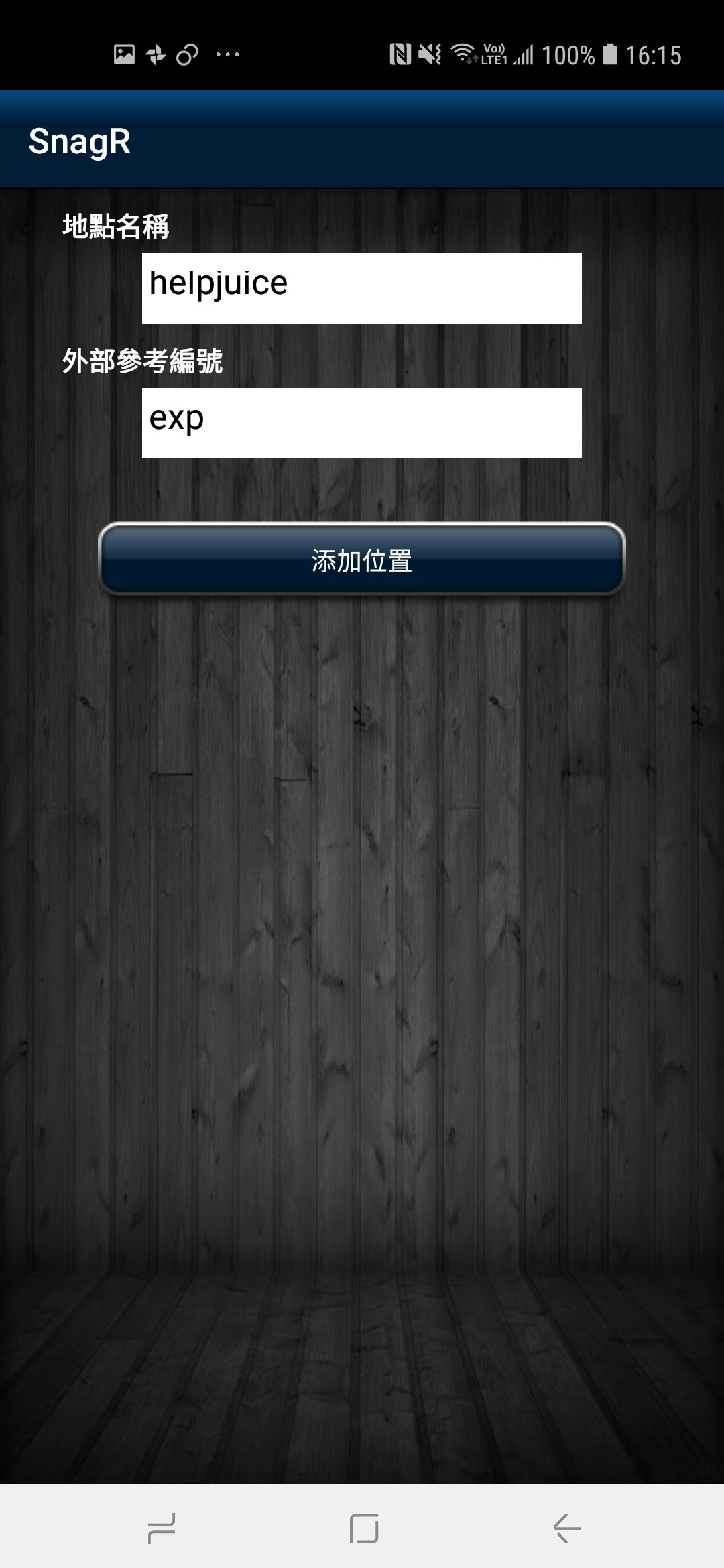
\- **編輯位置**，

按“**編輯**”，添加位置時會出現在相同的屏幕。

<img src="https://mintcdn.com/snagr/sv-OAbBsFhPJOpPC/images/direct/1566289130053-Screenshot_20190820-161533.jpg?fit=max&auto=format&n=sv-OAbBsFhPJOpPC&q=85&s=9e697efc415f316e0867765fe22fe174" alt="Screenshot 20190820 161533" width="1080" height="2340" data-path="images/direct/1566289130053-Screenshot_20190820-161533.jpg" />

更改資料，然後按“**添加位置**”。

\- **刪除位置**，

按 “**刪除未同步的位置**” 和 “**確定**” 刪除該位置。

*您只能刪除**尚未同步**的位置。*
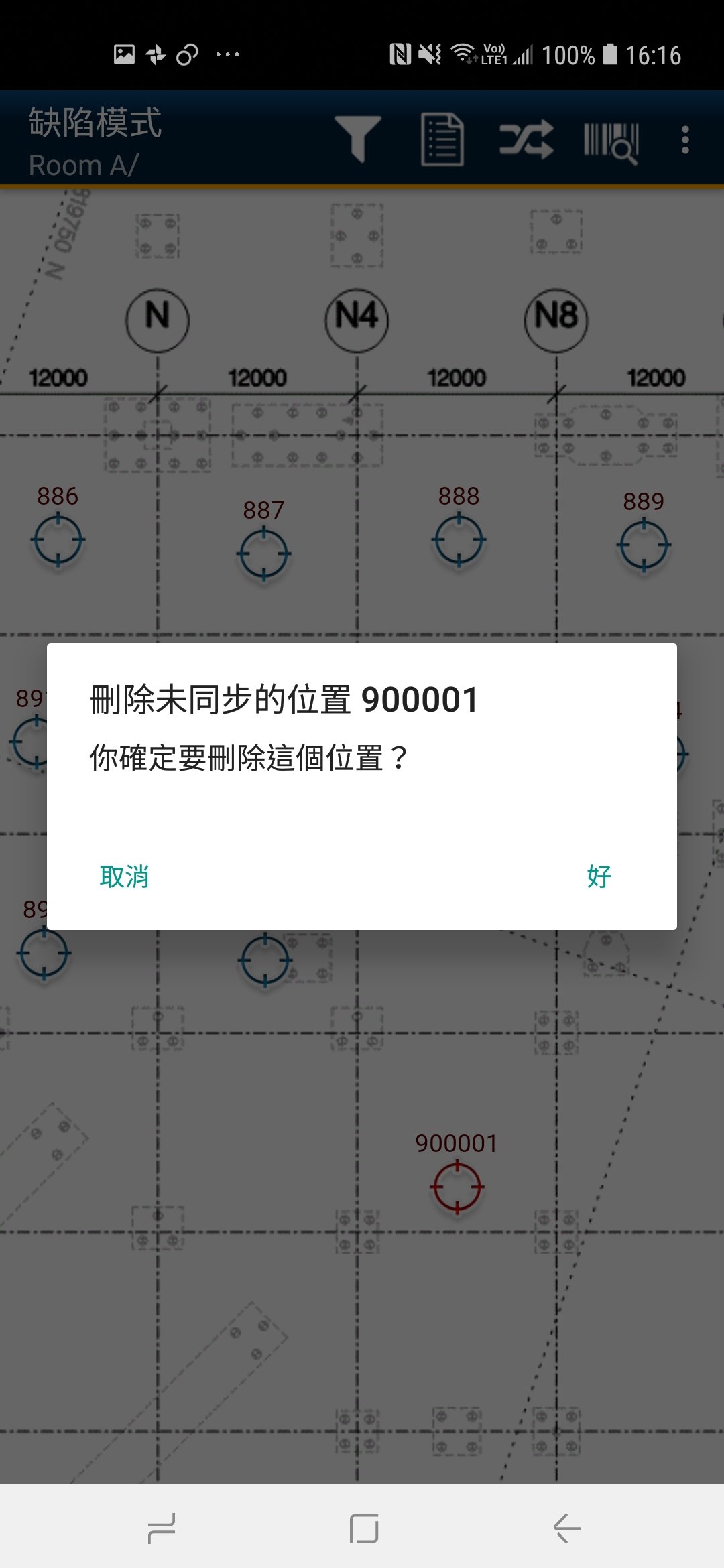
<img src="https://mintcdn.com/snagr/sv-OAbBsFhPJOpPC/images/direct/1566289150844-Screenshot_20190820-161608.jpg?fit=max&auto=format&n=sv-OAbBsFhPJOpPC&q=85&s=a95fc70d07079dc97de01f2630b97bb6" alt="Screenshot 20190820 161608" width="1080" height="2340" data-path="images/direct/1566289150844-Screenshot_20190820-161608.jpg" />