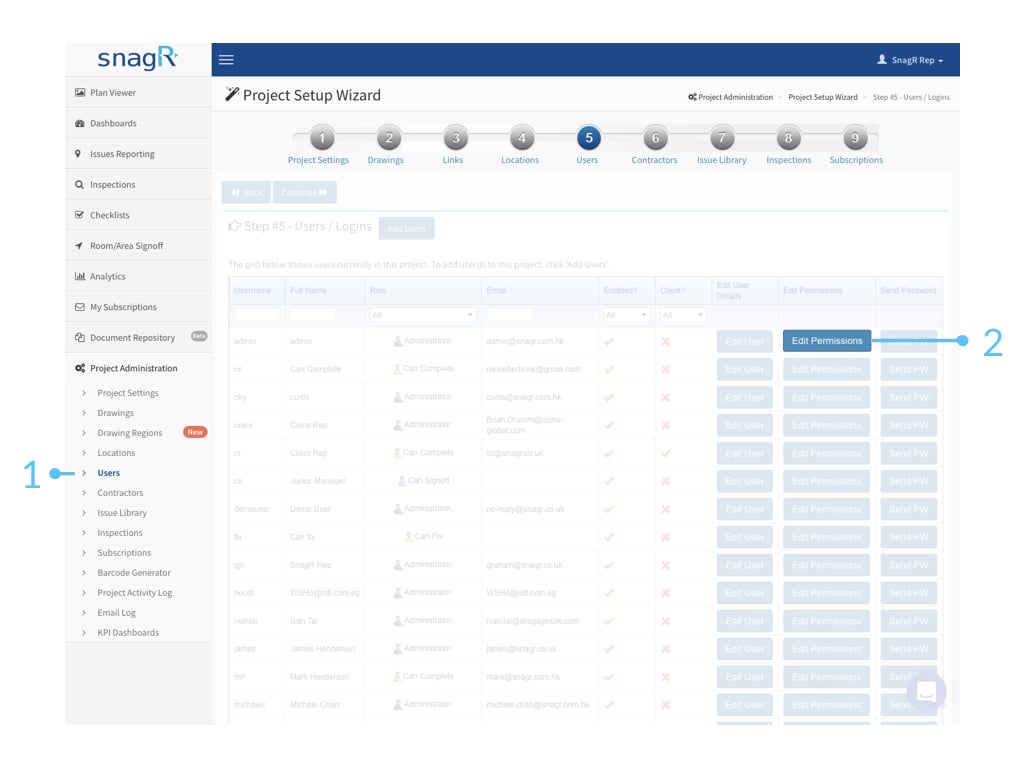
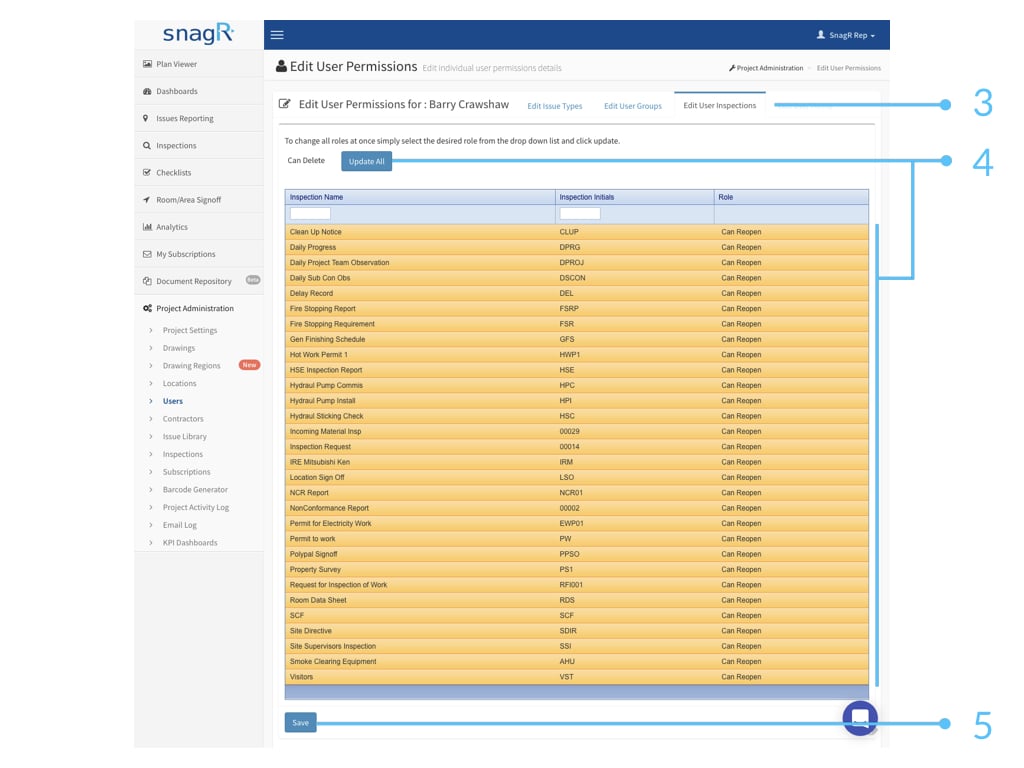
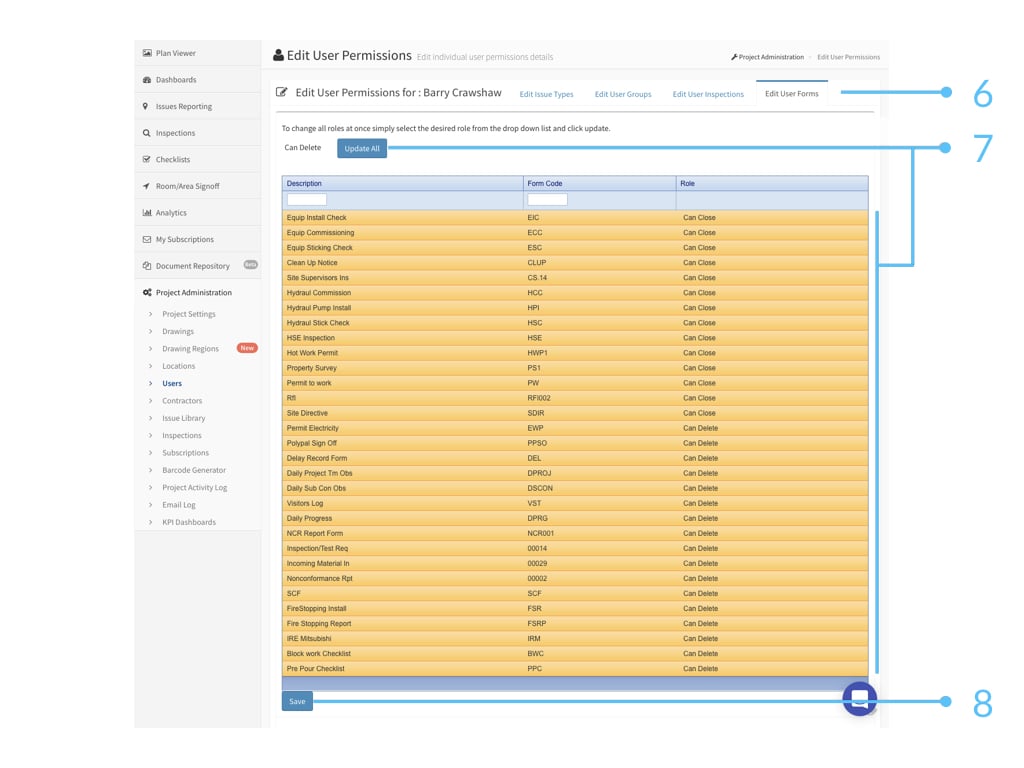
Permission settings is an important topic because not only does it ensure data security but it also defines a clear process for your project team, which a critical success factor in rolling out any systems and SnagR is no exception. When everyone knows who need to do what at when, people adopt to new systems easier.User accountsFor user accounts, go to Users > Edit Permissions.At Edit User Inspections, the permission sets are as follow:No AccessRead OnlyCan Edit (Note: to edit means the user cannot add inspections. They can only edit on existing inspections.)Can AddCan Close (Note: to close means it does not allow users to edit on the inspection anymore.)Can Reopen (Note: to reopen means it allows others to edit on the inspection form again.)Can Delete (Note: to be able to delete the inspection, the user also needs to be an administrator in issue permission sets.)At Edit User Forms, the permission sets are as follow:No AccessRead OnlyCan Edit (Note: to edit means the user can edit the form, but when a can update user updates the form field, can edit user can no longer edit it.)Can UpdateCan CloseCan Reopen (Note: to reopen the form allows others to edit on the form again.)Can Delete (Note: to be able to delete the inspection, the user also needs to be an administrator in issue permission sets.)Please update permissions at both Edit User Inspections and Edit User forms. This is because inspection is a template that consists of one or multiple forms.For batch update, use update all function at the top.Here is a mapping of the default Inspection and form permissions that comes by when setting up issue permission (please note this will no longer be available after web version v4.1.0.11578).
Issue Permission
Inspection Permission
Form Permission
Read Only
Read Only
Read Only
Can Fix
Can Edit
Can Edit
Can Sign Off
Can Close
Can Close
Can Close
Can Reopen
Can Reopen
Administrator
Can Delete
Can Delete
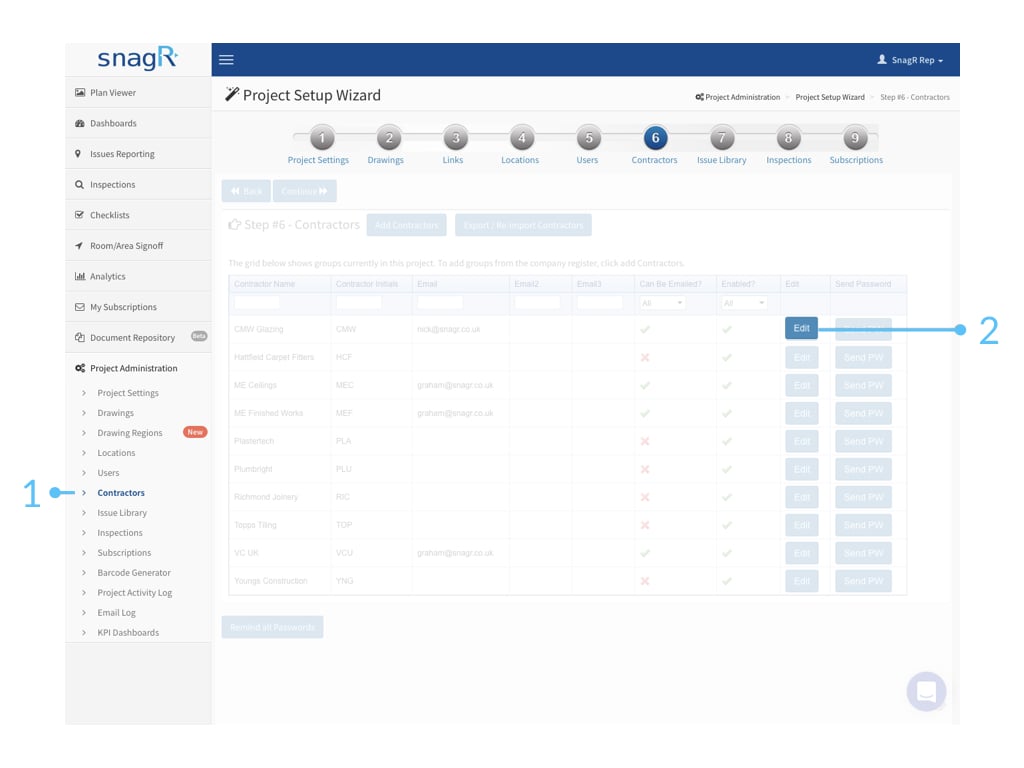
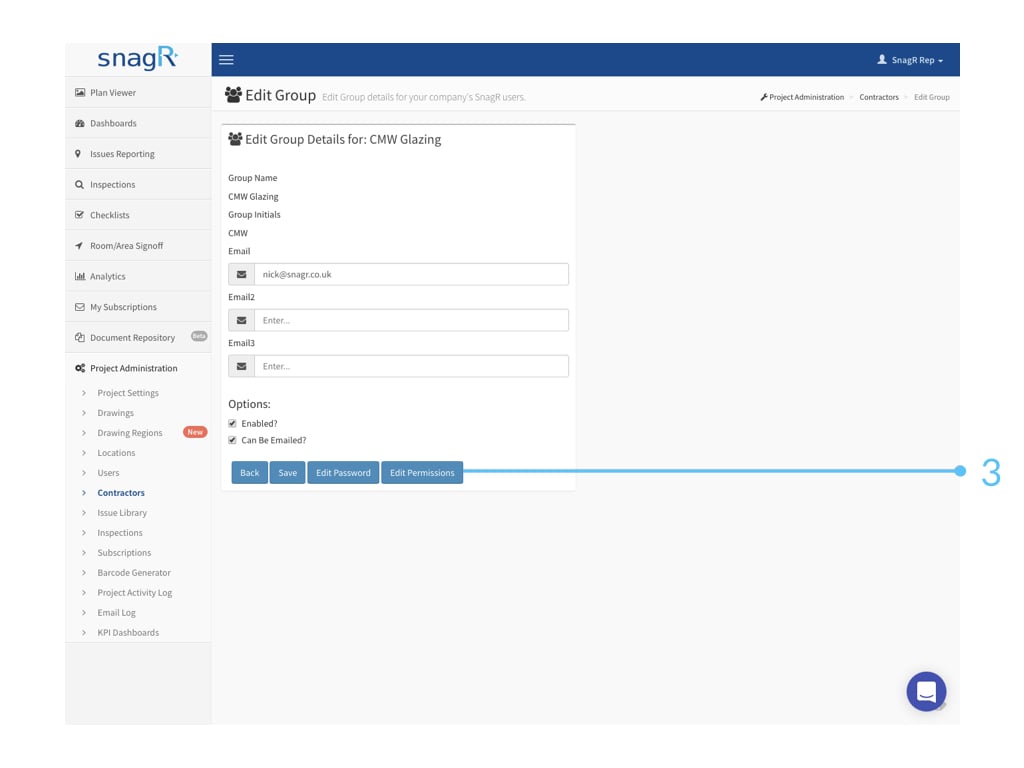
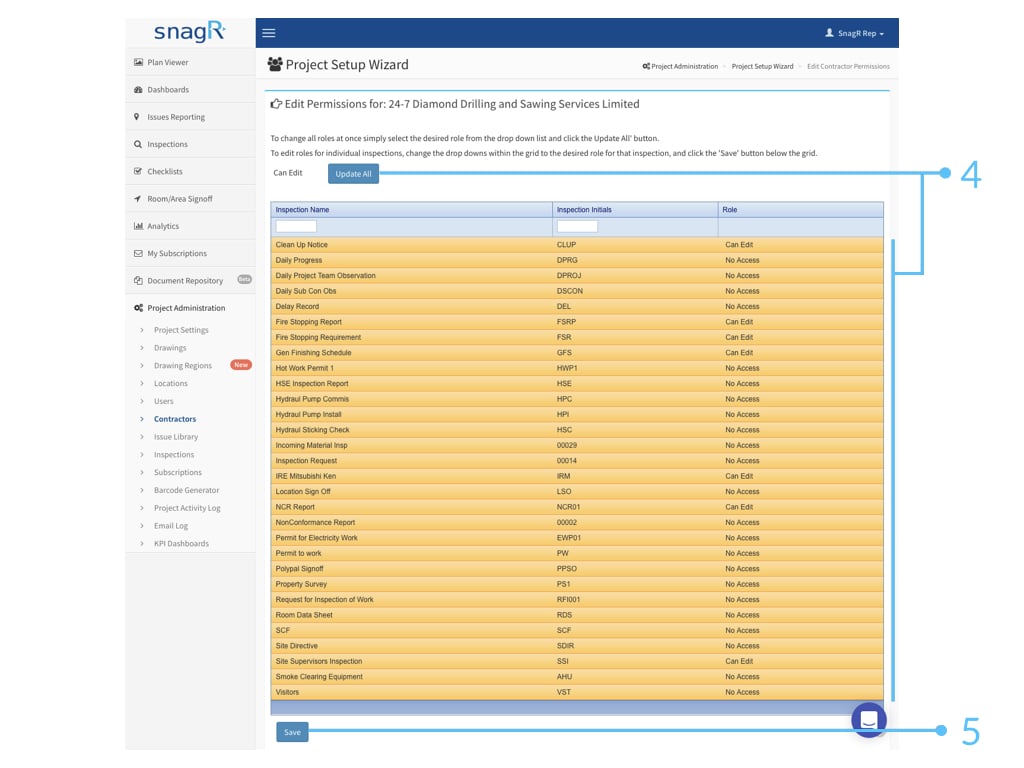
Contractor accountsFor contractor account, go to Contractors > Edit > Edit Permissions.At Edit Inspections, the permission sets are as follow:No AccessRead OnlyCan Edit (Note: to edit means the user cannot add inspections. They can only edit on existing inspections.)Can AddCan Close (Note: to close means it does not allow users to edit on the inspection anymore.)Can Reopen (Note: to reopen means it allows others to edit on the inspection form again.)Can Delete (Note: subcontractor cannot delete inspection forms as they cannot be project administrators by design.)Note: Subcontractor accounts can only see the inspections they create and they have been notified. They cannot see any other inspections.To batch update, use update all feature at the top.
{"docsConfig":{"theme":"mint","$schema":"https://mintlify.com/docs.json","name":"SnagR Support","colors":{"primary":"#004A8F","light":"#09B2E6","dark":"#0A8FBA"},"logo":{"light":"https://mintcdn.com/snagr/9U5Im1fRDoFRvv7Z/logo/light.png?fit=max\u0026auto=format\u0026n=9U5Im1fRDoFRvv7Z\u0026q=85\u0026s=5a9f70b9a8a2e54c2439431970ebc47c","dark":"https://mintcdn.com/snagr/9U5Im1fRDoFRvv7Z/logo/dark.png?fit=max\u0026auto=format\u0026n=9U5Im1fRDoFRvv7Z\u0026q=85\u0026s=3620511229c4b5583092622ab61f91ec"},"favicon":"https://mintcdn.com/snagr/Ml8zKd1uXOTgsgv2/favicon.svg?fit=max\u0026auto=format\u0026n=Ml8zKd1uXOTgsgv2\u0026q=85\u0026s=fab4219b55618095ca86e61d65e674db","contextual":{"options":["copy","view","chatgpt","claude","perplexity","mcp","cursor","vscode"],"display":"header"},"styling":{"latex":true},"navigation":{"languages":[{"language":"en","href":"en"},{"language":"nl","href":"nl"},{"language":"de","href":"de"},{"language":"it","href":"it"},{"language":"zh-Hant","href":"zh-hant"},{"language":"cn","href":"cn"}]}},"deployment":{"deploymentMetadataValue":{"subdomain":"snagr","hasAudioNarration":false,"actualSubdomain":"snagr","customDomains":["kb.snagr.co.uk"],"gitSource":{"type":"github","owner":"snagr","repo":"snagr-mintlify-kb","deployBranch":"main","contentDirectory":"","isPrivate":false,"mountPath":"","label":""},"entitlements":{"AI_CHAT":{"status":"DISABLED"},"WEB_MCP":{"status":"DISABLED"},"NARRATION":{"status":"DISABLED"}},"buildId":"6ab232001a82fb5814d97fef","clientVersion":"0.0.4227","searchFilterCounts":[{"language":"nl","tag":"Project opzetten","count":63},{"language":"en","tag":"Set up project","count":62},{"language":"de","tag":"Projekt einrichten","count":57},{"language":"it","tag":"Impostazione Progetti","count":57},{"language":"zh-Hant","tag":"項目設置","count":57},{"language":"en","tag":"New Features","count":41},{"language":"en","tag":"Release Notes","count":38},{"language":"cn","tag":"管理员模式","count":31},{"language":"en","tag":"Forms","count":27},{"language":"en","tag":"Issues","count":27},{"language":"it","tag":"Difetti","count":26},{"language":"zh-Hant","tag":"缺陷模式","count":26},{"language":"cn","tag":"缺陷模式","count":24},{"language":"zh-Hant","tag":"表格/檢查模式","count":24},{"language":"de","tag":"Fangen Sie an","count":23},{"language":"en","tag":"FAQ","count":23},{"language":"it","tag":"Ispezioni","count":23},{"language":"nl","tag":"Ga van start","count":22},{"language":"zh-Hant","tag":"常見問題","count":22},{"language":"nl","tag":"Formulieren","count":21},{"language":"nl","tag":"Veelgestelde vragen","count":21},{"language":"it","tag":"FAQ","count":20},{"language":"cn","tag":"表格模式","count":18},{"language":"de","tag":"Aktionspunkte","count":17},{"language":"nl","tag":"Actiepunten","count":17},{"language":"de","tag":"Häufig gestellte Fragen","count":16},{"language":"de","tag":"Formulare","count":15},{"language":"de","tag":"Formulare - Unternehmensebene","count":14},{"language":"nl","tag":"Formulieren - Bedrijfsniveau","count":14},{"language":"cn","tag":"入门指南","count":12},{"language":"en","tag":"Forms - Company Level","count":12},{"language":"nl","tag":"Accounts en Rechten - Projectniveau","count":12},{"language":"cn","tag":"文件管理","count":11},{"language":"de","tag":"Dokumente","count":11},{"language":"en","tag":"Documents","count":11},{"language":"en","tag":"Accounts and Permissions - Project Level","count":11},{"language":"it","tag":"Modelli di Documento - Amministrazione Societa'","count":11},{"language":"it","tag":"Repositorio Documenti","count":11},{"language":"nl","tag":"Documenten","count":11},{"language":"zh-Hant","tag":"帳戶及權限設定 - 項目管理區域","count":11},{"language":"zh-Hant","tag":"項目文件存儲庫","count":10},{"language":"zh-Hant","tag":"入門指南","count":10},{"language":"cn","tag":"图纸","count":9},{"language":"de","tag":"Konten und Rechte - Projektebene","count":9},{"language":"en","tag":"Submit Forms","count":9},{"language":"it","tag":"Utenti e Permessi-Amministrazione Progetto","count":9},{"language":"zh-Hant","tag":"圖紙 - 項目管理區域","count":9},{"language":"de","tag":"Erfolgsgeschichten","count":8},{"language":"de","tag":"Startanleitung: Wie füge ich Formulare hinzu?","count":8},{"language":"it","tag":"Casi studio","count":8},{"language":"it","tag":"Disegni - Amministrazione Progetto","count":8},{"language":"it","tag":"Impostazioni generali","count":8},{"language":"nl","tag":"Startgids: Hoe ga ik met actiepunten om?","count":8},{"language":"nl","tag":"Tekeningen - Projectniveau","count":8},{"language":"zh-Hant","tag":"一般問題","count":8},{"language":"zh-Hant","tag":"提交表格","count":8},{"language":"cn","tag":"帐户及权限设定","count":7},{"language":"cn","tag":"设定表格模板","count":7},{"language":"cn","tag":"管理文档","count":7},{"language":"cn","tag":"完成或编辑表格","count":7}]},"assistantConfig":{"enableAskAiButton":false,"enableStarterQuestions":false,"enableContextualStarterQuestions":false,"enableAskAiSearchBar":true},"basePath":"","hasChatPermissions":false,"hasWebMcpPermissions":false,"toggles":[{"name":"kill-isr","enabled":true,"variant":{"name":"disabled","enabled":false,"feature_enabled":true},"impressionData":false},{"name":"custom-rbac-roles","enabled":true,"variant":{"name":"disabled","enabled":false,"feature_enabled":true},"impressionData":false},{"name":"agent-mintlify-slack","enabled":true,"variant":{"name":"disabled","enabled":false,"feature_enabled":true},"impressionData":false},{"name":"agent-integrations-settings","enabled":true,"variant":{"name":"disabled","enabled":false,"feature_enabled":true},"impressionData":false},{"name":"rbac-expansion","enabled":true,"variant":{"name":"disabled","enabled":false,"feature_enabled":true},"impressionData":false},{"name":"automations-pr-grouping","enabled":true,"variant":{"name":"disabled","enabled":false,"feature_enabled":true},"impressionData":false},{"name":"custom-prefix","enabled":true,"variant":{"name":"disabled","enabled":false,"feature_enabled":true},"impressionData":false},{"name":"analytics-v7","enabled":true,"variant":{"name":"disabled","enabled":false,"feature_enabled":true},"impressionData":false},{"name":"user-flows-analytics","enabled":true,"variant":{"name":"disabled","enabled":false,"feature_enabled":true},"impressionData":false},{"name":"no-publish-flow","enabled":true,"variant":{"name":"disabled","enabled":false,"feature_enabled":true},"impressionData":false},{"name":"workos-onboarding","enabled":true,"variant":{"name":"disabled","enabled":false,"feature_enabled":true},"impressionData":false},{"name":"snapshot-serving-live","enabled":true,"variant":{"name":"disabled","enabled":false,"feature_enabled":true},"impressionData":false},{"name":"stripTemperatureMiddleware","enabled":true,"variant":{"name":"disabled","enabled":false,"feature_enabled":true},"impressionData":false},{"name":"support-platform-pylon-zendesk","enabled":true,"variant":{"name":"disabled","enabled":false,"feature_enabled":true},"impressionData":false},{"name":"snapshot-serving","enabled":true,"variant":{"name":"disabled","enabled":false,"feature_enabled":true},"impressionData":false},{"name":"instant-rollback","enabled":true,"variant":{"name":"disabled","enabled":false,"feature_enabled":true},"impressionData":false},{"name":"granular-notifications-server","enabled":true,"variant":{"name":"disabled","enabled":false,"feature_enabled":true},"impressionData":false},{"name":"granular-notifications","enabled":true,"variant":{"name":"disabled","enabled":false,"feature_enabled":true},"impressionData":false},{"name":"automations-fable","enabled":true,"variant":{"name":"disabled","enabled":false,"feature_enabled":true},"impressionData":false},{"name":"fixed-ai-action-pricing","enabled":true,"variant":{"name":"disabled","enabled":false,"feature_enabled":true},"impressionData":false},{"name":"automation-resolve-merge-conflict","enabled":true,"variant":{"name":"disabled","enabled":false,"feature_enabled":true},"impressionData":false},{"name":"scoped-publishing","enabled":true,"variant":{"name":"disabled","enabled":false,"feature_enabled":true},"impressionData":false},{"name":"mintql","enabled":true,"variant":{"name":"disabled","enabled":false,"feature_enabled":true},"impressionData":false},{"name":"page-level-analytics","enabled":true,"variant":{"name":"disabled","enabled":false,"feature_enabled":true},"impressionData":false},{"name":"editor-version-history-v2","enabled":true,"variant":{"name":"disabled","enabled":false,"feature_enabled":true},"impressionData":false},{"name":"billing-page-v2","enabled":true,"variant":{"name":"disabled","enabled":false,"feature_enabled":true},"impressionData":false},{"name":"full-page-search","enabled":true,"variant":{"name":"disabled","enabled":false,"feature_enabled":true},"impressionData":false},{"name":"workspace-projects","enabled":true,"variant":{"name":"disabled","enabled":false,"feature_enabled":true},"impressionData":false},{"name":"assistant-v5","enabled":true,"variant":{"name":"disabled","enabled":false,"feature_enabled":true},"impressionData":false},{"name":"fork-pr-previews","enabled":true,"variant":{"name":"disabled","enabled":false,"feature_enabled":true},"impressionData":false},{"name":"revalidation-jwt","enabled":true,"variant":{"name":"disabled","enabled":false,"feature_enabled":true},"impressionData":false},{"name":"workos-sso-scim","enabled":true,"variant":{"name":"disabled","enabled":false,"feature_enabled":true},"impressionData":false},{"name":"hobby-abuse-scan","enabled":true,"variant":{"name":"disabled","enabled":false,"feature_enabled":true},"impressionData":false},{"name":"dashboard-inbox","enabled":true,"variant":{"name":"disabled","enabled":false,"feature_enabled":true},"impressionData":false},{"name":"workos-signup","enabled":true,"variant":{"name":"disabled","enabled":false,"feature_enabled":true},"impressionData":false},{"name":"turbopuffer-dual-write","enabled":true,"variant":{"name":"disabled","enabled":false,"feature_enabled":true},"impressionData":false},{"name":"workos-enabled","enabled":true,"variant":{"name":"disabled","enabled":false,"feature_enabled":true},"impressionData":false},{"name":"approve-review-flow","enabled":true,"variant":{"name":"disabled","enabled":false,"feature_enabled":true},"impressionData":false},{"name":"editor-metadata","enabled":true,"variant":{"name":"disabled","enabled":false,"feature_enabled":true},"impressionData":false},{"name":"sso-setup-deadline-banner","enabled":true,"variant":{"name":"disabled","enabled":false,"feature_enabled":true},"impressionData":false},{"name":"turbopuffer-serve","enabled":true,"variant":{"name":"disabled","enabled":false,"feature_enabled":true},"impressionData":false},{"name":"live-agents","enabled":true,"variant":{"name":"disabled","enabled":false,"feature_enabled":true},"impressionData":false},{"name":"starter-pricing","enabled":true,"variant":{"name":"control","enabled":true,"payload":{"type":"string","value":"control"},"feature_enabled":true},"impressionData":false},{"name":"llms-txt-v2","enabled":true,"variant":{"name":"disabled","enabled":false,"feature_enabled":true},"impressionData":false},{"name":"wildcard-email-auth","enabled":true,"variant":{"name":"disabled","enabled":false,"feature_enabled":true},"impressionData":false}],"googleFontsInlined":false},"customCss":[]}
{"page":{"pagePath":"en/set-up-project/accounts-and-permissions-project-level/how-to-set-permissions-forms","slug":"/en/set-up-project/accounts-and-permissions-project-level/how-to-set-permissions-forms","pageMetadata":{"title":"How to set permissions? (Forms)","description":null,"href":"/en/set-up-project/accounts-and-permissions-project-level/how-to-set-permissions-forms"},"pageType":"default","mdx":{"mdxSource":{"compiledSource":"\"use strict\";const{Fragment:_Fragment,jsx:_jsx,jsxs:_jsxs}=arguments[0];const{useMDXComponents:_provideComponents}=arguments[0];function _createMdxContent(props){const _components={a:`a`,del:`del`,p:`p`,strong:`strong`,tbody:`tbody`,td:`td`,th:`th`,thead:`thead`,tr:`tr`,..._provideComponents(),...props.components},{OptimizedImage,Table}=_components;if(!OptimizedImage)_missingMdxReference(`OptimizedImage`,true);if(!Table)_missingMdxReference(`Table`,true);return _jsxs(_Fragment,{children:[_jsxs(_components.p,{children:[`Permission settings is an important topic because not only does it ensure data security but it also `,_jsx(_components.strong,{children:`defines a clear process`}),` for your project team, which a `,_jsx(_components.strong,{children:`critical success factor`}),` in rolling out any systems and SnagR is no exception. When everyone knows `,_jsx(_components.strong,{children:`who need to do what at when`}),`, people adopt to new systems easier.`]}),`\n`,_jsx(_components.p,{children:_jsx(_components.strong,{children:`User accounts`})}),`\n`,_jsx(_components.p,{children:`For user accounts, go to Users > Edit Permissions.`}),`\n`,_jsx(OptimizedImage,{src:`https://mintcdn.com/snagr/TvNTzzhiwQs9oAcA/images/uploads/129629-Admin_Website.068.jpeg?fit=max\u0026auto=format\u0026n=TvNTzzhiwQs9oAcA\u0026q=85\u0026s=9939343a268d334da14df027ff4bf258`,alt:`Admin Website.068`,\"data-og-width\":`1024`,width:`1024`,\"data-og-height\":`768`,height:`768`,\"data-path\":`images/uploads/129629-Admin_Website.068.jpeg`,\"data-optimize\":`true`,\"data-opv\":`3`,srcset:`https://mintcdn.com/snagr/TvNTzzhiwQs9oAcA/images/uploads/129629-Admin_Website.068.jpeg?w=280\u0026fit=max\u0026auto=format\u0026n=TvNTzzhiwQs9oAcA\u0026q=85\u0026s=5cf102debfca7364ea74aef3b635f049 280w, https://mintcdn.com/snagr/TvNTzzhiwQs9oAcA/images/uploads/129629-Admin_Website.068.jpeg?w=560\u0026fit=max\u0026auto=format\u0026n=TvNTzzhiwQs9oAcA\u0026q=85\u0026s=64865b2b0a641adca9c75536ca4cacbc 560w, https://mintcdn.com/snagr/TvNTzzhiwQs9oAcA/images/uploads/129629-Admin_Website.068.jpeg?w=840\u0026fit=max\u0026auto=format\u0026n=TvNTzzhiwQs9oAcA\u0026q=85\u0026s=eb91127d5816e179a5aaec8bd5e8ae5c 840w, https://mintcdn.com/snagr/TvNTzzhiwQs9oAcA/images/uploads/129629-Admin_Website.068.jpeg?w=1100\u0026fit=max\u0026auto=format\u0026n=TvNTzzhiwQs9oAcA\u0026q=85\u0026s=dfa71ea6eb6db187406c6310359dbe6f 1100w, https://mintcdn.com/snagr/TvNTzzhiwQs9oAcA/images/uploads/129629-Admin_Website.068.jpeg?w=1650\u0026fit=max\u0026auto=format\u0026n=TvNTzzhiwQs9oAcA\u0026q=85\u0026s=591ebace25151f705cb5f59f1b2f11f6 1650w, https://mintcdn.com/snagr/TvNTzzhiwQs9oAcA/images/uploads/129629-Admin_Website.068.jpeg?w=2500\u0026fit=max\u0026auto=format\u0026n=TvNTzzhiwQs9oAcA\u0026q=85\u0026s=7295499a352618b35a677acc74699c37 2500w`}),`\n`,_jsxs(_components.p,{children:[`At `,_jsx(_components.strong,{children:`Edit User Inspections`}),`, the permission sets are as follow:`]}),`\n`,_jsx(_components.p,{children:_jsx(_components.strong,{children:`No Access`})}),`\n`,_jsx(_components.p,{children:_jsx(_components.strong,{children:`Read Only`})}),`\n`,_jsxs(_components.p,{children:[_jsx(_components.strong,{children:`Can Edit`}),` (Note: to edit means the user cannot add inspections. They can only edit on existing inspections.)`]}),`\n`,_jsx(_components.p,{children:_jsx(_components.strong,{children:`Can Add`})}),`\n`,_jsxs(_components.p,{children:[_jsx(_components.strong,{children:`Can Close`}),` (Note: to close means it does not allow users to edit on the inspection anymore.)`]}),`\n`,_jsxs(_components.p,{children:[_jsx(_components.strong,{children:`Can Reopen`}),` (Note: to reopen means it allows others to edit on the inspection form again.)`]}),`\n`,_jsxs(_components.p,{children:[_jsx(_components.strong,{children:`Can Delete`}),` (Note: to be able to delete the inspection, the user also needs to be an administrator in `,_jsx(_components.a,{href:`/it/impostazione-progetti/utenti-e-permessi-amministrazione-progetto/how-to-set-up-form-permissions`,children:`issue permission sets`}),`.)`]}),`\n`,_jsx(OptimizedImage,{src:`https://mintcdn.com/snagr/TvNTzzhiwQs9oAcA/images/uploads/129636-Admin_Website.069.jpeg?fit=max\u0026auto=format\u0026n=TvNTzzhiwQs9oAcA\u0026q=85\u0026s=b8202f308290761f2227d01bc1c7cae5`,alt:`Admin Website.069`,\"data-og-width\":`1024`,width:`1024`,\"data-og-height\":`768`,height:`768`,\"data-path\":`images/uploads/129636-Admin_Website.069.jpeg`,\"data-optimize\":`true`,\"data-opv\":`3`,srcset:`https://mintcdn.com/snagr/TvNTzzhiwQs9oAcA/images/uploads/129636-Admin_Website.069.jpeg?w=280\u0026fit=max\u0026auto=format\u0026n=TvNTzzhiwQs9oAcA\u0026q=85\u0026s=d5ca94d3fd25854a83231104641b8c6a 280w, https://mintcdn.com/snagr/TvNTzzhiwQs9oAcA/images/uploads/129636-Admin_Website.069.jpeg?w=560\u0026fit=max\u0026auto=format\u0026n=TvNTzzhiwQs9oAcA\u0026q=85\u0026s=afb5c911c458c1ebfd116ffb6d5f029e 560w, https://mintcdn.com/snagr/TvNTzzhiwQs9oAcA/images/uploads/129636-Admin_Website.069.jpeg?w=840\u0026fit=max\u0026auto=format\u0026n=TvNTzzhiwQs9oAcA\u0026q=85\u0026s=8290783f7e83fbb4a9507b834b4d25b7 840w, https://mintcdn.com/snagr/TvNTzzhiwQs9oAcA/images/uploads/129636-Admin_Website.069.jpeg?w=1100\u0026fit=max\u0026auto=format\u0026n=TvNTzzhiwQs9oAcA\u0026q=85\u0026s=cf953c73a272a7501d0cdf8456abaf4c 1100w, https://mintcdn.com/snagr/TvNTzzhiwQs9oAcA/images/uploads/129636-Admin_Website.069.jpeg?w=1650\u0026fit=max\u0026auto=format\u0026n=TvNTzzhiwQs9oAcA\u0026q=85\u0026s=786c5f3b84ce2c6b90d3b6f60d39d5bb 1650w, https://mintcdn.com/snagr/TvNTzzhiwQs9oAcA/images/uploads/129636-Admin_Website.069.jpeg?w=2500\u0026fit=max\u0026auto=format\u0026n=TvNTzzhiwQs9oAcA\u0026q=85\u0026s=9f59f22f692edcdad29471d19b19d7c7 2500w`}),`\n`,_jsxs(_components.p,{children:[`At `,_jsx(_components.strong,{children:`Edit User Forms`}),`, the permission sets are as follow:`]}),`\n`,_jsx(_components.p,{children:_jsx(_components.strong,{children:`No Access`})}),`\n`,_jsx(_components.p,{children:_jsx(_components.strong,{children:`Read Only`})}),`\n`,_jsxs(_components.p,{children:[_jsx(_components.strong,{children:`Can Edit`}),` (Note: to edit means the user can edit the form, but when a can update user updates the form field, can edit user can no longer edit it.)`]}),`\n`,_jsx(_components.p,{children:_jsx(_components.strong,{children:`Can Update`})}),`\n`,_jsx(_components.p,{children:_jsx(_components.strong,{children:`Can Close`})}),`\n`,_jsxs(_components.p,{children:[_jsx(_components.strong,{children:`Can Reopen`}),` (Note: to reopen the form allows others to edit on the form again.)`]}),`\n`,_jsxs(_components.p,{children:[_jsx(_components.strong,{children:`Can Delete`}),` (Note: to be able to delete the inspection, the user also needs to be an administrator in `,_jsx(_components.a,{href:`/it/impostazione-progetti/utenti-e-permessi-amministrazione-progetto/how-to-set-up-form-permissions`,children:`issue permission sets`}),`.)`]}),`\n`,_jsx(OptimizedImage,{src:`https://mintcdn.com/snagr/TvNTzzhiwQs9oAcA/images/uploads/129637-Admin_Website.070.jpeg?fit=max\u0026auto=format\u0026n=TvNTzzhiwQs9oAcA\u0026q=85\u0026s=e33bf9e56894534a4fabf3e93e20a9d6`,alt:`Admin Website.070`,\"data-og-width\":`1024`,width:`1024`,\"data-og-height\":`768`,height:`768`,\"data-path\":`images/uploads/129637-Admin_Website.070.jpeg`,\"data-optimize\":`true`,\"data-opv\":`3`,srcset:`https://mintcdn.com/snagr/TvNTzzhiwQs9oAcA/images/uploads/129637-Admin_Website.070.jpeg?w=280\u0026fit=max\u0026auto=format\u0026n=TvNTzzhiwQs9oAcA\u0026q=85\u0026s=c7e4ff26976f720b4741865f115756d8 280w, https://mintcdn.com/snagr/TvNTzzhiwQs9oAcA/images/uploads/129637-Admin_Website.070.jpeg?w=560\u0026fit=max\u0026auto=format\u0026n=TvNTzzhiwQs9oAcA\u0026q=85\u0026s=7c4dea04b9172a0678e28674fbef521c 560w, https://mintcdn.com/snagr/TvNTzzhiwQs9oAcA/images/uploads/129637-Admin_Website.070.jpeg?w=840\u0026fit=max\u0026auto=format\u0026n=TvNTzzhiwQs9oAcA\u0026q=85\u0026s=4cb2c7a651681386347acdb3d83dd375 840w, https://mintcdn.com/snagr/TvNTzzhiwQs9oAcA/images/uploads/129637-Admin_Website.070.jpeg?w=1100\u0026fit=max\u0026auto=format\u0026n=TvNTzzhiwQs9oAcA\u0026q=85\u0026s=42d1629528120e6bf584aa1ab7f9f78c 1100w, https://mintcdn.com/snagr/TvNTzzhiwQs9oAcA/images/uploads/129637-Admin_Website.070.jpeg?w=1650\u0026fit=max\u0026auto=format\u0026n=TvNTzzhiwQs9oAcA\u0026q=85\u0026s=d96fe19c1e4f4e2da667674eb4821731 1650w, https://mintcdn.com/snagr/TvNTzzhiwQs9oAcA/images/uploads/129637-Admin_Website.070.jpeg?w=2500\u0026fit=max\u0026auto=format\u0026n=TvNTzzhiwQs9oAcA\u0026q=85\u0026s=d0ca9caff5ba97f219a0dc1ed5c7ffee 2500w`}),`\n`,_jsxs(_components.p,{children:[`Please update permissions at both `,_jsx(_components.strong,{children:`Edit User Inspections`}),` and `,_jsx(_components.strong,{children:`Edit User forms`}),`. This is because inspection is a template that consists of one or multiple forms.`]}),`\n`,_jsx(_components.p,{children:`For batch update, use update all function at the top.`}),`\n`,_jsx(_components.p,{children:`Here is a mapping of the default Inspection and form permissions that comes by when setting up issue permission (please note this will no longer be available after web version v4.1.0.11578).`}),`\n`,_jsxs(Table,{children:[_jsx(_components.thead,{children:_jsxs(_components.tr,{children:[_jsx(_components.th,{children:_jsx(_components.strong,{children:`Issue Permission`})}),_jsx(_components.th,{children:_jsx(_components.strong,{children:`Inspection Permission`})}),_jsx(_components.th,{children:_jsx(_components.strong,{children:`Form Permission`})})]})}),_jsxs(_components.tbody,{children:[_jsxs(_components.tr,{children:[_jsx(_components.td,{children:`Read Only`}),_jsx(_components.td,{children:`Read Only`}),_jsx(_components.td,{children:`Read Only`})]}),_jsxs(_components.tr,{children:[_jsx(_components.td,{children:`Can Fix`}),_jsx(_components.td,{children:`Can Edit`}),_jsx(_components.td,{children:`Can Edit`})]}),_jsxs(_components.tr,{children:[_jsx(_components.td,{children:`Can Sign Off`}),_jsx(_components.td,{children:`Can Close`}),_jsx(_components.td,{children:`Can Close`})]}),_jsxs(_components.tr,{children:[_jsx(_components.td,{children:`Can Close`}),_jsx(_components.td,{children:`Can Reopen`}),_jsx(_components.td,{children:`Can Reopen`})]}),_jsxs(_components.tr,{children:[_jsx(_components.td,{children:`Administrator`}),_jsx(_components.td,{children:`Can Delete`}),_jsx(_components.td,{children:`Can Delete`})]})]})]}),`\n`,_jsx(_components.p,{children:_jsx(_components.strong,{children:`Contractor accounts`})}),`\n`,_jsx(_components.p,{children:`For contractor account, go to Contractors > Edit > Edit Permissions.`}),`\n`,_jsx(OptimizedImage,{src:`https://mintcdn.com/snagr/TvNTzzhiwQs9oAcA/images/uploads/129633-Admin_Website.071.jpeg?fit=max\u0026auto=format\u0026n=TvNTzzhiwQs9oAcA\u0026q=85\u0026s=771827c4c1060f05654fef5ea7eb54e7`,alt:`Admin Website.071`,\"data-og-width\":`1024`,width:`1024`,\"data-og-height\":`768`,height:`768`,\"data-path\":`images/uploads/129633-Admin_Website.071.jpeg`,\"data-optimize\":`true`,\"data-opv\":`3`,srcset:`https://mintcdn.com/snagr/TvNTzzhiwQs9oAcA/images/uploads/129633-Admin_Website.071.jpeg?w=280\u0026fit=max\u0026auto=format\u0026n=TvNTzzhiwQs9oAcA\u0026q=85\u0026s=4937306a3a2a10634ddc5b3cd072b465 280w, https://mintcdn.com/snagr/TvNTzzhiwQs9oAcA/images/uploads/129633-Admin_Website.071.jpeg?w=560\u0026fit=max\u0026auto=format\u0026n=TvNTzzhiwQs9oAcA\u0026q=85\u0026s=3d57f8608b4d5d931f30d4991dd9323a 560w, https://mintcdn.com/snagr/TvNTzzhiwQs9oAcA/images/uploads/129633-Admin_Website.071.jpeg?w=840\u0026fit=max\u0026auto=format\u0026n=TvNTzzhiwQs9oAcA\u0026q=85\u0026s=501a02c5f7a5dc0568bba608853082f3 840w, https://mintcdn.com/snagr/TvNTzzhiwQs9oAcA/images/uploads/129633-Admin_Website.071.jpeg?w=1100\u0026fit=max\u0026auto=format\u0026n=TvNTzzhiwQs9oAcA\u0026q=85\u0026s=5790b6d2e96f6f24cfa52aad28b03059 1100w, https://mintcdn.com/snagr/TvNTzzhiwQs9oAcA/images/uploads/129633-Admin_Website.071.jpeg?w=1650\u0026fit=max\u0026auto=format\u0026n=TvNTzzhiwQs9oAcA\u0026q=85\u0026s=fc68848488dd5f4245f802fc97832189 1650w, https://mintcdn.com/snagr/TvNTzzhiwQs9oAcA/images/uploads/129633-Admin_Website.071.jpeg?w=2500\u0026fit=max\u0026auto=format\u0026n=TvNTzzhiwQs9oAcA\u0026q=85\u0026s=98dd42d7e5a500fe577132e71e6e90a2 2500w`}),`\n`,_jsx(OptimizedImage,{src:`https://mintcdn.com/snagr/TvNTzzhiwQs9oAcA/images/uploads/129634-Admin_Website.072.jpeg?fit=max\u0026auto=format\u0026n=TvNTzzhiwQs9oAcA\u0026q=85\u0026s=c2b90a84617721a1d648a3606142fa74`,alt:`Admin Website.072`,\"data-og-width\":`1024`,width:`1024`,\"data-og-height\":`768`,height:`768`,\"data-path\":`images/uploads/129634-Admin_Website.072.jpeg`,\"data-optimize\":`true`,\"data-opv\":`3`,srcset:`https://mintcdn.com/snagr/TvNTzzhiwQs9oAcA/images/uploads/129634-Admin_Website.072.jpeg?w=280\u0026fit=max\u0026auto=format\u0026n=TvNTzzhiwQs9oAcA\u0026q=85\u0026s=460af4417b53976976e23d4f9e4f08d5 280w, https://mintcdn.com/snagr/TvNTzzhiwQs9oAcA/images/uploads/129634-Admin_Website.072.jpeg?w=560\u0026fit=max\u0026auto=format\u0026n=TvNTzzhiwQs9oAcA\u0026q=85\u0026s=218f3cb7876bc8b45e94c2ba63ef2f78 560w, https://mintcdn.com/snagr/TvNTzzhiwQs9oAcA/images/uploads/129634-Admin_Website.072.jpeg?w=840\u0026fit=max\u0026auto=format\u0026n=TvNTzzhiwQs9oAcA\u0026q=85\u0026s=cee464ac449716977fa70a96163c51c0 840w, https://mintcdn.com/snagr/TvNTzzhiwQs9oAcA/images/uploads/129634-Admin_Website.072.jpeg?w=1100\u0026fit=max\u0026auto=format\u0026n=TvNTzzhiwQs9oAcA\u0026q=85\u0026s=12805982a6215c47c85a1d9ae26c4a6e 1100w, https://mintcdn.com/snagr/TvNTzzhiwQs9oAcA/images/uploads/129634-Admin_Website.072.jpeg?w=1650\u0026fit=max\u0026auto=format\u0026n=TvNTzzhiwQs9oAcA\u0026q=85\u0026s=8fe015aee7d3af8eb0674d5efac81aca 1650w, https://mintcdn.com/snagr/TvNTzzhiwQs9oAcA/images/uploads/129634-Admin_Website.072.jpeg?w=2500\u0026fit=max\u0026auto=format\u0026n=TvNTzzhiwQs9oAcA\u0026q=85\u0026s=89b31e068a99f29be7daef719144c43f 2500w`}),`\n`,_jsx(OptimizedImage,{src:`https://mintcdn.com/snagr/TvNTzzhiwQs9oAcA/images/uploads/129635-Admin_Website.073.jpeg?fit=max\u0026auto=format\u0026n=TvNTzzhiwQs9oAcA\u0026q=85\u0026s=01764bfdd1f86691f660846c0dcaed8a`,alt:`Admin Website.073`,\"data-og-width\":`1024`,width:`1024`,\"data-og-height\":`768`,height:`768`,\"data-path\":`images/uploads/129635-Admin_Website.073.jpeg`,\"data-optimize\":`true`,\"data-opv\":`3`,srcset:`https://mintcdn.com/snagr/TvNTzzhiwQs9oAcA/images/uploads/129635-Admin_Website.073.jpeg?w=280\u0026fit=max\u0026auto=format\u0026n=TvNTzzhiwQs9oAcA\u0026q=85\u0026s=b92e1f5fa900f907d171b55e8bb982a8 280w, https://mintcdn.com/snagr/TvNTzzhiwQs9oAcA/images/uploads/129635-Admin_Website.073.jpeg?w=560\u0026fit=max\u0026auto=format\u0026n=TvNTzzhiwQs9oAcA\u0026q=85\u0026s=f14ea8844600b73ff2416789d4a034eb 560w, https://mintcdn.com/snagr/TvNTzzhiwQs9oAcA/images/uploads/129635-Admin_Website.073.jpeg?w=840\u0026fit=max\u0026auto=format\u0026n=TvNTzzhiwQs9oAcA\u0026q=85\u0026s=17789c976a0ce2872f1ea00f3596118c 840w, https://mintcdn.com/snagr/TvNTzzhiwQs9oAcA/images/uploads/129635-Admin_Website.073.jpeg?w=1100\u0026fit=max\u0026auto=format\u0026n=TvNTzzhiwQs9oAcA\u0026q=85\u0026s=8b11812dff6b4b6a113bacc4c3a6173b 1100w, https://mintcdn.com/snagr/TvNTzzhiwQs9oAcA/images/uploads/129635-Admin_Website.073.jpeg?w=1650\u0026fit=max\u0026auto=format\u0026n=TvNTzzhiwQs9oAcA\u0026q=85\u0026s=1b7eea20298ed20523758ef98990e0ba 1650w, https://mintcdn.com/snagr/TvNTzzhiwQs9oAcA/images/uploads/129635-Admin_Website.073.jpeg?w=2500\u0026fit=max\u0026auto=format\u0026n=TvNTzzhiwQs9oAcA\u0026q=85\u0026s=e2bd01b1b80ab2666847bb56eab9d6ad 2500w`}),`\n`,_jsxs(_components.p,{children:[`At `,_jsx(_components.strong,{children:`Edit Inspections`}),`, the permission sets are as follow:`]}),`\n`,_jsx(_components.p,{children:_jsx(_components.strong,{children:`No Access`})}),`\n`,_jsx(_components.p,{children:_jsx(_components.strong,{children:`Read Only`})}),`\n`,_jsxs(_components.p,{children:[_jsx(_components.strong,{children:`Can Edit`}),` (Note: to edit means the user cannot add inspections. They can only edit on existing inspections.)`]}),`\n`,_jsx(_components.p,{children:_jsx(_components.strong,{children:`Can Add`})}),`\n`,_jsxs(_components.p,{children:[_jsx(_components.strong,{children:`Can Close`}),` (Note: to close means it does not allow users to edit on the inspection anymore.)`]}),`\n`,_jsxs(_components.p,{children:[_jsx(_components.strong,{children:`Can Reopen`}),` (Note: to reopen means it allows others to edit on the inspection form again.)`]}),`\n`,_jsxs(_components.p,{children:[_jsx(_components.strong,{children:_jsx(_components.del,{children:`Can Delete`})}),` (Note: subcontractor cannot delete inspection forms as they cannot be project administrators by design.)`]}),`\n`,_jsxs(_components.p,{children:[_jsx(OptimizedImage,{src:`https://mintcdn.com/snagr/6FPuNAyw7DoC3mW5/images/direct/1526010613762-exclamation-mark.png?fit=max\u0026auto=format\u0026n=6FPuNAyw7DoC3mW5\u0026q=85\u0026s=018131000fbb64dab50da5e78db5ad7e`,alt:`exclamation mark`,width:`24`,\"data-og-width\":`256`,\"data-og-height\":`256`,\"data-path\":`images/direct/1526010613762-exclamation-mark.png`,\"data-optimize\":`true`,\"data-opv\":`3`,srcset:`https://mintcdn.com/snagr/6FPuNAyw7DoC3mW5/images/direct/1526010613762-exclamation-mark.png?w=280\u0026fit=max\u0026auto=format\u0026n=6FPuNAyw7DoC3mW5\u0026q=85\u0026s=aadecdf5bb300da721aeeeeddfd1692a 280w, https://mintcdn.com/snagr/6FPuNAyw7DoC3mW5/images/direct/1526010613762-exclamation-mark.png?w=560\u0026fit=max\u0026auto=format\u0026n=6FPuNAyw7DoC3mW5\u0026q=85\u0026s=f620323611e9164fba1ac48392cfb8ac 560w, https://mintcdn.com/snagr/6FPuNAyw7DoC3mW5/images/direct/1526010613762-exclamation-mark.png?w=840\u0026fit=max\u0026auto=format\u0026n=6FPuNAyw7DoC3mW5\u0026q=85\u0026s=86d89c46ec5cc9c2db054789b4417be7 840w, https://mintcdn.com/snagr/6FPuNAyw7DoC3mW5/images/direct/1526010613762-exclamation-mark.png?w=1100\u0026fit=max\u0026auto=format\u0026n=6FPuNAyw7DoC3mW5\u0026q=85\u0026s=f036e7bb3a2ce6683fef74238547504f 1100w, https://mintcdn.com/snagr/6FPuNAyw7DoC3mW5/images/direct/1526010613762-exclamation-mark.png?w=1650\u0026fit=max\u0026auto=format\u0026n=6FPuNAyw7DoC3mW5\u0026q=85\u0026s=700be37e4e20da7db71c0c77ec2a2b91 1650w, https://mintcdn.com/snagr/6FPuNAyw7DoC3mW5/images/direct/1526010613762-exclamation-mark.png?w=2500\u0026fit=max\u0026auto=format\u0026n=6FPuNAyw7DoC3mW5\u0026q=85\u0026s=5cb08d8aef56fe2c0161414405416dca 2500w`,inline:true}),`Note: Subcontractor accounts can only see the inspections they create and they have been notified. They cannot see any other inspections.`]}),`\n`,_jsx(_components.p,{children:`To batch update, use update all feature at the top.`})]})}function MDXContent(props={}){const{wrapper:MDXLayout}={..._provideComponents(),...props.components};return MDXLayout?_jsx(MDXLayout,{...props,children:_jsx(_createMdxContent,{...props})}):_createMdxContent(props)}return{default:MDXContent};function _missingMdxReference(id,component){throw new Error(`Expected `+(component?`component`:`object`)+\" `\"+id+\"` to be defined: you likely forgot to import, pass, or provide it.\")}","frontmatter":{},"scope":{"config":{},"pageMetadata":{"title":"How to set permissions? (Forms)","description":null,"href":"/en/set-up-project/accounts-and-permissions-project-level/how-to-set-permissions-forms"}}},"mdxSourceWithNoJs":null},"mdxExtracts":{"tableOfContents":[],"codeExamples":{}},"jsLinks":[],"subdomain":"snagr","siteName":"SnagR Support","title":"How to set permissions? (Forms) - SnagR Support","navMaps":{"firstHrefInVersion":{},"firstHrefInLanguage":{"en":{"href":"/en/set-up-project/accounts-and-permissions-project-level/how-to-set-permissions-forms","matchLevel":0},"nl":{"href":"/nl","matchLevel":3},"de":{"href":"/de","matchLevel":3},"it":{"href":"/it","matchLevel":3},"zh-Hant":{"href":"/zh-hant","matchLevel":3},"cn":{"href":"/cn","matchLevel":3}}},"lastModified":"2026-09-22T07:45:38.511Z","originalFileLocation":"en/set-up-project/accounts-and-permissions-project-level/how-to-set-permissions-forms.mdx","locale":"en"},"headHtml":"\u003cscript data-mint-head>(function(){var d=document.documentElement,p=null;if(!p){try{p=localStorage.getItem(\"isDarkMode\")}catch(e){}if(p==='true')p='dark';else if(p==='false')p='light';if(p!=='light'\u0026\u0026p!=='dark'\u0026\u0026p!=='system')p=\"system\"}var r=p==='system'?(matchMedia(\"(prefers-color-scheme: dark)\").matches?'dark':'light'):p;d.classList.remove(r==='dark'?'light':'dark');d.classList.add(r);d.setAttribute(\"data-theme-preference\",p)})();\u003c/script>\u003cmeta data-mint-head name=\"application-name\" content=\"SnagR Support\">\u003cmeta data-mint-head name=\"generator\" content=\"Mintlify\">\u003clink data-mint-head rel=\"icon\" type=\"image/png\" sizes=\"192x192\" href=\"/mintlify-assets/_mintlify/favicons/snagr/2WgZzfCjV36zP3Iz/_generated/favicon/android-chrome-192x192.png\" media=\"(prefers-color-scheme: light)\">\u003clink data-mint-head rel=\"apple-touch-icon\" type=\"image/png\" sizes=\"180x180\" href=\"/mintlify-assets/_mintlify/favicons/snagr/2WgZzfCjV36zP3Iz/_generated/favicon/apple-touch-icon.png\">\u003clink data-mint-head rel=\"icon\" type=\"image/png\" sizes=\"16x16\" href=\"/mintlify-assets/_mintlify/favicons/snagr/2WgZzfCjV36zP3Iz/_generated/favicon/favicon-16x16.png\" media=\"(prefers-color-scheme: light)\">\u003clink data-mint-head rel=\"icon\" type=\"image/png\" sizes=\"32x32\" href=\"/mintlify-assets/_mintlify/favicons/snagr/2WgZzfCjV36zP3Iz/_generated/favicon/favicon-32x32.png\" media=\"(prefers-color-scheme: light)\">\u003clink data-mint-head rel=\"shortcut icon\" type=\"image/x-icon\" href=\"/mintlify-assets/_mintlify/favicons/snagr/2WgZzfCjV36zP3Iz/_generated/favicon/favicon.ico\" media=\"(prefers-color-scheme: light)\">\u003clink data-mint-head rel=\"icon\" type=\"image/png\" sizes=\"192x192\" href=\"/mintlify-assets/_mintlify/favicons/snagr/2WgZzfCjV36zP3Iz/_generated/favicon-dark/android-chrome-192x192.png\" media=\"(prefers-color-scheme: dark)\">\u003clink data-mint-head rel=\"icon\" type=\"image/png\" sizes=\"16x16\" href=\"/mintlify-assets/_mintlify/favicons/snagr/2WgZzfCjV36zP3Iz/_generated/favicon-dark/favicon-16x16.png\" media=\"(prefers-color-scheme: dark)\">\u003clink data-mint-head rel=\"icon\" type=\"image/png\" sizes=\"32x32\" href=\"/mintlify-assets/_mintlify/favicons/snagr/2WgZzfCjV36zP3Iz/_generated/favicon-dark/favicon-32x32.png\" media=\"(prefers-color-scheme: dark)\">\u003clink data-mint-head rel=\"shortcut icon\" type=\"image/x-icon\" href=\"/mintlify-assets/_mintlify/favicons/snagr/2WgZzfCjV36zP3Iz/_generated/favicon-dark/favicon.ico\" media=\"(prefers-color-scheme: dark)\">\u003cmeta data-mint-head property=\"og:title\" content=\"How to set permissions? (Forms) - SnagR Support\">\u003cmeta data-mint-head property=\"og:site_name\" content=\"SnagR Support\">\u003cmeta data-mint-head property=\"og:url\" content=\"https://kb.snagr.co.uk/en/set-up-project/accounts-and-permissions-project-level/how-to-set-permissions-forms\">\u003cmeta data-mint-head property=\"og:type\" content=\"website\">\u003cmeta data-mint-head property=\"og:image\" content=\"https://snagr.mintlify.site/_mintlify/api/og/v2?division=Accounts+and+Permissions+-+Project+Level\u0026amp;title=How+to+set+permissions%3F+%28Forms%29\u0026amp;theme=f53dd1e56518cc693bc8ae0a\u0026amp;signature=69f6c48950e78ed627ac9b8ec03adddc47a0875f3ca2c2c2351c8b314507f725\">\u003cmeta data-mint-head property=\"og:image:width\" content=\"1200\">\u003cmeta data-mint-head property=\"og:image:height\" content=\"630\">\u003cmeta data-mint-head name=\"twitter:card\" content=\"summary_large_image\">\u003cmeta data-mint-head name=\"twitter:title\" content=\"How to set permissions? (Forms) - SnagR Support\">\u003cmeta data-mint-head name=\"twitter:image\" content=\"https://snagr.mintlify.site/_mintlify/api/og/v2?division=Accounts+and+Permissions+-+Project+Level\u0026amp;title=How+to+set+permissions%3F+%28Forms%29\u0026amp;theme=f53dd1e56518cc693bc8ae0a\u0026amp;signature=69f6c48950e78ed627ac9b8ec03adddc47a0875f3ca2c2c2351c8b314507f725\">\u003cmeta data-mint-head name=\"twitter:image:width\" content=\"1200\">\u003cmeta data-mint-head name=\"twitter:image:height\" content=\"630\">\u003cmeta data-mint-head name=\"msapplication-config\" content=\"/mintlify-assets/_mintlify/favicons/snagr/2WgZzfCjV36zP3Iz/_generated/favicon/browserconfig.xml\">\u003cmeta data-mint-head name=\"apple-mobile-web-app-title\" content=\"SnagR Support\">\u003cmeta data-mint-head name=\"msapplication-TileColor\" content=\"#004A8F\">\u003clink data-mint-head rel=\"canonical\" href=\"https://kb.snagr.co.uk/en/set-up-project/accounts-and-permissions-project-level/how-to-set-permissions-forms\">\u003clink data-mint-head rel=\"alternate\" type=\"application/xml\" href=\"/sitemap.xml\">\u003clink data-mint-head rel=\"alternate\" type=\"text/markdown\" href=\"/en/set-up-project/accounts-and-permissions-project-level/how-to-set-permissions-forms.md\">\u003cscript data-mint-head type=\"application/ld+json\">{\"@context\":\"https://schema.org\",\"@graph\":[{\"@type\":\"Organization\",\"@id\":\"https://kb.snagr.co.uk/#organization\",\"name\":\"SnagR Support\",\"url\":\"https://kb.snagr.co.uk\",\"logo\":{\"@type\":\"ImageObject\",\"url\":\"https://mintcdn.com/snagr/9U5Im1fRDoFRvv7Z/logo/light.png?fit=max\u0026auto=format\u0026n=9U5Im1fRDoFRvv7Z\u0026q=85\u0026s=5a9f70b9a8a2e54c2439431970ebc47c\"}},{\"@type\":\"WebSite\",\"@id\":\"https://kb.snagr.co.uk#website\",\"name\":\"SnagR Support\",\"url\":\"https://kb.snagr.co.uk\",\"publisher\":{\"@id\":\"https://kb.snagr.co.uk/#organization\"}},{\"@type\":\"WebPage\",\"@id\":\"https://kb.snagr.co.uk/en/set-up-project/accounts-and-permissions-project-level/how-to-set-permissions-forms#webpage\",\"url\":\"https://kb.snagr.co.uk/en/set-up-project/accounts-and-permissions-project-level/how-to-set-permissions-forms\",\"name\":\"How to set permissions? (Forms)\",\"dateModified\":\"2026-09-22T07:45:38.511Z\",\"isPartOf\":{\"@id\":\"https://kb.snagr.co.uk#website\"},\"breadcrumb\":{\"@id\":\"https://kb.snagr.co.uk/en/set-up-project/accounts-and-permissions-project-level/how-to-set-permissions-forms#breadcrumb\"}},{\"@type\":\"BreadcrumbList\",\"@id\":\"https://kb.snagr.co.uk/en/set-up-project/accounts-and-permissions-project-level/how-to-set-permissions-forms#breadcrumb\",\"itemListElement\":[{\"@type\":\"ListItem\",\"position\":1,\"name\":\"Set up project\",\"item\":\"https://kb.snagr.co.uk/en/set-up-project/drawings-project-level/how-to-group-drawings\"},{\"@type\":\"ListItem\",\"position\":2,\"name\":\"Accounts and Permissions - Project Level\",\"item\":\"https://kb.snagr.co.uk/en/set-up-project/accounts-and-permissions-project-level/how-to-add-users-to-project\"},{\"@type\":\"ListItem\",\"position\":3,\"name\":\"How to set permissions? (Forms)\",\"item\":\"https://kb.snagr.co.uk/en/set-up-project/accounts-and-permissions-project-level/how-to-set-permissions-forms\"}]},{\"@type\":[\"Article\",\"TechArticle\"],\"@id\":\"https://kb.snagr.co.uk/en/set-up-project/accounts-and-permissions-project-level/how-to-set-permissions-forms#article\",\"headline\":\"How to set permissions? (Forms)\",\"name\":\"How to set permissions? (Forms)\",\"url\":\"https://kb.snagr.co.uk/en/set-up-project/accounts-and-permissions-project-level/how-to-set-permissions-forms\",\"mainEntityOfPage\":{\"@id\":\"https://kb.snagr.co.uk/en/set-up-project/accounts-and-permissions-project-level/how-to-set-permissions-forms#webpage\"},\"dateModified\":\"2026-09-22T07:45:38.511Z\",\"publisher\":{\"@id\":\"https://kb.snagr.co.uk/#organization\"},\"isPartOf\":{\"@id\":\"https://kb.snagr.co.uk#website\"}}]}\u003c/script>\u003cscript data-mint-head type=\"application/ld+json\">{\"@context\":\"https://schema.org\",\"@type\":\"WebSite\",\"name\":\"SnagR Support\",\"publisher\":{\"@type\":\"Organization\",\"name\":\"SnagR Support\"},\"provider\":{\"@type\":\"Organization\",\"name\":\"Mintlify\",\"url\":\"https://mintlify.com\"}}\u003c/script>","agentPointerHref":"/en/set-up-project/accounts-and-permissions-project-level/how-to-set-permissions-forms.md","siteName":"SnagR Support","nav":{"global":null,"languages":[{"language":"en","groups":[{"group":"SnagR Support","pages":[{"title":"SnagR Support","href":"/en"}]},{"group":"Getting Started","pages":[{"group":"What is your role?","pages":[{"title":"Subcontractor","href":"/en/getting-started/what-is-your-role/subcontractor"},{"title":"Main Contractor","href":"/en/getting-started/what-is-your-role/main-contractor"},{"title":"Developer","href":"/en/getting-started/what-is-your-role/developer"},{"title":"Manufacturer","href":"/en/getting-started/what-is-your-role/manufacturer"}]},{"group":"Starter Guide: How do I take issues?","pages":[{"title":"Starter Guide: How do I take issues?","href":"/en/getting-started/starter-guide-how-do-i-take-issues/index"}]},{"group":"Starter Guide: How to submit forms?","pages":[{"title":"Starter Guide: How to submit forms?","href":"/en/getting-started/starter-guide-how-to-submit-forms/index"}]}]},{"group":"Issues","pages":[{"group":"Add Issues","pages":[{"title":"How to add an issue?","href":"/en/issues/add-issues/how-to-add-an-issue"},{"title":"Can I add multiple issues on the same spot?","href":"/en/issues/add-issues/how-to-add-multiple-issues-on-the-same-spot"},{"title":"Can I add more photos to an issue?","href":"/en/issues/add-issues/can-i-add-more-photos-to-an-issue"},{"title":"Can I \"copy and paste\" an issue?","href":"/en/issues/add-issues/can-i-copy-and-paste-an-issue"},{"title":"What is \"Add Future Issue\"?","href":"/en/issues/add-issues/what-is-add-future-issue"},{"title":"Can I define photo size?","href":"/en/issues/add-issues/can-i-define-photo-size"},{"title":"Can I save commonly used issue descriptions?","href":"/en/issues/add-issues/add-the-previous-issue"}]},{"group":"Update Issues","pages":[{"title":"How to update / close issues?","href":"/en/issues/update-issues/how-to-update-issues"},{"title":"The issue pins have different colours. What do they mean?","href":"/en/issues/update-issues/what-do-the-pin-colours-represent"},{"title":"Can I send a notification regarding an issue or update?","href":"/en/issues/update-issues/how-do-i-send-a-notification-regarding-an-issue"}]},{"group":"Find Issues","pages":[{"title":"How do I search for issues?","href":"/en/issues/find-issues/how-do-i-search-issues-on-device"},{"title":"Where do I see issue notifications?","href":"/en/issues/find-issues/where-do-i-see-issue-notifications"},{"title":"How to view issue history?","href":"/en/issues/find-issues/how-to-view-issue-history"},{"title":"Can I filter issues on drawings?","href":"/en/issues/find-issues/filtering-issues-on-device"}]},{"group":"Edit Issues","pages":[{"title":"Can I edit issues?","href":"/en/issues/edit-issues/can-i-edit-issues"},{"title":"Can I batch edit issues?","href":"/en/issues/edit-issues/how-to-batch-edit-issues"},{"title":"Can I delete issues?","href":"/en/issues/edit-issues/can-i-delete-issues"},{"title":"Can I move an issue pin?","href":"/en/issues/edit-issues/can-i-move-an-issue-pin"},{"title":"Issue pins overlap on each other. It's difficult to click on them. How can this be fixed?","href":"/en/issues/edit-issues/how-to-organise-issue-pins-that-overlap-on-each-other"},{"title":"How to break items out from a plot with multiple issues?","href":"/en/issues/edit-issues/how-to-break-items-out-from-a-plot-with-multiple-issues"}]},{"group":"Report and Analytics","pages":[{"title":"How to generate an issue report?","href":"/en/issues/report-and-analytics/how-to-generate-an-issue-report"},{"title":"Can issue reports be generated automatically?","href":"/en/issues/report-and-analytics/can-issue-reports-be-generated-automatically"},{"title":"How to generate issue report for subcontractors only?","href":"/en/issues/report-and-analytics/how-to-generate-issue-report-for-subcontractors-only"},{"title":"Can I have a report with the first and last photo only?","href":"/en/issues/report-and-analytics/can-i-have-a-report-with-the-first-and-last-photo-only"},{"title":"How to get a summary statistics of our issue records?","href":"/en/issues/report-and-analytics/how-to-get-a-summary-statistics-of-our-issue-records"},{"title":"How do I view issue analytics?","href":"/en/issues/report-and-analytics/how-do-i-view-analytics"},{"title":"Project Summary: What are the figures in red colour?","href":"/en/issues/report-and-analytics/project-summary-what-are-the-figures-in-red-colour"}]}]},{"group":"Forms","pages":[{"group":"Submit Forms","pages":[{"title":"How to complete forms on device?","href":"/en/forms/submit-forms/how-to-complete-forms-on-device"},{"title":"How to complete forms on website?","href":"/en/forms/submit-forms/how-to-complete-forms-on-website"},{"title":"How do I view and submit permits?","href":"/en/forms/submit-forms/permits-dashboard"},{"title":"Can I track changes of a form?","href":"/en/forms/submit-forms/can-i-track-changes-of-a-form"},{"title":"Can I have a summary of the form workflow history?","href":"/en/forms/submit-forms/can-i-have-a-summary-of-the-form-workflow-history"},{"title":"How do I send notifications regarding a form?","href":"/en/forms/submit-forms/how-do-i-send-notifications-regarding-a-form"},{"title":"How can I be notified of forms updates?","href":"/en/forms/submit-forms/how-can-i-be-notified-of-forms-updates"},{"title":"How can I add a photo from the photo gallery in an inspection form?","href":"/en/forms/submit-forms/how-can-i-add-a-photo-from-the-photo-gallery-in-an-inspection-form"},{"title":"How to \"Closed (Failed)\" related forms?","href":"/en/forms/submit-forms/how-to-closed-failed-related-forms"}]},{"group":"Find and Edit Forms","pages":[{"title":"How can I search for forms?","href":"/en/forms/find-and-edit-forms/how-can-i-search-for-forms"},{"title":"How do I see form notifications?","href":"/en/forms/find-and-edit-forms/how-do-i-see-form-notifications"},{"title":"How can I delete Inspection Forms?","href":"/en/forms/find-and-edit-forms/can-i-delete-form"},{"title":"Can I search inspection forms by its content?","href":"/en/forms/find-and-edit-forms/can-i-search-inspection-forms-by-the-hotspot-value"},{"title":"How do I get an overview of all Inspection Forms?","href":"/en/forms/find-and-edit-forms/inspection-dashboard"},{"title":"Can I change the location/discipline of an inspection form?","href":"/en/forms/find-and-edit-forms/can-i-change-location-of-an-inspection-form"},{"title":"How to scan and fill the QRCode image / QRCode text field?","href":"/en/forms/find-and-edit-forms/how-to-scan-and-fill-the-qrcode-image-qrcode-text-field"}]},{"group":"Export Forms","pages":[{"title":"Can I export forms in PDF?","href":"/en/forms/export-forms/can-i-export-forms-in-pdf"},{"title":"How do I export form PDF if there are issues and documents attached to it?","href":"/en/forms/export-forms/how-do-i-export-form-pdf-if-there-are-issues-and-documents-attached-to-it"},{"title":"Can I extract a list of forms that are created on SnagR?","href":"/en/forms/export-forms/can-i-extract-a-list-of-forms-that-are-created-on-snagr"},{"title":"How to export form content into Excel?","href":"/en/forms/export-forms/how-to-export-excel-from-template"},{"title":"[Export Form Content to Excel] How to setup template?","href":"/en/forms/export-forms/how-to-design-the-dms-export-template"}]},{"group":"Link Issues and Documents to Forms","pages":[{"title":"How can I link issues to a form?","href":"/en/forms/link-issues-and-documents-to-forms/how-can-i-link-issues-to-a-form"},{"title":"How can I unlink issues from a form?","href":"/en/forms/link-issues-and-documents-to-forms/how-can-i-unlink-issues-from-a-form"},{"title":"How to upload documents to link to forms? (New upgrade)","href":"/en/forms/link-issues-and-documents-to-forms/how-to-upload-documents-to-link-to-forms-new-upgrade"},{"title":"How to mark the document as \"Not in Use\"? (New Upgrade)","href":"/en/forms/link-issues-and-documents-to-forms/how-to-mark-the-document-as-not-in-use-new-upgrade"},{"title":"How can I link documents to a form? (Older version)","href":"/en/forms/link-issues-and-documents-to-forms/how-can-i-link-documents-to-a-form"},{"title":"How can I unlink documents from a form? (Older version)","href":"/en/forms/link-issues-and-documents-to-forms/how-can-i-unlink-documents-from-a-form"}]}]},{"group":"Documents","pages":[{"group":"Upload Document","pages":[{"title":"How to create a folder?","href":"/en/documents/upload-document/how-to-create-a-folder"},{"title":"How to upload documents to the Project Document Repository?","href":"/en/documents/upload-document/how-to-upload-documents"},{"title":"What is bundle?","href":"/en/documents/upload-document/what-is-bundle"},{"title":"Is there version control in SnagR documents?","href":"/en/documents/upload-document/is-there-version-control-in-snagr-documents"}]},{"group":"Download Documents","pages":[{"title":"How to download files?","href":"/en/documents/download-documents/how-to-download-files"}]},{"group":"Manage Documents","pages":[{"title":"How to link documents to locations?","href":"/en/documents/manage-documents/how-to-link-documents-to-locations"},{"title":"Who has access to document repository?","href":"/en/documents/manage-documents/who-has-access-to-document-repository"},{"title":"How to delete a folder?","href":"/en/documents/manage-documents/how-to-delete-a-folder"},{"title":"How to delete a file?","href":"/en/documents/manage-documents/how-to-delete-a-file"},{"title":"How to move a file from one folder to another?","href":"/en/documents/manage-documents/how-to-move-a-file-from-one-folder-to-another"},{"title":"How to find documents by locations?","href":"/en/documents/manage-documents/how-to-find-documents-by-locations"}]}]},{"group":"Set up project","pages":[{"group":"Drawings - Project Level","pages":[{"title":"How to create drawing sets / folders?","href":"/en/set-up-project/drawings-project-level/how-to-group-drawings"},{"title":"How to edit drawing set?","href":"/en/set-up-project/drawings-project-level/how-to-edit-drawing-set"},{"title":"How to prepare and upload drawings?","href":"/en/set-up-project/drawings-project-level/how-to-upload-drawings"},{"title":"How to edit drawings?","href":"/en/set-up-project/drawings-project-level/how-to-edit-existing-drawing"},{"title":"What is Drawing Region and how to set it up?","href":"/en/set-up-project/drawings-project-level/how-to-set-up-the-drawing-regions"},{"title":"What is the quickest way to set up repetitive units?","href":"/en/set-up-project/drawings-project-level/what-is-the-quickest-way-to-set-up-repetitive-units"},{"title":"How to link drawings together (manually)?","href":"/en/set-up-project/drawings-project-level/how-to-link-drawings-together-manually"},{"title":"How to link drawings together (automatically)?","href":"/en/set-up-project/drawings-project-level/how-to-link-drawings-together-automatically"}]},{"group":"Locations - Project Level","pages":[{"title":"How to set up locations on drawings?","href":"/en/set-up-project/locations-project-level/how-to-set-up-locations-on-drawings"},{"title":"How to move / edit / delete a location pin?","href":"/en/set-up-project/locations-project-level/move-edit-delete-a-location-pin"},{"title":"How to generate QR codes for locations?","href":"/en/set-up-project/locations-project-level/create-barcode-for-location"}]},{"group":"Accounts and Permissions - Project Level","pages":[{"title":"How to add users to project?","href":"/en/set-up-project/accounts-and-permissions-project-level/how-to-add-users-to-project"},{"title":"How to add contractors to project?","href":"/en/set-up-project/accounts-and-permissions-project-level/how-to-add-contractors-to-project"},{"title":"How to edit users and contractors?","href":"/en/set-up-project/accounts-and-permissions-project-level/how-to-edit-users-and-contractors"},{"title":"How to set permissions? (Issues)","description":null,"href":"/en/set-up-project/accounts-and-permissions-project-level/how-to-set-permissions-issues"},{"title":"How to set permissions? (Forms)","href":"/en/set-up-project/accounts-and-permissions-project-level/how-to-set-permissions-forms"},{"title":"How to set permissions for KPI dashboards?","description":null,"href":"/en/set-up-project/accounts-and-permissions-project-level/how-to-set-permission-for-kpi-dashboard"},{"title":"How to set permissions for custom reports?","href":"/en/set-up-project/accounts-and-permissions-project-level/how-to-set-permission-for-custom-reports"},{"title":"How to send password reminders?","href":"/en/set-up-project/accounts-and-permissions-project-level/how-to-send-password-reminders"},{"title":"How to batch update user(s) permissions?","href":"/en/set-up-project/accounts-and-permissions-project-level/how-to-batch-update-user-permissions"},{"title":"How to batch edit User(s) Role / Enabled?","href":"/en/set-up-project/accounts-and-permissions-project-level/how-to-batch-edit-user-s-role-enabled"},{"title":"How to reset Two-Factor Authentication key?","href":"/en/set-up-project/accounts-and-permissions-project-level/reset2fa"}]},{"group":"Notifications - Project Level","pages":[{"title":"How to set up issues notifications for all users?","href":"/en/set-up-project/notifications-project-level/how-to-set-up-issues-notifications-for-all-users"},{"title":"How to set up forms notifications for all users?","href":"/en/set-up-project/notifications-project-level/how-to-set-up-forms-notifications-for-all-users"},{"title":"How to manage subscriptions?","href":"/en/set-up-project/notifications-project-level/how-to-manage-subscriptions"}]},{"group":"Standard Issue List - Project Level","pages":[{"title":"I can't see the issue list when I add issues. What is wrong?","href":"/en/set-up-project/standard-issue-list-project-level/how-to-enable-specific-issue-categories-for-a-project"},{"title":"Can the contractor be automatically selected when a specific issue type is selected?","href":"/en/set-up-project/standard-issue-list-project-level/linkup-issue-contractor"}]},{"group":"General Settings","pages":[{"title":"Edit Project Settings (at Project Level)","href":"/en/set-up-project/general-settings/how-to-edit-the-project-settings"},{"title":"Edit Default Language or Logo (at Company Level)","href":"/en/set-up-project/general-settings/edit-default-language-or-logo"},{"title":"Password complexity set up (at Company level)","href":"/en/set-up-project/general-settings/passwordcomplexity"},{"title":"Edit / View Projects (at Company Level)","href":"/en/set-up-project/general-settings/edit-view-projects"},{"title":"Edit Priorities and Due Days (at Company Level)","href":"/en/set-up-project/general-settings/can-i-edit-the-priorities-and-due-day"},{"title":"Regions / Divisions / Programs (at Company Level)","href":"/en/set-up-project/general-settings/regions-divisions-programs"},{"title":"Terminology (at Company Level)","href":"/en/set-up-project/general-settings/terminology"}]},{"group":"New Projects - Company Level","pages":[{"title":"How do I create a new project?","href":"/en/set-up-project/new-projects-company-level/how-do-i-create-a-new-project"},{"title":"How do I clone project?","href":"/en/set-up-project/new-projects-company-level/how-do-i-clone-project"}]},{"group":"Standard Issue List - Company Level","pages":[{"title":"How to design the issue list?","href":"/en/set-up-project/standard-issue-list-company-level/how-to-design-the-issue-list"},{"title":"How to import issue list?","href":"/en/set-up-project/standard-issue-list-company-level/how-to-import-issue-list"},{"title":"How to add single items to issue list?","href":"/en/set-up-project/standard-issue-list-company-level/how-to-add-single-items-to-issue-list"},{"title":"How to edit items on standard issue list?","href":"/en/set-up-project/standard-issue-list-company-level/how-to-edit-items-on-standard-issue-list"},{"title":"How can I enable auto-close for photo diaries?","href":"/en/set-up-project/standard-issue-list-company-level/how-can-i-set-up-auto-close-for-photo-diaries"}]},{"group":"Forms - Company Level","pages":[{"title":"How do I create an inspection form template and build in business logic?","href":"/en/set-up-project/forms-company-level/how-to-design-inspections-in-snagr"},{"title":"How can I edit an inspection template?","href":"/en/set-up-project/forms-company-level/how-to-edit-the-inspection-template"},{"title":"How do I set up a digital form?","href":"/en/set-up-project/forms-company-level/how-do-i-digitalise-a-form"},{"title":"How to edit form details?","href":"/en/set-up-project/forms-company-level/how-to-edit-form-details"},{"title":"Can I edit / replace form page image?","href":"/en/set-up-project/forms-company-level/can-i-edit-replace-inspection-form"},{"title":"How to create a custom list?","href":"/en/set-up-project/forms-company-level/how-to-create-custom-list"},{"title":"How to edit custom list?","href":"/en/set-up-project/forms-company-level/how-to-edit-the-custom-list"},{"title":"How to create a Hierarchical List?","href":"/en/set-up-project/forms-company-level/how-to-create-a-hierarchical-list"},{"title":"Import/Export Inspection Form Templates","href":"/en/set-up-project/forms-company-level/import-export-inspection-form-templates"},{"title":"How can I remove a form template from an inspection template?","href":"/en/set-up-project/forms-company-level/how-can-i-remove-a-form-from-the-inspection-template"},{"title":"Can I remove the inspection template at company level?","href":"/en/set-up-project/forms-company-level/how-can-i-remove-the-inspection-from-the-company"},{"title":"How to set up the QR Code image field?","href":"/en/set-up-project/forms-company-level/how-to-set-up-the-qr-code-image"}]},{"group":"Accounts and Permissions - Company Level","pages":[{"title":"Manage User at Company Level","href":"/en/set-up-project/accounts-and-permissions-company-level/add-user-at-the-company-level"},{"title":"Manage Contractors at Company Level","href":"/en/set-up-project/accounts-and-permissions-company-level/add-contractors-at-the-company-level"}]},{"group":"Checklists and Scheduling - Company Level","pages":[{"title":"Create Project Checklist","href":"/en/set-up-project/checklists-and-scheduling-company-level/project-checklists"},{"title":"Import Project Checklists (at Project level)","href":"/en/set-up-project/checklists-and-scheduling-company-level/project-checklists-2"},{"title":"Create Construction Stages","href":"/en/set-up-project/checklists-and-scheduling-company-level/construction-stages"},{"title":"Import Construction Stages Schedules to track progress (at Project Level)","href":"/en/set-up-project/checklists-and-scheduling-company-level/construction-stages-2"}]},{"group":"Permits - Company Level","pages":[{"title":"Add Permit Inspection","href":"/en/set-up-project/permits-company-level/add-permit-inspection"},{"title":"Add Permit Form Pages","href":"/en/set-up-project/permits-company-level/add-permit"},{"title":"View/Edit/Delete Permit Inspection","href":"/en/set-up-project/permits-company-level/view-edit-delete-permit-inspection"}]}]},{"group":"Reporting","pages":[{"group":"Standard PDF Report","pages":[{"title":"Standard PDF Report","href":"/en/reporting/standard-pdf-report/index"}]},{"group":"Analytics","pages":[{"title":"How do I view a custom KPI dashboard?","href":"/en/reporting/analytics/how-do-i-see-custom-dashboard"}]},{"group":"Custom PDF Report","pages":[{"title":"How do I generate a custom report?","href":"/en/reporting/custom-pdf-report/how-do-i-generate-a-custom-report"}]}]},{"group":"FAQ","pages":[{"group":"Get Ready On Mobile","pages":[{"title":"How do I download a project on mobile app?","href":"/en/faq/get-ready-on-mobile/how-do-i-download-a-project"},{"title":"How can I go from one drawing to another?","href":"/en/faq/get-ready-on-mobile/how-can-i-go-from-one-drawing-to-another"},{"title":"Overview of all icons/buttons in mobile app","href":"/en/faq/get-ready-on-mobile/icons-or-buttons-on-the-device"},{"title":"What is synchronise and why should I do it?","href":"/en/faq/get-ready-on-mobile/what-does-synchronise-mean"},{"title":"Can I set up auto sync?","href":"/en/faq/get-ready-on-mobile/can-i-set-up-auto-sync"},{"title":"How to enable location data on the mobile device?","href":"/en/faq/get-ready-on-mobile/how-to-enable-location-data-on-the-mobile-device"}]},{"group":"Troubleshooting on Mobile","pages":[{"title":"I can login on website, but I can't on mobile app. What is wrong?","href":"/en/faq/troubleshooting-on-mobile/common-issues-in-project-download"},{"title":"The app has been \"Checking Credentials\" for a long time. What is wrong?","href":"/en/faq/troubleshooting-on-mobile/the-app-has-been-checking-credentials-for-a-long-time-and-does-not-allow-me-to-download-project-on-mobile-app"},{"title":"Remove and re-add project","href":"/en/faq/troubleshooting-on-mobile/remove-and-re-add-project"},{"title":"I can't sync on mobile app. What should I do?","href":"/en/faq/troubleshooting-on-mobile/i-can-t-sync-on-mobile-app-what-should-i-do"}]},{"group":"General","pages":[{"title":"How do I change password?","href":"/en/faq/general/how-do-i-change-password"},{"title":"What is issue mode? What is inspection mode?","href":"/en/faq/general/what-is-issue-mode-and-form-mode"},{"title":"What OS version does SnagR support?","href":"/en/faq/general/what-os-version-does-snagr-support"},{"title":"What is Project Activity Log?","href":"/en/faq/general/what-is-email-log"},{"title":"How can I contact SnagR?","href":"/en/faq/general/how-can-i-contact-snagr"},{"title":"What if I forgot my account password?","href":"/en/faq/general/what-if-i-forgot-my-account-password"},{"title":"How can users activate Two-Factor Authentication?","href":"/en/faq/general/2fa"},{"title":"Login with Two-Factor Authentication","href":"/en/faq/general/loginwith2fa"}]},{"group":"Troubelshooting for Admins","pages":[{"title":"I can't add a user. I don't see him/her on the project, but the system says email already exists. What is wrong?","href":"/en/faq/troubelshooting-for-admins/i-can-t-add-a-user-i-don-t-see-him-her-on-the-project-but-the-system-says-email-already-exists-what-is-wrong"},{"title":"I can't see the Inspection Template on the project. What is wrong?","href":"/en/faq/troubelshooting-for-admins/how-to-enable-form-templates-for-a-project"}]},{"group":"Locations","pages":[{"title":"Location Ready for Inspection","href":"/en/faq/locations/location-ready-for-inspection"},{"title":"Location Sign-off","href":"/en/faq/locations/location-sign-off"},{"title":"Room / Area Signoff","href":"/en/faq/locations/room-area-signoff"}]}]},{"group":"New Features","pages":[{"group":"Release Notes","pages":[{"title":"Release Notes - v4.1.11845 (28-Nov-2019)","href":"/en/new-features/release-notes/latest-release-notes-v4-1-11845"},{"title":"Release Notes - Web v4.1.0.11913 (13-Jan-2020)","href":"/en/new-features/release-notes/latest-release-notes-v41011913-13-jan-2020"},{"title":"Release Notes - Mobile (iOS \u0026 Android) v4.145.9 (23-Jan-2020)","href":"/en/new-features/release-notes/latest-release-notes-mobile-app-v41459-23-jan-2020"},{"title":"Release Notes - v4.1.11930 (29-Jan-2019)","href":"/en/new-features/release-notes/release-notes-v4111930-29-jan-2019"},{"title":"Release Notes - Mobile (iOS \u0026 Android) v4.146.1 (29-Jan-2020)","href":"/en/new-features/release-notes/release-notes-mobile-ios-android-v4-146-1-29-jan-2020"},{"title":"Release Notes - Hotfix Android v4.146.2 (13-March-2020)","href":"/en/new-features/release-notes/release-notes-hotfix-android-v41462-13-march-2020"},{"title":"Release Notes - Hotfix iOS v4.146.3 (18-March-2020)","href":"/en/new-features/release-notes/release-notes-hotfix-ios-v41463-18-march-2020"},{"title":"Release Notes - Hotfix iOS v4.146.5 (19-March-2020)","href":"/en/new-features/release-notes/release-notes-hotfix-ios-v41465-19-march-2020"},{"title":"Release Notes - iOS v4.147.2 (20-April-2020)","href":"/en/new-features/release-notes/release-notes-ios-v41472-20-april-2020"},{"title":"Release Notes - Hot fix - iOS v4.148.0 (30-April-2020)","href":"/en/new-features/release-notes/release-notes-ios-v41480-30-april-2020"},{"title":"Release Notes - Hot fix - iOS v4.148.3 (12-May-2020)","href":"/en/new-features/release-notes/release-notes-ios-v41483-12-may-2020"},{"title":"Release Notes - Hot fix iOS v4.148.6 (29-May-2020)","href":"/en/new-features/release-notes/release-notes-hot-fix-ios-v41486-29-may-2020"},{"title":"Release Notes - Android v4.148.6 (29-May-2020)","href":"/en/new-features/release-notes/release-notes-android-v41486-29-may-2020"},{"title":"Release Notes - Hot fix Android v4.148.9 (07-June-2020)","href":"/en/new-features/release-notes/release-notes-android-v41489-07-june-2020"},{"title":"Release Notes - Hot fix Android v4.149.0 (10-June-2020)","href":"/en/new-features/release-notes/release-notes-hot-fix-android-v41490-10-june-2020"},{"title":"Release Notes - Hot fix Android v4.148.9 (07-June-2020)","href":"/en/new-features/release-notes/release-notes-hot-fix-android-v41489-07-june-2020"},{"title":"Release Notes - Hot fix iOS v4.149.3 (18-June-2020)","href":"/en/new-features/release-notes/release-notes-hot-fix-ios-v41493-18-june-2020"},{"title":"Release Notes - Hot fix Android v4.149.6 (16-July-2020)","href":"/en/new-features/release-notes/release-notes-hot-fix-android-v41496-16-july-2020"},{"title":"Release Notes - iOS v4.149.7 \u0026 Android v4.149.8 (18-Sept-2020)","href":"/en/new-features/release-notes/release-notes-ios-v41497-18-sept-2020"},{"title":"Release Notes - Hotfix iOS / Android v4.150.6 (23-Sept-2020)","href":"/en/new-features/release-notes/release-notes-hotfix-ios-android-v41506-23-sept-2020"},{"title":"Release Notes - Hotfix iOS / Android v4.151.0 (25-Sept-2020)","href":"/en/new-features/release-notes/release-notes-hotfix-ios-android-v41510-25-sept-2020"},{"title":"Release Notes - Hotfix iOS / Android v4.151.2 (-6-Oct-2020)","href":"/en/new-features/release-notes/release-notes-hotfix-ios-android-v41512-6-oct-2020"},{"title":"Release Notes - Hotfix iOS v4.151.5 / Android v4.151.4 (9-Oct-2020)","href":"/en/new-features/release-notes/release-notes-hotfix-ios-android-v41515-9-oct-2020"},{"title":"Release Notes - v4.151.7 (29-Oct-2020)","href":"/en/new-features/release-notes/release-notes-v41517-29-oct-2020"},{"title":"Release Notes - Hotfix iOS v4.152.2 (5-Nov-2020)","href":"/en/new-features/release-notes/release-notes-hotfix-ios-v41522-5-nov-2020"},{"title":"Release Notes - Hotfix iOS v4.152.5 (3-Dec-2020)","href":"/en/new-features/release-notes/release-notes-hotfix-ios-v41525-3-dec-2020"},{"title":"Release Notes - Hotfix iOS v4.152.6 (9-Dec-2020)","href":"/en/new-features/release-notes/release-notes-hotfix-ios-v41526-9-dec-2020"},{"title":"Release Notes - Hotfix iOS v4.152.7 / Android v4.152.9 (21-Jan-2021)","href":"/en/new-features/release-notes/release-notes-hotfix-ios-v41527-android-v41529-21-jan-2021"},{"title":"Release Notes - Hotfix iOS/Android v4.153.1 (03-May-2021)","href":"/en/new-features/release-notes/release-notes-hotfix-iosandroid-v41531-03-may-2021"},{"title":"Release Notes - Hotfix iOS/Android v4.153.6 (12-May-2021)","href":"/en/new-features/release-notes/release-notes-hotfix-iosandroid-v41536-12-may-2021"},{"title":"Release Notes - Hotfix iOS/Android v4.153.7 (28-May-2021)","href":"/en/new-features/release-notes/release-notes-hotfix-iosandroid-v41537-28-may-2021"},{"title":"Release Notes - Hotfix iOS v4.154.0 (07-June-2021)","href":"/en/new-features/release-notes/release-notes-hotfix-ios-v41540-07-june-2021"},{"title":"Release Notes - Hotfix Android v4.154.3 (06-August-2021)","href":"/en/new-features/release-notes/release-notes-hotfix-android-v41543-06-august-2021"},{"title":"Release Notes - Hotfix Android v4.154.4 (24-August-2021)","href":"/en/new-features/release-notes/release-notes-hotfix-android-v41544-24-august-2021"},{"title":"Release Notes - Hotfix Android v4.154.5 (27-August-2021)","href":"/en/new-features/release-notes/release-notes-hotfix-android-v41545-27-august-2021"},{"title":"Release Notes - Hotfix iOS v4.154.9 (19-Oct-2021)","href":"/en/new-features/release-notes/release-notes-hotfix-ios-v41549-19-oct-2021"},{"title":"Release Notes - Hotfix iOS v4.155.2 / Android v4.155.4 (17-Nov-2021)","href":"/en/new-features/release-notes/release-notes-hotfix-ios-v41552-android-v41554-17-nov-2021"},{"title":"Release Notes - Android v4.160.5 (04-Feb-2022)","href":"/en/new-features/release-notes/release-notes-android-v41605-04-feb-2022"}]},{"group":"2FA","pages":[{"title":"Enable Two-Factor Authentication (at Company level)","href":"/en/new-features/2fa/enable2fa"}]},{"group":"Document repository (Upgrade)","pages":[{"title":"Document repository (Upgrade)","href":"/en/new-features/document-repository-upgrade/index"}]},{"group":"Others","pages":[{"title":"Others","href":"/en/new-features/others/index"}]}]},{"group":"Success stories","pages":[{"group":"Quality","pages":[{"title":"Defect Management","href":"/en/success-stories/quality/defect-management"},{"title":"Handover to Purchasers","href":"/en/success-stories/quality/handover-process-with-purchaser"},{"title":"Request for Inspections","href":"/en/success-stories/quality/request-for-inspections"},{"title":"Non Conformance Report","href":"/en/success-stories/quality/non-conformance-report"}]},{"group":"Safety","pages":[{"title":"Safety Inspection","href":"/en/success-stories/safety/safety-inspection"},{"title":"Permit to Work","href":"/en/success-stories/safety/permit-to-work"}]},{"group":"Site Operations","pages":[{"title":"Site Diary","href":"/en/success-stories/site-operations/daily-site-walk"},{"title":"Photo Diary","href":"/en/success-stories/site-operations/photo-diary"}]}]},{"group":"SnagR Home","pages":[{"group":"Owner","pages":[{"group":"Appointment","pages":[{"title":"How to the SnagR Home user request an appointment?","href":"/en/snagr-home/owner/appointment/how-to-the-snagr-home-user-request-an-appointment"},{"title":"How to the SnagR Home user cancel a requested appointment?","href":"/en/snagr-home/owner/appointment/how-to-the-snagr-home-user-cancel-a-requested-appointment"}]}]},{"group":"Staff","pages":[{"group":"Appointment","pages":[{"title":"How to create an appointment for the Owner?","href":"/en/snagr-home/staff/appointment/how-to-create-an-appointment-for-the-owner"},{"title":"How to withdraw an appointment?","href":"/en/snagr-home/staff/appointment/how-to-withdraw-an-appointment"},{"title":"How to confirm appointment?","href":"/en/snagr-home/staff/appointment/how-to-confirm-appointment"}]}]},{"group":"SnagR Home Admin","pages":[{"title":"How to update the user's profile?","href":"/en/snagr-home/snagr-home-admin/how-to-update-the-users-profile"},{"title":"How to edit user's detail?","href":"/en/snagr-home/snagr-home-admin/how-to-edit-users-detail"},{"title":"How to generate the Welcome Pack(s)?","href":"/en/snagr-home/snagr-home-admin/how-to-generate-the-welcome-packs"},{"group":"Appointment","pages":[{"title":"To batch assign the appointment?","href":"/en/snagr-home/snagr-home-admin/appointment/to-batch-assign-the-appointment"}]}]}]}]},{"language":"nl","pages":[{"title":"nl","href":"/nl"}]},{"language":"de","pages":[{"title":"de","href":"/de"}]},{"language":"it","pages":[{"title":"it","href":"/it"}]},{"language":"zh-Hant","pages":[{"title":"zh-Hant","href":"/zh-hant"}]},{"language":"cn","pages":[{"title":"cn","href":"/cn"}]}]},"basePath":"","title":"How to set permissions? (Forms) - SnagR Support","deploymentId":"dpl_vSEmv961Ncyvz1psVwgUnTXQMSYk","buildId":"dpl_vSEmv961Ncyvz1psVwgUnTXQMSYk","dynamics":["a74be98ba7"],"chunks":["zoom-image-lightbox-BguUeq2N.js","lightbox-handle-r17bVUz3.js"]}