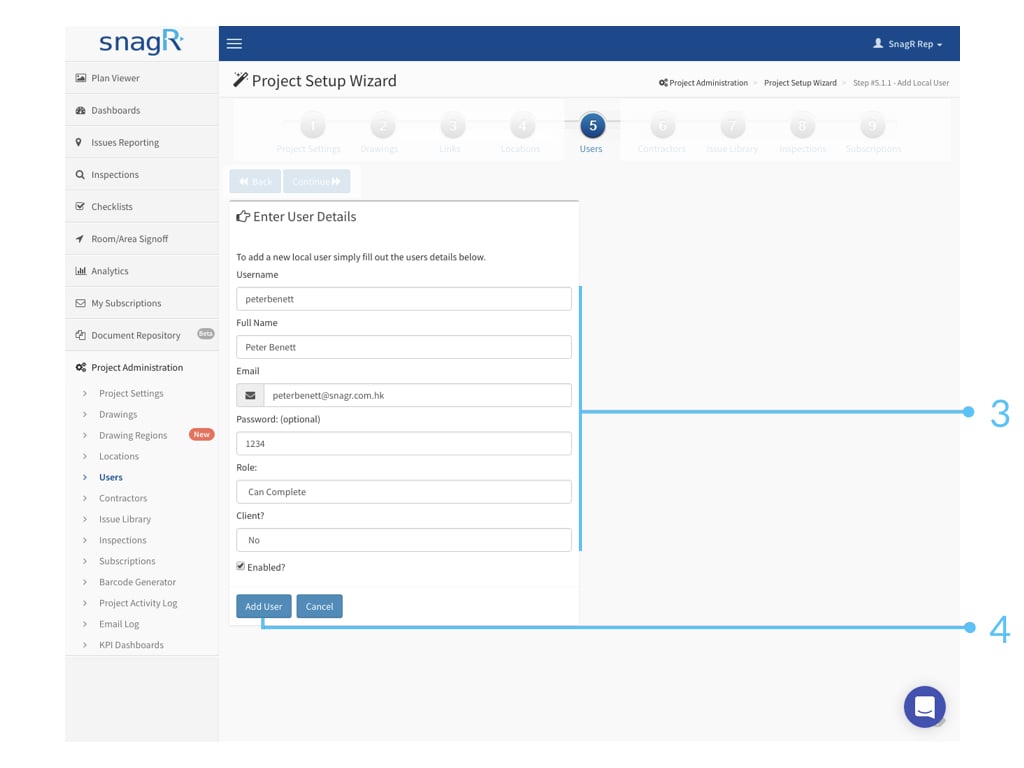
WebsiteUser list is the list of people who will be able to access SnagR.What is required to set up a user?Permissions settingsIt is important to revisit your current issue rectification workflow, lay out the parties that are involved and their role and responsibilities. With that it becomes clear how permissions should be defined for your project in SnagR. Learn more about workflow and permissions before proceeding.Full name and email addressThe email address of a user will be used for account reminders and report notifications. If the email address is invalid the user will fail to receive email notifications from SnagR. It is handy to have a username naming standard and the same initial password for all users, so that in a training session it is simple for everyone to pick up their account credentials.For example, the username will always be the first part of the email address, i.e., peterbenett@snagr.com.au will have username peterbenett, and the initial password will always be 12345.
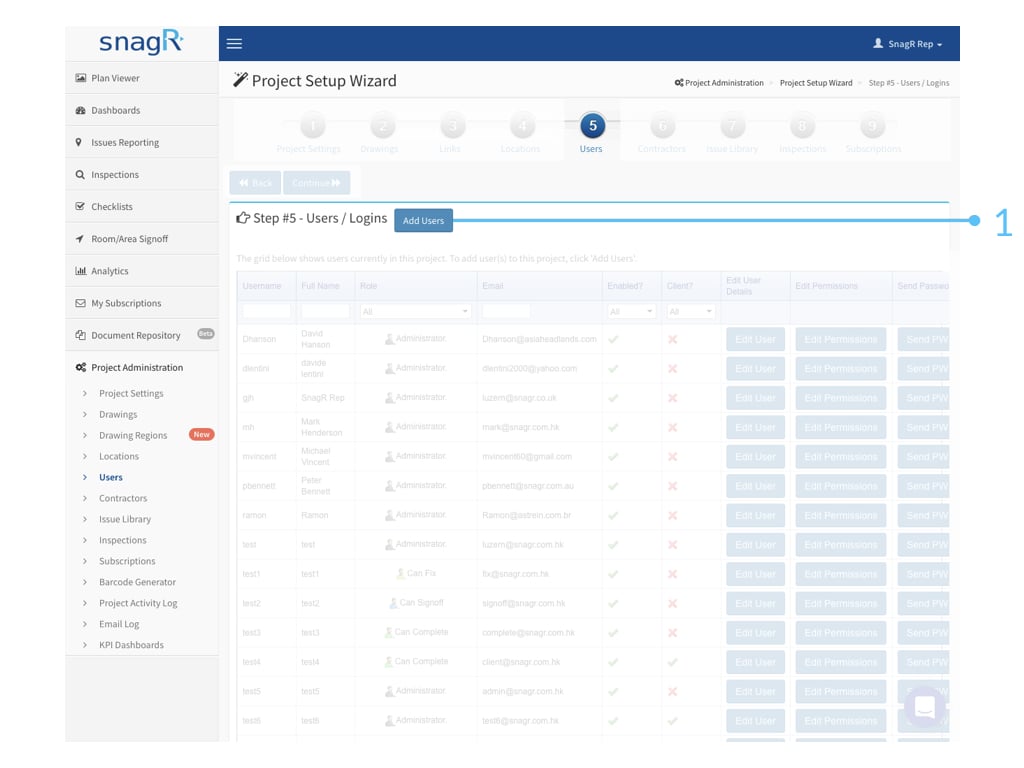
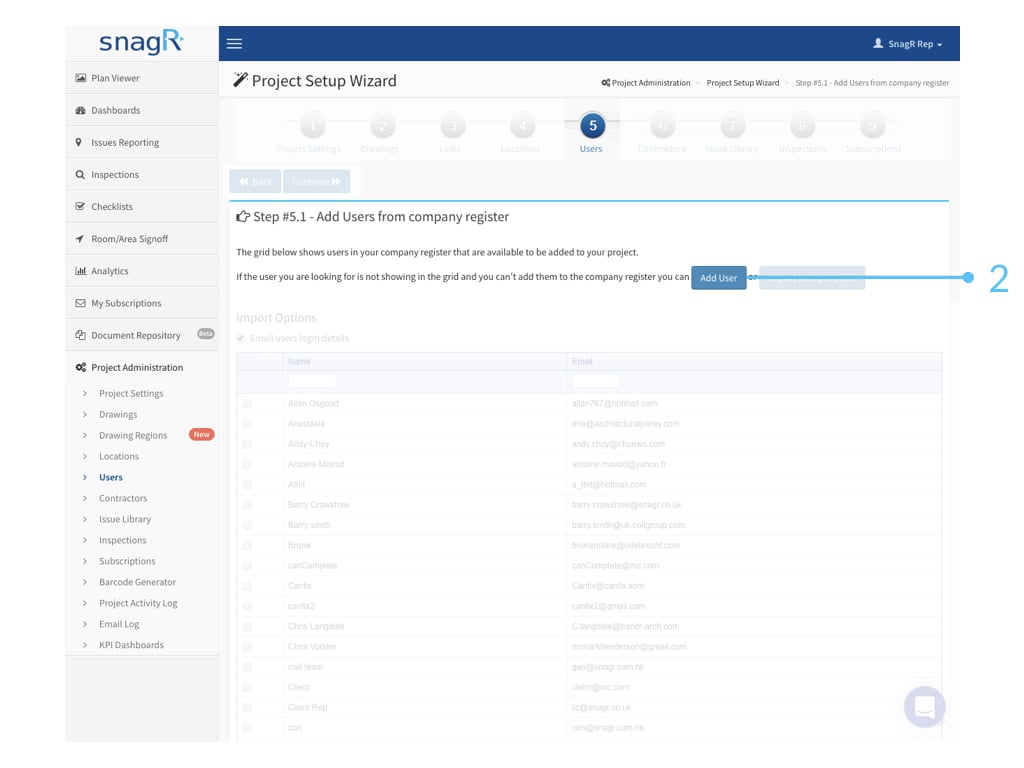
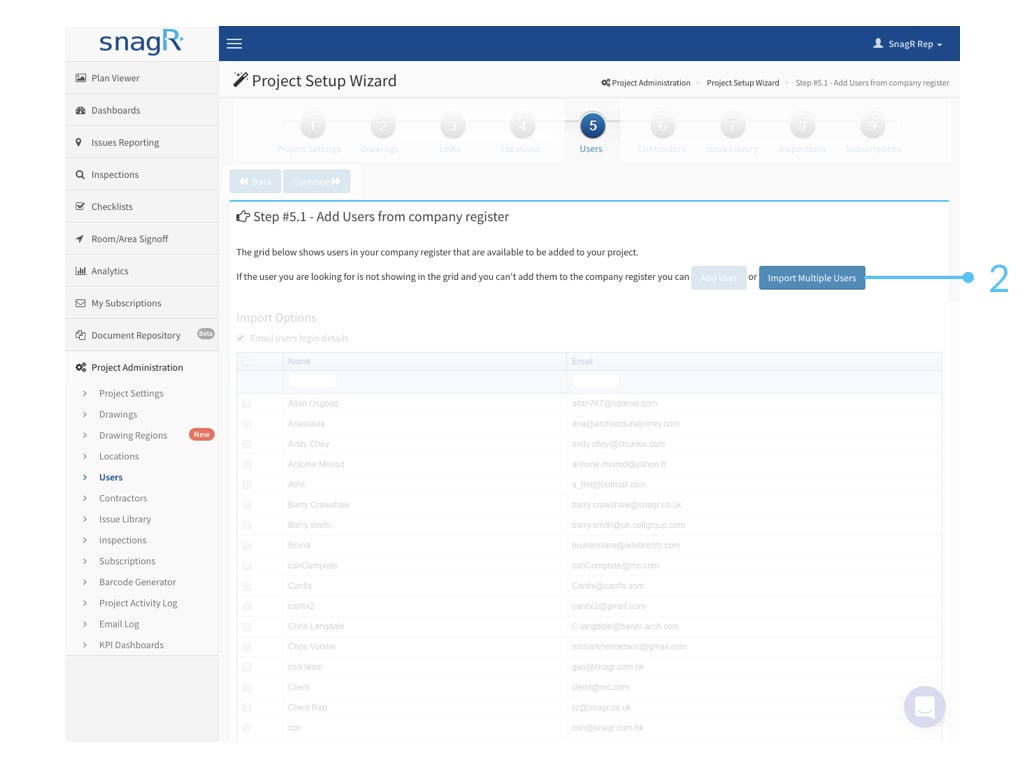
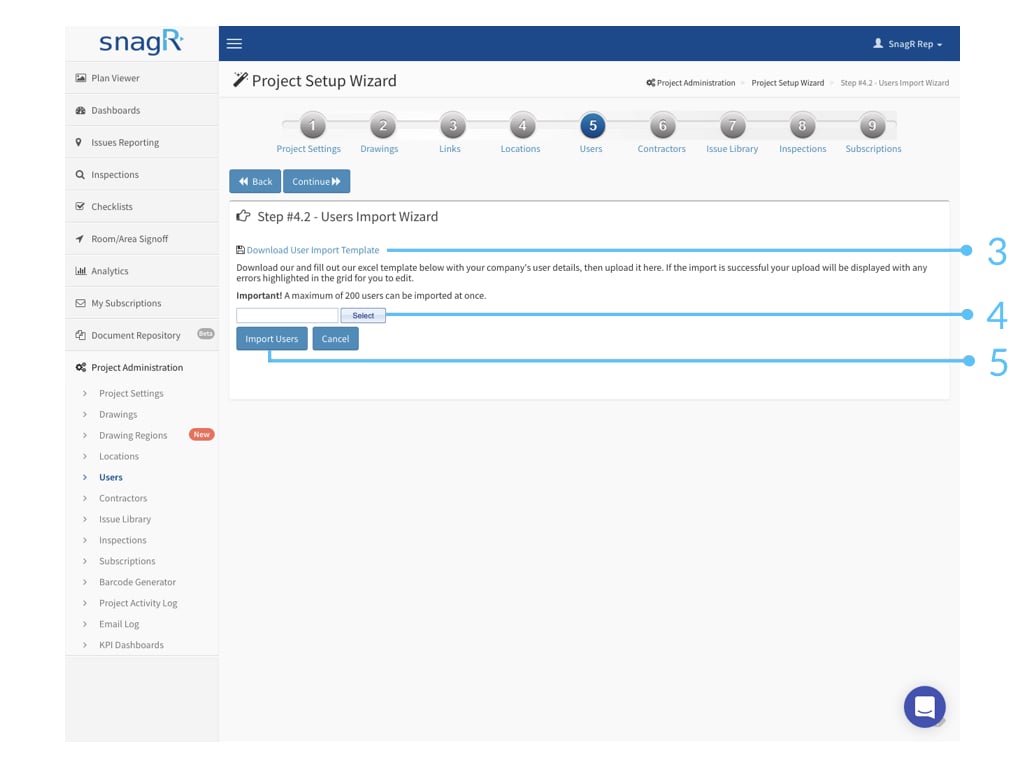
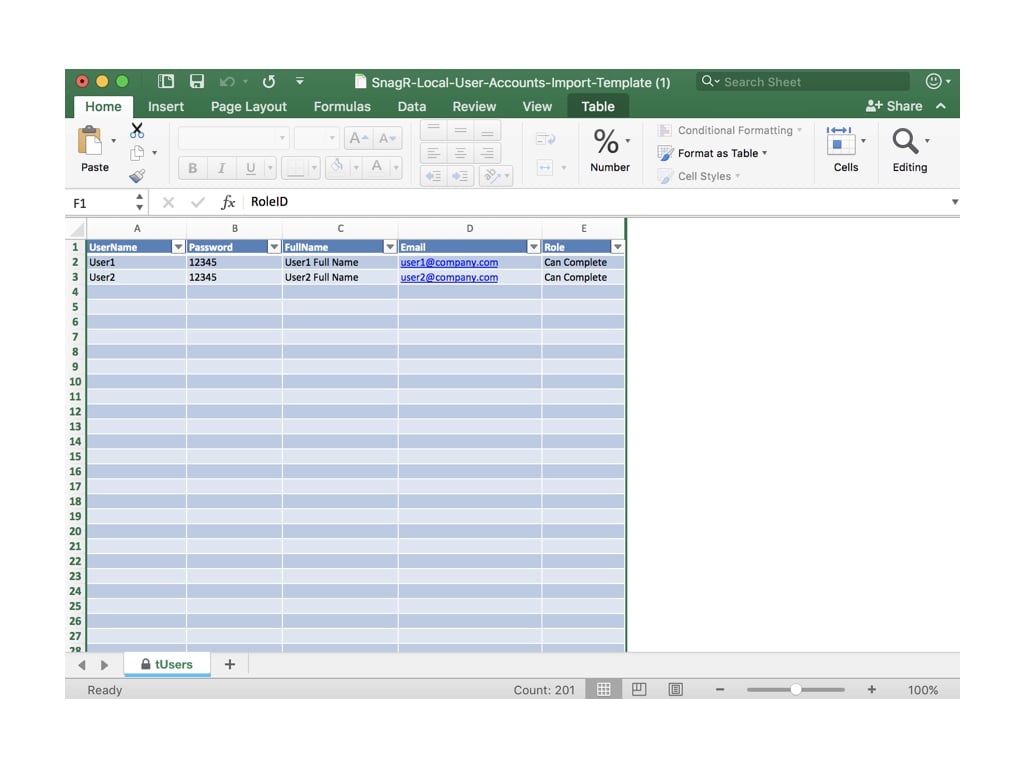
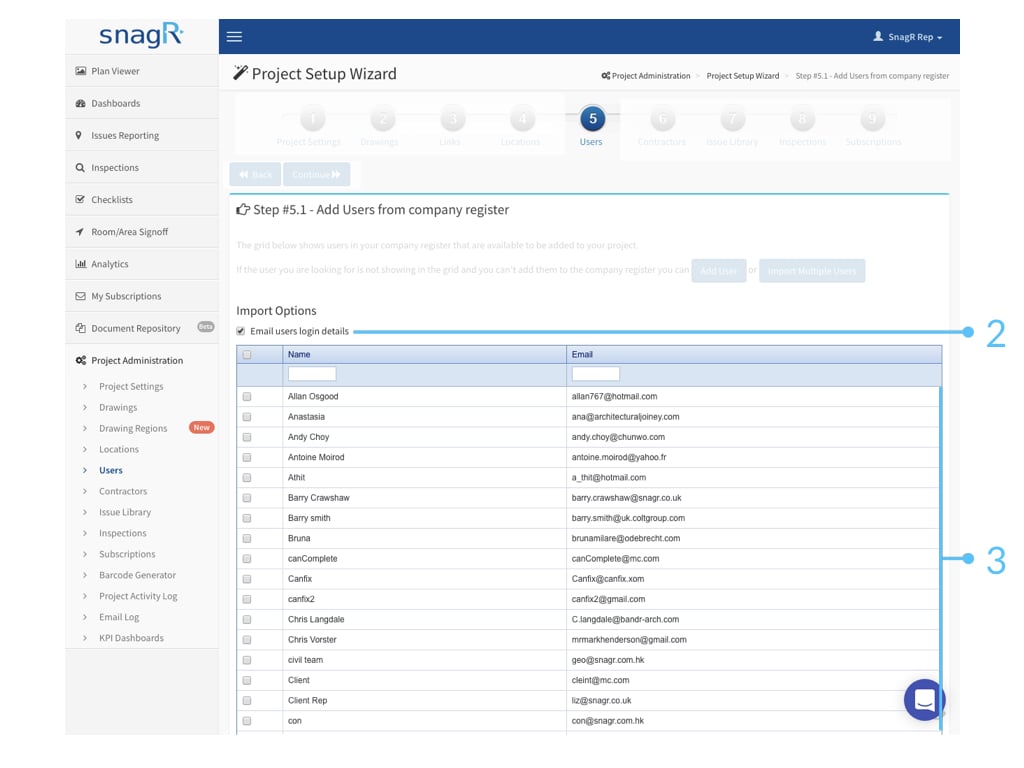
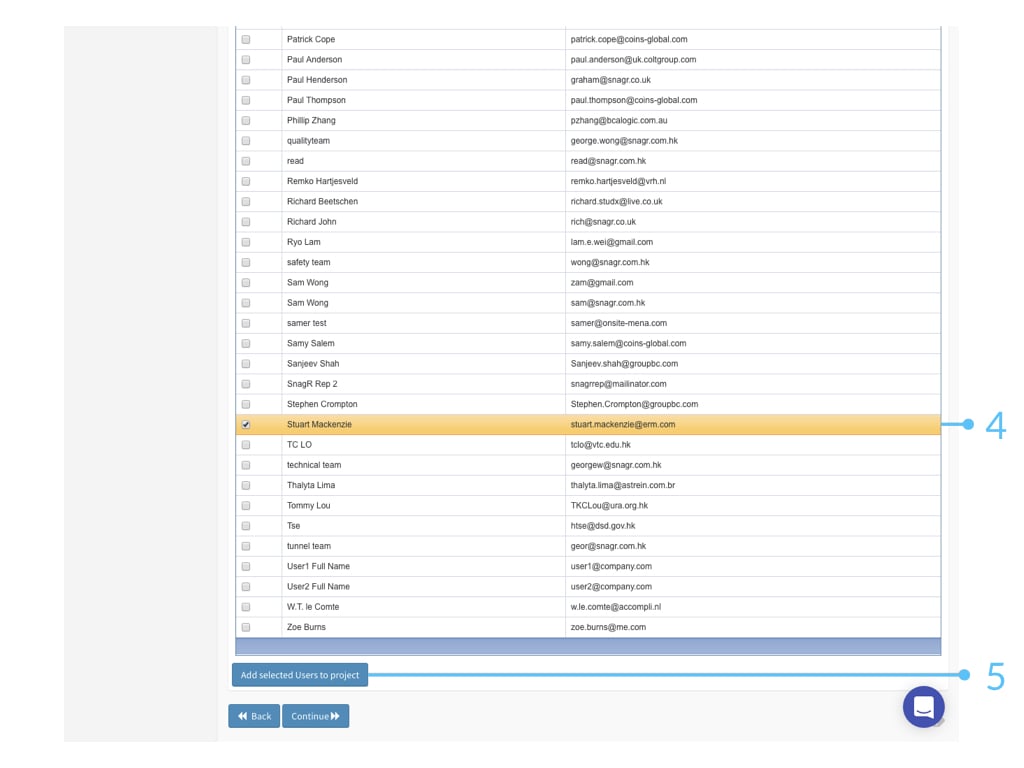
How to add a user?When everything is ready, click Add Users to proceed.Next you can choose to create a user manually or by an Excel import.Adding users manually What’s Enabled? If you would like the user to access the system, check enabled. If you would not like the user to have access anymore, uncheck the box. They would not be able to login to the system then. Note a user can be disabled but cannot be deleted. This is to protect the project data such that if a user has created any issues or forms previously the record always remain. What’s C****lient? When you set a user to be client, they can only see the issues created by themselves, and they are also the only ones to be able to close those issues. Learn more at permissions.Wants to be quicker? Import multiple users with Excel Be sure the spreadsheet is named tUsers so that the import matches to the database table.How about adding a user who exists on other project(s)?When you attempt to add new users but the system gives you an error telling you that this user already exists but you do not see him/her on the project at all. It is likely they exist on other projects within the same company.Once you click Add Users, a table of existing users in the same company always appear.Click here to know how to add the users to the company level. If it’s a long list , use Ctrl + F (Windows) or Command + F (Mac) to find your users.Click Add Selected Users to project at the bottom.
{"docsConfig":{"theme":"mint","$schema":"https://mintlify.com/docs.json","name":"SnagR Support","colors":{"primary":"#004A8F","light":"#09B2E6","dark":"#0A8FBA"},"logo":{"light":"https://mintcdn.com/snagr/9U5Im1fRDoFRvv7Z/logo/light.png?fit=max\u0026auto=format\u0026n=9U5Im1fRDoFRvv7Z\u0026q=85\u0026s=5a9f70b9a8a2e54c2439431970ebc47c","dark":"https://mintcdn.com/snagr/9U5Im1fRDoFRvv7Z/logo/dark.png?fit=max\u0026auto=format\u0026n=9U5Im1fRDoFRvv7Z\u0026q=85\u0026s=3620511229c4b5583092622ab61f91ec"},"favicon":"https://mintcdn.com/snagr/Ml8zKd1uXOTgsgv2/favicon.svg?fit=max\u0026auto=format\u0026n=Ml8zKd1uXOTgsgv2\u0026q=85\u0026s=fab4219b55618095ca86e61d65e674db","contextual":{"options":["copy","view","chatgpt","claude","perplexity","mcp","cursor","vscode"],"display":"header"},"styling":{"latex":true},"navigation":{"languages":[{"language":"en","href":"en"},{"language":"nl","href":"nl"},{"language":"de","href":"de"},{"language":"it","href":"it"},{"language":"zh-Hant","href":"zh-hant"},{"language":"cn","href":"cn"}]}},"deployment":{"deploymentMetadataValue":{"subdomain":"snagr","hasAudioNarration":false,"actualSubdomain":"snagr","customDomains":["kb.snagr.co.uk"],"gitSource":{"type":"github","owner":"snagr","repo":"snagr-mintlify-kb","deployBranch":"main","contentDirectory":"","isPrivate":false,"mountPath":"","label":""},"entitlements":{"AI_CHAT":{"status":"DISABLED"},"WEB_MCP":{"status":"DISABLED"},"NARRATION":{"status":"DISABLED"}},"buildId":"6ab232001a82fb5814d97fef","clientVersion":"0.0.4227","searchFilterCounts":[{"language":"nl","tag":"Project opzetten","count":63},{"language":"en","tag":"Set up project","count":62},{"language":"de","tag":"Projekt einrichten","count":57},{"language":"it","tag":"Impostazione Progetti","count":57},{"language":"zh-Hant","tag":"項目設置","count":57},{"language":"en","tag":"New Features","count":41},{"language":"en","tag":"Release Notes","count":38},{"language":"cn","tag":"管理员模式","count":31},{"language":"en","tag":"Forms","count":27},{"language":"en","tag":"Issues","count":27},{"language":"it","tag":"Difetti","count":26},{"language":"zh-Hant","tag":"缺陷模式","count":26},{"language":"cn","tag":"缺陷模式","count":24},{"language":"zh-Hant","tag":"表格/檢查模式","count":24},{"language":"de","tag":"Fangen Sie an","count":23},{"language":"en","tag":"FAQ","count":23},{"language":"it","tag":"Ispezioni","count":23},{"language":"nl","tag":"Ga van start","count":22},{"language":"zh-Hant","tag":"常見問題","count":22},{"language":"nl","tag":"Formulieren","count":21},{"language":"nl","tag":"Veelgestelde vragen","count":21},{"language":"it","tag":"FAQ","count":20},{"language":"cn","tag":"表格模式","count":18},{"language":"de","tag":"Aktionspunkte","count":17},{"language":"nl","tag":"Actiepunten","count":17},{"language":"de","tag":"Häufig gestellte Fragen","count":16},{"language":"de","tag":"Formulare","count":15},{"language":"de","tag":"Formulare - Unternehmensebene","count":14},{"language":"nl","tag":"Formulieren - Bedrijfsniveau","count":14},{"language":"cn","tag":"入门指南","count":12},{"language":"en","tag":"Forms - Company Level","count":12},{"language":"nl","tag":"Accounts en Rechten - Projectniveau","count":12},{"language":"cn","tag":"文件管理","count":11},{"language":"de","tag":"Dokumente","count":11},{"language":"en","tag":"Documents","count":11},{"language":"en","tag":"Accounts and Permissions - Project Level","count":11},{"language":"it","tag":"Modelli di Documento - Amministrazione Societa'","count":11},{"language":"it","tag":"Repositorio Documenti","count":11},{"language":"nl","tag":"Documenten","count":11},{"language":"zh-Hant","tag":"帳戶及權限設定 - 項目管理區域","count":11},{"language":"zh-Hant","tag":"項目文件存儲庫","count":10},{"language":"zh-Hant","tag":"入門指南","count":10},{"language":"cn","tag":"图纸","count":9},{"language":"de","tag":"Konten und Rechte - Projektebene","count":9},{"language":"en","tag":"Submit Forms","count":9},{"language":"it","tag":"Utenti e Permessi-Amministrazione Progetto","count":9},{"language":"zh-Hant","tag":"圖紙 - 項目管理區域","count":9},{"language":"de","tag":"Erfolgsgeschichten","count":8},{"language":"de","tag":"Startanleitung: Wie füge ich Formulare hinzu?","count":8},{"language":"it","tag":"Casi studio","count":8},{"language":"it","tag":"Disegni - Amministrazione Progetto","count":8},{"language":"it","tag":"Impostazioni generali","count":8},{"language":"nl","tag":"Startgids: Hoe ga ik met actiepunten om?","count":8},{"language":"nl","tag":"Tekeningen - Projectniveau","count":8},{"language":"zh-Hant","tag":"一般問題","count":8},{"language":"zh-Hant","tag":"提交表格","count":8},{"language":"cn","tag":"帐户及权限设定","count":7},{"language":"cn","tag":"设定表格模板","count":7},{"language":"cn","tag":"管理文档","count":7},{"language":"cn","tag":"完成或编辑表格","count":7}]},"assistantConfig":{"enableAskAiButton":false,"enableStarterQuestions":false,"enableContextualStarterQuestions":false,"enableAskAiSearchBar":true},"basePath":"","hasChatPermissions":false,"hasWebMcpPermissions":false,"toggles":[{"name":"kill-isr","enabled":true,"variant":{"name":"disabled","enabled":false,"feature_enabled":true},"impressionData":false},{"name":"custom-rbac-roles","enabled":true,"variant":{"name":"disabled","enabled":false,"feature_enabled":true},"impressionData":false},{"name":"agent-mintlify-slack","enabled":true,"variant":{"name":"disabled","enabled":false,"feature_enabled":true},"impressionData":false},{"name":"agent-integrations-settings","enabled":true,"variant":{"name":"disabled","enabled":false,"feature_enabled":true},"impressionData":false},{"name":"rbac-expansion","enabled":true,"variant":{"name":"disabled","enabled":false,"feature_enabled":true},"impressionData":false},{"name":"automations-pr-grouping","enabled":true,"variant":{"name":"disabled","enabled":false,"feature_enabled":true},"impressionData":false},{"name":"custom-prefix","enabled":true,"variant":{"name":"disabled","enabled":false,"feature_enabled":true},"impressionData":false},{"name":"analytics-v7","enabled":true,"variant":{"name":"disabled","enabled":false,"feature_enabled":true},"impressionData":false},{"name":"user-flows-analytics","enabled":true,"variant":{"name":"disabled","enabled":false,"feature_enabled":true},"impressionData":false},{"name":"no-publish-flow","enabled":true,"variant":{"name":"disabled","enabled":false,"feature_enabled":true},"impressionData":false},{"name":"workos-onboarding","enabled":true,"variant":{"name":"disabled","enabled":false,"feature_enabled":true},"impressionData":false},{"name":"snapshot-serving-live","enabled":true,"variant":{"name":"disabled","enabled":false,"feature_enabled":true},"impressionData":false},{"name":"stripTemperatureMiddleware","enabled":true,"variant":{"name":"disabled","enabled":false,"feature_enabled":true},"impressionData":false},{"name":"support-platform-pylon-zendesk","enabled":true,"variant":{"name":"disabled","enabled":false,"feature_enabled":true},"impressionData":false},{"name":"snapshot-serving","enabled":true,"variant":{"name":"disabled","enabled":false,"feature_enabled":true},"impressionData":false},{"name":"instant-rollback","enabled":true,"variant":{"name":"disabled","enabled":false,"feature_enabled":true},"impressionData":false},{"name":"granular-notifications-server","enabled":true,"variant":{"name":"disabled","enabled":false,"feature_enabled":true},"impressionData":false},{"name":"granular-notifications","enabled":true,"variant":{"name":"disabled","enabled":false,"feature_enabled":true},"impressionData":false},{"name":"automations-fable","enabled":true,"variant":{"name":"disabled","enabled":false,"feature_enabled":true},"impressionData":false},{"name":"fixed-ai-action-pricing","enabled":true,"variant":{"name":"disabled","enabled":false,"feature_enabled":true},"impressionData":false},{"name":"automation-resolve-merge-conflict","enabled":true,"variant":{"name":"disabled","enabled":false,"feature_enabled":true},"impressionData":false},{"name":"scoped-publishing","enabled":true,"variant":{"name":"disabled","enabled":false,"feature_enabled":true},"impressionData":false},{"name":"mintql","enabled":true,"variant":{"name":"disabled","enabled":false,"feature_enabled":true},"impressionData":false},{"name":"page-level-analytics","enabled":true,"variant":{"name":"disabled","enabled":false,"feature_enabled":true},"impressionData":false},{"name":"editor-version-history-v2","enabled":true,"variant":{"name":"disabled","enabled":false,"feature_enabled":true},"impressionData":false},{"name":"billing-page-v2","enabled":true,"variant":{"name":"disabled","enabled":false,"feature_enabled":true},"impressionData":false},{"name":"full-page-search","enabled":true,"variant":{"name":"disabled","enabled":false,"feature_enabled":true},"impressionData":false},{"name":"workspace-projects","enabled":true,"variant":{"name":"disabled","enabled":false,"feature_enabled":true},"impressionData":false},{"name":"assistant-v5","enabled":true,"variant":{"name":"disabled","enabled":false,"feature_enabled":true},"impressionData":false},{"name":"fork-pr-previews","enabled":true,"variant":{"name":"disabled","enabled":false,"feature_enabled":true},"impressionData":false},{"name":"revalidation-jwt","enabled":true,"variant":{"name":"disabled","enabled":false,"feature_enabled":true},"impressionData":false},{"name":"workos-sso-scim","enabled":true,"variant":{"name":"disabled","enabled":false,"feature_enabled":true},"impressionData":false},{"name":"hobby-abuse-scan","enabled":true,"variant":{"name":"disabled","enabled":false,"feature_enabled":true},"impressionData":false},{"name":"dashboard-inbox","enabled":true,"variant":{"name":"disabled","enabled":false,"feature_enabled":true},"impressionData":false},{"name":"workos-signup","enabled":true,"variant":{"name":"disabled","enabled":false,"feature_enabled":true},"impressionData":false},{"name":"turbopuffer-dual-write","enabled":true,"variant":{"name":"disabled","enabled":false,"feature_enabled":true},"impressionData":false},{"name":"workos-enabled","enabled":true,"variant":{"name":"disabled","enabled":false,"feature_enabled":true},"impressionData":false},{"name":"approve-review-flow","enabled":true,"variant":{"name":"disabled","enabled":false,"feature_enabled":true},"impressionData":false},{"name":"editor-metadata","enabled":true,"variant":{"name":"disabled","enabled":false,"feature_enabled":true},"impressionData":false},{"name":"sso-setup-deadline-banner","enabled":true,"variant":{"name":"disabled","enabled":false,"feature_enabled":true},"impressionData":false},{"name":"turbopuffer-serve","enabled":true,"variant":{"name":"disabled","enabled":false,"feature_enabled":true},"impressionData":false},{"name":"live-agents","enabled":true,"variant":{"name":"disabled","enabled":false,"feature_enabled":true},"impressionData":false},{"name":"starter-pricing","enabled":true,"variant":{"name":"control","enabled":true,"payload":{"type":"string","value":"control"},"feature_enabled":true},"impressionData":false},{"name":"llms-txt-v2","enabled":true,"variant":{"name":"disabled","enabled":false,"feature_enabled":true},"impressionData":false},{"name":"wildcard-email-auth","enabled":true,"variant":{"name":"disabled","enabled":false,"feature_enabled":true},"impressionData":false}],"googleFontsInlined":false},"customCss":[]}
{"page":{"pagePath":"en/set-up-project/accounts-and-permissions-project-level/how-to-add-users-to-project","slug":"/en/set-up-project/accounts-and-permissions-project-level/how-to-add-users-to-project","pageMetadata":{"title":"How to add users to project?","description":null,"href":"/en/set-up-project/accounts-and-permissions-project-level/how-to-add-users-to-project"},"pageType":"default","mdx":{"mdxSource":{"compiledSource":"\"use strict\";const{Fragment:_Fragment,jsx:_jsx,jsxs:_jsxs}=arguments[0];const{useMDXComponents:_provideComponents}=arguments[0];function _createMdxContent(props){const _components={a:`a`,p:`p`,strong:`strong`,..._provideComponents(),...props.components},{OptimizedFrame,OptimizedImage}=_components;if(!OptimizedFrame)_missingMdxReference(`OptimizedFrame`,true);if(!OptimizedImage)_missingMdxReference(`OptimizedImage`,true);return _jsxs(_Fragment,{children:[_jsxs(_components.p,{children:[_jsx(OptimizedImage,{src:`https://mintcdn.com/snagr/Fc-Qgss-VatVIL0b/images/uploads/123693-if_ic_tv_48px_352186.png?fit=max\u0026auto=format\u0026n=Fc-Qgss-VatVIL0b\u0026q=85\u0026s=06b23e0223986004fba7bbb6aa8febb3`,alt:`if ic tv 48px 352186`,width:`20`,\"data-og-width\":`128`,\"data-og-height\":`128`,\"data-path\":`images/uploads/123693-if_ic_tv_48px_352186.png`,\"data-optimize\":`true`,\"data-opv\":`3`,srcset:`https://mintcdn.com/snagr/Fc-Qgss-VatVIL0b/images/uploads/123693-if_ic_tv_48px_352186.png?w=280\u0026fit=max\u0026auto=format\u0026n=Fc-Qgss-VatVIL0b\u0026q=85\u0026s=27a7eb8a9261e01427cf809a8489dafb 280w, https://mintcdn.com/snagr/Fc-Qgss-VatVIL0b/images/uploads/123693-if_ic_tv_48px_352186.png?w=560\u0026fit=max\u0026auto=format\u0026n=Fc-Qgss-VatVIL0b\u0026q=85\u0026s=830b98d3f9bb757a233876916a5ba0b9 560w, https://mintcdn.com/snagr/Fc-Qgss-VatVIL0b/images/uploads/123693-if_ic_tv_48px_352186.png?w=840\u0026fit=max\u0026auto=format\u0026n=Fc-Qgss-VatVIL0b\u0026q=85\u0026s=20d6c7e19b0f527609ad90f8b6e4e9c8 840w, https://mintcdn.com/snagr/Fc-Qgss-VatVIL0b/images/uploads/123693-if_ic_tv_48px_352186.png?w=1100\u0026fit=max\u0026auto=format\u0026n=Fc-Qgss-VatVIL0b\u0026q=85\u0026s=0854a48cb07081ed4e6c06193d9f369a 1100w, https://mintcdn.com/snagr/Fc-Qgss-VatVIL0b/images/uploads/123693-if_ic_tv_48px_352186.png?w=1650\u0026fit=max\u0026auto=format\u0026n=Fc-Qgss-VatVIL0b\u0026q=85\u0026s=07fa185ceee6af6ab25d9f2a50612479 1650w, https://mintcdn.com/snagr/Fc-Qgss-VatVIL0b/images/uploads/123693-if_ic_tv_48px_352186.png?w=2500\u0026fit=max\u0026auto=format\u0026n=Fc-Qgss-VatVIL0b\u0026q=85\u0026s=2787e36ed2b33d95ca686937febd89f3 2500w`,inline:true}),` `,_jsx(_components.strong,{children:`Website`})]}),`\n`,_jsx(_components.p,{children:`User list is the list of people who will be able to access SnagR.`}),`\n`,_jsx(_components.p,{children:_jsx(_components.strong,{children:`What is required to set up a user?`})}),`\n`,_jsx(_components.p,{children:_jsx(_components.strong,{children:`Permissions settings`})}),`\n`,_jsxs(_components.p,{children:[`It is important to revisit your current issue rectification workflow, lay out the parties that are involved and their role and responsibilities. With that it becomes clear how permissions should be defined for your project in SnagR. Learn more about `,_jsx(_components.a,{href:`/en/set-up-project/accounts-and-permissions-project-level/how-to-set-permissions-issues`,children:`workflow and permissions`}),` before proceeding.`]}),`\n`,_jsx(_components.p,{children:_jsx(_components.strong,{children:`Full name and email address`})}),`\n`,_jsx(_components.p,{children:`The email address of a user will be used for account reminders and report notifications. If the email address is invalid the user will fail to receive email notifications from SnagR.`}),`\n`,_jsxs(_components.p,{children:[_jsx(OptimizedImage,{src:`https://mintcdn.com/snagr/xF5c6BECuZRMUk48/images/uploads/127505-sparkles.png?fit=max\u0026auto=format\u0026n=xF5c6BECuZRMUk48\u0026q=85\u0026s=904495e280f3b621b409dbce01ef7c8a`,alt:`sparkles`,width:`25`,\"data-og-width\":`256`,\"data-og-height\":`256`,\"data-path\":`images/uploads/127505-sparkles.png`,\"data-optimize\":`true`,\"data-opv\":`3`,srcset:`https://mintcdn.com/snagr/xF5c6BECuZRMUk48/images/uploads/127505-sparkles.png?w=280\u0026fit=max\u0026auto=format\u0026n=xF5c6BECuZRMUk48\u0026q=85\u0026s=1cb631a18bfed923f6f6907db98a5361 280w, https://mintcdn.com/snagr/xF5c6BECuZRMUk48/images/uploads/127505-sparkles.png?w=560\u0026fit=max\u0026auto=format\u0026n=xF5c6BECuZRMUk48\u0026q=85\u0026s=d7a7c70f552b376b076013b88589d5d6 560w, https://mintcdn.com/snagr/xF5c6BECuZRMUk48/images/uploads/127505-sparkles.png?w=840\u0026fit=max\u0026auto=format\u0026n=xF5c6BECuZRMUk48\u0026q=85\u0026s=ee419e19007c02f5113bef69f8034ac6 840w, https://mintcdn.com/snagr/xF5c6BECuZRMUk48/images/uploads/127505-sparkles.png?w=1100\u0026fit=max\u0026auto=format\u0026n=xF5c6BECuZRMUk48\u0026q=85\u0026s=46a9e2644e2c433c75ec6a67e0903099 1100w, https://mintcdn.com/snagr/xF5c6BECuZRMUk48/images/uploads/127505-sparkles.png?w=1650\u0026fit=max\u0026auto=format\u0026n=xF5c6BECuZRMUk48\u0026q=85\u0026s=62a824fc616f7a16d0cea000e6e93903 1650w, https://mintcdn.com/snagr/xF5c6BECuZRMUk48/images/uploads/127505-sparkles.png?w=2500\u0026fit=max\u0026auto=format\u0026n=xF5c6BECuZRMUk48\u0026q=85\u0026s=7f641edc6838fb9aeeebe269e0c0705f 2500w`,inline:true}),` It is handy to have a username naming standard and the same initial password for all users, so that in a training session it is simple for everyone to pick up their account credentials.`]}),`\n`,_jsxs(_components.p,{children:[`For example, the username will always be the first part of the email address, i.e., `,_jsx(_components.a,{href:`mailto:peterbenett@snagr.com.au,`,children:`peterbenett@snagr.com.au`}),` will have username peterbenett, and the initial password will always be 12345.`]}),`\n`,_jsx(OptimizedFrame,{src:`https://player.vimeo.com/video/108708140`,width:`100%`,height:`400`,frameBorder:`0`,allow:`autoplay; fullscreen; picture-in-picture`,allowFullScreen:true}),`\n`,_jsx(_components.p,{children:_jsx(_components.strong,{children:`How to add a user?`})}),`\n`,_jsx(_components.p,{children:`When everything is ready, click Add Users to proceed.`}),`\n`,_jsx(OptimizedImage,{src:`https://mintcdn.com/snagr/TvNTzzhiwQs9oAcA/images/uploads/129429-Admin_Website.027.jpeg?fit=max\u0026auto=format\u0026n=TvNTzzhiwQs9oAcA\u0026q=85\u0026s=b28c178f3142788b52ec5cc94e54f09b`,alt:`Admin Website.027`,\"data-og-width\":`1024`,width:`1024`,\"data-og-height\":`768`,height:`768`,\"data-path\":`images/uploads/129429-Admin_Website.027.jpeg`,\"data-optimize\":`true`,\"data-opv\":`3`,srcset:`https://mintcdn.com/snagr/TvNTzzhiwQs9oAcA/images/uploads/129429-Admin_Website.027.jpeg?w=280\u0026fit=max\u0026auto=format\u0026n=TvNTzzhiwQs9oAcA\u0026q=85\u0026s=564c5198d5f7f0f4c3a30ec9f9f94df3 280w, https://mintcdn.com/snagr/TvNTzzhiwQs9oAcA/images/uploads/129429-Admin_Website.027.jpeg?w=560\u0026fit=max\u0026auto=format\u0026n=TvNTzzhiwQs9oAcA\u0026q=85\u0026s=ef20d1495089497fc1072939b7ae6b19 560w, https://mintcdn.com/snagr/TvNTzzhiwQs9oAcA/images/uploads/129429-Admin_Website.027.jpeg?w=840\u0026fit=max\u0026auto=format\u0026n=TvNTzzhiwQs9oAcA\u0026q=85\u0026s=a7d0bbccfc10254dc98cc63a63a251c0 840w, https://mintcdn.com/snagr/TvNTzzhiwQs9oAcA/images/uploads/129429-Admin_Website.027.jpeg?w=1100\u0026fit=max\u0026auto=format\u0026n=TvNTzzhiwQs9oAcA\u0026q=85\u0026s=9b859d216f91b6278ed199029c4ace9e 1100w, https://mintcdn.com/snagr/TvNTzzhiwQs9oAcA/images/uploads/129429-Admin_Website.027.jpeg?w=1650\u0026fit=max\u0026auto=format\u0026n=TvNTzzhiwQs9oAcA\u0026q=85\u0026s=85648cff2e244d476bc933721844b8a8 1650w, https://mintcdn.com/snagr/TvNTzzhiwQs9oAcA/images/uploads/129429-Admin_Website.027.jpeg?w=2500\u0026fit=max\u0026auto=format\u0026n=TvNTzzhiwQs9oAcA\u0026q=85\u0026s=e1a6fa1636817d6ced1a136683d8f6a6 2500w`}),`\n`,_jsx(_components.p,{children:`Next you can choose to create a user manually or by an Excel import.`}),`\n`,_jsx(_components.p,{children:_jsx(_components.strong,{children:`Adding users manually`})}),`\n`,_jsx(OptimizedImage,{src:`https://mintcdn.com/snagr/TvNTzzhiwQs9oAcA/images/uploads/129430-Admin_Website.028.jpeg?fit=max\u0026auto=format\u0026n=TvNTzzhiwQs9oAcA\u0026q=85\u0026s=2730fa704880a220498d597299d6ed91`,alt:`Admin Website.028`,\"data-og-width\":`1024`,width:`1024`,\"data-og-height\":`768`,height:`768`,\"data-path\":`images/uploads/129430-Admin_Website.028.jpeg`,\"data-optimize\":`true`,\"data-opv\":`3`,srcset:`https://mintcdn.com/snagr/TvNTzzhiwQs9oAcA/images/uploads/129430-Admin_Website.028.jpeg?w=280\u0026fit=max\u0026auto=format\u0026n=TvNTzzhiwQs9oAcA\u0026q=85\u0026s=f26ccfe563e161ba1158b01d2e683876 280w, https://mintcdn.com/snagr/TvNTzzhiwQs9oAcA/images/uploads/129430-Admin_Website.028.jpeg?w=560\u0026fit=max\u0026auto=format\u0026n=TvNTzzhiwQs9oAcA\u0026q=85\u0026s=11f2464a8d51283de0e6a6c778537438 560w, https://mintcdn.com/snagr/TvNTzzhiwQs9oAcA/images/uploads/129430-Admin_Website.028.jpeg?w=840\u0026fit=max\u0026auto=format\u0026n=TvNTzzhiwQs9oAcA\u0026q=85\u0026s=35012346015b2684b396852e7482e8fe 840w, https://mintcdn.com/snagr/TvNTzzhiwQs9oAcA/images/uploads/129430-Admin_Website.028.jpeg?w=1100\u0026fit=max\u0026auto=format\u0026n=TvNTzzhiwQs9oAcA\u0026q=85\u0026s=5141006670efa3e289c811d6aedb0912 1100w, https://mintcdn.com/snagr/TvNTzzhiwQs9oAcA/images/uploads/129430-Admin_Website.028.jpeg?w=1650\u0026fit=max\u0026auto=format\u0026n=TvNTzzhiwQs9oAcA\u0026q=85\u0026s=4877f0483d9072f12ace777ef046ebb9 1650w, https://mintcdn.com/snagr/TvNTzzhiwQs9oAcA/images/uploads/129430-Admin_Website.028.jpeg?w=2500\u0026fit=max\u0026auto=format\u0026n=TvNTzzhiwQs9oAcA\u0026q=85\u0026s=6c7866662a4a95c181fb36454ecb1373 2500w`}),`\n`,_jsx(OptimizedImage,{src:`https://mintcdn.com/snagr/TvNTzzhiwQs9oAcA/images/uploads/129431-Admin_Website.029.jpeg?fit=max\u0026auto=format\u0026n=TvNTzzhiwQs9oAcA\u0026q=85\u0026s=a23a8a0264e4a9363eb51bd53a2d7428`,alt:`Admin Website.029`,\"data-og-width\":`1024`,width:`1024`,\"data-og-height\":`768`,height:`768`,\"data-path\":`images/uploads/129431-Admin_Website.029.jpeg`,\"data-optimize\":`true`,\"data-opv\":`3`,srcset:`https://mintcdn.com/snagr/TvNTzzhiwQs9oAcA/images/uploads/129431-Admin_Website.029.jpeg?w=280\u0026fit=max\u0026auto=format\u0026n=TvNTzzhiwQs9oAcA\u0026q=85\u0026s=a3c080f5b309bc1e4840c16f44218b1b 280w, https://mintcdn.com/snagr/TvNTzzhiwQs9oAcA/images/uploads/129431-Admin_Website.029.jpeg?w=560\u0026fit=max\u0026auto=format\u0026n=TvNTzzhiwQs9oAcA\u0026q=85\u0026s=863927fcbdb3cade7c0f2dcb2ebdbf26 560w, https://mintcdn.com/snagr/TvNTzzhiwQs9oAcA/images/uploads/129431-Admin_Website.029.jpeg?w=840\u0026fit=max\u0026auto=format\u0026n=TvNTzzhiwQs9oAcA\u0026q=85\u0026s=83f1c1028d76745b057ebe5471636a1e 840w, https://mintcdn.com/snagr/TvNTzzhiwQs9oAcA/images/uploads/129431-Admin_Website.029.jpeg?w=1100\u0026fit=max\u0026auto=format\u0026n=TvNTzzhiwQs9oAcA\u0026q=85\u0026s=83c7529f563f90cdd2429f0c84d1b3d2 1100w, https://mintcdn.com/snagr/TvNTzzhiwQs9oAcA/images/uploads/129431-Admin_Website.029.jpeg?w=1650\u0026fit=max\u0026auto=format\u0026n=TvNTzzhiwQs9oAcA\u0026q=85\u0026s=22316c58ad29c20d7a0864d703e0e524 1650w, https://mintcdn.com/snagr/TvNTzzhiwQs9oAcA/images/uploads/129431-Admin_Website.029.jpeg?w=2500\u0026fit=max\u0026auto=format\u0026n=TvNTzzhiwQs9oAcA\u0026q=85\u0026s=eb100a3b63126ed338f9da16673fa241 2500w`}),`\n`,_jsxs(_components.p,{children:[_jsx(OptimizedImage,{src:`https://mintcdn.com/snagr/xF5c6BECuZRMUk48/images/uploads/127504-Pencil_Emoji.png?fit=max\u0026auto=format\u0026n=xF5c6BECuZRMUk48\u0026q=85\u0026s=c7ff319a4ea97df1ee49942094a3f933`,alt:`Pencil Emoji`,width:`20`,\"data-og-width\":`640`,\"data-og-height\":`640`,\"data-path\":`images/uploads/127504-Pencil_Emoji.png`,\"data-optimize\":`true`,\"data-opv\":`3`,srcset:`https://mintcdn.com/snagr/xF5c6BECuZRMUk48/images/uploads/127504-Pencil_Emoji.png?w=280\u0026fit=max\u0026auto=format\u0026n=xF5c6BECuZRMUk48\u0026q=85\u0026s=f77d9107077361635ddaf9df53e64f1b 280w, https://mintcdn.com/snagr/xF5c6BECuZRMUk48/images/uploads/127504-Pencil_Emoji.png?w=560\u0026fit=max\u0026auto=format\u0026n=xF5c6BECuZRMUk48\u0026q=85\u0026s=6cc61534b3e9be8a75b28792a8ffffdf 560w, https://mintcdn.com/snagr/xF5c6BECuZRMUk48/images/uploads/127504-Pencil_Emoji.png?w=840\u0026fit=max\u0026auto=format\u0026n=xF5c6BECuZRMUk48\u0026q=85\u0026s=61b251e4402ba416ed233814d25f6e64 840w, https://mintcdn.com/snagr/xF5c6BECuZRMUk48/images/uploads/127504-Pencil_Emoji.png?w=1100\u0026fit=max\u0026auto=format\u0026n=xF5c6BECuZRMUk48\u0026q=85\u0026s=5cdaad2ff144deba5bba670d5f841296 1100w, https://mintcdn.com/snagr/xF5c6BECuZRMUk48/images/uploads/127504-Pencil_Emoji.png?w=1650\u0026fit=max\u0026auto=format\u0026n=xF5c6BECuZRMUk48\u0026q=85\u0026s=9d92425c16e766023cda3bf4418a11bb 1650w, https://mintcdn.com/snagr/xF5c6BECuZRMUk48/images/uploads/127504-Pencil_Emoji.png?w=2500\u0026fit=max\u0026auto=format\u0026n=xF5c6BECuZRMUk48\u0026q=85\u0026s=2d6649a48bf691b34931bce14fb574c7 2500w`,inline:true}),` What’s `,_jsx(_components.strong,{children:`Enabled?`}),` If you would like the user to access the system, check enabled. If you would not like the user to have access anymore, uncheck the box. They would not be able to login to the system then. Note a user can be disabled but cannot be deleted. This is to protect the project data such that if a user has created any issues or forms previously the record always remain.`]}),`\n`,_jsxs(_components.p,{children:[_jsx(OptimizedImage,{src:`https://mintcdn.com/snagr/xF5c6BECuZRMUk48/images/uploads/127504-Pencil_Emoji.png?fit=max\u0026auto=format\u0026n=xF5c6BECuZRMUk48\u0026q=85\u0026s=c7ff319a4ea97df1ee49942094a3f933`,alt:`Pencil Emoji`,width:`20`,\"data-og-width\":`640`,\"data-og-height\":`640`,\"data-path\":`images/uploads/127504-Pencil_Emoji.png`,\"data-optimize\":`true`,\"data-opv\":`3`,srcset:`https://mintcdn.com/snagr/xF5c6BECuZRMUk48/images/uploads/127504-Pencil_Emoji.png?w=280\u0026fit=max\u0026auto=format\u0026n=xF5c6BECuZRMUk48\u0026q=85\u0026s=f77d9107077361635ddaf9df53e64f1b 280w, https://mintcdn.com/snagr/xF5c6BECuZRMUk48/images/uploads/127504-Pencil_Emoji.png?w=560\u0026fit=max\u0026auto=format\u0026n=xF5c6BECuZRMUk48\u0026q=85\u0026s=6cc61534b3e9be8a75b28792a8ffffdf 560w, https://mintcdn.com/snagr/xF5c6BECuZRMUk48/images/uploads/127504-Pencil_Emoji.png?w=840\u0026fit=max\u0026auto=format\u0026n=xF5c6BECuZRMUk48\u0026q=85\u0026s=61b251e4402ba416ed233814d25f6e64 840w, https://mintcdn.com/snagr/xF5c6BECuZRMUk48/images/uploads/127504-Pencil_Emoji.png?w=1100\u0026fit=max\u0026auto=format\u0026n=xF5c6BECuZRMUk48\u0026q=85\u0026s=5cdaad2ff144deba5bba670d5f841296 1100w, https://mintcdn.com/snagr/xF5c6BECuZRMUk48/images/uploads/127504-Pencil_Emoji.png?w=1650\u0026fit=max\u0026auto=format\u0026n=xF5c6BECuZRMUk48\u0026q=85\u0026s=9d92425c16e766023cda3bf4418a11bb 1650w, https://mintcdn.com/snagr/xF5c6BECuZRMUk48/images/uploads/127504-Pencil_Emoji.png?w=2500\u0026fit=max\u0026auto=format\u0026n=xF5c6BECuZRMUk48\u0026q=85\u0026s=2d6649a48bf691b34931bce14fb574c7 2500w`,inline:true}),` What’s `,_jsx(_components.strong,{children:`C****lient?`}),` When you set a user to be client, they can only see the issues created by themselves, and they are also the only ones to be able to close those issues. Learn more at permissions.`]}),`\n`,_jsx(_components.p,{children:_jsx(_components.strong,{children:`Wants to be quicker? Import multiple users with Excel`})}),`\n`,_jsx(OptimizedImage,{src:`https://mintcdn.com/snagr/TvNTzzhiwQs9oAcA/images/uploads/129433-Admin_Website.031.jpeg?fit=max\u0026auto=format\u0026n=TvNTzzhiwQs9oAcA\u0026q=85\u0026s=3acc84b7841d7b9a2d0f804b98c2edf9`,alt:`Admin Website.031`,\"data-og-width\":`1024`,width:`1024`,\"data-og-height\":`768`,height:`768`,\"data-path\":`images/uploads/129433-Admin_Website.031.jpeg`,\"data-optimize\":`true`,\"data-opv\":`3`,srcset:`https://mintcdn.com/snagr/TvNTzzhiwQs9oAcA/images/uploads/129433-Admin_Website.031.jpeg?w=280\u0026fit=max\u0026auto=format\u0026n=TvNTzzhiwQs9oAcA\u0026q=85\u0026s=8835590d672d9eb73ab41943b588a84c 280w, https://mintcdn.com/snagr/TvNTzzhiwQs9oAcA/images/uploads/129433-Admin_Website.031.jpeg?w=560\u0026fit=max\u0026auto=format\u0026n=TvNTzzhiwQs9oAcA\u0026q=85\u0026s=ae387fad45e825a2932fd8730356da9d 560w, https://mintcdn.com/snagr/TvNTzzhiwQs9oAcA/images/uploads/129433-Admin_Website.031.jpeg?w=840\u0026fit=max\u0026auto=format\u0026n=TvNTzzhiwQs9oAcA\u0026q=85\u0026s=67df291275fc5900988da5684c05b078 840w, https://mintcdn.com/snagr/TvNTzzhiwQs9oAcA/images/uploads/129433-Admin_Website.031.jpeg?w=1100\u0026fit=max\u0026auto=format\u0026n=TvNTzzhiwQs9oAcA\u0026q=85\u0026s=bffe931ae6793ea30bef963042061bbd 1100w, https://mintcdn.com/snagr/TvNTzzhiwQs9oAcA/images/uploads/129433-Admin_Website.031.jpeg?w=1650\u0026fit=max\u0026auto=format\u0026n=TvNTzzhiwQs9oAcA\u0026q=85\u0026s=730e17203786ce75731a92160739bba5 1650w, https://mintcdn.com/snagr/TvNTzzhiwQs9oAcA/images/uploads/129433-Admin_Website.031.jpeg?w=2500\u0026fit=max\u0026auto=format\u0026n=TvNTzzhiwQs9oAcA\u0026q=85\u0026s=493770e6f798d08f007a6b3e305266ae 2500w`}),`\n`,_jsx(OptimizedImage,{src:`https://mintcdn.com/snagr/TvNTzzhiwQs9oAcA/images/uploads/129434-Admin_Website.032.jpeg?fit=max\u0026auto=format\u0026n=TvNTzzhiwQs9oAcA\u0026q=85\u0026s=c5e41a44f5fff209a93c21e09df67830`,alt:`Admin Website.032`,\"data-og-width\":`1024`,width:`1024`,\"data-og-height\":`768`,height:`768`,\"data-path\":`images/uploads/129434-Admin_Website.032.jpeg`,\"data-optimize\":`true`,\"data-opv\":`3`,srcset:`https://mintcdn.com/snagr/TvNTzzhiwQs9oAcA/images/uploads/129434-Admin_Website.032.jpeg?w=280\u0026fit=max\u0026auto=format\u0026n=TvNTzzhiwQs9oAcA\u0026q=85\u0026s=54cd11a30ce8f9c7ed40677ced1a6898 280w, https://mintcdn.com/snagr/TvNTzzhiwQs9oAcA/images/uploads/129434-Admin_Website.032.jpeg?w=560\u0026fit=max\u0026auto=format\u0026n=TvNTzzhiwQs9oAcA\u0026q=85\u0026s=fc7d73ebfee68537472583852e5a898f 560w, https://mintcdn.com/snagr/TvNTzzhiwQs9oAcA/images/uploads/129434-Admin_Website.032.jpeg?w=840\u0026fit=max\u0026auto=format\u0026n=TvNTzzhiwQs9oAcA\u0026q=85\u0026s=b20a3c4975a1ed9e20c77c84b5321c9f 840w, https://mintcdn.com/snagr/TvNTzzhiwQs9oAcA/images/uploads/129434-Admin_Website.032.jpeg?w=1100\u0026fit=max\u0026auto=format\u0026n=TvNTzzhiwQs9oAcA\u0026q=85\u0026s=22de81159bd0f8f26d7759cf80c270c5 1100w, https://mintcdn.com/snagr/TvNTzzhiwQs9oAcA/images/uploads/129434-Admin_Website.032.jpeg?w=1650\u0026fit=max\u0026auto=format\u0026n=TvNTzzhiwQs9oAcA\u0026q=85\u0026s=5861ebb823bd960ced9c7da7e1d05147 1650w, https://mintcdn.com/snagr/TvNTzzhiwQs9oAcA/images/uploads/129434-Admin_Website.032.jpeg?w=2500\u0026fit=max\u0026auto=format\u0026n=TvNTzzhiwQs9oAcA\u0026q=85\u0026s=245aa5f9e6684bae4e99f6630188baff 2500w`}),`\n`,_jsx(OptimizedImage,{src:`https://mintcdn.com/snagr/TvNTzzhiwQs9oAcA/images/uploads/129435-Admin_Website.033.jpeg?fit=max\u0026auto=format\u0026n=TvNTzzhiwQs9oAcA\u0026q=85\u0026s=41a42d0b136674fb2a8d5c9e023a1951`,alt:`Admin Website.033`,\"data-og-width\":`1024`,width:`1024`,\"data-og-height\":`768`,height:`768`,\"data-path\":`images/uploads/129435-Admin_Website.033.jpeg`,\"data-optimize\":`true`,\"data-opv\":`3`,srcset:`https://mintcdn.com/snagr/TvNTzzhiwQs9oAcA/images/uploads/129435-Admin_Website.033.jpeg?w=280\u0026fit=max\u0026auto=format\u0026n=TvNTzzhiwQs9oAcA\u0026q=85\u0026s=87b5a446900fe8501216243e6ab55a96 280w, https://mintcdn.com/snagr/TvNTzzhiwQs9oAcA/images/uploads/129435-Admin_Website.033.jpeg?w=560\u0026fit=max\u0026auto=format\u0026n=TvNTzzhiwQs9oAcA\u0026q=85\u0026s=02f0370d1535aae9decce18b324c4b31 560w, https://mintcdn.com/snagr/TvNTzzhiwQs9oAcA/images/uploads/129435-Admin_Website.033.jpeg?w=840\u0026fit=max\u0026auto=format\u0026n=TvNTzzhiwQs9oAcA\u0026q=85\u0026s=627a6e471c45f5b54ec01159a15fe01b 840w, https://mintcdn.com/snagr/TvNTzzhiwQs9oAcA/images/uploads/129435-Admin_Website.033.jpeg?w=1100\u0026fit=max\u0026auto=format\u0026n=TvNTzzhiwQs9oAcA\u0026q=85\u0026s=ae9b52b66b6b0c1d4d8b80fc8dbcf2af 1100w, https://mintcdn.com/snagr/TvNTzzhiwQs9oAcA/images/uploads/129435-Admin_Website.033.jpeg?w=1650\u0026fit=max\u0026auto=format\u0026n=TvNTzzhiwQs9oAcA\u0026q=85\u0026s=64bc95a9da740f07898d8791a59026d9 1650w, https://mintcdn.com/snagr/TvNTzzhiwQs9oAcA/images/uploads/129435-Admin_Website.033.jpeg?w=2500\u0026fit=max\u0026auto=format\u0026n=TvNTzzhiwQs9oAcA\u0026q=85\u0026s=e687ccd8c205d645e3986a97c120665f 2500w`}),`\n`,_jsxs(_components.p,{children:[_jsx(OptimizedImage,{src:`https://mintcdn.com/snagr/xF5c6BECuZRMUk48/images/uploads/127505-sparkles.png?fit=max\u0026auto=format\u0026n=xF5c6BECuZRMUk48\u0026q=85\u0026s=904495e280f3b621b409dbce01ef7c8a`,alt:`sparkles`,width:`25`,\"data-og-width\":`256`,\"data-og-height\":`256`,\"data-path\":`images/uploads/127505-sparkles.png`,\"data-optimize\":`true`,\"data-opv\":`3`,srcset:`https://mintcdn.com/snagr/xF5c6BECuZRMUk48/images/uploads/127505-sparkles.png?w=280\u0026fit=max\u0026auto=format\u0026n=xF5c6BECuZRMUk48\u0026q=85\u0026s=1cb631a18bfed923f6f6907db98a5361 280w, https://mintcdn.com/snagr/xF5c6BECuZRMUk48/images/uploads/127505-sparkles.png?w=560\u0026fit=max\u0026auto=format\u0026n=xF5c6BECuZRMUk48\u0026q=85\u0026s=d7a7c70f552b376b076013b88589d5d6 560w, https://mintcdn.com/snagr/xF5c6BECuZRMUk48/images/uploads/127505-sparkles.png?w=840\u0026fit=max\u0026auto=format\u0026n=xF5c6BECuZRMUk48\u0026q=85\u0026s=ee419e19007c02f5113bef69f8034ac6 840w, https://mintcdn.com/snagr/xF5c6BECuZRMUk48/images/uploads/127505-sparkles.png?w=1100\u0026fit=max\u0026auto=format\u0026n=xF5c6BECuZRMUk48\u0026q=85\u0026s=46a9e2644e2c433c75ec6a67e0903099 1100w, https://mintcdn.com/snagr/xF5c6BECuZRMUk48/images/uploads/127505-sparkles.png?w=1650\u0026fit=max\u0026auto=format\u0026n=xF5c6BECuZRMUk48\u0026q=85\u0026s=62a824fc616f7a16d0cea000e6e93903 1650w, https://mintcdn.com/snagr/xF5c6BECuZRMUk48/images/uploads/127505-sparkles.png?w=2500\u0026fit=max\u0026auto=format\u0026n=xF5c6BECuZRMUk48\u0026q=85\u0026s=7f641edc6838fb9aeeebe269e0c0705f 2500w`,inline:true}),` Be sure the spreadsheet is named tUsers so that the import matches to the database table.`]}),`\n`,_jsx(_components.p,{children:_jsx(_components.strong,{children:`How about adding a user who exists on other project(s)?`})}),`\n`,_jsx(_components.p,{children:`When you attempt to add new users but the system gives you an error telling you that this user already exists but you do not see him/her on the project at all. It is likely they exist on other projects within the same company.`}),`\n`,_jsx(_components.p,{children:`Once you click Add Users, a table of existing users in the same company always appear.`}),`\n`,_jsxs(_components.p,{children:[`Click `,_jsx(_components.a,{href:`/en/set-up-project/accounts-and-permissions-company-level/add-user-at-the-company-level`,children:`here`}),` to know how to add the users to the company level.`]}),`\n`,_jsx(OptimizedImage,{src:`https://mintcdn.com/snagr/TvNTzzhiwQs9oAcA/images/uploads/129436-Admin_Website.035.jpeg?fit=max\u0026auto=format\u0026n=TvNTzzhiwQs9oAcA\u0026q=85\u0026s=5903414f6254d51dcee486a3dee0bcdf`,alt:`Admin Website.035`,\"data-og-width\":`1024`,width:`1024`,\"data-og-height\":`768`,height:`768`,\"data-path\":`images/uploads/129436-Admin_Website.035.jpeg`,\"data-optimize\":`true`,\"data-opv\":`3`,srcset:`https://mintcdn.com/snagr/TvNTzzhiwQs9oAcA/images/uploads/129436-Admin_Website.035.jpeg?w=280\u0026fit=max\u0026auto=format\u0026n=TvNTzzhiwQs9oAcA\u0026q=85\u0026s=adf9aee01839465cb07f8605665e09af 280w, https://mintcdn.com/snagr/TvNTzzhiwQs9oAcA/images/uploads/129436-Admin_Website.035.jpeg?w=560\u0026fit=max\u0026auto=format\u0026n=TvNTzzhiwQs9oAcA\u0026q=85\u0026s=ac7025d18552658ed61d364d663dbac0 560w, https://mintcdn.com/snagr/TvNTzzhiwQs9oAcA/images/uploads/129436-Admin_Website.035.jpeg?w=840\u0026fit=max\u0026auto=format\u0026n=TvNTzzhiwQs9oAcA\u0026q=85\u0026s=7d0ec8e40b6ef343e59bd3d4bd45d9d1 840w, https://mintcdn.com/snagr/TvNTzzhiwQs9oAcA/images/uploads/129436-Admin_Website.035.jpeg?w=1100\u0026fit=max\u0026auto=format\u0026n=TvNTzzhiwQs9oAcA\u0026q=85\u0026s=d523481478c596bd0f581cfd988a7612 1100w, https://mintcdn.com/snagr/TvNTzzhiwQs9oAcA/images/uploads/129436-Admin_Website.035.jpeg?w=1650\u0026fit=max\u0026auto=format\u0026n=TvNTzzhiwQs9oAcA\u0026q=85\u0026s=0e72fd6c9bd9e74a531f0dadc59c3dd7 1650w, https://mintcdn.com/snagr/TvNTzzhiwQs9oAcA/images/uploads/129436-Admin_Website.035.jpeg?w=2500\u0026fit=max\u0026auto=format\u0026n=TvNTzzhiwQs9oAcA\u0026q=85\u0026s=d88a4b55348ae8a0061954621f5d61aa 2500w`}),`\n`,_jsx(OptimizedImage,{src:`https://mintcdn.com/snagr/TvNTzzhiwQs9oAcA/images/uploads/129437-Admin_Website.036.jpeg?fit=max\u0026auto=format\u0026n=TvNTzzhiwQs9oAcA\u0026q=85\u0026s=1538099b2329696f2387b12a414041b3`,alt:`Admin Website.036`,\"data-og-width\":`1024`,width:`1024`,\"data-og-height\":`768`,height:`768`,\"data-path\":`images/uploads/129437-Admin_Website.036.jpeg`,\"data-optimize\":`true`,\"data-opv\":`3`,srcset:`https://mintcdn.com/snagr/TvNTzzhiwQs9oAcA/images/uploads/129437-Admin_Website.036.jpeg?w=280\u0026fit=max\u0026auto=format\u0026n=TvNTzzhiwQs9oAcA\u0026q=85\u0026s=7ccf70e541a5805c926860467407b973 280w, https://mintcdn.com/snagr/TvNTzzhiwQs9oAcA/images/uploads/129437-Admin_Website.036.jpeg?w=560\u0026fit=max\u0026auto=format\u0026n=TvNTzzhiwQs9oAcA\u0026q=85\u0026s=733714717ef6125388fb7a36bdc81e44 560w, https://mintcdn.com/snagr/TvNTzzhiwQs9oAcA/images/uploads/129437-Admin_Website.036.jpeg?w=840\u0026fit=max\u0026auto=format\u0026n=TvNTzzhiwQs9oAcA\u0026q=85\u0026s=0d9e6af877bbae161375d7607b1fde4e 840w, https://mintcdn.com/snagr/TvNTzzhiwQs9oAcA/images/uploads/129437-Admin_Website.036.jpeg?w=1100\u0026fit=max\u0026auto=format\u0026n=TvNTzzhiwQs9oAcA\u0026q=85\u0026s=e2d1386bd8e07b6ea8719e454e100678 1100w, https://mintcdn.com/snagr/TvNTzzhiwQs9oAcA/images/uploads/129437-Admin_Website.036.jpeg?w=1650\u0026fit=max\u0026auto=format\u0026n=TvNTzzhiwQs9oAcA\u0026q=85\u0026s=399bdd63226f189a644dacd3b7c00880 1650w, https://mintcdn.com/snagr/TvNTzzhiwQs9oAcA/images/uploads/129437-Admin_Website.036.jpeg?w=2500\u0026fit=max\u0026auto=format\u0026n=TvNTzzhiwQs9oAcA\u0026q=85\u0026s=7cc92b5f2d72b9dfa8dabb9cbeb04e70 2500w`}),`\n`,_jsxs(_components.p,{children:[_jsx(OptimizedImage,{src:`https://mintcdn.com/snagr/xF5c6BECuZRMUk48/images/uploads/127505-sparkles.png?fit=max\u0026auto=format\u0026n=xF5c6BECuZRMUk48\u0026q=85\u0026s=904495e280f3b621b409dbce01ef7c8a`,alt:`sparkles`,width:`25`,\"data-og-width\":`256`,\"data-og-height\":`256`,\"data-path\":`images/uploads/127505-sparkles.png`,\"data-optimize\":`true`,\"data-opv\":`3`,srcset:`https://mintcdn.com/snagr/xF5c6BECuZRMUk48/images/uploads/127505-sparkles.png?w=280\u0026fit=max\u0026auto=format\u0026n=xF5c6BECuZRMUk48\u0026q=85\u0026s=1cb631a18bfed923f6f6907db98a5361 280w, https://mintcdn.com/snagr/xF5c6BECuZRMUk48/images/uploads/127505-sparkles.png?w=560\u0026fit=max\u0026auto=format\u0026n=xF5c6BECuZRMUk48\u0026q=85\u0026s=d7a7c70f552b376b076013b88589d5d6 560w, https://mintcdn.com/snagr/xF5c6BECuZRMUk48/images/uploads/127505-sparkles.png?w=840\u0026fit=max\u0026auto=format\u0026n=xF5c6BECuZRMUk48\u0026q=85\u0026s=ee419e19007c02f5113bef69f8034ac6 840w, https://mintcdn.com/snagr/xF5c6BECuZRMUk48/images/uploads/127505-sparkles.png?w=1100\u0026fit=max\u0026auto=format\u0026n=xF5c6BECuZRMUk48\u0026q=85\u0026s=46a9e2644e2c433c75ec6a67e0903099 1100w, https://mintcdn.com/snagr/xF5c6BECuZRMUk48/images/uploads/127505-sparkles.png?w=1650\u0026fit=max\u0026auto=format\u0026n=xF5c6BECuZRMUk48\u0026q=85\u0026s=62a824fc616f7a16d0cea000e6e93903 1650w, https://mintcdn.com/snagr/xF5c6BECuZRMUk48/images/uploads/127505-sparkles.png?w=2500\u0026fit=max\u0026auto=format\u0026n=xF5c6BECuZRMUk48\u0026q=85\u0026s=7f641edc6838fb9aeeebe269e0c0705f 2500w`,inline:true}),` If it’s a long list `,_jsx(OptimizedImage,{src:`https://mintcdn.com/snagr/TvNTzzhiwQs9oAcA/images/uploads/129559-facepalm-emoji-ios10-emojipedia.jpg?fit=max\u0026auto=format\u0026n=TvNTzzhiwQs9oAcA\u0026q=85\u0026s=1ff0f8d18bfaa622838cc12a101a0679`,alt:`facepalm emoji ios10 emojipedia`,width:`20`,\"data-og-width\":`172`,\"data-og-height\":`177`,\"data-path\":`images/uploads/129559-facepalm-emoji-ios10-emojipedia.jpg`,\"data-optimize\":`true`,\"data-opv\":`3`,srcset:`https://mintcdn.com/snagr/TvNTzzhiwQs9oAcA/images/uploads/129559-facepalm-emoji-ios10-emojipedia.jpg?w=280\u0026fit=max\u0026auto=format\u0026n=TvNTzzhiwQs9oAcA\u0026q=85\u0026s=32bf5d1c90b4d89777028366673fbf2c 280w, https://mintcdn.com/snagr/TvNTzzhiwQs9oAcA/images/uploads/129559-facepalm-emoji-ios10-emojipedia.jpg?w=560\u0026fit=max\u0026auto=format\u0026n=TvNTzzhiwQs9oAcA\u0026q=85\u0026s=7df594d97f4ec101f35b30e18d5c0e96 560w, https://mintcdn.com/snagr/TvNTzzhiwQs9oAcA/images/uploads/129559-facepalm-emoji-ios10-emojipedia.jpg?w=840\u0026fit=max\u0026auto=format\u0026n=TvNTzzhiwQs9oAcA\u0026q=85\u0026s=e1f9f9fd6c0df9e01c0fbf6e53198575 840w, https://mintcdn.com/snagr/TvNTzzhiwQs9oAcA/images/uploads/129559-facepalm-emoji-ios10-emojipedia.jpg?w=1100\u0026fit=max\u0026auto=format\u0026n=TvNTzzhiwQs9oAcA\u0026q=85\u0026s=31760b78a96c00408dee25e3bc6d7068 1100w, https://mintcdn.com/snagr/TvNTzzhiwQs9oAcA/images/uploads/129559-facepalm-emoji-ios10-emojipedia.jpg?w=1650\u0026fit=max\u0026auto=format\u0026n=TvNTzzhiwQs9oAcA\u0026q=85\u0026s=42918e03fd7c9a9d06d222deb4af36b6 1650w, https://mintcdn.com/snagr/TvNTzzhiwQs9oAcA/images/uploads/129559-facepalm-emoji-ios10-emojipedia.jpg?w=2500\u0026fit=max\u0026auto=format\u0026n=TvNTzzhiwQs9oAcA\u0026q=85\u0026s=af58de77dbf8821e2ea8c1ce0b3f5d5e 2500w`,inline:true}),`, use Ctrl + F (Windows) or Command + F (Mac) to find your users.`]}),`\n`,_jsx(_components.p,{children:`Click Add Selected Users to project at the bottom.`})]})}function MDXContent(props={}){const{wrapper:MDXLayout}={..._provideComponents(),...props.components};return MDXLayout?_jsx(MDXLayout,{...props,children:_jsx(_createMdxContent,{...props})}):_createMdxContent(props)}return{default:MDXContent};function _missingMdxReference(id,component){throw new Error(`Expected `+(component?`component`:`object`)+\" `\"+id+\"` to be defined: you likely forgot to import, pass, or provide it.\")}","frontmatter":{},"scope":{"config":{},"pageMetadata":{"title":"How to add users to project?","description":null,"href":"/en/set-up-project/accounts-and-permissions-project-level/how-to-add-users-to-project"}}},"mdxSourceWithNoJs":null},"mdxExtracts":{"tableOfContents":[],"codeExamples":{}},"jsLinks":[],"subdomain":"snagr","siteName":"SnagR Support","title":"How to add users to project? - SnagR Support","navMaps":{"firstHrefInVersion":{},"firstHrefInLanguage":{"en":{"href":"/en/set-up-project/accounts-and-permissions-project-level/how-to-add-users-to-project","matchLevel":0},"nl":{"href":"/nl","matchLevel":3},"de":{"href":"/de","matchLevel":3},"it":{"href":"/it","matchLevel":3},"zh-Hant":{"href":"/zh-hant","matchLevel":3},"cn":{"href":"/cn","matchLevel":3}}},"lastModified":"2026-09-22T07:45:38.554Z","originalFileLocation":"en/set-up-project/accounts-and-permissions-project-level/how-to-add-users-to-project.mdx","locale":"en"},"headHtml":"\u003cscript data-mint-head>(function(){var d=document.documentElement,p=null;if(!p){try{p=localStorage.getItem(\"isDarkMode\")}catch(e){}if(p==='true')p='dark';else if(p==='false')p='light';if(p!=='light'\u0026\u0026p!=='dark'\u0026\u0026p!=='system')p=\"system\"}var r=p==='system'?(matchMedia(\"(prefers-color-scheme: dark)\").matches?'dark':'light'):p;d.classList.remove(r==='dark'?'light':'dark');d.classList.add(r);d.setAttribute(\"data-theme-preference\",p)})();\u003c/script>\u003cmeta data-mint-head name=\"application-name\" content=\"SnagR Support\">\u003cmeta data-mint-head name=\"generator\" content=\"Mintlify\">\u003clink data-mint-head rel=\"icon\" type=\"image/png\" sizes=\"192x192\" href=\"/mintlify-assets/_mintlify/favicons/snagr/2WgZzfCjV36zP3Iz/_generated/favicon/android-chrome-192x192.png\" media=\"(prefers-color-scheme: light)\">\u003clink data-mint-head rel=\"apple-touch-icon\" type=\"image/png\" sizes=\"180x180\" href=\"/mintlify-assets/_mintlify/favicons/snagr/2WgZzfCjV36zP3Iz/_generated/favicon/apple-touch-icon.png\">\u003clink data-mint-head rel=\"icon\" type=\"image/png\" sizes=\"16x16\" href=\"/mintlify-assets/_mintlify/favicons/snagr/2WgZzfCjV36zP3Iz/_generated/favicon/favicon-16x16.png\" media=\"(prefers-color-scheme: light)\">\u003clink data-mint-head rel=\"icon\" type=\"image/png\" sizes=\"32x32\" href=\"/mintlify-assets/_mintlify/favicons/snagr/2WgZzfCjV36zP3Iz/_generated/favicon/favicon-32x32.png\" media=\"(prefers-color-scheme: light)\">\u003clink data-mint-head rel=\"shortcut icon\" type=\"image/x-icon\" href=\"/mintlify-assets/_mintlify/favicons/snagr/2WgZzfCjV36zP3Iz/_generated/favicon/favicon.ico\" media=\"(prefers-color-scheme: light)\">\u003clink data-mint-head rel=\"icon\" type=\"image/png\" sizes=\"192x192\" href=\"/mintlify-assets/_mintlify/favicons/snagr/2WgZzfCjV36zP3Iz/_generated/favicon-dark/android-chrome-192x192.png\" media=\"(prefers-color-scheme: dark)\">\u003clink data-mint-head rel=\"icon\" type=\"image/png\" sizes=\"16x16\" href=\"/mintlify-assets/_mintlify/favicons/snagr/2WgZzfCjV36zP3Iz/_generated/favicon-dark/favicon-16x16.png\" media=\"(prefers-color-scheme: dark)\">\u003clink data-mint-head rel=\"icon\" type=\"image/png\" sizes=\"32x32\" href=\"/mintlify-assets/_mintlify/favicons/snagr/2WgZzfCjV36zP3Iz/_generated/favicon-dark/favicon-32x32.png\" media=\"(prefers-color-scheme: dark)\">\u003clink data-mint-head rel=\"shortcut icon\" type=\"image/x-icon\" href=\"/mintlify-assets/_mintlify/favicons/snagr/2WgZzfCjV36zP3Iz/_generated/favicon-dark/favicon.ico\" media=\"(prefers-color-scheme: dark)\">\u003cmeta data-mint-head property=\"og:title\" content=\"How to add users to project? - SnagR Support\">\u003cmeta data-mint-head property=\"og:site_name\" content=\"SnagR Support\">\u003cmeta data-mint-head property=\"og:url\" content=\"https://kb.snagr.co.uk/en/set-up-project/accounts-and-permissions-project-level/how-to-add-users-to-project\">\u003cmeta data-mint-head property=\"og:type\" content=\"website\">\u003cmeta data-mint-head property=\"og:image\" content=\"https://snagr.mintlify.site/_mintlify/api/og/v2?division=Accounts+and+Permissions+-+Project+Level\u0026amp;title=How+to+add+users+to+project%3F\u0026amp;theme=f53dd1e56518cc693bc8ae0a\u0026amp;signature=64953f0ff6e34f887ed79f4070142b734346216d5101f62bf6d473281e0c87d4\">\u003cmeta data-mint-head property=\"og:image:width\" content=\"1200\">\u003cmeta data-mint-head property=\"og:image:height\" content=\"630\">\u003cmeta data-mint-head name=\"twitter:card\" content=\"summary_large_image\">\u003cmeta data-mint-head name=\"twitter:title\" content=\"How to add users to project? - SnagR Support\">\u003cmeta data-mint-head name=\"twitter:image\" content=\"https://snagr.mintlify.site/_mintlify/api/og/v2?division=Accounts+and+Permissions+-+Project+Level\u0026amp;title=How+to+add+users+to+project%3F\u0026amp;theme=f53dd1e56518cc693bc8ae0a\u0026amp;signature=64953f0ff6e34f887ed79f4070142b734346216d5101f62bf6d473281e0c87d4\">\u003cmeta data-mint-head name=\"twitter:image:width\" content=\"1200\">\u003cmeta data-mint-head name=\"twitter:image:height\" content=\"630\">\u003cmeta data-mint-head name=\"msapplication-config\" content=\"/mintlify-assets/_mintlify/favicons/snagr/2WgZzfCjV36zP3Iz/_generated/favicon/browserconfig.xml\">\u003cmeta data-mint-head name=\"apple-mobile-web-app-title\" content=\"SnagR Support\">\u003cmeta data-mint-head name=\"msapplication-TileColor\" content=\"#004A8F\">\u003clink data-mint-head rel=\"canonical\" href=\"https://kb.snagr.co.uk/en/set-up-project/accounts-and-permissions-project-level/how-to-add-users-to-project\">\u003clink data-mint-head rel=\"alternate\" type=\"application/xml\" href=\"/sitemap.xml\">\u003clink data-mint-head rel=\"alternate\" type=\"text/markdown\" href=\"/en/set-up-project/accounts-and-permissions-project-level/how-to-add-users-to-project.md\">\u003cscript data-mint-head type=\"application/ld+json\">{\"@context\":\"https://schema.org\",\"@graph\":[{\"@type\":\"Organization\",\"@id\":\"https://kb.snagr.co.uk/#organization\",\"name\":\"SnagR Support\",\"url\":\"https://kb.snagr.co.uk\",\"logo\":{\"@type\":\"ImageObject\",\"url\":\"https://mintcdn.com/snagr/9U5Im1fRDoFRvv7Z/logo/light.png?fit=max\u0026auto=format\u0026n=9U5Im1fRDoFRvv7Z\u0026q=85\u0026s=5a9f70b9a8a2e54c2439431970ebc47c\"}},{\"@type\":\"WebSite\",\"@id\":\"https://kb.snagr.co.uk#website\",\"name\":\"SnagR Support\",\"url\":\"https://kb.snagr.co.uk\",\"publisher\":{\"@id\":\"https://kb.snagr.co.uk/#organization\"}},{\"@type\":\"WebPage\",\"@id\":\"https://kb.snagr.co.uk/en/set-up-project/accounts-and-permissions-project-level/how-to-add-users-to-project#webpage\",\"url\":\"https://kb.snagr.co.uk/en/set-up-project/accounts-and-permissions-project-level/how-to-add-users-to-project\",\"name\":\"How to add users to project?\",\"dateModified\":\"2026-09-22T07:45:38.554Z\",\"isPartOf\":{\"@id\":\"https://kb.snagr.co.uk#website\"},\"breadcrumb\":{\"@id\":\"https://kb.snagr.co.uk/en/set-up-project/accounts-and-permissions-project-level/how-to-add-users-to-project#breadcrumb\"}},{\"@type\":\"BreadcrumbList\",\"@id\":\"https://kb.snagr.co.uk/en/set-up-project/accounts-and-permissions-project-level/how-to-add-users-to-project#breadcrumb\",\"itemListElement\":[{\"@type\":\"ListItem\",\"position\":1,\"name\":\"Set up project\",\"item\":\"https://kb.snagr.co.uk/en/set-up-project/drawings-project-level/how-to-group-drawings\"},{\"@type\":\"ListItem\",\"position\":2,\"name\":\"How to add users to project?\",\"item\":\"https://kb.snagr.co.uk/en/set-up-project/accounts-and-permissions-project-level/how-to-add-users-to-project\"}]},{\"@type\":[\"Article\",\"TechArticle\"],\"@id\":\"https://kb.snagr.co.uk/en/set-up-project/accounts-and-permissions-project-level/how-to-add-users-to-project#article\",\"headline\":\"How to add users to project?\",\"name\":\"How to add users to project?\",\"url\":\"https://kb.snagr.co.uk/en/set-up-project/accounts-and-permissions-project-level/how-to-add-users-to-project\",\"mainEntityOfPage\":{\"@id\":\"https://kb.snagr.co.uk/en/set-up-project/accounts-and-permissions-project-level/how-to-add-users-to-project#webpage\"},\"dateModified\":\"2026-09-22T07:45:38.554Z\",\"publisher\":{\"@id\":\"https://kb.snagr.co.uk/#organization\"},\"isPartOf\":{\"@id\":\"https://kb.snagr.co.uk#website\"}}]}\u003c/script>\u003cscript data-mint-head type=\"application/ld+json\">{\"@context\":\"https://schema.org\",\"@type\":\"WebSite\",\"name\":\"SnagR Support\",\"publisher\":{\"@type\":\"Organization\",\"name\":\"SnagR Support\"},\"provider\":{\"@type\":\"Organization\",\"name\":\"Mintlify\",\"url\":\"https://mintlify.com\"}}\u003c/script>","agentPointerHref":"/en/set-up-project/accounts-and-permissions-project-level/how-to-add-users-to-project.md","siteName":"SnagR Support","nav":{"global":null,"languages":[{"language":"en","groups":[{"group":"SnagR Support","pages":[{"title":"SnagR Support","href":"/en"}]},{"group":"Getting Started","pages":[{"group":"What is your role?","pages":[{"title":"Subcontractor","href":"/en/getting-started/what-is-your-role/subcontractor"},{"title":"Main Contractor","href":"/en/getting-started/what-is-your-role/main-contractor"},{"title":"Developer","href":"/en/getting-started/what-is-your-role/developer"},{"title":"Manufacturer","href":"/en/getting-started/what-is-your-role/manufacturer"}]},{"group":"Starter Guide: How do I take issues?","pages":[{"title":"Starter Guide: How do I take issues?","href":"/en/getting-started/starter-guide-how-do-i-take-issues/index"}]},{"group":"Starter Guide: How to submit forms?","pages":[{"title":"Starter Guide: How to submit forms?","href":"/en/getting-started/starter-guide-how-to-submit-forms/index"}]}]},{"group":"Issues","pages":[{"group":"Add Issues","pages":[{"title":"How to add an issue?","href":"/en/issues/add-issues/how-to-add-an-issue"},{"title":"Can I add multiple issues on the same spot?","href":"/en/issues/add-issues/how-to-add-multiple-issues-on-the-same-spot"},{"title":"Can I add more photos to an issue?","href":"/en/issues/add-issues/can-i-add-more-photos-to-an-issue"},{"title":"Can I \"copy and paste\" an issue?","href":"/en/issues/add-issues/can-i-copy-and-paste-an-issue"},{"title":"What is \"Add Future Issue\"?","href":"/en/issues/add-issues/what-is-add-future-issue"},{"title":"Can I define photo size?","href":"/en/issues/add-issues/can-i-define-photo-size"},{"title":"Can I save commonly used issue descriptions?","href":"/en/issues/add-issues/add-the-previous-issue"}]},{"group":"Update Issues","pages":[{"title":"How to update / close issues?","href":"/en/issues/update-issues/how-to-update-issues"},{"title":"The issue pins have different colours. What do they mean?","href":"/en/issues/update-issues/what-do-the-pin-colours-represent"},{"title":"Can I send a notification regarding an issue or update?","href":"/en/issues/update-issues/how-do-i-send-a-notification-regarding-an-issue"}]},{"group":"Find Issues","pages":[{"title":"How do I search for issues?","href":"/en/issues/find-issues/how-do-i-search-issues-on-device"},{"title":"Where do I see issue notifications?","href":"/en/issues/find-issues/where-do-i-see-issue-notifications"},{"title":"How to view issue history?","href":"/en/issues/find-issues/how-to-view-issue-history"},{"title":"Can I filter issues on drawings?","href":"/en/issues/find-issues/filtering-issues-on-device"}]},{"group":"Edit Issues","pages":[{"title":"Can I edit issues?","href":"/en/issues/edit-issues/can-i-edit-issues"},{"title":"Can I batch edit issues?","href":"/en/issues/edit-issues/how-to-batch-edit-issues"},{"title":"Can I delete issues?","href":"/en/issues/edit-issues/can-i-delete-issues"},{"title":"Can I move an issue pin?","href":"/en/issues/edit-issues/can-i-move-an-issue-pin"},{"title":"Issue pins overlap on each other. It's difficult to click on them. How can this be fixed?","href":"/en/issues/edit-issues/how-to-organise-issue-pins-that-overlap-on-each-other"},{"title":"How to break items out from a plot with multiple issues?","href":"/en/issues/edit-issues/how-to-break-items-out-from-a-plot-with-multiple-issues"}]},{"group":"Report and Analytics","pages":[{"title":"How to generate an issue report?","href":"/en/issues/report-and-analytics/how-to-generate-an-issue-report"},{"title":"Can issue reports be generated automatically?","href":"/en/issues/report-and-analytics/can-issue-reports-be-generated-automatically"},{"title":"How to generate issue report for subcontractors only?","href":"/en/issues/report-and-analytics/how-to-generate-issue-report-for-subcontractors-only"},{"title":"Can I have a report with the first and last photo only?","href":"/en/issues/report-and-analytics/can-i-have-a-report-with-the-first-and-last-photo-only"},{"title":"How to get a summary statistics of our issue records?","href":"/en/issues/report-and-analytics/how-to-get-a-summary-statistics-of-our-issue-records"},{"title":"How do I view issue analytics?","href":"/en/issues/report-and-analytics/how-do-i-view-analytics"},{"title":"Project Summary: What are the figures in red colour?","href":"/en/issues/report-and-analytics/project-summary-what-are-the-figures-in-red-colour"}]}]},{"group":"Forms","pages":[{"group":"Submit Forms","pages":[{"title":"How to complete forms on device?","href":"/en/forms/submit-forms/how-to-complete-forms-on-device"},{"title":"How to complete forms on website?","href":"/en/forms/submit-forms/how-to-complete-forms-on-website"},{"title":"How do I view and submit permits?","href":"/en/forms/submit-forms/permits-dashboard"},{"title":"Can I track changes of a form?","href":"/en/forms/submit-forms/can-i-track-changes-of-a-form"},{"title":"Can I have a summary of the form workflow history?","href":"/en/forms/submit-forms/can-i-have-a-summary-of-the-form-workflow-history"},{"title":"How do I send notifications regarding a form?","href":"/en/forms/submit-forms/how-do-i-send-notifications-regarding-a-form"},{"title":"How can I be notified of forms updates?","href":"/en/forms/submit-forms/how-can-i-be-notified-of-forms-updates"},{"title":"How can I add a photo from the photo gallery in an inspection form?","href":"/en/forms/submit-forms/how-can-i-add-a-photo-from-the-photo-gallery-in-an-inspection-form"},{"title":"How to \"Closed (Failed)\" related forms?","href":"/en/forms/submit-forms/how-to-closed-failed-related-forms"}]},{"group":"Find and Edit Forms","pages":[{"title":"How can I search for forms?","href":"/en/forms/find-and-edit-forms/how-can-i-search-for-forms"},{"title":"How do I see form notifications?","href":"/en/forms/find-and-edit-forms/how-do-i-see-form-notifications"},{"title":"How can I delete Inspection Forms?","href":"/en/forms/find-and-edit-forms/can-i-delete-form"},{"title":"Can I search inspection forms by its content?","href":"/en/forms/find-and-edit-forms/can-i-search-inspection-forms-by-the-hotspot-value"},{"title":"How do I get an overview of all Inspection Forms?","href":"/en/forms/find-and-edit-forms/inspection-dashboard"},{"title":"Can I change the location/discipline of an inspection form?","href":"/en/forms/find-and-edit-forms/can-i-change-location-of-an-inspection-form"},{"title":"How to scan and fill the QRCode image / QRCode text field?","href":"/en/forms/find-and-edit-forms/how-to-scan-and-fill-the-qrcode-image-qrcode-text-field"}]},{"group":"Export Forms","pages":[{"title":"Can I export forms in PDF?","href":"/en/forms/export-forms/can-i-export-forms-in-pdf"},{"title":"How do I export form PDF if there are issues and documents attached to it?","href":"/en/forms/export-forms/how-do-i-export-form-pdf-if-there-are-issues-and-documents-attached-to-it"},{"title":"Can I extract a list of forms that are created on SnagR?","href":"/en/forms/export-forms/can-i-extract-a-list-of-forms-that-are-created-on-snagr"},{"title":"How to export form content into Excel?","href":"/en/forms/export-forms/how-to-export-excel-from-template"},{"title":"[Export Form Content to Excel] How to setup template?","href":"/en/forms/export-forms/how-to-design-the-dms-export-template"}]},{"group":"Link Issues and Documents to Forms","pages":[{"title":"How can I link issues to a form?","href":"/en/forms/link-issues-and-documents-to-forms/how-can-i-link-issues-to-a-form"},{"title":"How can I unlink issues from a form?","href":"/en/forms/link-issues-and-documents-to-forms/how-can-i-unlink-issues-from-a-form"},{"title":"How to upload documents to link to forms? (New upgrade)","href":"/en/forms/link-issues-and-documents-to-forms/how-to-upload-documents-to-link-to-forms-new-upgrade"},{"title":"How to mark the document as \"Not in Use\"? (New Upgrade)","href":"/en/forms/link-issues-and-documents-to-forms/how-to-mark-the-document-as-not-in-use-new-upgrade"},{"title":"How can I link documents to a form? (Older version)","href":"/en/forms/link-issues-and-documents-to-forms/how-can-i-link-documents-to-a-form"},{"title":"How can I unlink documents from a form? (Older version)","href":"/en/forms/link-issues-and-documents-to-forms/how-can-i-unlink-documents-from-a-form"}]}]},{"group":"Documents","pages":[{"group":"Upload Document","pages":[{"title":"How to create a folder?","href":"/en/documents/upload-document/how-to-create-a-folder"},{"title":"How to upload documents to the Project Document Repository?","href":"/en/documents/upload-document/how-to-upload-documents"},{"title":"What is bundle?","href":"/en/documents/upload-document/what-is-bundle"},{"title":"Is there version control in SnagR documents?","href":"/en/documents/upload-document/is-there-version-control-in-snagr-documents"}]},{"group":"Download Documents","pages":[{"title":"How to download files?","href":"/en/documents/download-documents/how-to-download-files"}]},{"group":"Manage Documents","pages":[{"title":"How to link documents to locations?","href":"/en/documents/manage-documents/how-to-link-documents-to-locations"},{"title":"Who has access to document repository?","href":"/en/documents/manage-documents/who-has-access-to-document-repository"},{"title":"How to delete a folder?","href":"/en/documents/manage-documents/how-to-delete-a-folder"},{"title":"How to delete a file?","href":"/en/documents/manage-documents/how-to-delete-a-file"},{"title":"How to move a file from one folder to another?","href":"/en/documents/manage-documents/how-to-move-a-file-from-one-folder-to-another"},{"title":"How to find documents by locations?","href":"/en/documents/manage-documents/how-to-find-documents-by-locations"}]}]},{"group":"Set up project","pages":[{"group":"Drawings - Project Level","pages":[{"title":"How to create drawing sets / folders?","href":"/en/set-up-project/drawings-project-level/how-to-group-drawings"},{"title":"How to edit drawing set?","href":"/en/set-up-project/drawings-project-level/how-to-edit-drawing-set"},{"title":"How to prepare and upload drawings?","href":"/en/set-up-project/drawings-project-level/how-to-upload-drawings"},{"title":"How to edit drawings?","href":"/en/set-up-project/drawings-project-level/how-to-edit-existing-drawing"},{"title":"What is Drawing Region and how to set it up?","href":"/en/set-up-project/drawings-project-level/how-to-set-up-the-drawing-regions"},{"title":"What is the quickest way to set up repetitive units?","href":"/en/set-up-project/drawings-project-level/what-is-the-quickest-way-to-set-up-repetitive-units"},{"title":"How to link drawings together (manually)?","href":"/en/set-up-project/drawings-project-level/how-to-link-drawings-together-manually"},{"title":"How to link drawings together (automatically)?","href":"/en/set-up-project/drawings-project-level/how-to-link-drawings-together-automatically"}]},{"group":"Locations - Project Level","pages":[{"title":"How to set up locations on drawings?","href":"/en/set-up-project/locations-project-level/how-to-set-up-locations-on-drawings"},{"title":"How to move / edit / delete a location pin?","href":"/en/set-up-project/locations-project-level/move-edit-delete-a-location-pin"},{"title":"How to generate QR codes for locations?","description":null,"href":"/en/set-up-project/locations-project-level/create-barcode-for-location"}]},{"group":"Accounts and Permissions - Project Level","pages":[{"title":"How to add users to project?","href":"/en/set-up-project/accounts-and-permissions-project-level/how-to-add-users-to-project"},{"title":"How to add contractors to project?","description":null,"href":"/en/set-up-project/accounts-and-permissions-project-level/how-to-add-contractors-to-project"},{"title":"How to edit users and contractors?","href":"/en/set-up-project/accounts-and-permissions-project-level/how-to-edit-users-and-contractors"},{"title":"How to set permissions? (Issues)","href":"/en/set-up-project/accounts-and-permissions-project-level/how-to-set-permissions-issues"},{"title":"How to set permissions? (Forms)","href":"/en/set-up-project/accounts-and-permissions-project-level/how-to-set-permissions-forms"},{"title":"How to set permissions for KPI dashboards?","href":"/en/set-up-project/accounts-and-permissions-project-level/how-to-set-permission-for-kpi-dashboard"},{"title":"How to set permissions for custom reports?","href":"/en/set-up-project/accounts-and-permissions-project-level/how-to-set-permission-for-custom-reports"},{"title":"How to send password reminders?","href":"/en/set-up-project/accounts-and-permissions-project-level/how-to-send-password-reminders"},{"title":"How to batch update user(s) permissions?","href":"/en/set-up-project/accounts-and-permissions-project-level/how-to-batch-update-user-permissions"},{"title":"How to batch edit User(s) Role / Enabled?","href":"/en/set-up-project/accounts-and-permissions-project-level/how-to-batch-edit-user-s-role-enabled"},{"title":"How to reset Two-Factor Authentication key?","href":"/en/set-up-project/accounts-and-permissions-project-level/reset2fa"}]},{"group":"Notifications - Project Level","pages":[{"title":"How to set up issues notifications for all users?","href":"/en/set-up-project/notifications-project-level/how-to-set-up-issues-notifications-for-all-users"},{"title":"How to set up forms notifications for all users?","href":"/en/set-up-project/notifications-project-level/how-to-set-up-forms-notifications-for-all-users"},{"title":"How to manage subscriptions?","href":"/en/set-up-project/notifications-project-level/how-to-manage-subscriptions"}]},{"group":"Standard Issue List - Project Level","pages":[{"title":"I can't see the issue list when I add issues. What is wrong?","href":"/en/set-up-project/standard-issue-list-project-level/how-to-enable-specific-issue-categories-for-a-project"},{"title":"Can the contractor be automatically selected when a specific issue type is selected?","href":"/en/set-up-project/standard-issue-list-project-level/linkup-issue-contractor"}]},{"group":"General Settings","pages":[{"title":"Edit Project Settings (at Project Level)","href":"/en/set-up-project/general-settings/how-to-edit-the-project-settings"},{"title":"Edit Default Language or Logo (at Company Level)","href":"/en/set-up-project/general-settings/edit-default-language-or-logo"},{"title":"Password complexity set up (at Company level)","href":"/en/set-up-project/general-settings/passwordcomplexity"},{"title":"Edit / View Projects (at Company Level)","href":"/en/set-up-project/general-settings/edit-view-projects"},{"title":"Edit Priorities and Due Days (at Company Level)","href":"/en/set-up-project/general-settings/can-i-edit-the-priorities-and-due-day"},{"title":"Regions / Divisions / Programs (at Company Level)","href":"/en/set-up-project/general-settings/regions-divisions-programs"},{"title":"Terminology (at Company Level)","href":"/en/set-up-project/general-settings/terminology"}]},{"group":"New Projects - Company Level","pages":[{"title":"How do I create a new project?","href":"/en/set-up-project/new-projects-company-level/how-do-i-create-a-new-project"},{"title":"How do I clone project?","href":"/en/set-up-project/new-projects-company-level/how-do-i-clone-project"}]},{"group":"Standard Issue List - Company Level","pages":[{"title":"How to design the issue list?","href":"/en/set-up-project/standard-issue-list-company-level/how-to-design-the-issue-list"},{"title":"How to import issue list?","href":"/en/set-up-project/standard-issue-list-company-level/how-to-import-issue-list"},{"title":"How to add single items to issue list?","href":"/en/set-up-project/standard-issue-list-company-level/how-to-add-single-items-to-issue-list"},{"title":"How to edit items on standard issue list?","href":"/en/set-up-project/standard-issue-list-company-level/how-to-edit-items-on-standard-issue-list"},{"title":"How can I enable auto-close for photo diaries?","href":"/en/set-up-project/standard-issue-list-company-level/how-can-i-set-up-auto-close-for-photo-diaries"}]},{"group":"Forms - Company Level","pages":[{"title":"How do I create an inspection form template and build in business logic?","href":"/en/set-up-project/forms-company-level/how-to-design-inspections-in-snagr"},{"title":"How can I edit an inspection template?","href":"/en/set-up-project/forms-company-level/how-to-edit-the-inspection-template"},{"title":"How do I set up a digital form?","href":"/en/set-up-project/forms-company-level/how-do-i-digitalise-a-form"},{"title":"How to edit form details?","href":"/en/set-up-project/forms-company-level/how-to-edit-form-details"},{"title":"Can I edit / replace form page image?","href":"/en/set-up-project/forms-company-level/can-i-edit-replace-inspection-form"},{"title":"How to create a custom list?","href":"/en/set-up-project/forms-company-level/how-to-create-custom-list"},{"title":"How to edit custom list?","href":"/en/set-up-project/forms-company-level/how-to-edit-the-custom-list"},{"title":"How to create a Hierarchical List?","href":"/en/set-up-project/forms-company-level/how-to-create-a-hierarchical-list"},{"title":"Import/Export Inspection Form Templates","href":"/en/set-up-project/forms-company-level/import-export-inspection-form-templates"},{"title":"How can I remove a form template from an inspection template?","href":"/en/set-up-project/forms-company-level/how-can-i-remove-a-form-from-the-inspection-template"},{"title":"Can I remove the inspection template at company level?","href":"/en/set-up-project/forms-company-level/how-can-i-remove-the-inspection-from-the-company"},{"title":"How to set up the QR Code image field?","href":"/en/set-up-project/forms-company-level/how-to-set-up-the-qr-code-image"}]},{"group":"Accounts and Permissions - Company Level","pages":[{"title":"Manage User at Company Level","href":"/en/set-up-project/accounts-and-permissions-company-level/add-user-at-the-company-level"},{"title":"Manage Contractors at Company Level","href":"/en/set-up-project/accounts-and-permissions-company-level/add-contractors-at-the-company-level"}]},{"group":"Checklists and Scheduling - Company Level","pages":[{"title":"Create Project Checklist","href":"/en/set-up-project/checklists-and-scheduling-company-level/project-checklists"},{"title":"Import Project Checklists (at Project level)","href":"/en/set-up-project/checklists-and-scheduling-company-level/project-checklists-2"},{"title":"Create Construction Stages","href":"/en/set-up-project/checklists-and-scheduling-company-level/construction-stages"},{"title":"Import Construction Stages Schedules to track progress (at Project Level)","href":"/en/set-up-project/checklists-and-scheduling-company-level/construction-stages-2"}]},{"group":"Permits - Company Level","pages":[{"title":"Add Permit Inspection","href":"/en/set-up-project/permits-company-level/add-permit-inspection"},{"title":"Add Permit Form Pages","href":"/en/set-up-project/permits-company-level/add-permit"},{"title":"View/Edit/Delete Permit Inspection","href":"/en/set-up-project/permits-company-level/view-edit-delete-permit-inspection"}]}]},{"group":"Reporting","pages":[{"group":"Standard PDF Report","pages":[{"title":"Standard PDF Report","href":"/en/reporting/standard-pdf-report/index"}]},{"group":"Analytics","pages":[{"title":"How do I view a custom KPI dashboard?","href":"/en/reporting/analytics/how-do-i-see-custom-dashboard"}]},{"group":"Custom PDF Report","pages":[{"title":"How do I generate a custom report?","href":"/en/reporting/custom-pdf-report/how-do-i-generate-a-custom-report"}]}]},{"group":"FAQ","pages":[{"group":"Get Ready On Mobile","pages":[{"title":"How do I download a project on mobile app?","href":"/en/faq/get-ready-on-mobile/how-do-i-download-a-project"},{"title":"How can I go from one drawing to another?","href":"/en/faq/get-ready-on-mobile/how-can-i-go-from-one-drawing-to-another"},{"title":"Overview of all icons/buttons in mobile app","href":"/en/faq/get-ready-on-mobile/icons-or-buttons-on-the-device"},{"title":"What is synchronise and why should I do it?","href":"/en/faq/get-ready-on-mobile/what-does-synchronise-mean"},{"title":"Can I set up auto sync?","href":"/en/faq/get-ready-on-mobile/can-i-set-up-auto-sync"},{"title":"How to enable location data on the mobile device?","href":"/en/faq/get-ready-on-mobile/how-to-enable-location-data-on-the-mobile-device"}]},{"group":"Troubleshooting on Mobile","pages":[{"title":"I can login on website, but I can't on mobile app. What is wrong?","href":"/en/faq/troubleshooting-on-mobile/common-issues-in-project-download"},{"title":"The app has been \"Checking Credentials\" for a long time. What is wrong?","href":"/en/faq/troubleshooting-on-mobile/the-app-has-been-checking-credentials-for-a-long-time-and-does-not-allow-me-to-download-project-on-mobile-app"},{"title":"Remove and re-add project","href":"/en/faq/troubleshooting-on-mobile/remove-and-re-add-project"},{"title":"I can't sync on mobile app. What should I do?","href":"/en/faq/troubleshooting-on-mobile/i-can-t-sync-on-mobile-app-what-should-i-do"}]},{"group":"General","pages":[{"title":"How do I change password?","href":"/en/faq/general/how-do-i-change-password"},{"title":"What is issue mode? What is inspection mode?","href":"/en/faq/general/what-is-issue-mode-and-form-mode"},{"title":"What OS version does SnagR support?","href":"/en/faq/general/what-os-version-does-snagr-support"},{"title":"What is Project Activity Log?","href":"/en/faq/general/what-is-email-log"},{"title":"How can I contact SnagR?","href":"/en/faq/general/how-can-i-contact-snagr"},{"title":"What if I forgot my account password?","href":"/en/faq/general/what-if-i-forgot-my-account-password"},{"title":"How can users activate Two-Factor Authentication?","href":"/en/faq/general/2fa"},{"title":"Login with Two-Factor Authentication","href":"/en/faq/general/loginwith2fa"}]},{"group":"Troubelshooting for Admins","pages":[{"title":"I can't add a user. I don't see him/her on the project, but the system says email already exists. What is wrong?","href":"/en/faq/troubelshooting-for-admins/i-can-t-add-a-user-i-don-t-see-him-her-on-the-project-but-the-system-says-email-already-exists-what-is-wrong"},{"title":"I can't see the Inspection Template on the project. What is wrong?","href":"/en/faq/troubelshooting-for-admins/how-to-enable-form-templates-for-a-project"}]},{"group":"Locations","pages":[{"title":"Location Ready for Inspection","href":"/en/faq/locations/location-ready-for-inspection"},{"title":"Location Sign-off","href":"/en/faq/locations/location-sign-off"},{"title":"Room / Area Signoff","href":"/en/faq/locations/room-area-signoff"}]}]},{"group":"New Features","pages":[{"group":"Release Notes","pages":[{"title":"Release Notes - v4.1.11845 (28-Nov-2019)","href":"/en/new-features/release-notes/latest-release-notes-v4-1-11845"},{"title":"Release Notes - Web v4.1.0.11913 (13-Jan-2020)","href":"/en/new-features/release-notes/latest-release-notes-v41011913-13-jan-2020"},{"title":"Release Notes - Mobile (iOS \u0026 Android) v4.145.9 (23-Jan-2020)","href":"/en/new-features/release-notes/latest-release-notes-mobile-app-v41459-23-jan-2020"},{"title":"Release Notes - v4.1.11930 (29-Jan-2019)","href":"/en/new-features/release-notes/release-notes-v4111930-29-jan-2019"},{"title":"Release Notes - Mobile (iOS \u0026 Android) v4.146.1 (29-Jan-2020)","href":"/en/new-features/release-notes/release-notes-mobile-ios-android-v4-146-1-29-jan-2020"},{"title":"Release Notes - Hotfix Android v4.146.2 (13-March-2020)","href":"/en/new-features/release-notes/release-notes-hotfix-android-v41462-13-march-2020"},{"title":"Release Notes - Hotfix iOS v4.146.3 (18-March-2020)","href":"/en/new-features/release-notes/release-notes-hotfix-ios-v41463-18-march-2020"},{"title":"Release Notes - Hotfix iOS v4.146.5 (19-March-2020)","href":"/en/new-features/release-notes/release-notes-hotfix-ios-v41465-19-march-2020"},{"title":"Release Notes - iOS v4.147.2 (20-April-2020)","href":"/en/new-features/release-notes/release-notes-ios-v41472-20-april-2020"},{"title":"Release Notes - Hot fix - iOS v4.148.0 (30-April-2020)","href":"/en/new-features/release-notes/release-notes-ios-v41480-30-april-2020"},{"title":"Release Notes - Hot fix - iOS v4.148.3 (12-May-2020)","href":"/en/new-features/release-notes/release-notes-ios-v41483-12-may-2020"},{"title":"Release Notes - Hot fix iOS v4.148.6 (29-May-2020)","href":"/en/new-features/release-notes/release-notes-hot-fix-ios-v41486-29-may-2020"},{"title":"Release Notes - Android v4.148.6 (29-May-2020)","href":"/en/new-features/release-notes/release-notes-android-v41486-29-may-2020"},{"title":"Release Notes - Hot fix Android v4.148.9 (07-June-2020)","href":"/en/new-features/release-notes/release-notes-android-v41489-07-june-2020"},{"title":"Release Notes - Hot fix Android v4.149.0 (10-June-2020)","href":"/en/new-features/release-notes/release-notes-hot-fix-android-v41490-10-june-2020"},{"title":"Release Notes - Hot fix Android v4.148.9 (07-June-2020)","href":"/en/new-features/release-notes/release-notes-hot-fix-android-v41489-07-june-2020"},{"title":"Release Notes - Hot fix iOS v4.149.3 (18-June-2020)","href":"/en/new-features/release-notes/release-notes-hot-fix-ios-v41493-18-june-2020"},{"title":"Release Notes - Hot fix Android v4.149.6 (16-July-2020)","href":"/en/new-features/release-notes/release-notes-hot-fix-android-v41496-16-july-2020"},{"title":"Release Notes - iOS v4.149.7 \u0026 Android v4.149.8 (18-Sept-2020)","href":"/en/new-features/release-notes/release-notes-ios-v41497-18-sept-2020"},{"title":"Release Notes - Hotfix iOS / Android v4.150.6 (23-Sept-2020)","href":"/en/new-features/release-notes/release-notes-hotfix-ios-android-v41506-23-sept-2020"},{"title":"Release Notes - Hotfix iOS / Android v4.151.0 (25-Sept-2020)","href":"/en/new-features/release-notes/release-notes-hotfix-ios-android-v41510-25-sept-2020"},{"title":"Release Notes - Hotfix iOS / Android v4.151.2 (-6-Oct-2020)","href":"/en/new-features/release-notes/release-notes-hotfix-ios-android-v41512-6-oct-2020"},{"title":"Release Notes - Hotfix iOS v4.151.5 / Android v4.151.4 (9-Oct-2020)","href":"/en/new-features/release-notes/release-notes-hotfix-ios-android-v41515-9-oct-2020"},{"title":"Release Notes - v4.151.7 (29-Oct-2020)","href":"/en/new-features/release-notes/release-notes-v41517-29-oct-2020"},{"title":"Release Notes - Hotfix iOS v4.152.2 (5-Nov-2020)","href":"/en/new-features/release-notes/release-notes-hotfix-ios-v41522-5-nov-2020"},{"title":"Release Notes - Hotfix iOS v4.152.5 (3-Dec-2020)","href":"/en/new-features/release-notes/release-notes-hotfix-ios-v41525-3-dec-2020"},{"title":"Release Notes - Hotfix iOS v4.152.6 (9-Dec-2020)","href":"/en/new-features/release-notes/release-notes-hotfix-ios-v41526-9-dec-2020"},{"title":"Release Notes - Hotfix iOS v4.152.7 / Android v4.152.9 (21-Jan-2021)","href":"/en/new-features/release-notes/release-notes-hotfix-ios-v41527-android-v41529-21-jan-2021"},{"title":"Release Notes - Hotfix iOS/Android v4.153.1 (03-May-2021)","href":"/en/new-features/release-notes/release-notes-hotfix-iosandroid-v41531-03-may-2021"},{"title":"Release Notes - Hotfix iOS/Android v4.153.6 (12-May-2021)","href":"/en/new-features/release-notes/release-notes-hotfix-iosandroid-v41536-12-may-2021"},{"title":"Release Notes - Hotfix iOS/Android v4.153.7 (28-May-2021)","href":"/en/new-features/release-notes/release-notes-hotfix-iosandroid-v41537-28-may-2021"},{"title":"Release Notes - Hotfix iOS v4.154.0 (07-June-2021)","href":"/en/new-features/release-notes/release-notes-hotfix-ios-v41540-07-june-2021"},{"title":"Release Notes - Hotfix Android v4.154.3 (06-August-2021)","href":"/en/new-features/release-notes/release-notes-hotfix-android-v41543-06-august-2021"},{"title":"Release Notes - Hotfix Android v4.154.4 (24-August-2021)","href":"/en/new-features/release-notes/release-notes-hotfix-android-v41544-24-august-2021"},{"title":"Release Notes - Hotfix Android v4.154.5 (27-August-2021)","href":"/en/new-features/release-notes/release-notes-hotfix-android-v41545-27-august-2021"},{"title":"Release Notes - Hotfix iOS v4.154.9 (19-Oct-2021)","href":"/en/new-features/release-notes/release-notes-hotfix-ios-v41549-19-oct-2021"},{"title":"Release Notes - Hotfix iOS v4.155.2 / Android v4.155.4 (17-Nov-2021)","href":"/en/new-features/release-notes/release-notes-hotfix-ios-v41552-android-v41554-17-nov-2021"},{"title":"Release Notes - Android v4.160.5 (04-Feb-2022)","href":"/en/new-features/release-notes/release-notes-android-v41605-04-feb-2022"}]},{"group":"2FA","pages":[{"title":"Enable Two-Factor Authentication (at Company level)","href":"/en/new-features/2fa/enable2fa"}]},{"group":"Document repository (Upgrade)","pages":[{"title":"Document repository (Upgrade)","href":"/en/new-features/document-repository-upgrade/index"}]},{"group":"Others","pages":[{"title":"Others","href":"/en/new-features/others/index"}]}]},{"group":"Success stories","pages":[{"group":"Quality","pages":[{"title":"Defect Management","href":"/en/success-stories/quality/defect-management"},{"title":"Handover to Purchasers","href":"/en/success-stories/quality/handover-process-with-purchaser"},{"title":"Request for Inspections","href":"/en/success-stories/quality/request-for-inspections"},{"title":"Non Conformance Report","href":"/en/success-stories/quality/non-conformance-report"}]},{"group":"Safety","pages":[{"title":"Safety Inspection","href":"/en/success-stories/safety/safety-inspection"},{"title":"Permit to Work","href":"/en/success-stories/safety/permit-to-work"}]},{"group":"Site Operations","pages":[{"title":"Site Diary","href":"/en/success-stories/site-operations/daily-site-walk"},{"title":"Photo Diary","href":"/en/success-stories/site-operations/photo-diary"}]}]},{"group":"SnagR Home","pages":[{"group":"Owner","pages":[{"group":"Appointment","pages":[{"title":"How to the SnagR Home user request an appointment?","href":"/en/snagr-home/owner/appointment/how-to-the-snagr-home-user-request-an-appointment"},{"title":"How to the SnagR Home user cancel a requested appointment?","href":"/en/snagr-home/owner/appointment/how-to-the-snagr-home-user-cancel-a-requested-appointment"}]}]},{"group":"Staff","pages":[{"group":"Appointment","pages":[{"title":"How to create an appointment for the Owner?","href":"/en/snagr-home/staff/appointment/how-to-create-an-appointment-for-the-owner"},{"title":"How to withdraw an appointment?","href":"/en/snagr-home/staff/appointment/how-to-withdraw-an-appointment"},{"title":"How to confirm appointment?","href":"/en/snagr-home/staff/appointment/how-to-confirm-appointment"}]}]},{"group":"SnagR Home Admin","pages":[{"title":"How to update the user's profile?","href":"/en/snagr-home/snagr-home-admin/how-to-update-the-users-profile"},{"title":"How to edit user's detail?","href":"/en/snagr-home/snagr-home-admin/how-to-edit-users-detail"},{"title":"How to generate the Welcome Pack(s)?","href":"/en/snagr-home/snagr-home-admin/how-to-generate-the-welcome-packs"},{"group":"Appointment","pages":[{"title":"To batch assign the appointment?","href":"/en/snagr-home/snagr-home-admin/appointment/to-batch-assign-the-appointment"}]}]}]}]},{"language":"nl","pages":[{"title":"nl","href":"/nl"}]},{"language":"de","pages":[{"title":"de","href":"/de"}]},{"language":"it","pages":[{"title":"it","href":"/it"}]},{"language":"zh-Hant","pages":[{"title":"zh-Hant","href":"/zh-hant"}]},{"language":"cn","pages":[{"title":"cn","href":"/cn"}]}]},"basePath":"","title":"How to add users to project? - SnagR Support","deploymentId":"dpl_vSEmv961Ncyvz1psVwgUnTXQMSYk","buildId":"dpl_vSEmv961Ncyvz1psVwgUnTXQMSYk","dynamics":["a74be98ba7"],"chunks":["zoom-image-lightbox-BguUeq2N.js","lightbox-handle-r17bVUz3.js"]}